Business Challenge
A platform team vends a subscription for a new workload, exactly as its landing zone is designed to. The Terraform plan is clean. The apply gets about a third of the way through and stops:
Code=OperationNotAllowed
Message=Operation results in exceeding quota limits of Core.
Maximum allowed: 4, Current in use: 4, Additional requested: 2.
This is a familiar shape of problem with a familiar fix. Somebody opens the portal, finds the VM family the workload uses, asks for more, and gets approved in under five minutes at no cost. The pipeline is re-run. It fails again — on a quota nobody has touched, in a subscription where every VM family now shows plenty of headroom.
Two weeks later the same platform team hits something that looks identical and is not: a deployment that fails intermittently under load with 429, on a ceiling that cannot be raised at all because it is not a count of anything.
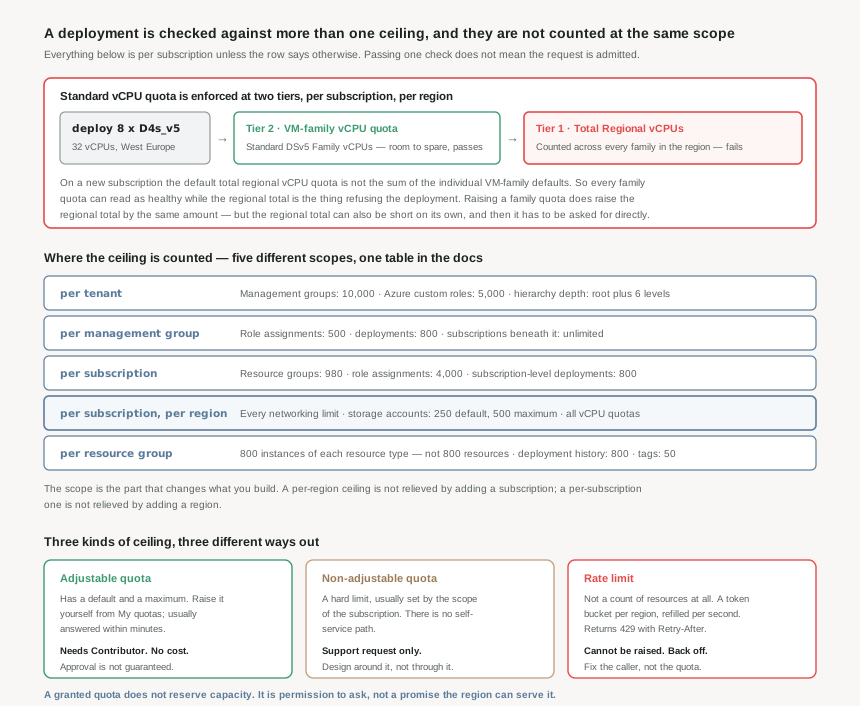
An adjustable quota has a default and a maximum, and you raise it yourself. A non-adjustable quota is a hard ceiling set by the scope, and only a support engineer can move it. A rate limit is not a count of resources at all — it is a token bucket refilling per second, and no request will ever raise it. The portal shows the first two on the same page. The third only appears when something fails.
Architecture
Quotas are, in Microsoft's own words, the assigned number of resources for your subscription, set and enforced in the scope of the subscription. That sentence is doing more work than it looks. "In the scope of the subscription" is where the enforcement is anchored — but it is not where every ceiling is counted, and the difference is what this post is about.
Adjustable, non-adjustable, and neither
The limits documentation gives you the first distinction for free, if you read the table headers rather than the numbers. Where a limit can be adjusted, the table carries both a Default limit and a Maximum limit, and the limit can be raised above the default but never above the maximum. Where a limit cannot be adjusted, there is only one column — and Microsoft's own gloss is that in that case there is no soft limit, only a hard one.
An adjustable quota is raised from My quotas in the portal by entering a new limit or a target usage percentage and submitting it directly. It needs Contributor, it costs nothing, and it is usually answered within a few minutes. A non-adjustable quota has no self-service path at all: it goes to support, and the honest expectation is that you will be helped to design around it rather than through it.
A rate limit is the third thing, and it is not on that page. Since 2024, Resource Manager throttles per region rather than per Resource Manager instance, using a token bucket. At subscription scope the bucket holds 250 read tokens refilling at 25 per second, and 200 write and 200 delete tokens each refilling at 10 per second. Empty the write bucket and it takes 20 seconds to refill completely; sustained, that is 600 writes a minute. Those limits apply per subscription, per service principal and per operation type, with a global ceiling across all principals of 15 times the individual rate — 150 writes per second for the whole subscription, however many identities are pushing.
Every Resource Manager response carries the remaining count for that operation type — x-ms-ratelimit-remaining-subscription-reads, x-ms-ratelimit-remaining-subscription-writes, and the delete and tenant equivalents. A pipeline that logs those on every call has a leading indicator of throttling instead of a 429 postmortem. When the bucket does empty, the 429 carries Retry-After, and a request sent before that value elapses is not processed — it just returns a new retry value.
The five scopes a ceiling can be counted at
The subscription limits page reads like one table. It is not. The rows are counted at five different scopes, and the scope is the part that determines what you can do about a ceiling you are approaching.
- Per tenant — 10,000 management groups, 5,000 Azure custom roles, and a hierarchy depth of the root level plus six.
- Per management group — 500 role assignments, 800 deployments. Subscriptions beneath one are unlimited.
- Per subscription — 980 resource groups, 4,000 role assignments, 800 subscription-level deployments.
- Per subscription, per region — every vCPU quota, storage accounts at 250 default and 500 maximum, and the entire networking table, which the documentation states applies per region per subscription.
- Per resource group — 800 instances of each resource type, 800 entries of deployment history, 50 tags.
That fourth row is the one that catches landing zone designs. A per-region ceiling is not relieved by adding a subscription in the same region, and a per-subscription ceiling is not relieved by adding a region. Getting the pairing backwards produces a topology that solves nothing.
Two tiers on the vCPU quota, and why the second request is different
Standard vCPU quotas — the ones that apply to pay-as-you-go and reserved instances — are enforced at two tiers, for each subscription, in each region. The first tier is the total regional vCPU quota, counted across every VM series in that region. The second is the VM-family vCPU quota, such as D-series.
Raising a family quota does raise the regional total: when a VM-family increase is approved, Azure automatically increases the regional quota for that region by the same amount. That is why the first fix in the opening story worked, and it is why most people never learn there are two tiers.
The trap is stated plainly in the documentation and read by almost nobody. On a new subscription, the default total regional vCPU quota is not necessarily equal to the sum of the default quotas for the individual VM series. Every family can have room while the regional total does not, and in that case the regional quota has to be requested explicitly — a different request, on a different quota, in the same portal.
Regional quotas are also strictly per region. Ask for 30 vCPUs in West Europe and you get 30 vCPUs in West Europe; nothing changes anywhere else. A multi-region design needs the request repeated per region, deliberately, as part of the build rather than after the first failure.
Why This Architecture Holds Up
A quota looks like an operational nuisance: something that blocks you once, gets raised, and is never thought about again. Four properties make it structural instead.
Microsoft states it directly: an assigned quota does not reserve or guarantee capacity for customer use, and capacity may not be available at the time of request. Quota is permission to ask. A subscription showing 500 vCPUs of headroom in a region tells you that Azure will not refuse the API call — it says nothing about whether that region has the machines. Capacity assurance is a different mechanism entirely, and treating a healthy quota page as a capacity plan is how a regional failover discovers it has none.
Defaults arrive with every new subscription
Each subscription has its own default value for each quota. A landing zone that vends subscriptions vends the defaults with them, every time. If subscription vending does not include a quota step, every new workload rediscovers the same ceilings on its first real deployment.
Quotas can move down as well as up
Microsoft may review and adjust quotas from time to time, including decreasing them where allocated quota is not being used. An increase granted for a migration that then finished is not a permanent property of the subscription.
800 per type is not 800 per group
The resource group limit is 800 instances of each resource type, and a long list of common types — virtual machines, disks, storage accounts, network interfaces, public IPs, web sites — is exempt entirely. Some of the rest can be lifted by registering a preview feature such as Microsoft.Resources/ARMDisableResourcesPerRGLimit rather than by opening a ticket.
Deployment history fills up quietly
800 deployments per resource group, and Azure deletes the oldest automatically as you near it. Deleting a history entry does not touch the deployed resources — but a pipeline that deploys hourly is silently losing its own audit trail long before anyone thinks to look.
Where the automation actually is
Quota management can be scripted, but not uniformly, and the gap is worth knowing before designing around it. The Azure Quota Service REST API can read current limits, read usage and request increases — for Compute and Machine Learning only. The portal covers all providers. The Support API covers all providers too, but is available to customers on unified, premier or professional direct support plans.
So an end-to-end "check quota, request more, then deploy" pipeline is straightforwardly buildable for compute, and for everything else is either a support ticket or a person in a portal. For the read half there is always az vm list-usage --location "West Europe" --output table, which prints current value and limit side by side, with Total Regional vCPUs listed among the families rather than above them — the two tiers, in one flat list, distinguishable only by the name.
OperationNotAllowed with "exceeding quota limits of Core" is a compute quota, counted per subscription per region, and it names the maximum, the current usage and the additional amount requested. ResourceQuotaExceeded is the resource group instance limit and says so — "would exceed the quota of N resources of type X per resource group". The first is raised by asking. The second is usually fixed by splitting the resource group, and asking will not help.
Key Architecture Decisions
| Decision | Choose this | Because |
|---|---|---|
| Where quota requests belong in the lifecycle | In subscription vending, before the first workload deployment | Every new subscription arrives with its own defaults. Doing it at vend time costs minutes; doing it at first deploy costs a failed pipeline and a context switch. |
| Raising vCPU quota for a new workload | Request the VM family, then check the total regional figure separately | A family increase raises the regional total by the same amount, but the regional default is not the sum of the family defaults. The regional tier can be short on its own. |
| Planning for a multi-region deployment | Repeat the request per region, as part of the build | Regional quotas are enforced per region and raising one changes nothing elsewhere. A failover region with default quota is a failover region that cannot absorb the load. |
| Relying on headroom shown on the quota page | Treat it as permission to ask, and plan capacity separately | A granted quota does not reserve or guarantee capacity, and capacity may not be available when you ask for it. |
| Responding to a 429 from Resource Manager | Honour Retry-After and reduce the caller's rate |
Rate limits are a token bucket, not a quota. No request raises them, and a retry sent early is discarded and returns a new retry value. |
| Sizing a resource group | Count instances per resource type, and check the exemption list first | The limit is 800 of each type, not 800 in total, and the types most likely to be numerous are exempt. Splitting a resource group that did not need splitting is a permanent structural cost. |
| Automating quota checks in a pipeline | Quota API for compute, portal or support for the rest | The Quota Service REST API supports Compute and Machine Learning. Designing a provider-agnostic quota gate on it will not survive contact with the second service. |
| Keeping an increase you were granted | Use it, or expect to justify it again | Microsoft may adjust quotas where allocated quota is not utilised. A one-off increase for a migration is not permanent estate configuration. |
Closing Thought
The number in a quota table is the least interesting thing about it. What matters is the scope it is counted at, because that decides whether the answer to running out is another region, another subscription, another resource group, or a conversation with support — and whether there is an answer at all.
Almost every quota story ends the same way: it was raised in five minutes and nobody thought about it again. The ones that do not end that way are the ones where the ceiling was a different kind of ceiling than it looked, or was counted somewhere other than where it was assumed to be. Both are readable in advance, in a table most people only open after a deployment has already failed.
#12 moves from what you are allowed to what you call things: resource naming standards that survive three years — what the platform actually constrains, what it does not, and which parts of a name you can never change afterwards.
Comments