Business Challenge
A team sets up Google Cloud for a new subsidiary. Somebody clicks through the billing form on a Friday afternoon, the projects get created, the work starts. Four separate problems arrive later, and every one of them was decided in that form.
The country came from the Google payments profile, and the country is what determines the currency of the payments account. Google's own instruction is blunt: choose the country and currency carefully, because you cannot change these selections later. Editing the country on an existing Cloud Billing account means creating a new billing account.
Correct approachTreat the country on the payments profile as a primary key, not a preference. Decide the billing entity — which legal entity pays, in which currency, under which tax ID — before anyone opens the console.
The payments profile is not a Google Cloud object. It connects to all of that account's Google services — Google Ads, Google Cloud, Google Workspace, Fi phone service — and an individual profile can be managed only by the person who owns it, with no ability to add or remove users.
Correct approachCreate an organization payments profile, which lets you add other users to the profile you manage. An individual profile makes one person a single point of failure for the entire bill, and no amount of Cloud IAM fixes it, because Cloud IAM does not reach that far.
Subaccounts are intended for resellers. A billing subaccount is a Cloud Billing account owned by a reseller's parent account, and creating one returns an error if the parent account has not been provisioned for subaccounts. Provisioning is not a checkbox in the console.
Correct approachSplit cost with the hierarchy and with labels, not with billing objects. Folders, projects and labels are what cost reporting groups on; subaccounts are for a company that bills other companies.
Linking a project to a billing account is one action that crosses two objects, so it needs a grant on each: billing.resourceAssociations.create on the billing account, and resourcemanager.projects.createBillingAssignment on the project. Holding only the billing half is the most common way to be denied.
Grant Billing Account User on the billing account and Project Billing Manager on the project, folder or organization. The pair is the unit; either alone is a permission error waiting to happen.
Not a settings page on your organization. It is a separate resource with its own resource name, its own IAM policy and its own immutable currency, and it answers exactly one question: who pays for the usage in these projects. Most of what is confusing about Google Cloud billing follows from the fact that this object is not where people go looking for it.
Architecture
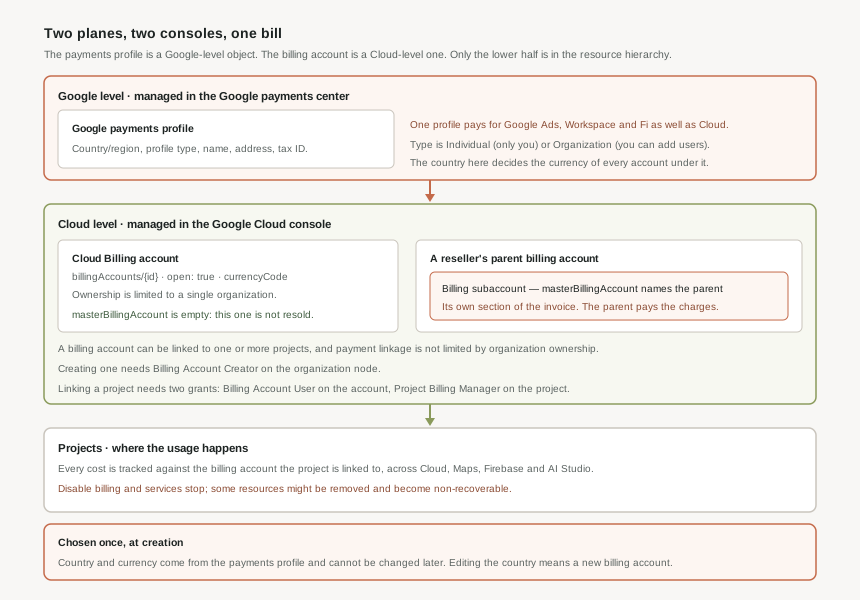
Money in Google Cloud lives on two planes, managed in two different consoles. Most of the confusion in this area comes from treating them as one thing.
The payments profile: a Google-level object
The payments profile is managed in the Google payments center, not the Google Cloud console. It stores the country or region — which is used to determine the currency of the payments account — the profile type, and the name, address and tax ID. It connects to all of your Google services, so the same profile can be paying for Google Ads and Google Workspace alongside Cloud.
Its type is the decision that matters. An individual profile can be managed only by you, and you cannot add or remove users on it. An organization profile lets you add other users to the profile you manage. For anything a company depends on, that is not a close call.
The billing account: a Cloud-level object
The Cloud Billing account is set up in Google Cloud and defines who pays for a given set of Google Cloud resources and Google Maps Platform APIs. It tracks all of the costs incurred by Google Cloud, Google Maps Platform, Firebase and Google AI Studio usage across every project linked to it.
Its API shape says the rest. The resource name has the form billingAccounts/{billing_account_id}. open is true if the account will be charged for usage on associated projects and false if it is closed. currencyCode is the currency it is billed and charged in, as an ISO 4217 code such as USD. And masterBillingAccount names the parent account it is resold through — empty on an ordinary account.
| Google payments profile | Cloud Billing account | |
|---|---|---|
| Managed in | Google payments center | Google Cloud console |
| Scope | All Google services — Ads, Cloud, Workspace, Fi | Google Cloud, Maps Platform, Firebase, AI Studio |
| Holds | Country/region, profile type, name, address, tax ID | Resource name, open state, currency code, links to projects |
| Access control | Profile type: individual, or organization with added users | Cloud IAM roles on the billing account |
| In the resource hierarchy | No | Owned by a single organization |
Ownership and payment linkage are two different relationships
This is the sentence in Google's documentation that most repays reading slowly. Ownership of a Cloud Billing account is limited to a single organization. Payment linkage of a project to a Cloud Billing account is not limited by organization ownership.
So the account belongs to one organization and cannot be shared out, but the projects it pays for do not all have to live in that organization. That asymmetry is what makes cross-organization arrangements possible at all — and it is also why "which organization owns this account" and "whose projects does it pay for" are questions with different answers, and both need asking during an audit.
Subaccounts, and who they are actually for
Cloud Billing subaccounts are intended for resellers. A billing subaccount is a Cloud Billing account owned by a reseller's parent Cloud Billing account, and the usage charges for all billing subaccounts are paid for by that parent. What a subaccount buys is presentation: it groups charges from projects together on a separate section of the invoice.
Creating one requires billing.accounts.update on the parent account — normally held by billing account administrators — and the call returns an error if the parent has not been provisioned for subaccounts. Google Cloud resellers are directed to the Channel Services APIs, accounts.customers.create and accounts.customers.entitlements.create, rather than to the subaccounts create method at all.
It reads like an account-per-team split and it is not one. A subaccount is a billing presentation layer inside a reseller relationship: the parent still pays every charge, the parent must be provisioned to have subaccounts at all, and nothing about it isolates a team's resources. Per-team separation on Google Cloud is done with folders and projects, which is what the hierarchy in post #1 is for.
The six roles, and which node each is granted on
Billing permissions are unusual in this series because they are granted in three different places — the organization node, the billing account, and the resource hierarchy — and knowing which is which is most of the job.
| Role | Granted at | Permits |
|---|---|---|
Billing Account Creatorroles/billing.creator | Organization | Create new self-serve billing accounts. Grants billing.accounts.create. |
Billing Account Administratorroles/billing.admin | Organization or billing account | Manage the account, payment methods and payments profile information, configure exports, link and unlink projects, manage roles on the account. |
Billing Account Userroles/billing.user | Billing account | Link projects to the billing account. Deliberately very restricted, so that it can be assigned broadly. |
Billing Account Viewerroles/billing.viewer | Organization or billing account | Read cost and payment information. Cannot manage account properties or link and unlink projects. |
Billing Account Costs Managerroles/billing.costsManager | Organization or billing account | Create and manage budgets, view cost data, export billing information. Excludes pricing data management. |
Project Billing Managerroles/billing.projectManager | Organization, folder or project | Link and unlink projects to and from billing accounts, from the project's side. |
The pairing is the part worth memorising. Creating a project that can spend money needs a grant on the billing account and a grant on the hierarchy: Billing Account User together with Project Creator or Project Billing Manager. One without the other produces a project that exists and cannot bill, or a permission error at the moment of linking.
Why This Architecture Holds Up
Most fields in this series have been cheap to set and expensive to revisit — the project ID in post #5, the bucket location in post #9, the network tier in post #10. The country on a payments profile is the strongest case yet, because there is no revisiting at all.
The country determines the currency. The currency is stamped onto the billing account as currencyCode and is what the account is billed and charged in. Google states plainly that these selections cannot be changed later, and that editing the country on an existing Cloud Billing account requires creating a new billing account.
Every project has to be relinked, which needs the two-sided grant on each one. Historical cost data does not follow the projects across, so reporting has a seam in it forever. Budgets, alerts and billing exports are configured per account and have to be rebuilt. And the old account cannot be tidied away afterwards — a closed Cloud Billing account cannot be deleted, because the information is retained for reporting and auditing purposes.
One project, one payer
A Cloud Billing account can be linked to one or more projects, and it tracks the costs of all of them. The relationship in the other direction is the one that shapes designs: a project's usage is charged to the account it is linked to, so "which billing account pays for this?" always has exactly one answer, and changing that answer is a deliberate act requiring permission on both sides.
That is why the project boundary is also the billing boundary on Google Cloud. If two workloads need to be paid for by different entities, they need different projects — not different labels, not different folders, different projects.
Closing is not deleting
Closing an active Cloud Billing account stops all billable services in any projects linked to it. The open field goes false and the account stops being charged for usage on associated projects. What does not happen is removal: a closed account cannot be deleted, and its information is retained for reporting and auditing purposes.
Read that as a feature rather than an annoyance. An immutable, retained record of who paid for what is exactly what an auditor wants, and it is the same reason the currency cannot be edited in place — a mutable payer record would make every historical invoice ambiguous.
The blast radius of disabling billing
Post #12 covers this properly, but it belongs here as a reason to take the objects seriously. When billing is disabled on a project, all Google Cloud and Google Maps Platform services are stopped, billing on that project stops, and some Google Cloud resources might be removed and become non-recoverable.
That last clause is why the billing account is not an administrative detail. A misconfigured payer is a live data-loss path, reachable by anyone holding a role that can unlink a project.
Where cost separation actually comes from
With subaccounts ruled out for anyone who is not a reseller, the tools that remain are the ones already in this series. The organization owns the billing account. Folders and projects group the spend. A project is the finest-grained thing that has exactly one payer. Labels carry the reporting dimensions on top.
Multiple billing accounts under one organization are still available, and they are the right answer when different legal entities, currencies or invoicing arrangements are genuinely involved — which is precisely when the immutable country field stops being an obstacle and starts being the point.
Key Architecture Decisions
| Decision | Choose this | Because |
|---|---|---|
| Payments profile type | Organization, never individual | An individual profile can be managed only by its owner and cannot have users added, making one person a single point of failure for the whole bill. |
| Country on the payments profile | Decide before opening the console | It determines the currency, cannot be changed later, and correcting it requires creating a new billing account and relinking every project. |
| Splitting cost between teams | Folders, projects and labels | Subaccounts are for resellers, require a parent provisioned for them, and leave the parent paying every charge regardless. |
| Separate legal entities or currencies | Separate billing accounts | Currency is fixed per account, and ownership of an account is limited to a single organization. |
| Who may create billing accounts | Billing Account Creator, on the organization node, to very few people | It is the only role that can bring a new payer into existence, and it is granted at the organization rather than on any account. |
| Who may attach projects to a payer | Billing Account User plus Project Billing Manager | Linking crosses two objects and needs a grant on each; Billing Account User is deliberately restricted so it can be assigned widely. |
| Finance and FinOps access | Billing Account Costs Manager or Billing Account Viewer | Budgets, cost views and exports without the ability to link, unlink or change payment methods. |
| Auditing who pays for what | Check ownership and linkage separately | Ownership is limited to one organization; payment linkage is not, so a project outside the organization can still be on the account. |
| Retiring a billing account | Plan to close, not to delete | A closed account cannot be deleted — the information is retained for reporting and auditing purposes. |
Closing Thought
The resource hierarchy from post #1 answers "who controls this". The billing account answers "who pays for this", and the two are deliberately different structures — one nests, one does not; one is edited freely, one has fields that are set once and never again.
The practical consequence is that billing cannot be delegated to whoever happens to be setting up the console. The country, the profile type and the number of billing accounts are decisions about legal entities and currencies, made once, at the point where the least is known and the most is at stake. That is worth ten minutes with whoever owns the company's finances, before the first project exists.
#12 covers linking a project to a billing account and what breaks the moment billing is disabled: which services stop, which resources are removed and become non-recoverable, and how to notice an unlinked project before its data is gone.
Comments