Business Challenge
A platform team ratifies a naming convention in week one, before anything is deployed. It is a good one, close to what Microsoft itself recommends: type, workload, environment, region, instance, separated by hyphens. rg-retail-prod-weu-001. It goes into the Bicep modules, the pull request template and the wiki, and for the first month everything named through it comes out identical and readable.
Three things then happen, in this order, and each one is a different kind of failure.
Week five. The first storage account. st-retail-prod-weu-001 is rejected before it reaches a resource group: storage account names allow lowercase letters and numbers, and nothing else. The hyphen is not a style preference the platform is willing to accommodate. Somebody strips the delimiters for that one resource type, the deployment succeeds, and the convention now has an exception in it — documented nowhere except in the module that needed it.
Month nine. The business unit called Retail is folded into a division with a different name. Four hundred resources still say retail, and there is no rename operation on any of them.
Year three. A new workload is called Excel Export, and the deployment stops on something nobody has seen before:
Code=ReservedResourceName;
Message=The resource name <resource-name> or a part of the name is a
trademarked or reserved word.Azure enforces that a name is unique within its scope, within a length range, and made of valid characters — and Microsoft's own guidance says all three vary by resource. Those are not negotiable and they are not consistent. The fourth constraint is the one the organisation adds: what the name is supposed to mean. That is the only part under your control, and it is the part that goes stale.
Architecture
A naming convention is usually written as a style guide — a sentence with angle brackets in it, agreed in a meeting. It is more useful to read it as a schema, because that is what Resource Manager treats it as. The platform validates every name against a per-type schema at create time, the schema differs by resource type, and the field it validates is one you can almost never change afterwards.
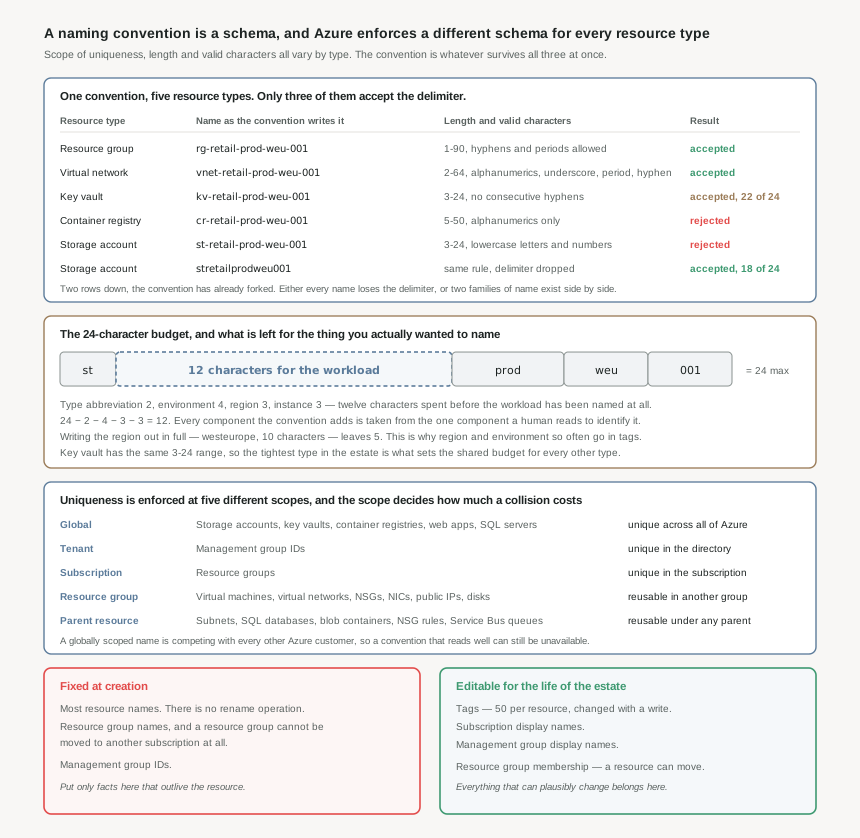
Scope decides what a collision costs
Microsoft documents three scope levels for naming purposes, and the resource rules table adds two more that matter to a platform team.
- Global — unique across all of Azure. This applies to PaaS resources with public IP endpoints, because the name becomes the initial default public DNS name. Storage accounts, key vaults, container registries, web apps and SQL servers are all here.
- Tenant — management group IDs.
- Subscription — resource groups.
- Resource group — virtual machines, virtual networks, network security groups, NICs, public IPs, disks. Two resource groups can hold identically named resources without conflict.
- Parent resource — subnets inside a virtual network, databases inside a SQL server, containers inside a storage account, rules inside an NSG.
The practical consequence is that a globally scoped name is being competed for by every other Azure customer, and a convention that reads beautifully in a document can simply be unavailable. stretailprod001 is a name several thousand organisations might plausibly want. The lower the scope, the more the convention is a matter of taste; at global scope it is a matter of what is left.
Scope also decides the blast radius of getting it wrong. A duplicated subnet name is caught by the deployment that creates it. A storage account name that turns out to be taken is caught in the same place, but the fix is different: you cannot resolve it by putting the resource somewhere else, only by changing the name.
The character rules are a schema, not a house style
The per-type rules are where a single convention quietly becomes several. A few of the ranges, from the same table:
| Resource | Scope | Length | Valid characters |
|---|---|---|---|
| Resource group | Subscription | 1-90 | Letters, digits, underscores, hyphens, periods, parentheses. Can't end with a period. |
| Management group | Tenant | 1-90 | Alphanumerics, hyphens, underscores, periods, parentheses. |
| Virtual network | Resource group | 2-64 | Alphanumerics, underscores, periods, hyphens. |
| Subnet | Virtual network | 1-80 | Alphanumerics, underscores, periods, hyphens. |
| Network security group | Resource group | 1-80 | Alphanumerics, underscores, periods, hyphens. |
| Virtual machine | Resource group | 1-15 (Windows), 1-64 (Linux) | Excludes a long list of punctuation. Windows names can't include periods. |
| SQL server | Global | 1-63 | Lowercase letters, numbers, hyphens. |
| Key vault | Global | 3-24 | Alphanumerics and hyphens. No consecutive hyphens. |
| Container registry | Global | 5-50 | Alphanumerics only. |
| Storage account | Global | 3-24 | Lowercase letters and numbers only. |
Two rows of that table are enough to fork a convention. Storage accounts and container registries reject the hyphen, so either every name in the estate drops the delimiter, or the estate carries two families of name and every script that parses one has to know which it is holding. Microsoft states the trade-off plainly: use a hyphen for readability, but not every resource allows a delimiter, and if you need absolute consistency across all your Azure resource names, do not use one.
The virtual machine row hides a second name entirely. A VM has a resource name and a host name, the portal uses the same value for both when you create one, and the 1-15 Windows limit is the host name restriction — the resource name itself can run to 64 characters. A convention that assumes 15 characters everywhere for VMs is constraining the wrong field; one that assumes 64 will produce Windows machines that cannot be created.
Resource and resource group names are case-insensitive unless the rules table says otherwise, and an API can return a different casing than the one you supplied — so Microsoft's instruction is to always perform a case-insensitive comparison of names. Any drift detection or inventory reconciliation that compares names with == will eventually report a difference that does not exist. Separately: do not put # in a name. It interferes with URL parsing during Resource Manager requests.
The 24-character budget
Storage accounts and key vaults both cap at 24 characters, and because a convention is only worth having if it is the same everywhere, that cap is effectively the estate's budget. It is smaller than it looks once the components are laid out.
Take the recommended components — type, workload, environment, region, instance. A two-character type abbreviation, prod, a three-letter region code and a three-digit instance number spend twelve characters between them: 24 − 2 − 4 − 3 − 3 = 12. Twelve characters are left for the only component a human actually reads to identify the thing. Spell the region out as westeurope instead and the arithmetic becomes 24 − 2 − 10 − 4 − 3, leaving five.
This is why Microsoft maintains a published abbreviation list — rg, vnet, snet, nsg, vm, st, kv, cr, mg — and it is why the same list is worth adopting verbatim rather than inventing a local one. The abbreviations are not there to look tidy. They are there because the budget does not stretch.
It is also the first place to ask whether a component belongs in the name at all. Environment and region are both stable facts, so they qualify on the permanence test below — but they cost seven of twenty-four characters to encode, and both are available from the resource's own properties and from a tag. A component earns its place in the name when something reads the name to find it: a person scanning a portal list, a script matching a prefix, a policy denying a pattern. If nothing does, it is paying rent.
Reserved words, and the check that happens whether you need it or not
Resources with an accessible endpoint cannot use reserved words or trademarks in the name, and the name is checked when the resource is created even if the endpoint is not currently enabled. That last clause is what makes this an architecture problem rather than a curiosity: a private, internal, no-public-access deployment is still validated against the list.
The list runs to around forty entries and reads like a product catalogue — ACCESS, AZURE, BING, EXCEL, EXCHANGE, OFFICE, OFFICE365, ONEDRIVE, OUTLOOK, SHAREPOINT, SKYPE, VISIO, XBOX. Two entries are stricter than the rest: MICROSOFT and WINDOWS are blocked as a whole word or as a substring anywhere in the name. One is weaker: LOGIN is blocked only at the start.
An estate that names resources after the applications they serve will meet this eventually, because the applications organisations run are frequently named after the products they integrate with. It is worth putting the list into whatever validates names before a deployment reaches Azure, so the failure happens in a pull request rather than half way through an apply.
Why This Architecture Holds Up
Microsoft's own guidance opens with it: most Azure resource names can't be changed after creation — include only information that remains constant in the name, and use tags to capture other details. Read as a design rule, that is a test every naming component has to pass before it is allowed in. Not "is this useful?" but "will this still be true in three years, and what happens if it is not?"
Applying that test to the usual components is uncomfortable, because the ones that fail it hardest are the ones people most want to encode.
Workload and application names change
Products get renamed, business units merge, projects get transferred. A resource named for a team is named for an organisation chart, and the organisation chart is the least stable document in the company. This is the single most common reason a three-year-old estate reads as wrong.
Environment is stable, but not always
dev, test, prod are usually invariant — until a pre-production environment is promoted, or a green estate becomes the blue one. Encode it if the platform genuinely treats environments as separate estates. Encode it reluctantly if environments are recycled.
Region is stable for the resource
A resource does not change region; moving one across regions creates a new resource with a new name anyway. Region is therefore safe to encode. The question is whether it is worth three characters of a twenty-four character budget when the resource's own location already carries it.
Cost centre and owner never belong in a name
Both change routinely, and both are exactly what tags are for — 50 per resource, editable with a write, with tag names up to 512 characters and values up to 256. Anything that can plausibly be re-assigned is a tag, not a name.
What "cannot be renamed" costs in practice
There is no rename operation on most resource types, so the real question is what the workaround costs. Moving a resource is the closest thing available, and moving is not renaming — it changes the resource's ID, not its name.
That is its own bill. Microsoft's instruction after a move is to find every place the resource ID appears — custom dashboards, scripts, templates — and change it. During the move, both the source and destination resource groups are locked, and that lock can last up to four hours, during which nothing in either group can be created, deleted or updated. Any active role assignment on the moved resource does not travel with it: it becomes orphaned and has to be created again on the other side. And a single move operation returns an error immediately above 800 resources.
Resource groups are worse, because they have no escape at all. You cannot move a resource group to a new subscription — you can only move all of its resources into a resource group that already exists in the target subscription, and tags, role assignments and policies do not transfer with them. A resource group name is therefore the most permanent string in the estate: it cannot be renamed, and the group itself cannot be relocated.
Management groups and subscriptions both split identity into a fixed ID and an editable display name, and the guidance leans on that split: use a globally unique identifier for the management group ID, and treat the display name as the thing that describes the platform function or workload types within it. A subscription display name is likewise a descriptive name you can change. These are the two places in the hierarchy where a rename is genuinely free — and correspondingly, the two places where a rigid encoded convention buys you the least.
Key Architecture Decisions
Enforcing it, before the estate is large enough to need enforcing
A convention that is only in a wiki is a convention that holds for as long as the people who wrote it are reviewing pull requests. Azure Policy evaluates the resource name field directly, and a deny effect on a name pattern is one of the few controls that works before the resource exists, which is the only moment at which the name is still changeable.
{
  "if": {
    "allOf": [
      { "field": "type", "equals": "Microsoft.Storage/storageAccounts" },
      { "not": { "field": "name", "match": "st??????????????###" } }
    ]
  },
  "then": { "effect": "deny" }
}
The pattern language is small and worth knowing exactly. like takes a wildcard * and the value must not carry more than one of them. match is a positional template: # matches a digit, ? matches a letter, . matches any character, and every other character matches itself. match and notMatch are case-sensitive — alone among the string conditions, which are all case-insensitive — so a rule that means to require lowercase should use match, and a rule that does not care should use matchInsensitively. There is also a fullName field, which returns the name prepended by its parents (myServer/myDatabase), for rules about child resources.
Policy rules can call template functions, and a failed evaluation is an implicit deny. Microsoft's own worked example of this is a naming rule: substring(field('name'), 0, 3) to test a prefix throws when the name is shorter than three characters, and that error denies the deployment. A prefix rule written the obvious way is a rule that blocks every short name in the subscription, for a reason that appears nowhere in the error. Prefer match and like over arithmetic on strings; where a function is unavoidable, guard its inputs, and assign with enforcementMode of doNotEnforce while validating.
| Decision | Choose this | Because |
|---|---|---|
| Which facts go in the name | Only those that remain constant for the life of the resource | Most resource names can't be changed after creation, and Microsoft's guidance is explicit that everything else belongs in tags. |
| Encoding the owning team or business unit | Tag it, don't name it | Org charts change more often than estates do. A tag is one write; a name is a redeployment or a four-hour move with orphaned role assignments. |
| Choosing a delimiter | Hyphen, with a documented no-delimiter variant for the types that reject it | Not every resource allows a delimiter. Microsoft's stated alternative — drop the hyphen everywhere for absolute consistency — is the right call only if tooling parses names. |
| Setting the length budget | Design against 24 characters, not against the roomiest type | Storage accounts and key vaults cap at 24. Four fixed components leave 12 characters for the workload; a full region name leaves 5. |
| Type abbreviations | Adopt the published Cloud Adoption Framework list verbatim | It is maintained, it covers types you have not deployed yet, and a local list means a new resource type arrives with an argument attached. |
| Naming a virtual machine | Constrain to 15 characters for Windows even though the resource name allows 64 | A VM carries a resource name and a host name; the 15-character limit is the host name, and the portal writes the same value into both. |
| Comparing names in tooling | Case-insensitive, always | Names are case-insensitive unless noted, and an API can return different casing than you supplied. Exact-match comparison produces phantom drift. |
| Handling globally scoped names | Assume the first choice is taken and make the generator deterministic but collision-tolerant | Global names compete with every Azure customer. A convention with no room to disambiguate stalls the deployment that discovers the clash. |
| Enforcement mechanism | Azure Policy deny on name, plus the reserved-word list in pre-deployment validation |
Policy is the only check that runs before the resource exists. The reserved-word check is cheap to run locally and expensive to hit mid-apply. |
| Writing the policy rule itself | match or like, not string functions |
A template function that errors makes the policy an implicit deny. Microsoft's documented example of exactly this failure is a prefix rule using substring. |
| Anything identifying or sensitive | Keep it out of names and tags entirely | Data entered in resource names and tags isn't considered customer data, so it does not carry those protections. |
Closing Thought
The interesting question about a naming convention is not what it looks like. It is which of its components are claims about the world that could stop being true, and what happens to the estate when one of them does. Every component is a bet that a fact will outlive the resource, settled in a field with no update operation.
That is why the convention that survives three years is usually the plainer one. It carries the type, because the type never changes; something durable about what the thing is; and a number, because numbers do not go out of date. Everything else — owner, cost centre, project, criticality, the name of the team that built it — sits in tags, where changing it is a write rather than a migration. A shorter name looks like it is saying less. It is saying only the part that will still be true.
#13 takes up the other half of this: tagging strategy, and the tags that do not inherit — what a tag can carry that a name cannot, where inheritance stops, and why an estate can be fully tagged and still unable to answer who owns a resource.
Official Azure Reference
- Naming rules and restrictions for Azure resources
- Define your naming convention
- Abbreviation recommendations for Azure resources
- Resolve reserved resource name errors
- Move Azure resources to a new resource group or subscription
- Details of the policy definition structure: policy rules
- Azure subscription and service limits, quotas, and constraints
Comments