Business Challenge
A platform team runs a few dozen projects on one billing account. Over a quarter, four separate incidents arrive. Nobody edited a workload in any of them, and all four are the same object: the link between a project and the account that pays for it.
Billing being enabled is two conditions, not one: the project is linked to a Cloud Billing account, and the linked account is active and in good standing — that is, not closed or suspended. Break the second and the first still looks correct. In gcloud beta billing projects describe, that is a populated billingAccountName sitting next to billingEnabled: false.
Monitor billingEnabled, not the presence of a link. A project can be attached to a payer that has stopped paying, and nothing on the project changed to make that happen.
The project was a Shared VPC host. Google's wording is explicit: if you disable billing for a project that hosts a Shared VPC, services in the service project which depend on the Shared VPC are also disabled, and all Compute Engine instances that use the Shared VPC as the network interface are shut down.
Correct approachTreat a host project's billing link as shared infrastructure with the same blast radius as the network itself, and lock it. The projects that go down are not the ones the operator was looking at.
Someone had wired up the documented pattern — a budget notification into Pub/Sub, a function that unlinks the billing account. It fired, everything stopped, and the invoice was still over. Google says so in the tutorial itself: there is a delay between incurring costs and receiving budget notifications, so you might incur additional costs for usage that has not arrived at the time that all services are stopped.
Correct approachKnow what that pattern is. It is an emergency stop with data loss attached, not a cap. For an enforced ceiling, use a spend cap budget — and read its limits before relying on it.
The project came back inside the 30-day recovery period, the operator held Project Owner, and linking still failed with User missing permission 'resourcemanager.projects.createBillingAssignment' to link a billing account to project. The permission was not the problem — propagation was. Retry after about 10 minutes; in rare instances it takes up to 36 hours.
Read that particular error as latency until proven otherwise, and do not start re-granting roles to fix it. Restoring a project and re-enabling its billing are two steps, and the second is not immediately available.
Architecture
A project does not have a billing switch. It has an association with a separate object, and everything in this post follows from that.
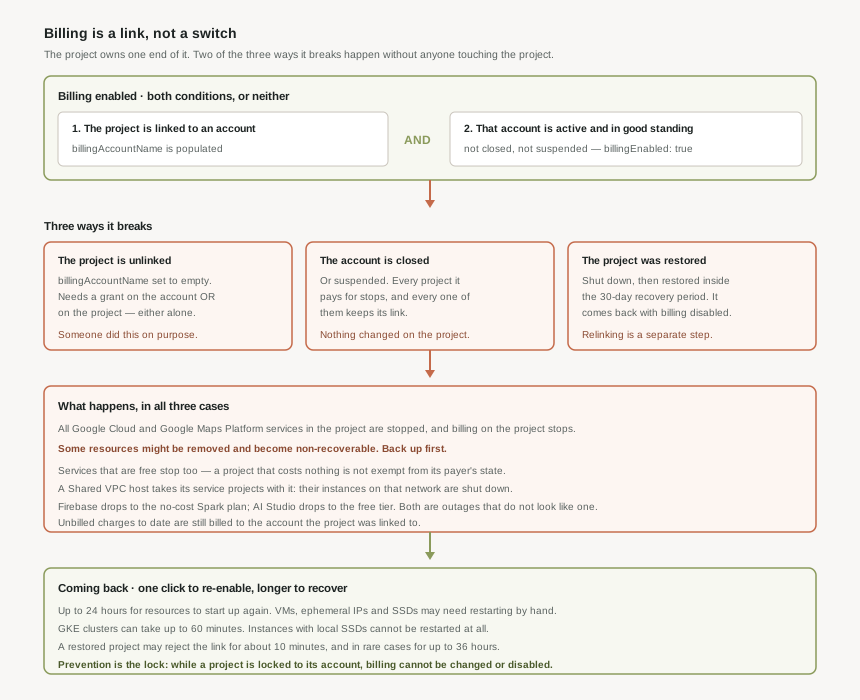
Billing enabled is a two-part condition
Billing is enabled on a project when the project is linked to a Cloud Billing account and that account is active and in good standing. Two objects, two states, and the project owns only half of it.
The API says the same thing in two fields. gcloud beta billing projects describe PROJECT_ID returns billingAccountName and billingEnabled, and they can disagree: a populated account name with billingEnabled: false means the project is linked to an inactive Cloud Billing account. That combination is the one worth alerting on, because nobody did anything to the project to produce it.
billingAccountName | billingEnabled | What it means |
|---|---|---|
| Populated | true | Linked to an active account. Services run and charges accrue. |
| Populated | false | Linked to a closed or suspended account. Services are stopped; the link is intact and tells you nothing. |
| Empty | false | Unlinked. Somebody, or something, disassociated the billing account. |
The link is a two-sided grant
Linking is one action across two resources, so it needs permission on each. Google is unambiguous that changing a project's Cloud Billing account requires both project permissions and billing account permissions, and the permission table splits neatly into halves.
| Action | On the billing account | On the project |
|---|---|---|
| Link a project to an account | billing.resourceAssociations.createBilling Account User or Billing Account Administrator |
resourcemanager.projects.createBillingAssignmentProject Billing Manager or Project Owner |
| Unlink a project from an account | billing.resourceAssociations.deleteBilling Account Administrator |
or resourcemanager.projects.deleteBillingAssignmentProject Billing Manager or Project Owner |
| See which projects an account pays for | billing.resourceAssociations.listBilling Account Viewer, Costs Manager or Administrator |
resourcemanager.projects.getProject Browser and above |
Attaching a project needs a grant on the billing account and a grant on the project — which is the intended friction, because attaching a project commits somebody's money. Detaching it needs only one of the two: billing.resourceAssociations.delete on the account, or resourcemanager.projects.deleteBillingAssignment on the project. So a Project Billing Manager who was never given anything on the billing account can still stop the project, and a Billing Account Administrator with no role on the project can do it from the other end.
Two smaller things ride along with the same operation. The console's path additionally wants Service Usage Viewer on the project, for serviceusage.services.list and serviceusage.effectivepolicy.get. And modifying links between projects and Cloud Billing accounts is classed as a sensitive action, so an operator may be asked to reauthenticate before the change is accepted.
From the command line it is two commands, and the REST call underneath both is projects.updateBillingInfo. Setting billingAccountName to empty is what disabling billing is — there is no separate disable verb.
gcloud billing projects link PROJECT_ID \
    --billing-account=0X0X0X-0X0X0X-0X0X0X

gcloud billing projects unlink PROJECT_ID

gcloud beta billing projects describe PROJECT_ID
Locking the link, which is the control that matters
Because unlinking needs only one side, Google provides a lock on the relationship itself. Locking a project to its linked billing account prevents the project from unintentionally being moved to a different billing account, and prevents the project link being deleted from the billing account — which is to say, it prevents billing being disabled. While it is locked, you cannot change or disable billing on the project until the relationship is unlocked, and a padlock appears beside the project in the billing console.
This is post #7's liens applied to money instead of to deletion. Same shape: a small, explicit object whose only job is to make an irreversible action require a second, deliberate step.
Locking requires both sides — Project Billing Manager and Project Browser (or Project Owner) on the project, plus Billing Account User and Billing Account Viewer (or Billing Account Administrator) on the account. Unlocking needs either the project side or Billing Account Administrator on its own. So a billing administrator is never locked out of an account they own, which is right, and it also means the lock protects against accident rather than against a determined administrator. Like every change to this link, locking and unlocking are sensitive actions and may prompt for reauthentication.
Three ways a project ends up with billing disabled
Only one of them involves anyone touching the project's billing settings.
- The project is unlinked from its billing account. Someone, or an automation, disassociated it.
billingAccountNamegoes empty. - The linked billing account is closed or suspended. Nothing changed on the project. Closing an account stops all services in every project paid for by it, and every one of those projects keeps its link.
- The project was shut down and then restored within the 30-day recovery period. It comes back with billing disabled, and re-enabling it is a separate step that may not work immediately.
One constraint sits on top of all three: you cannot disable billing on a project that has any active or pending committed use discounts in it. A CUD is a commitment made to a payer, so the payer cannot be detached while it is outstanding.
Why This Architecture Holds Up
The instinct that gets people into trouble is reading "disable billing" as "stop spending". It does stop spending. What it does on the way there is the problem.
What stops, and what is removed
When you disable billing for a project, all of your Google Cloud and Google Maps Platform services are stopped and billing on that project stops. Then comes the sentence that should change how the whole operation is treated: some of your Google Cloud resources might be removed and become non-recoverable, and Google's own advice is to back up any data you have in the project first.
"Might be removed" is doing real work in that sentence. It is not a promise about which resources survive, so there is no safe list to plan around. Removed resources are not recoverable, and re-enabling billing does not bring them back.
The API reference states the money side just as plainly: any billable activity of your in-use services will stop, your application could stop functioning as expected, and any unbilled charges to date will be billed to the previously associated account. Unlinking does not erase what has already been spent.
If a project is linked to a Cloud Billing account that is not in a billable state, you cannot use the products and services enabled in that project — and Google states this is true even if the project only uses services that are free. A project that costs nothing is not insulated from its payer's state. That is the detail which catches sandbox and internal-tooling projects, which nobody watches precisely because they never appear on an invoice.
Firebase and AI Studio degrade instead of stopping
Not every platform on a Google Cloud project behaves the same way. Disabling billing on a Firebase project downgrades it from the Blaze plan to the no-cost Spark plan, and if usage already exceeded the no-cost quota for a product, that product is shut off for the remainder of the month. A Google AI Studio project drops to the free usage tier and its rate limits.
So the same action produces a hard stop on one surface and a quiet downgrade on another, inside the same project. Both are outages; only one of them looks like one.
The Shared VPC blast radius
The worst case is not the project that was disabled. Disabling billing on a Shared VPC host project also disables the services in the service projects that depend on that Shared VPC: every Compute Engine instance using it as its network interface is shut down. Three service projects attached to the host means three projects down, none of which had anything done to them.
This is why the host project earns the lock. Its billing link is a dependency of every project in the shared network, and that dependency is invisible from the projects that have it.
Coming back is slower than going down
Re-enabling billing is one click. Recovery is not.
| Step | What Google states |
|---|---|
| Resources start again | After billing is re-enabled, it might take up to 24 hours for the resources to start up again. |
| Compute Engine | VM instances, ephemeral IP addresses and solid-state persistent disks may have to be restarted manually. |
| Instances with local SSDs | Almost all instances can be stopped and restarted, except virtual machine instances with local SSDs, which can't be restarted. |
| GKE | Most instances restart quickly, but Google Kubernetes Engine clusters can take up to 60 minutes to recover. |
| A restored project | Retry linking after about 10 minutes; in rare instances it can take up to 36 hours before billing can be re-enabled. |
| Anything removed | Not recoverable. |
Ephemeral IP addresses are the quiet entry in that list. An instance that comes back on a different address takes its external DNS with it, which is why the restart procedure ends by telling you to check DNS.
If you want a ceiling, use the thing that is a ceiling
The documented budget-plus-Pub/Sub-plus-function pattern that unlinks a billing account is presented as a tutorial, and its own text is a warning: this tutorial removes Cloud Billing from your project, shutting down all resources, and resources might be irretrievably deleted. It also says there is a delay between incurring costs and receiving budget notifications, so you might incur additional costs for usage that has not arrived by the time everything is stopped. It is a circuit breaker, and it does not guarantee you stay under the number.
A spend cap budget is the enforced version. When it is enforced, usage of the specified services is automatically paused until you manually lift the spend cap, with alert emails at 50% and 80% on the way there. It is narrower than people expect: a spend cap is limited to a budget scoped to a single Google Cloud project and a single eligible service, the budget period is monthly starting on the first day of each month, and enforcement is not instant — any cost overage is billed as normal.
Budget alerts tell a human that spending crossed a threshold, and stop nothing. Spend cap budgets pause one eligible service in one project when it exceeds its monthly amount, and need a manual action to resume. Unlinking the billing account stops everything in the project and may destroy data. They are ordered by blast radius, and the third one is not a cost control at all — it is an outage you chose.
Moving a project is not the same as disabling it
Changing which billing account pays for a project is a different operation with a different risk profile: switching a project to a different Cloud Billing account should not result in any service interruption or server downtime. What moves with it is the accounting.
- Charges split at the move date. Costs incurred before the move are billed to the former account, costs after it to the new one. Depending on the service it can take up to two days for charges to be reported to the transaction history, so the seam is not visible immediately.
- Committed use discounts follow the project and stop applying to the old account — even if CUD sharing was enabled there. They start applying to the new account at midnight in the US and Canadian Pacific Standard Time (UTC-8) time zone.
- Marketplace purchases block the move. If Google Cloud Marketplace purchases are attached to the project, it cannot be migrated until those purchases are transferred.
- Some account-level costs never move, because they are not attributed to a project at all. Support is the standard example; it appears in the cost table report under charges not specific to a project.
None of that is a reason to avoid moving projects. It is a reason to do it deliberately, and to check the commitment and Marketplace positions first rather than discover them in an invoice.
Key Architecture Decisions
| Decision | Choose this | Because |
|---|---|---|
| Detecting billing problems | Alert on billingEnabled, not on the link |
A project can be linked to a closed or suspended account and be fully stopped, while the link still looks correct. |
| Production and Shared VPC host projects | Lock the project to its billing account | Unlinking needs a grant on only one side, and a host project takes its service projects' instances down with it. |
| Who may attach a project to a payer | Billing Account User plus Project Billing Manager, granted separately | Linking is an AND across two resources, which is the intended friction on committing someone's money. |
| Who may detach one | Audit both sides, not just the billing account | Unlinking is an OR: Project Billing Manager alone is enough, with no role on the billing account at all. |
| Enforcing a spending limit | A spend cap budget, within its limits | It pauses usage until manually lifted, while the unlink-on-budget pattern is a shutdown with data loss that still cannot guarantee the number. |
| Emergency stop on a runaway project | Treat it as an outage and back up first | Disabling billing stops all services, and some resources might be removed and become non-recoverable. |
| Zero-cost and sandbox projects | Monitor them the same way as everything else | Services that are free still stop when the linked account is not in a billable state. |
| Recovery expectations | Plan for up to 24 hours, plus manual restarts | VMs, ephemeral IPs and SSDs may need restarting by hand, GKE can take up to 60 minutes, and local-SSD instances cannot be restarted at all. |
| Re-enabling billing on a restored project | Retry rather than re-grant roles | The createBillingAssignment error after a restore is propagation latency, and can take up to 36 hours to clear. |
| Moving a project between accounts | Check commitments and Marketplace purchases first | Marketplace purchases block the migration outright, and resource-based CUDs stop applying to the old account. |
Closing Thought
Every cloud has a switch that turns a project off. What is unusual here is how ordinary it looks: unlinking a billing account is a menu item, it is reachable with a role granted entirely on the project side, and the phrase describing its worst outcome — some resources might be removed and become non-recoverable — is one line in a bulleted list.
The useful mental model is that a project's billing link is a dependency like any other, with an owner at each end and a state either end can change. Once it is seen that way the controls follow: alert on the state rather than on the link, lock the projects that matter, and keep the emergency stop clearly separated from the tools that actually manage cost.
#13 covers billing export to BigQuery, and why the console is not the source of truth: what the standard, detailed and pricing exports each contain, when the data arrives, and why cost analysis that matters ends up as SQL rather than as a report page.
Official Google Cloud Reference
- Enable, disable, or change billing for a project
- Verify the billing status of your projects
- Secure the link between a project and its billing account
- Restarting Google Cloud services
- Manage spend cap budgets
- Disable billing usage with notifications
- Close or reopen your Cloud Billing account
- Overview of Cloud Billing access control
- Method: projects.updateBillingInfo
Comments