Business Challenge
A platform team designs the landing zone properly. Subscription per team per environment, management groups by governance posture, the whole shape from #1. Then they try to create the sixth subscription and cannot.
The estate is built on a billing account created by someone signing up on the Azure website, which caps at five subscriptions. Worse, the four they created and deleted during the proof of concept still count — the limit counts subscriptions regardless of state, so deleting them freed nothing.
Nothing about the design was wrong about Azure. It was wrong about the commercial agreement underneath it, which nobody had looked at because it is not an architectural artefact. It is, though: it decides how many subscriptions exist, who may create them, and what hierarchy sits above them.
In the portal, Cost Management + Billing, then Properties: the Type field says Microsoft Online Services Program, Enterprise Agreement, Microsoft Customer Agreement or Microsoft Partner Agreement. With multiple scopes, the Billing account type column shows the same thing. Any landing zone design should start with that value written down, because four different answers imply four different designs.
Architecture
Azure supports four billing account types. Each one puts a different hierarchy above the subscription, and that hierarchy is where invoices, budgets and delegation live.
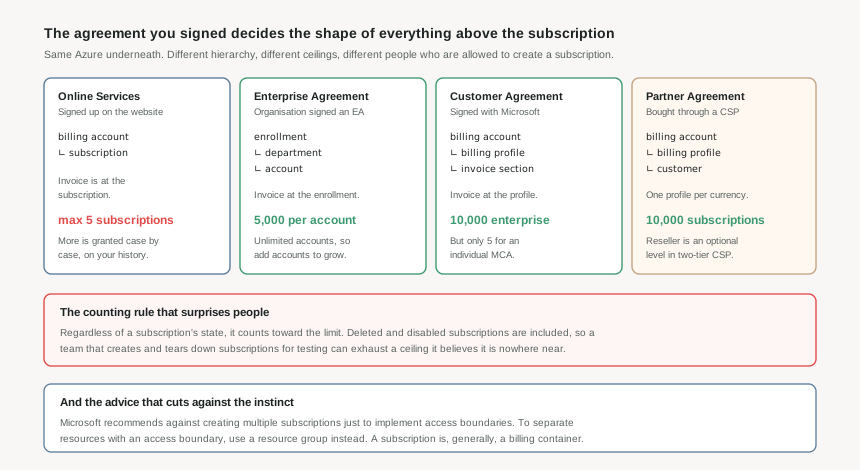
Microsoft Online Services Program — the one you get by signing up
Created when someone signs up through the Azure website: free account, pay-as-you-go rates, or a Visual Studio subscription. The hierarchy is two levels, billing account and subscription, and the invoice is generated at the subscription — as are the payment method and usage address.
A new one of these caps at five subscriptions. Subscriptions transferred in do not count against that, and the ability to create more is decided individually based on your history with Azure. That is a fine arrangement for personal projects and a poor foundation for an enterprise landing zone.
Enterprise Agreement — departments and account owners
Created when an organisation signs an EA. The billing account represents the enrollment, and the invoice is generated there. Beneath it are optional departments for grouping costs and setting budgets, and accounts, each representing a single account owner who can create and manage subscriptions billed to the enrollment.
An EA account holds up to 5,000 subscriptions, and an enrollment can contain an unlimited number of accounts — so the way to grow past the ceiling is to add accounts, not to ask for a bigger limit.
Microsoft Customer Agreement — profiles and invoice sections
Signed with a Microsoft representative, though in some regions signing up on the website produces one too. The hierarchy is billing account, then billing profile — which represents an invoice, with its own payment method and address — then invoice section, which is what subscriptions are actually attached to.
The ceiling depends entirely on which kind you have: 10,000 subscriptions for an enterprise MCA, five for an individual one. Two thousand times the difference, under the same product name, which is why "we have an MCA" is not by itself an answer to how many subscriptions you can build.
Microsoft Partner Agreement — buying through a CSP
Created for Cloud Solution Provider partners managing customers in the new commerce experience; the partner needs at least one customer with an Azure plan. Billing profile here represents an invoice for a currency, and beneath it sits the customer scope that subscriptions attach to. There is an optional reseller field, applicable only to indirect providers in the two-tier CSP model. Up to 10,000 subscriptions.
Why This Architecture Holds Up
It is tempting to file all of this under finance. Three things make it architectural.
Who can create a subscription
Under an EA it is an account owner, and accounts are a structure somebody has to create. Under MCA it flows through invoice sections. Under MPA the partner holds the relationship. "Self-service subscription vending" is a different build in each case, and impossible in the fourth.
How many you get
Five, 5,000 per account, 10,000, or five again depending on which MCA. A design that assumes subscription-per-team is fine at three of those numbers and dead at the fourth.
Where budgets attach
EA has departments for grouping costs and setting budgets. MCA has billing profiles and invoice sections. MOSP has neither — the subscription is the invoice. Cost allocation designs do not port between them.
Deleted still counts
The limit counts subscriptions regardless of state. Deleted and disabled are included. Any process that spins up subscriptions for testing is consuming a finite, non-recoverable resource.
The advice that cuts against the instinct
Microsoft's own guidance in the billing documentation is worth quoting for how directly it contradicts a common pattern: avoid creating multiple subscriptions to implement access boundaries. To separate resources with an access boundary, use a resource group.
That does not make subscription-per-workload wrong — there are excellent reasons for it, chiefly the quota and limit boundaries from #1. But "we need a separate subscription so team B cannot touch team A's things" is solving an access problem with a billing container, and there is a cheaper scope for it. Generally speaking, a subscription is a billing container.
A subscription created under an EA enrollment can appear in both the EA account billing scope and under a Microsoft Online Services Program scope. That is intended: when a MOSP billing scope is created for an EA enrollment account owner, all subscriptions under that enrollment account show there too. It is one subscription displayed twice, not two subscriptions.
Key Architecture Decisions
| Decision | Choose this | Because |
|---|---|---|
| First step of any landing zone design | Read the billing account Type and write it down | Four types imply four different hierarchies, ceilings and delegation models. Designing before checking is how a subscription-per-team plan meets a limit of five. |
| Building an enterprise estate on a website sign-up | Do not; move to an EA or enterprise MCA first | Five subscriptions, with additional ones granted case by case on your account history, is not a foundation you can plan against. |
| Growing past an EA account's ceiling | Add EA accounts, not support requests | An enrollment can hold unlimited accounts at 5,000 subscriptions each. The structure is designed to grow sideways. |
| Ephemeral or test subscriptions | Budget for them against the ceiling and stop deleting as cleanup | Deleted and disabled subscriptions still count. Deletion tidies the portal and recovers nothing. |
| Separating two teams' resources | Resource groups and RBAC first, subscriptions when a limit demands it | It is Microsoft's stated recommendation, and it keeps subscriptions for the thing they are actually scarce for — quotas and billing. |
| Estates bought through a partner | Establish who creates subscriptions before designing vending | Under a Partner Agreement the customer scope sits inside the partner's billing account, so self-service creation is a conversation with the partner rather than a piece of automation. |
Closing Thought
The commercial agreement is the one part of an Azure estate that architects routinely treat as somebody else's document. It sets the subscription ceiling, decides who may create one, and determines whether budgets attach to departments, invoice sections or nothing at all.
None of that is visible from inside a subscription, which is exactly why it gets discovered late. Thirty seconds in Cost Management + Billing, at the start, saves the redesign.
#10 goes one level deeper into the structure this post sketched: billing accounts, billing profiles and invoice sections — what each scope actually controls, and how to use them for cost allocation that survives a reorganisation.
Comments