📋 In This Post
Why — The Problem This Solves
In AWS I run two accounts. One is governance — Organizations, SCPs, Identity Center, the audit trail. The other runs workloads. That split is the backbone of everything I have built for fifteen weeks, and when I opened Google Cloud I assumed I would rebuild it as two projects.
That is wrong, and it is wrong in a way that quietly costs you the entire first phase of a governance roadmap.
An AWS account is a heavyweight boundary. Creating one is a workflow. So you ration accounts and pack many workloads into each. A Google Cloud project is free, appears in seconds, and is the unit that owns IAM, quota, API enablement and billing attribution. Ration projects the way you ration accounts and every workload ends up sharing one IAM surface and one quota pool — precisely what the account split existed to prevent.
The mapping is one level up from where you expect. The AWS account split maps onto folders. Projects multiply underneath, one per workload, because they are cheap.
Why teams do not already have this
Because the default path never asks you to. You sign in with a Google account, you get a project, and everything works. Projects created that way have no parent — they sit directly under a personal account with nothing above them. No folders. No organization policy. No inherited IAM.
I had six such projects before I started, accumulated over years of
coursework and API experiments, and not one of them could ever have policy
applied to it. That is not a configuration mistake. A project owned by a
@gmail.com account structurally cannot have a parent, because an
organization hangs off a domain you administer, and nobody administers
gmail.com.
The prerequisite nobody mentions
Folders, organization policy and VPC Service Controls all require an organization resource. An organization requires Cloud Identity. Cloud Identity requires a domain you own and can prove you own.
So the real first task of a Google Cloud landing zone is not Terraform. It is obtaining an organization at all — and as I will get to in Challenges, there is no API for that.
What You Need to Know — Skills & Tools
Google Cloud
- Cloud Identity Free — the identity layer that creates the organization
- Resource Manager — organizations, folders, projects
- Cloud IAM — and specifically how inheritance flows
- Service Usage — APIs are opt-in per project
- Cloud Billing — separate from the hierarchy, which matters more than it sounds
Tooling
- Terraform ≥ 1.9, provider
hashicorp/google ~> 6.0 - HCP Terraform for remote state
- gcloud CLI — and both of its credential stores
- A registered domain you control
Concepts to understand before starting
The two that will bite an AWS engineer hardest:
IAM inherits. A role granted on a folder applies to every project beneath it — including projects that do not exist yet. AWS has no equivalent; a role in the hub account grants nothing in the workload account. This inverts how often you write bindings. Folder-level grants become few and deliberate, and you stop repeating them per project.
Billing is not in the tree. The billing account is not a node in the hierarchy. One billing account funds projects across any folder, and moving a project between folders does not change who pays. There is no payer account, no consolidated billing to design around. Cost separation comes from per-project budgets and labels.
Architecture — How It Fits Together
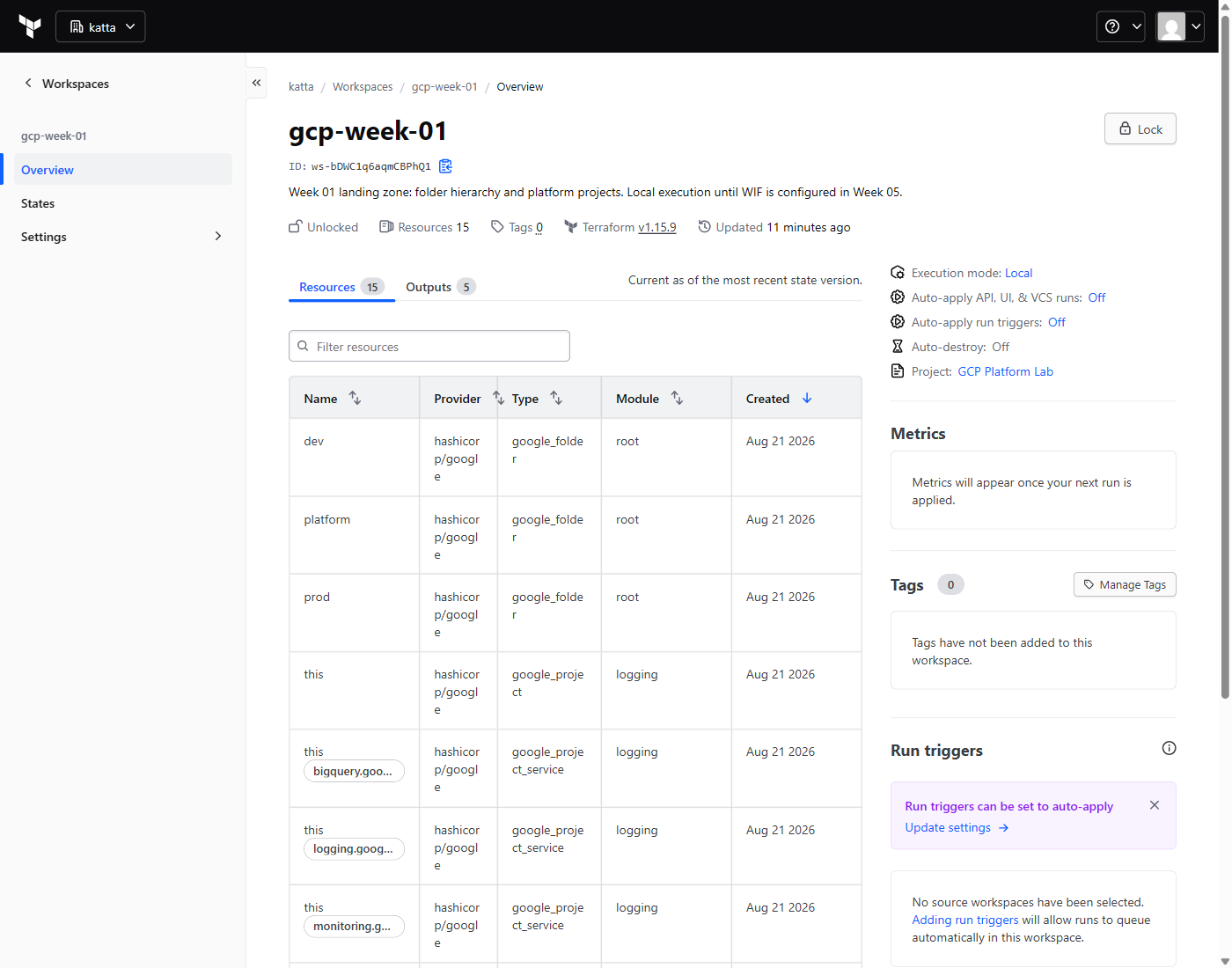
Four folders, four projects, and a state backend that lives outside Google Cloud entirely.
Why the platform projects are split three ways. Each has a different blast radius. Compromise network-hub and an attacker rewrites the network. Compromise logging and they read every log line in the estate. Compromise security and they hold the keys. Collapsed into one project, whoever can rotate a KMS key can also rewrite the network. Solo, that sounds academic — but projects are free, so the correct structure costs nothing.
How We Built It — Step by Step
Step 1 — Get an organization, which you cannot do with Terraform
There is no gcloud organizations create. The subcommands are
list, describe, and three IAM verbs. No create, no
delete. There is no Resource Manager API for it either.
An organization is not provisioned. It appears as a side effect of verifying a domain in Cloud Identity. So the first step of an infrastructure-as-code landing zone is a web form, and there is no way around that.
I signed up for Cloud Identity Free — not Workspace, which is paid and irrelevant here — using a domain I already owned. Because the domain is registered with Google, verification was automatic; no TXT record was needed.
Cloud Identity Free has no mailbox. My domain has no MX records, so the super-admin address cannot receive email. Set the recovery address to an inbox you actually read, during sign-up, and enrol a second factor immediately. There is no password-reset link for an address that cannot receive mail.
Step 2 — Grant yourself the ability to see your own organization
Verification created the organization. gcloud organizations list
then reported zero items for several minutes, which sent me looking for
a problem that did not exist. More on that in Challenges.
When an organization is created, Google grants your whole domain exactly two
roles: billing.creator and projectCreator. Nothing
that lets you see or administer the organization itself. Being Cloud Identity
super admin does not make you a Google Cloud organization admin — they are
different systems. You grant it to yourself:
gcloud organizations add-iam-policy-binding $ORG_ID \
  --member="user:me@example.com" \
  --role="roles/resourcemanager.organizationAdmin"
Then folderCreator, because — and this is easy to miss —
Organization Administrator lets you manage folders but does not include
resourcemanager.folders.create. Week 1 fails without it.
The documentation and the account disagreed here. Google's
own page on creating organizations says the super administrator who creates the
organization is automatically assigned the Organization Administrator role.
That did not happen on this account. The two roles the documentation describes
as automatic — roles/resourcemanager.projectCreator and
roles/billing.creator, both granted to the whole domain — were
present exactly as described. Organization Administrator was not.
The evidence is not a matter of interpretation: gcloud organizations
list returned nothing for the super admin, which is only possible if
that account lacked resourcemanager.organizations.get. Granting
the role by hand fixed it immediately.
Worth knowing before you spend twenty minutes assuming propagation delay, as I did.
Step 3 — Cross the billing boundary
My billing account belonged to the old personal identity. The new organization admin is a different principal and inherits nothing from it. No organization-level role reaches a billing account that sits outside the organization.
Signed in as the old identity:
gcloud billing accounts add-iam-policy-binding $BILLING_ACCOUNT \
  --member="user:me@example.com" \
  --role="roles/billing.user"
Without this, google_project creation fails on the billing
association, and the error does not obviously point at a cross-identity
permission problem.
Step 4 — A seed project, and where state lives
I built a small bootstrap configuration that creates one project to anchor the lab, enables seven APIs on it, and nothing else.
My first design put Terraform state in a GCS bucket that the same
configuration creates — which means the configuration cannot store its own state
until after it has run once. The standard dance: apply with local state, add the
backend block, terraform init -migrate-state.
I then moved it to HCP Terraform, to match the AWS lab and keep one workspace list across both clouds. Doing both in one afternoon made something obvious that I would not otherwise have noticed:
Had I started on HCP, the chicken-and-egg would not have existed. A cloud-native backend needs a bucket that Terraform must create before it can store state. HCP needs nothing to pre-exist inside Google Cloud. That is a real argument for an external backend at the bootstrap layer, separate from any consistency argument.
Step 5 — The hierarchy, in Terraform
Folders first. dev and prod are folders rather than a
label on a project, because the entire point is that policy attaches to them. An
organization policy on workloads/prod constrains every project
beneath it, including ones that do not exist yet. A label constrains nothing.
resource "google_folder" "platform" {
  display_name = "platform"
  parent       = "organizations/${var.org_id}"
}

resource "google_folder" "workloads" {
  display_name = "workloads"
  parent       = "organizations/${var.org_id}"
}

resource "google_folder" "prod" {
  display_name = "prod"
  parent       = google_folder.workloads.name
}
Then a project-factory module every later week reuses, so projects are never created ad hoc:
resource "google_project" "this" {
  name            = var.display_name
  project_id      = var.project_id
  folder_id       = var.folder_id
  billing_account = var.billing_account

  # The default network ships with permissive firewall rules nobody chose.
  # Every network in this lab is created explicitly.
  auto_create_network = false

  labels = local.labels
}

resource "google_project_service" "this" {
  for_each = toset(var.activate_apis)

  project            = google_project.this.project_id
  service            = each.value
  disable_on_destroy = false
}
activate_apis defaults to an empty list. A project that enables
nothing has the smallest possible surface, and each week adds only what it uses.
For contrast, an old personal project of mine had 38 APIs enabled from years of
experimenting — none of them costing anything, all of them latent blast radius.
Verifying it actually works
Building and proving are different claims. Three checks, in increasing order of how much I trust them.
1. Terraform agrees with itself. A second plan should report no changes, and the exit code says so without reading prose:
terraform plan -detailed-exitcode # 0 = no changes, 2 = drift2. The cloud agrees with Terraform. State can be confidently wrong, so I query Google Cloud directly rather than trusting it:
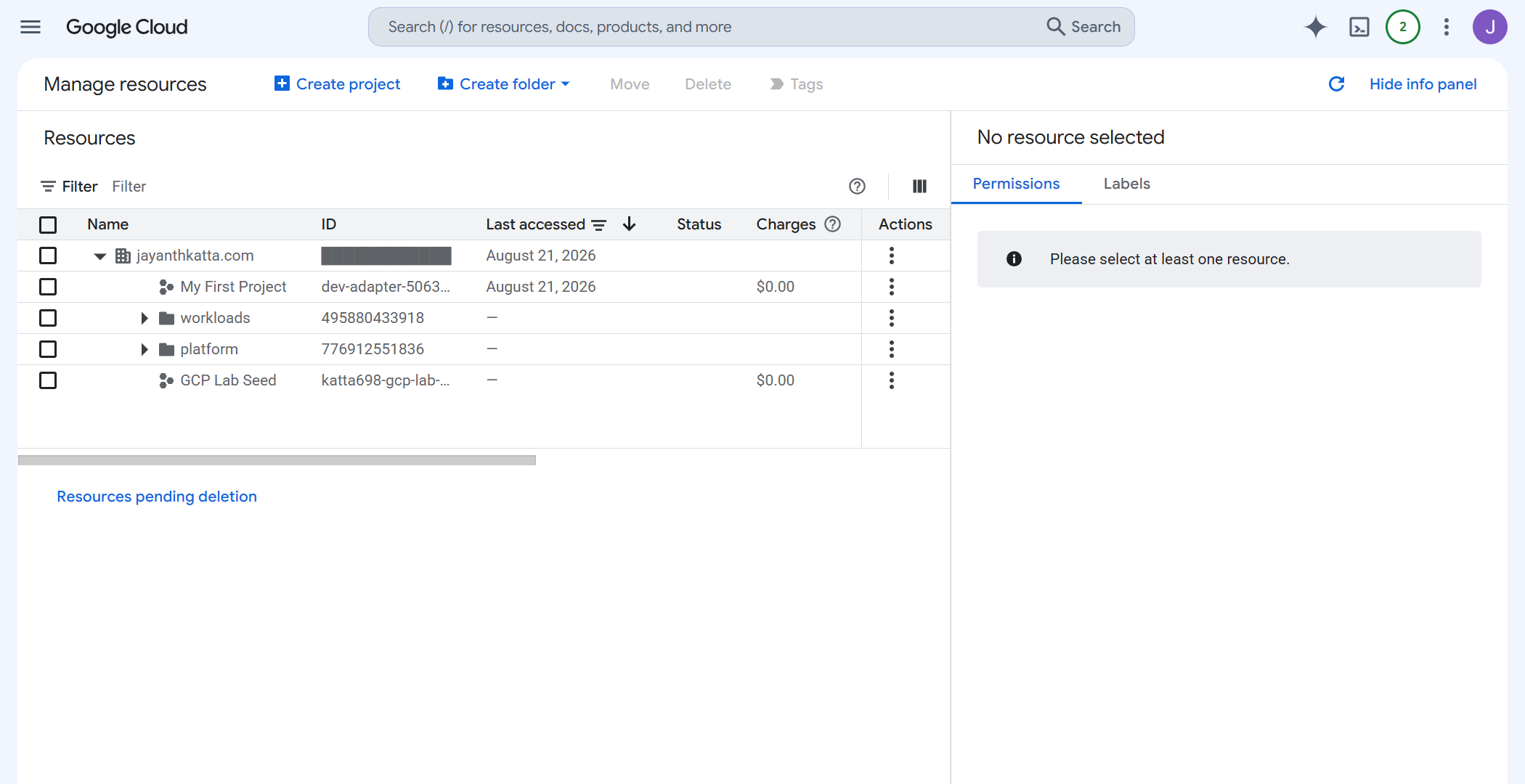
gcloud resource-manager folders list --organization=$ORG_ID
gcloud projects describe my-lab-seed \
  --format="value(projectId,lifecycleState,parent.id)"
The parent.id field is the one that matters — it is the
difference between a project that is in the hierarchy and one that
merely exists.
3. The console shows what I claim it shows.
Challenges — What Actually Went Wrong
1. gcloud organizations list lied
The organization existed and was ACTIVE. The CLI reported
Listed 0 items for several minutes afterwards, and I went looking for
a provisioning delay that was not the problem.
The cause: gcloud queries the v3 Resource
Manager API, which returns only organizations you hold
resourcemanager.organizations.get on. A raw v1
organizations:search call with the same credentials returned it
immediately. Zero items is not evidence of absence — it is evidence of missing
permission, and the two look identical from the CLI.
2. Verifying the domain did not create the organization
I expected the organization at verification. It appeared only when the new admin account first signed in to the Cloud console and accepted the terms. Combined with the previous item, this produced a stretch where I could not tell whether the organization did not exist yet or existed and was invisible.
3. Terraform ignored the credentials I had just created
gcloud auth login authenticates the CLI. The Terraform provider
reads Application Default Credentials, a separate store. Two
logins, two token files, and only one of them is what Terraform uses.
Worse, the ADC consent screen has checkboxes that are not ticked by default. Clicking through produced a confident-looking success followed by “cloud-platform scope is required but not consented”. The page looks complete when nothing is selected.
4. Projects are slow, and folders are not
Measured on the apply: folders created in 11–12 seconds. Projects took 3m15s, 3m50s and 5m33s. Nothing was wrong — that is just how long project creation takes. Worth knowing before you assume an apply has hung, and worth designing around if a week creates many projects.
Security — Controls at Every Layer
- No service account keys anywhere. Not one, in the whole lab. Local runs use ADC; CI moves to Workload Identity Federation in Week 5. If something appears to need a key, that is a signal to redesign, not to create one.
- Least API enablement. Two or three APIs per project, explicit in code, rather than whatever accumulates.
- No default network.
auto_create_network = falseeverywhere, so the permissive default firewall rules never exist to be forgotten about. - Blast-radius separation. Network, logging and key management in three separate projects with three separate IAM surfaces.
prevent_destroyon the seed project. The project that anchors the lab should not be removable by a mistyped command.- No account identifiers in the repository. Organization ID,
billing account ID and project numbers live only in a gitignored
terraform.tfvars, and the staged tree is swept for them before every push. Gitignoring the obvious files is not enough on its own — prose leaks too, so the sweep greps everything staged rather than a filename list. - Screenshots are captured by a script, not by hand. Every
figure in this series goes through
capture_gcp.py, which masks organization IDs, billing account IDs and project numbers in the live page before taking the shot, then refuses to write the file if any identifier survives redaction — and refuses again if the page turns out to be a sign-in screen rather than the page that was asked for. A screenshot is the easiest way to publish something you did not mean to, and the only way I trust it is to make the failure mode a hard stop rather than a habit.
Cost
Zero. Not “a few cents” — actually nothing.
Free by design
- Cloud Identity Free at this user count
- The organization resource
- Folders — no charge, no quota cost
- Projects — free; you pay for what runs in them
- IAM bindings and API enablement
- HCP Terraform free tier
Worth doing anyway
Set a budget alert before deploying anything with a per-hour price. A landing zone costs nothing, but it is the thing every future week bills through, and the guardrail is easier to add now than to remember later.
This is the part that makes the “projects are free” argument concrete. Doing the hierarchy correctly — four folders, three separated platform projects — cost exactly the same as doing it badly.
Cleanup
There is none, deliberately. Week 1 is permanent infrastructure; every later week sits inside the hierarchy it creates, so tearing it down orphans the entire lab.
The cleanup script refuses to run without an explicit flag:
if [[ "${1:-}" != "--i-really-mean-it" ]]; then
  echo "Refusing: week 01 is permanent infrastructure." >&2
  exit 1
fi
One thing I did tear down: the GCS state bucket, once state moved to HCP. A
bucket named -tfstate- holding an out-of-date state file is a trap
for whoever reads it next, including me in six months. Deleting it required
force_destroy = true first, because it was versioned and non-empty.
References
- Resource hierarchy — organizations, folders, projects
- Creating and managing organizations
- Creating and managing folders
- IAM overview — including policy inheritance
- Set up Cloud Identity
- Terraform
google_folder - Terraform
google_project - The code for this week
Key Takeaways
- The AWS account split maps onto folders, not projects. A project is free and disposable and owns IAM, quota and billing attribution. If you find yourself rationing projects, you have imported a constraint that does not exist here.
- IAM inherits downward, and that changes how much you write. A folder binding covers projects that do not exist yet. Folder-level grants should be few and deliberate.
- Billing is orthogonal to the hierarchy. There is no payer account to design around. Cost separation is budgets and labels.
- You cannot script your way to an organization. No API, no Terraform resource. It appears when a domain is verified and someone from that domain signs in. Plan for a manual first step.
- An empty CLI result is not proof of absence.
organizations listreturning zero meant “you lack a permission”, not “nothing exists”. - Two credential stores.
gcloud auth loginandgcloud auth application-default loginare not the same thing, and Terraform only cares about the second.
What I’d do differently in production
- Do not use the super admin as a daily driver. I granted Organization Administrator to the same identity that owns Cloud Identity super-admin. That is one account away from total compromise. In production these are separate identities, with super admin kept as break-glass. I am doing that split properly in Week 7, and I am flagging it here rather than quietly leaving it.
- Remote execution from day one. These workspaces run local execution, so there is no run history and no approval gate — a plan I read on my own laptop is the only record. Real teams need Workload Identity Federation and remote runs before the first apply, not in Week 5.
- Organization policy in the same change as the folders. I
created
devandprodas separate folders precisely so they could carry different constraints, and then did not add any constraints — that is Week 2. For a real landing zone, an emptyprodfolder that enforces nothing is a false sense of separation. - Budget alerts before the hierarchy, not after. Nothing here costs money, which made it easy to defer the guardrail. The right order is guardrail first.
- Group-based IAM, not user-based. Every binding I wrote names a user. Production binds to groups so that access survives people joining and leaving. Week 9.
Next week: organization policy — putting actual constraints on the folders this week created, and finding out which of them Google enforces the way I expect.
Comments