Business Challenge
Post #12 ended on a division of labour that sounds settled: the name carries what can never change, and tags carry everything else. It is the right division. It is also where most organisations stop thinking, because a tag looks like the easy half — a key-value pair, editable with a write, fifty of them per resource. There is nothing to design.
Here is what that assumption produces, roughly eighteen months in.
The platform team assigns Require a tag on resources with a deny effect for costcenter, owner and env. Compliance climbs to green across the board. Finance is told cost allocation is solved. Two quarters later the monthly cost report still has a large untagged bucket in it, two product teams are arguing about a line item neither of them recognises, and an incident at two in the morning ends with a network security group nobody can find an owner for.
Every one of those outcomes is consistent with the policy being green, and each has a different cause:
- The
denypolicy does not apply to resource groups, so the containers themselves were never in scope of the thing reporting compliance. - Somebody tagged the resource groups instead, correctly and carefully, and the resources inside them stayed untagged — because resources don't inherit the tags you apply to a resource group or a subscription.
- The untagged line items in the cost report are resource types whose tags never reach billing at all, plus purchases that emit no usage at subscription scope.
- The NSG has an
ownertag. It saysplatform-team, which was true when the policy stamped it and has not been true for a year.
A tagging policy reports on whether a tag exists. Nothing in Azure reports on whether the value is still true, whether the tag reached the cost report, or whether the resources that matter were in scope of the assignment. Those are three separate mechanisms, and the compliance percentage is blind to all of them.
Architecture
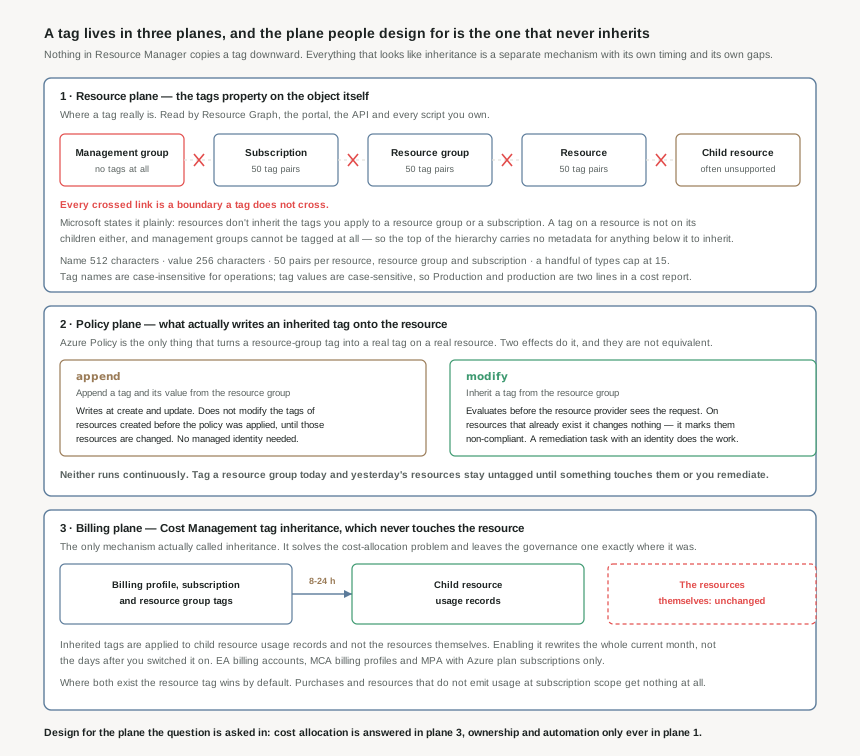
The useful model is that a tag exists in three different planes, and they are only loosely connected. Designing a tagging strategy means deciding, for each question you want answered, which plane the answer comes from — because the mechanism that gets a tag into one plane frequently does nothing for the other two.
Plane one: the resource, where nothing is inherited
This is the tag as a property on the object — what Resource Graph queries, what the portal filters on, what your automation reads. Microsoft's statement about it is one sentence long and is the whole reason this post exists: resources don't inherit the tags you apply to a resource group or a subscription.
Read that at each level of the hierarchy and the picture is bleaker than it first sounds:
- Management groups cannot be tagged at all. Tags apply to resources, resource groups and subscriptions — not to management groups. The layer that models the organisation carries no metadata for anything below it to pick up.
- A subscription tag is not on its resource groups.
- A resource group tag is not on its resources.
- A resource tag is not on its children, and many child resources have no tag property to put one in. This is not only an obscure-type problem: Machine Learning workspace tags don't propagate to compute clusters and compute instances, and the compute is the part that costs money.
The budget within that plane is generous and easy to misjudge. Each resource, resource group and subscription can hold a maximum of 50 tag name-value pairs; the tag name is limited to 512 characters and the value to 256, with storage account tag names capped at 128. Fifty sounds like room to spare until you meet the exceptions — Azure Automation, Azure Content Delivery Network, Azure Public DNS, Azure Private DNS and Log Analytics saved searches support only 15. Lay a typical foundational taxonomy over that ceiling and it is tight: four functional tags, three classification, two accounting and two ownership is 15 − 4 − 3 − 2 − 2 = 4 slots left for everything a workload team wants to add.
Two further gaps belong here rather than in a footnote, because both produce a resource that is permanently unlabelled: classic resources such as Cloud Services don't support tags at all, and you can't add a tag to a virtual machine that has been marked as generalized.
Plane two: policy, which is what people actually mean by inheritance
Because Resource Manager has no inheritance, Azure Policy supplies it — and the two effects that do it behave differently in the way that matters most.
append | modify | |
|---|---|---|
| Built-in definition | Append a tag and its value from the resource group | Inherit a tag from the resource group |
| New resources | Tag written at create or update | Tag written at create or update |
| Resources that already exist | Does not modify their tags until those resources are changed | Marked non-compliant; changed only by a remediation task |
| Overwrites a different value | No — appends only when the tag is missing | Yes on the add-or-replace variant; the if missing variant leaves it alone |
| Can remove a tag | No | Yes — and tags are the only thing Remove supports |
| Needs a managed identity | No | Yes, for remediation |
Microsoft's own recommendation follows from that table: for managing tags, use modify instead of append, because it provides more operation types and the ability to remediate existing resources — and fall back to append only when you cannot create a managed identity.
The timing is the part that surprises people. modify evaluates before the request gets processed by a Resource Provider, which is why it can stamp a tag onto a deployment that never mentioned one. But when the same definition runs as part of a routine evaluation cycle, it makes no changes to resources that already exist — it marks them non-compliant and waits. Tag a resource group this morning and the four hundred resources inside it are still untagged this afternoon, this week and next quarter, unless something touches them or somebody triggers a remediation task.
A tag modify policy should have mode set to indexed unless the target resource is a resource group — the wrong mode is not an error, it is a policy evaluating against the wrong set of things. And Require a tag on resources, the deny definition most estates start with, does not apply to resource groups; the resource-group equivalent is a separate definition. Assign the first without the second and you get a compliance figure for an estate whose containers were never in scope.
Plane three: billing, the only thing Azure actually calls inheritance
Cost Management has a setting named tag inheritance, and it is a genuinely different mechanism from everything above. Enabled at an EA billing account, an MCA billing profile or a subscription, it applies billing, resource group and subscription tags to child resource usage records. Microsoft's note is unambiguous about what it does not do: inherited tags are applied to child resource usage records and not the resources themselves.
It solves the cost-allocation problem outright and the governance problem not at all. Nothing in Resource Graph changes. No resource acquires a tag. The Terraform plan is unaffected. What changes is the cost report, and it changes in a specific way worth knowing before you enable it:
- It takes about 8-24 hours for child resource usage records to be updated after the setting or the inherited tags change.
- It rewrites the current month, not the future. Microsoft's worked example: enable it on October 20 and child resource usage records are updated from October 1, using the tags that existed on October 20. A tag corrected mid-month therefore restates the month to date.
- The resource tag wins by default. Where a resource tag matches the inherited tag, the resource tag is applied to its usage record unless you switch the setting to prefer the inherited one.
- It does not reach everything. Purchases and resources that do not emit usage at a subscription scope get no subscription tags applied, even with the setting on.
- It requires the right agreement. Enterprise Agreement, Microsoft Customer Agreement, or Microsoft Partner Agreement with Azure plan subscriptions.
The tag support reference has a column labelled Supports tags, which says whether the resource type has a property for the tag, and a separate column labelled Tag in cost report, which says whether that resource type passes the tag to the cost report. They are not the same answer. A resource can be perfectly tagged in plane one and still contribute an untagged line to the invoice — which is exactly the gap tag inheritance exists to close.
Why This Architecture Holds Up
Post #12's rule was that anything which might stop being true belongs in a tag rather than a name. That is correct, and it has a consequence nobody enjoys: the estate's mutable metadata now lives in a field with no schema, no referential integrity, no change history surfaced anywhere obvious, and no mechanism that notices when a value stops matching reality. A wrong name is visible. A wrong tag looks exactly like a right one.
Four properties of the tag system make that worse than it sounds, and each is a design constraint rather than a quirk.
Names are case-insensitive, values are not
Tag names are case-insensitive for operations, but the resource provider may keep whatever casing you supplied and you will see it in cost reports. Values are case-sensitive outright, so environment: Production and environment: production are different tag values that appear separately in cost reports and resource queries. This is the most common reason a cost report has more categories than the taxonomy has.
There is no type system
A tag value is a string of up to 256 characters. Nothing validates that costcenter is a real cost centre, that owner resolves to somebody who still works here, or that env is one of three permitted values — unless a policy condition says so. Compliance against "the tag exists" is cheap; compliance against "the tag is right" is something you have to build.
Tags are plain text and widely visible
Tags are stored as plain text, and sensitive values could be exposed through cost reports, commands that return existing tag definitions, deployment histories, exported templates and monitoring logs. A tag is closer to a public label than to a private annotation, which rules out ticket references containing customer names, personal identifiers, and anything an auditor would call data.
Tagging rights are not resource rights
The Tag Contributor role grants write access on Microsoft.Resources/tags, which lets a principal tag a resource it otherwise cannot touch. It carries a portal quirk worth knowing before you hand it out: it can't apply tags to resources or resource groups through the Azure portal, though it can apply tags to subscriptions there, and it supports all tag operations through Azure PowerShell and the REST API.
Decide what each tag is for before deciding what it is called
Microsoft's foundational categories — functional, classification, accounting, purpose and ownership — are a useful checklist precisely because they group tags by who reads them. That is the question that decides everything else about a tag: which plane it needs to reach, how quickly a stale value hurts, and whether a policy can supply it or a human must.
| Category | Read by | Plane it must reach | What a stale value costs |
|---|---|---|---|
Functional — app, tier, env, region | Operations and automation | Resource. Automation queries Resource Graph, not the invoice. | A runbook acts on the wrong environment. |
Classification — criticality, confidentiality, sla | Security and compliance | Resource, and enforced rather than requested. | A control is not applied to something that needed it. |
Accounting — department, costcenter | Finance | Billing. This is the one tag inheritance is for. | A chargeback report nobody accepts. |
Purpose — businessprocess, businessimpact | Business stakeholders | Reporting, periodically. | Low. These age slowly and are read rarely. |
Ownership — businessunit, opsteam | Whoever is awake at two in the morning | Resource, and it must be current. | Highest of the five, and the most likely to be stale. |
The ownership row is the one worth arguing about. It has the shortest half-life of any tag — teams reorganise, people leave, services are handed over — and it is the only one whose failure is discovered during an incident rather than during a review. Pointing it at a durable identity that outlives an individual, such as a group or a service identifier rather than a person, is the difference between a tag that decays in months and one that survives a reorganisation.
Key Architecture Decisions
The shape that works
Tag the resource group with everything durable, use modify to push those tags down onto the resources, use deny only for the small set that must never be absent, and turn on Cost Management tag inheritance as a backstop for the cost report rather than as a substitute for either.
{
  "if": {
    "field": "tags['costcenter']",
    "exists": "false"
  },
  "then": {
    "effect": "modify",
    "details": {
      "roleDefinitionIds": [
        "/providers/Microsoft.Authorization/roleDefinitions/4a9ae827-6dc8-4573-8ac7-8239d42aa03f"
      ],
      "operations": [
        {
          "operation": "add",
          "field": "tags['costcenter']",
          "value": "[resourceGroup().tags['costcenter']]"
        }
      ]
    }
  }
}
Three details in that fragment carry the weight. roleDefinitionIds is required and names the permissions the remediation identity gets — Tag Contributor is sufficient for a tags-only policy and is narrower than Contributor. The operation is add rather than addOrReplace, so a team that deliberately set a different value keeps it. And the definition needs mode of indexed, because its target is resources rather than resource groups.
modify is the effect that can fix an estate retroactively, which means the first remediation task you run against an established subscription is a change to every non-compliant resource in it, performed by a managed identity, on a schedule you chose. Scope the first one narrowly, prefer the if missing variant over add-or-replace while you are still establishing what the correct values are, and remember that add-or-replace will overwrite a value somebody set on purpose. Post #16 takes remediation tasks and their identities on their own terms.
| Decision | Choose this | Because |
|---|---|---|
| How many tags are mandatory | As few as answer a question somebody actually asks, and never more than the tightest supported ceiling | Several types support only 15 tags. Eleven mandatory tags leave four for the workload team, and a mandatory tag nobody reads is a deployment failure with no upside. |
| Getting tags onto resources | modify inheriting from the resource group, not append |
Microsoft's own recommendation: modify provides more operation types and the ability to remediate existing resources. append leaves everything created before the assignment untagged until it is changed. |
Which tags get a deny |
Only the ones whose absence is genuinely unacceptable, and assign the resource-group definition alongside | Require a tag on resources does not apply to resource groups. A deny on a tag a policy could have supplied blocks deployments for no gain. |
| Cost allocation coverage | Enable Cost Management tag inheritance as well, not instead | It catches resource types that do not pass tags to the cost report at all. It changes no resource, so it fixes nothing in plane one. |
| Enabling tag inheritance mid-month | Expect the month to date to be restated, and wait 8-24 hours before reading the result | Records are updated from the first of the current month using the tags that existed when the setting changed. |
| Tag value casing | Lowercase names, and one documented casing for values, enforced by policy | Names are case-insensitive for operations, values are case-sensitive. Two casings of one value are two rows in every cost report and two results in every query. |
The owner tag |
A group or service identifier, never an individual | It has the shortest half-life of any tag and its failure is discovered during an incident. A durable identity survives the reorganisation that invalidates a person's name. |
| Anything sensitive | Keep it out entirely | Tags are stored as plain text and are exposed through cost reports, deployment histories, exported templates and monitoring logs. |
| Grouping costs under a parent resource | The cm-resource-parent tag, with the parent's resource ID as the value |
It groups tagged costs in Cost Management without filters, which is the right tool for a set of resources belonging to one thing rather than to one department. |
| Delegating the right to tag | Tag Contributor, with its portal limitation understood | It permits tagging without permitting change to the resource. It cannot tag resources or resource groups through the portal, though it supports all tag operations through PowerShell and the REST API. |
| Validating the strategy | Query Resource Graph for a tag, read the cost report for the same tag, and compare | They are different planes and they will disagree. The size of the disagreement is the only honest measure of whether the tagging strategy works. |
Closing Thought
A naming convention fails loudly: the deployment is rejected, or the name reads wrong to anybody who looks at it. A tagging strategy fails silently, and it fails in a plane you were not looking at. The compliance dashboard is green because the tag exists. The cost report is wrong because the tag never reached a usage record. The incident is slow because the tag's value stopped being true a year ago and nothing in Azure has an opinion about that.
So the question worth asking about each tag is not "should we have it" — the answer is nearly always yes, they are cheap — but "who reads this, in which plane, and what happens on the day it is wrong". Tags that survive an answer to that are worth enforcing. The rest are metadata about metadata: complete, compliant, and answering nothing.
#14 turns to the mechanism that has been doing the work in the background of both this post and the last one: Azure Policy itself — definitions, assignments and effects, what each effect can and cannot reach, and why the order they evaluate in decides which one wins.
Official Azure Reference
- Use tags to organize your Azure resources and management hierarchy
- Tag support for Azure resources
- Policy definitions for tagging resources
- Azure Policy definitions modify effect
- Group and allocate costs using tag inheritance
- Define your tagging strategy
- Azure built-in roles for Management and governance
Comments