Business Challenge
A finance partner asks four questions about last quarter's Google Cloud spend. Three of them cannot be answered from the console at all, and the fourth is answered wrongly by a query that looks obviously correct.
The reports page groups by service, SKU, project, label and location, and there it stops. Google states the boundary plainly: data at the sub-SKU level, for example by resource ID, is not available. Every N2 instance in a region collapses into one SKU line, and no filter in the console splits it apart.
Correct approach
Enable the detailed usage cost export. Resource-level attribution is a property of that export and of nothing else — it is what resource.name is for.
Console reports filter on the dimensions Google ships. They do not join. Any attribution model that lives in a CMDB, an ownership table or a Terraform inventory is unreachable from a report page, no matter how many filters it grows.
Correct approachGet the rows into BigQuery and the question becomes a join. That is the substantive reason the export exists: it turns cost from a page you read into a table you can put next to your own tables.
There is nothing to show. A regional dataset reflects only billing data incurred from the date the export was enabled, and a multi-region dataset reaches back to the start of the previous month — not to the start of the account. The console kept its own history; the export did not inherit it.
Correct approachEnable all three exports on day one of any billing account, before there is anything worth analysing. It is the only decision in this post that cannot be made later.
SELECT SUM(cost) over a month is not that month's cost. It ignores credits, which are a repeated field rather than a column; it mixes usage dates with the billing period they land in; and summed as floating point it drifts. Google's own examples note that directly summing the floating point cost and credit values can result in floating point rounding errors.
Sum cost plus the unnested credit amounts, scope by invoice.month when reconciling to an invoice, and convert to micros before summing when the total has to match to the cent.
Architecture
Billing export is not one feature. It is three independent exports from one Cloud Billing account, each written into its own table in a BigQuery dataset you own, each enabled separately.
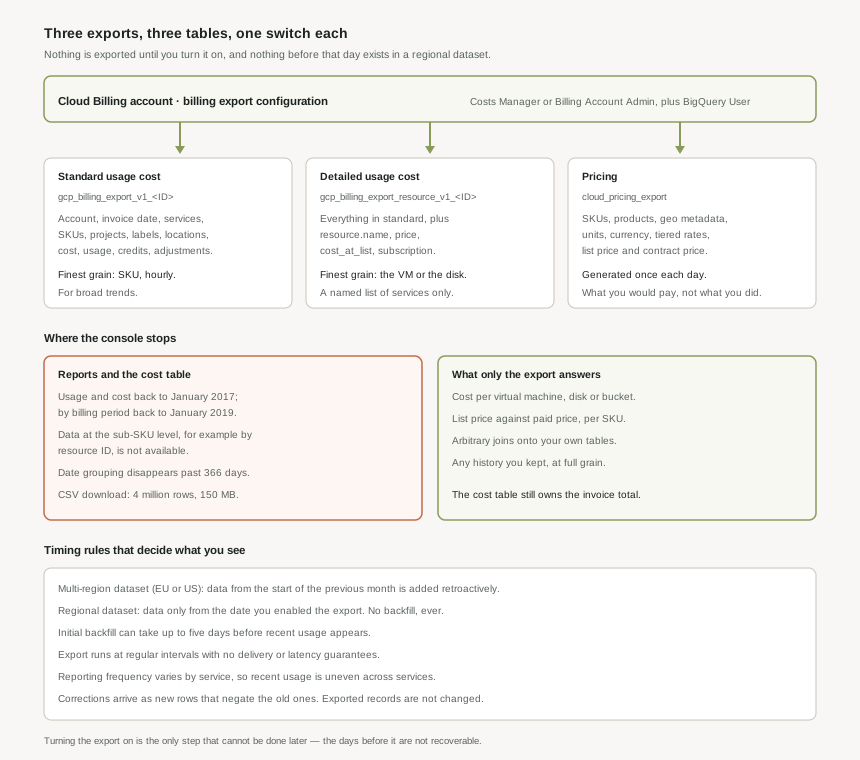
The three exports
| Export | Table | What it holds |
|---|---|---|
| Standard usage cost | gcp_billing_export_v1_<BILLING_ACCOUNT_ID> |
Account ID, invoice date, services, SKUs, projects, labels, locations, cost, usage, credits, adjustments and currency. Google's guidance: use it to analyse broad trends. |
| Detailed usage cost | gcp_billing_export_resource_v1_<BILLING_ACCOUNT_ID> |
Everything in the standard export plus resource-level cost data — the virtual machine or SSD that generated the usage. Adds resource.name, price, cost_at_list and subscription. |
| Pricing | cloud_pricing_export |
Billing account ID, services, SKUs, products, geographic metadata, pricing units, currency, aggregation and tiers. What you would pay, not what you did. |
They answer different questions, and the third one is the one teams forget. The usage exports say what was spent; the pricing export says what the rates were. Only together do they answer "was that the right price?" — and if the account has custom contract pricing, billing-account-specific pricing data is exported alongside the list price, which is what makes that comparison possible at all.
The detailed export is the standard export plus resource identity, so the same spend arrives split across more rows — Google notes the increased granularity of resource-level information can increase the number of rows, which are aggregated in the standard usage cost format. Two consequences: queries written against one table do not transfer unchanged to the other, and the detailed table is the larger and more expensive one to scan.
Resource-level data covers a named list of services, not everything
The detailed export includes granular cost information about a specific list: AlloyDB for PostgreSQL, App Engine, BigQuery, Bigtable, Cloud Data Fusion, Cloud Deploy, Cloud Run functions, Cloud Logging, Cloud Run, Cloud SQL, Cloud Storage, Compute Engine, Dataflow, Managed Service for Apache Spark Metastore, Firestore and Datastore, Google Kubernetes Engine, Managed Microsoft AD, Memorystore for Redis, Secret Manager and Spanner.
That covers most of what an ordinary platform spends money on, and it is still a list rather than a rule. A service outside it appears in the detailed table with the same SKU-level attribution the standard export gives, and there are carve-outs inside the list too — App Engine Flex costs are not part of the granular App Engine instance costs, for instance. Check the service before promising a per-resource breakdown of it.
Turning it on takes a role on each side
The same two-sided pattern as post #12's project link, for the same reason: the configuration lives on the billing account, and the data lands in a project.
- On the Cloud Billing account — Billing Account Costs Manager or Billing Account Administrator.
- On the project holding the dataset — BigQuery User.
- For the pricing export, more: Billing Account Administrator, BigQuery Admin, the
resourcemanager.projects.updatepermission, and the BigQuery Data Transfer Service API enabled.
The dataset's location matters and is not freely chosen. Both multi-region locations are supported, and only a subset of regional locations are. That choice then governs how much history you get, which is the next section.
The export writes through billing-export-bigquery@system.gserviceaccount.com. Google's warning is explicit: if you delete it, the table is not updated, which puts you at risk of data loss. It looks exactly like the kind of Google-managed principal a permissions clean-up removes, and nothing fails loudly when it goes — the table simply stops growing. The same applies to writing your own rows into these tables: manually inserted data might be deleted by the Cloud Billing export process.
The timing rules
| Rule | What Google states |
|---|---|
| Multi-region dataset | The dataset includes billing data incurred from the start of the previous month from when you first enabled the export. |
| Regional dataset | Usage cost data only reflects billing data incurred starting from the date you enabled Cloud Billing export. |
| Initial backfill | It might take up to five days for retroactive Cloud Billing data to finish exporting. |
| Steady state | Data is exported at regular intervals, with no delivery or latency guarantees for the export to BigQuery. |
| Per service | Usage reporting frequency varies by service, so recent usage does not appear at the same time for all of them. |
| Changing dataset | Previously exported billing data is not backfilled automatically to the new storage location. |
| Pricing export | Pricing data is generated once each day to prepare it for export. |
Two of those are worth reading twice. No delivery or latency guarantees means a dashboard built on this table is a lagging indicator by design — correct for month-end reconciliation, wrong for anything that needs to react to spend within the hour. And not backfilled automatically means moving the dataset later splits your history across two places, to be joined by hand.
Why This Architecture Holds Up
The console is not wrong. It is a report, and a report is a fixed set of questions answered well. The gap only appears when the question was not one of them.
Where the reports page ends
- Sub-SKU is not available. No resource ID, no instance name, at any time range.
- History is long but the grouping is not. Usage and cost data goes back to January 2017, and data filtered by billing period back to January 2019 — but if the time range spans more than 366 days, the date-based grouping options are not selectable.
- The finest rounding is in the download, not the page. A CSV download carries an unrounded subtotal to six decimal places beside the subtotal rounded to two, which matters the moment you start reallocating a shared cost across teams.
- No joins, ever. Whatever your organisation knows about ownership stays outside.
What the console still owns
One thing, and it is the important one: the invoice. The cost table report is described as a cost management tool for understanding the costs that reconcile to your invoice, and with filters in their default state, the total in the footer matches the invoice or statement total for the selected document. Nothing you compute in BigQuery has that guarantee attached to it.
The cost table report is the reconciliation surface — it is scoped to a billing period and its total is the invoice's total. The BigQuery export is the analysis surface — full grain, joinable, and yours to keep. Using the export to argue with an invoice is a category error; using the console to attribute cost to a resource is impossible. Keep both, and know which question goes where.
Why a naive SUM disagrees with both
Three fields cause nearly every mismatch between a query and an invoice.
| Field | What goes wrong |
|---|---|
credits |
A repeated field, not a column. SUM(cost) alone reports cost before discounts, sustained-use credits and promotions — always too high. The total is SUM(cost) plus the sum of the unnested credit amounts. |
invoice.month |
The year and month (YYYYMM) of the invoice that includes the cost line items — which is not the month the usage happened in. Filtering on usage_start_time gives a calendar month; reconciling to an invoice needs invoice.month. |
cost_type |
Says whether a line is regular, tax, adjustment, or rounding error. A query that does not look at it silently blends tax and corrections into service cost. |
The standard shape, then, is this — and it is worth writing once as a view rather than re-deriving it per dashboard:
SELECT
  invoice.month AS billing_period,
  service.description AS service,
  SUM(cost) + SUM(IFNULL((SELECT SUM(c.amount) FROM UNNEST(credits) c), 0)) AS total
FROM `PROJECT.DATASET.gcp_billing_export_v1_XXXXXX_XXXXXX_XXXXXX`
WHERE invoice.month = '202607'
GROUP BY billing_period, service
ORDER BY total DESC
For a total that must match to the cent, Google's own example converts costs and credits to micros before summing and back afterwards, precisely because summing the floating point values directly can produce rounding errors. That is not pedantry at a few dollars; at a few million rows it is the difference between a reconciliation that closes and one that does not.
Corrections arrive as new rows
Exported records are not edited in place. Corrections appear as new data that negates incorrect data on the source SKUs, so a period can change total after you have queried it, without any row you already read changing. Cached and materialised aggregates over recent months need rebuilding, not appending.
This is also why the export is documented as not mapping directly to an invoice: late-reported usage and corrections land under a billing period that has already been read once. It is the same reason the cost table notes that detailed usage costs for an invoice month might differ slightly from those for a calendar month.
Certain usage costs are owned by the Cloud Billing account and are not included in a project — Support is the standard example. In the cost table they show as [Charges not specific to a project] with empty project fields. Any per-project chargeback model built by grouping the export on project ID drops these on the floor unless it handles the null case deliberately. They do not disappear from the invoice.
The FOCUS export, and its two-year clock
Google also provides a FOCUS-format export, the FinOps Foundation's cross-cloud cost schema, for organisations normalising spend across providers. One property of it deserves flagging before it becomes an archive: billing data exported to the Google-provided FOCUS export is subject to a two-year time-to-live policy, and data older than two years is deleted from that table automatically.
The standard and detailed exports are ordinary BigQuery tables in your dataset, and their retention is yours to set. The FOCUS one is not. If it is the table a long-horizon model reads from, copy it somewhere you own before the clock matters.
Key Architecture Decisions
| Decision | Choose this | Because |
|---|---|---|
| When to enable the export | The day the billing account is created | A regional dataset holds nothing from before the switch, and a multi-region one reaches back only to the start of the previous month. |
| Which exports to enable | All three | They answer different questions, cost nothing to have on, and none of them backfills the history you skipped. |
| Dataset location | A multi-region location, decided once | It is the only option that backfills anything, and previously exported data is not moved to a new location later. |
| Which table to query by default | Standard for trends, detailed for attribution | The detailed table carries more rows for the same spend, so scanning it for a service-level chart is paying for granularity nobody reads. |
| Reconciling to an invoice | The cost table report | Its footer total matches the invoice total for the selected document; a BigQuery query carries no such guarantee. |
| Scoping a cost query | invoice.month for reconciliation, usage timestamps for behaviour |
They are different months, and mixing them is the most common source of a total nobody can explain. |
| Computing a total | Cost plus unnested credits, in micros where it must be exact | SUM(cost) alone is pre-credit and therefore always too high, and floating point summation drifts at scale. |
| Near-real-time cost alerting | Budgets, not the export | The export has no delivery or latency guarantee and service reporting frequency varies, so freshness cannot be relied on. |
| Per-project chargeback | Handle account-level charges explicitly | Support and similar costs belong to the billing account and carry no project, so grouping on project ID silently loses them. |
| Long-term cost history | Keep your own copy of the standard export | The FOCUS export is deleted after two years; a table in your dataset is retained on your terms. |
| Permissions clean-up | Leave the export service account alone | Deleting billing-export-bigquery@system.gserviceaccount.com stops the table updating, with no error to notice. |
Closing Thought
Almost every mistake in a Google Cloud billing setup can be corrected later. A wrong role is regranted, a project is moved to a different account, a budget is rewritten. This one cannot: the export writes from the moment it is switched on, and the months before it are not stored anywhere you can query.
Which makes it an odd thing to treat as a reporting feature. It is closer to enabling audit logs — a decision whose whole value is that it was made before anyone needed the data. The queries can wait; the switch cannot.
#14 reads a Google Cloud invoice: what its sections mean, how a billing period relates to the calendar month the usage happened in, and which numbers on it exist nowhere else.
Official Google Cloud Reference
- Export Cloud Billing data to BigQuery
- Set up Cloud Billing data export to BigQuery
- Cloud Billing export table structure
- Standard usage cost data schema
- Detailed usage cost data schema
- Pricing data schema
- Example queries for Cloud Billing data export
- View your Cloud Billing reports and cost trends
- View and download the Cost table report
Comments