Business Challenge
Post #39 ended at the token endpoint with three things coming back. This post is about what those three things are, who each one is addressed to, and how long each one lasts — which turns out to be a harder question than it sounds, because the platform deliberately refuses to give the same answer twice.
The failures here are not exotic. They are the same four, everywhere:
- A client sends the ID token to an API, because both are JWTs and one of them worked.
- A client parses the access token to read a claim, and breaks the day the API changes its token version — or the day it asks for a Microsoft Graph token, which may not decode at all.
- An app keys its own database on email address or username, and two years later an employee changes their name.
- Somebody disables an account, watches the session continue, and concludes that revocation is broken. It is not. It is doing exactly what the table says, and the table mostly says "Stays alive".
Each of those is a small misreading of a document, and each costs a real afternoon. The documents are short. This post is mostly them, arranged so the contradictions are visible next to each other.
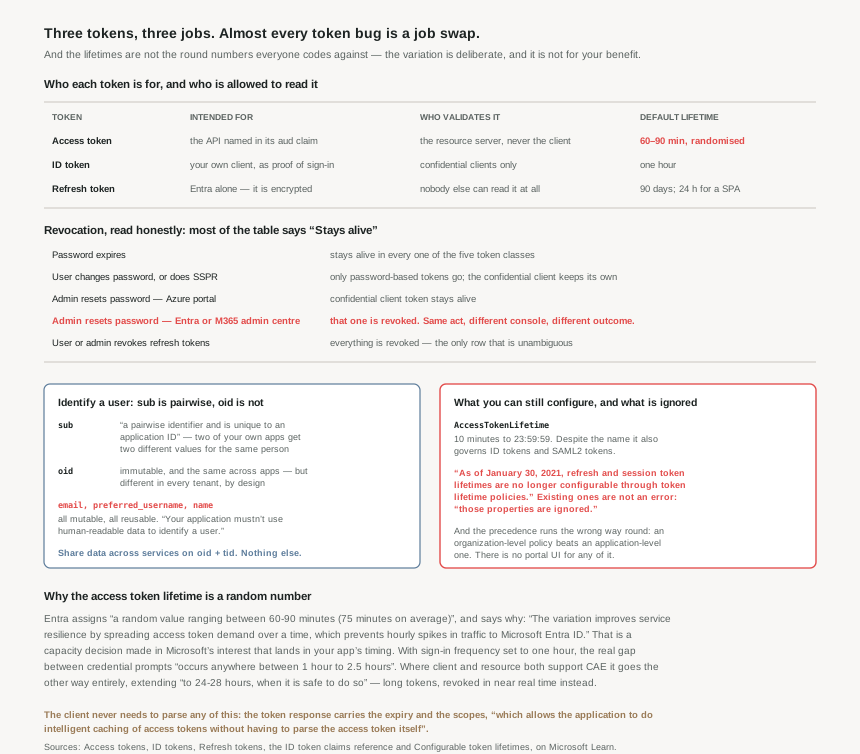
Access tokens are sensitive credentials and pose a security risk if not handled correctly, and they are for the API: although client applications can receive and use access tokens, they should treat them as opaque strings. ID tokens go the other way — they are for the client, and you shouldn't use an ID token to call an API.
So the two JWTs in your hand are addressed to two different readers. Nothing about their shape tells you that. The aud claim does.
Architecture
Three tokens, and who each one is addressed to
| Token | What it proves | Who reads it | Who validates it |
|---|---|---|---|
| Access | Authorization — granting access to specific resources on behalf of an authenticated user | The API named in aud |
The resource server should validate the access token before accepting it as proof of authorization |
| ID | Authentication — confirming that a user is successfully authenticated | Your own client | Only confidential clients should validate ID tokens |
| Refresh | Nothing, to you. It is a means of getting the other two back | Entra alone | Nobody — refresh tokens are encrypted and only the Microsoft identity platform can read them |
The ownership rule is worth stating flatly, because it explains most of the confusion about who may change what: resources always own their tokens using the aud claim and are the only applications that can change their token details. The client that requested the token has no say in its contents or its version. An API selects v1.0 or v2.0 through requestedAccessTokenVersion in its own manifest, where the values of null and 1 result in v1.0 tokens, and the value of 2 results in v2.0 tokens — and a client calling the v1.0 endpoint for a resource set to 2 gets a v2.0 token anyway.
This is the part people miss while reaching for a JWT library. The token response already carries what the client wants: this information includes the expiry time of the access token and the scopes for which it's valid. This data allows the application to do intelligent caching of access tokens without having to parse the access token itself.
And if you insist anyway, it may not work: tokens that a Microsoft API receives might not always be a JWT that can be decoded. A Graph token that refuses to decode is not a bug to be worked around. It is the documented behaviour of a token you were never the audience for.
Who should validate a token — a shorter list than expected
Not all applications should validate tokens. Two cases only: a web API validating access tokens sent to it, which must only accept tokens containing one of their AppId URIs as the aud claim; and a web app validating ID tokens received through the browser in the hybrid flow. Everything else is out of scope. Public clients don't benefit from validating ID tokens because the application communicates directly with the IDP where SSL protection ensures the ID tokens are valid, and they shouldn't validate the access tokens, as they are for the web API to validate, not the client.
There is a name for getting this wrong in the other direction — accepting a token addressed to somebody else. Validating and accepting tokens meant for another resource is an example of the confused deputy problem. An API that checks the signature and the expiry but not the audience will happily accept a valid token minted for a completely different service.
Two mechanical notes that cost debugging time. Use kid, not x5t: though v1.0 tokens contain both the x5t and kid claims, v2.0 tokens contain only the kid claim. And keys move — Microsoft Entra ID rotates the possible set of keys on a periodic basis, so write the application to handle those key changes automatically, with a reasonable frequency to check for updates being every 24 hours. A cached key set that is never refreshed is an outage with a long fuse.
Identifying a user: the claim you want is not the one you can read
Every claim in an ID token that a human can read is unsuitable for identifying that human. That is not an accident, and the documentation is unusually direct about it.
| Claim | Stable? | What the docs say |
|---|---|---|
preferred_username |
No | Its value is mutable and might change over time. Since it's mutable, this value can't be used to make authorization decisions. |
email |
No | This value isn't guaranteed to be correct and is mutable over time. Never use it for authorization or to save data for a user. |
name |
No | The value isn't guaranteed to be unique, it can be changed, and should be used only for display purposes. |
sub |
Yes, per application | The subject is a pairwise identifier and is unique to an application ID. |
oid |
Yes, per tenant | Two different applications signing in the same user receives the same value in the oid claim. |
The distinction between the last two rows is the one that bites, and it bites late. sub is pairwise: if a single user signs into two different apps using two different client IDs, those apps receive two different values for the subject claim. So two of your own applications, keyed on sub, cannot recognise that they are looking at the same person — and that only becomes visible on the day you try to join their data. The guidance is explicit: if you need to share data across services, oid and tid is best as all apps get the same oid and tid claims for a user acting in a tenant.
And there is a boundary oid does not cross. If a single user exists in multiple tenants, the user contains a different object ID in each tenant — they're considered different accounts, even though the user logs into each account with the same credentials. That is deliberate: the oid and sub claims for a user change across tenants, by design, to ensure that applications can't track users across tenants. A cross-tenant correlation feature is not a thing you have forgotten how to build. It is a thing the platform exists to prevent.
Finally, the claim that disappears under load. If a user is a member of more groups than the overage limit (150 for SAML tokens, 200 for JWT tokens), the groups claim isn't included in the token. Not truncated — absent, replaced by a _claim_names pointer at Microsoft Graph. Authorization code that reads groups and finds nothing will conclude the user is in no groups, which is the most privileged-looking failure available: it fails open for anything that checks for the absence of a group, and fails closed for everything else. Post #38's argument for app roles over group membership is partly this.
Why This Architecture Holds Up
Because the access token lifetime is random, and the reason is not yours
There is no one-hour access token. When issued, the Microsoft identity platform assigns a random value ranging between 60-90 minutes (75 minutes on average) as the default lifetime of an access token. The reason given is plainly a capacity argument: the variation improves service resilience by spreading access token demand over a time, which prevents hourly spikes in traffic to Microsoft Entra ID.
That is a legitimate thing for a platform at that scale to do, and it is worth noticing what it means. A property of your application's session behaviour is being set by Microsoft's need to flatten a load curve. Any test that asserts an expiry, any cache warmed on a fixed schedule, any runbook that says "tokens last an hour" — all of them are describing a number that does not exist.
It compounds with Conditional Access. Organizations that use Conditional Access sign-in frequency to enforce how frequently sign-ins occur can't override default access token lifetime variation, and the documented worked example is the one to carry into a design review: set sign-in frequency to one hour, and the actual sign-in interval occurs anywhere between 1 hour to 2.5 hours. If an auditor has been told users reauthenticate hourly, that is a statement nobody can make good on.
Two other defaults sit alongside it. Tenants that don't use Conditional Access have a default access token lifetime of two hours for clients such as Microsoft Teams and Microsoft 365; and where client and resource both support Continuous Access Evaluation, the lifetime is automatically extended to 24-28 hours, when it is safe to do so, with the trade stated openly — these long-lived tokens will be revoked in near real time in response to critical events such as account disablement and password changes. That is a genuinely better design than a short expiry: instead of hoping the window is small, the platform keeps the channel open and pushes the revocation through it.
Because most of the revocation table says the token survives
The refresh token revocation table is five columns of token class against nine conditions, and reading it as "changing the password logs everyone out" is wrong in almost every cell.
| Condition | Password-based token | Non-password-based token | Confidential client token |
|---|---|---|---|
| Password expires | Stays alive | Stays alive | Stays alive |
| Password changed by user | Revoked | Stays alive | Stays alive |
| User does SSPR | Revoked | Stays alive | Stays alive |
| Admin resets password (Azure portal) | Revoked | Stays alive | Stays alive |
| Admin resets password (Entra admin center) | Revoked | Revoked | Revoked |
| Admin resets password (M365 admin center) | Revoked | Revoked | Revoked |
| User revokes their refresh tokens | Revoked | Revoked | Revoked |
| Admin revokes all refresh tokens for a user | Revoked | Revoked | Revoked |
| Single sign-out | Stays alive | Stays alive | Stays alive |
Three rows deserve to be read twice. Password expiry revokes nothing at all — every cell in that row says the token stays alive. A user changing their own password, or resetting it through SSPR, leaves every non-password-based token intact, which includes anything obtained with a passwordless or certificate-based sign-in. And the one that looks like a documentation error until you accept that it is not: the same administrator performing the same password reset produces different outcomes in different consoles. Through the Azure portal, a confidential client's token survives. Through the Entra admin center or the M365 admin center, it does not.
I cannot tell you why the consoles differ — the documentation states it without explaining it. What I can say is what to do with it. If the intent is "this person is out", the only rows that do that unconditionally are the two explicit revocations: the user revoking their own refresh tokens, or an admin revoking all refresh tokens for the user. Everything else is partial. An incident runbook that says "reset the password" has, on the documentation's own account, left several classes of token working.
One more exclusion, easy to miss and exactly the case where it matters: refresh tokens are not revoked for B2B users in their resource tenant. The token needs to be revoked in the home tenant. Revoking a departing partner's access from your own tenant does not end their session. You do not own the account, and you cannot end it.
Because half the knobs were removed five years ago and the policies still validate
This is the failure mode I would most expect to find in a long-lived tenant. As of January 30, 2021, refresh and session token lifetimes are no longer configurable through token lifetime policies. The next sentence is the dangerous one: if you have existing policies that set refresh or session token properties, those properties are ignored. New tokens are always issued with the default configuration.
Ignored, not rejected. A policy written in 2019 to shorten refresh token lifetimes is still sitting in the tenant, still readable, still looking like a control — and doing nothing. Nothing warns. The replacement is Conditional Access sign-in frequency, which is a different object in a different blade owned by a different team.
What remains configurable is one property with a misleading name. Despite the name, AccessTokenLifetime controls the lifetime of access tokens, ID tokens, and SAML2 tokens — minimum 10 minutes (00:10:00), maximum one day (23:59:59). Shortening access tokens for one application therefore also shortens its ID tokens and its SAML assertions, which is rarely what the person filling in the number intended.
And the precedence runs the opposite way to almost every other policy system on Azure: for token lifetime policies, an organization-level policy takes precedence over an application-level policy. If your app-level policy doesn't seem to take effect, check whether an organization-level policy exists. Specific does not beat general here. General wins.
Three more limits, each of which has surprised someone: there is no configuration surface in the Microsoft Entra admin center — Graph API and PowerShell only; configuring token lifetimes for managed identity service principals isn't supported; and the policy only applies to mobile and desktop clients accessing SharePoint Online and OneDrive for Business resources. It doesn't apply to web browser sessions.
Because the refresh token is the only durable thing you hold, and it rotates
The refresh token is the asset. It is bound to a combination of user and client, but aren't tied to a resource or tenant, so a client can use a refresh token to acquire access tokens across any combination of resource and tenant where it has permission to do so. One stolen refresh token is not access to one API. It is access to everything that client is permitted to reach, until something revokes it — and we have just seen how much does not.
It also rotates, with a caveat that reads like a warning because it is one: refresh tokens replace themselves with a fresh token upon every use. The Microsoft identity platform doesn't revoke old refresh tokens when used to fetch new access tokens. Securely delete the old refresh token after acquiring a new one. Rotation without invalidation means a token store that appends rather than replaces is quietly accumulating live credentials.
And the lifetime depends on where the token was delivered, not on what the client is: 24 hours for single-page applications, 24 hours for apps that use email one-time passcode authentication flow, and 90 days for all other scenarios. The 24-hour SPA case was post #39's closing constraint and it is worth restating, because it is the one that shapes a user experience: refresh tokens sent to a redirect URI registered as spa expire after 24 hours, the replacements inherit that expiry, and renewal must visit the sign-in page in a top-level frame because browsers block third-party cookies in an iframe.
Key Architecture Decisions
| Situation | Decision | Why |
|---|---|---|
| Client needs the token's expiry | Read the token response, never the token | The response carries expiry and scopes, which allows the application to do intelligent caching of access tokens without having to parse the access token itself. |
| A Graph token will not decode | Stop — this is expected | Tokens that a Microsoft API receives might not always be a JWT that can be decoded. |
| Keying your database on a user | oid + tid |
All apps get the same oid and tid claims for a user acting in a tenant; sub differs per application. |
| Tempted to key on email or UPN | Don't | Your application mustn't use human-readable data to identify a user. Names change; addresses get reissued. |
Authorizing on the groups claim |
Handle the overage, or use app roles | Past 150 for SAML tokens, 200 for JWT tokens the claim is absent, not truncated. |
| An API validating a token | Check aud before anything else |
Accepting another resource's token is the confused deputy problem. |
| Ending a compromised session | Revoke refresh tokens explicitly | A password reset leaves non-password-based tokens alive; only explicit revocation clears every column. |
| A departing B2B guest | Revoke in their home tenant | Refresh tokens are not revoked for B2B users in their resource tenant. |
| An old token lifetime policy in the tenant | Audit it — it may be inert | Refresh and session properties set before 30 January 2021 are silently ignored. |
| Shortening one app's access token | Expect its ID and SAML tokens to shorten too | Despite the name, AccessTokenLifetime controls the lifetime of access tokens, ID tokens, and SAML2 tokens. |
| An app-level policy that has no effect | Look for an organization-level one | An organization-level policy takes precedence over an application-level policy. |
| Wanting faster revocation | Adopt CAE rather than shortening lifetimes | CAE extends tokens to 24-28 hours and revokes them in near real time — the better trade. |
Closing Thought
The thing I did not expect from this material is how much of it is about refusing to answer. How long does an access token last? A random number. Which user is this? Not the name, not the email, not the username, and the stable answer depends on whether you are asking within one app or across several. Is this session over? Depends which console the administrator used.
That is frustrating to read and mostly correct in design. The randomised lifetime protects a service that would otherwise get a spike on the hour. The pairwise sub stops applications correlating people across tenants. The mutable claims are marked unusable precisely because they are the ones a developer would reach for first. Each refusal is a decision someone made rather than a gap someone left.
The one I would not defend is the retired policy properties. Those properties are ignored is a sentence describing a control that still exists, still reads back, and does nothing — and in a tenant old enough to have one, nobody will find it by accident. The general lesson from five years of this series' worth of Azure reading is the same every time: a setting that fails loudly is a nuisance, and a setting that fails silently is a liability. This is one of the second kind, and it has been sitting in tenants since January 2021.
#41 moves from the token to the decision that issues it: Conditional Access — the signals it reads, the decisions it makes, and how enforcement actually reaches a session.
Comments