Business Challenge
Eight posts of policy machinery have treated principals as abstract. This one looks at the principal type that causes most of the machinery to be needed.
It did not. Service accounts are given a unique ID within IAM at creation, and internally, all role bindings are granted using these IDs — not the email address. A new account with the same address inherits nothing, and the new service account will not be attached to the resource either.
Correct approachUndelete rather than recreate where possible. Google's own advice is blunter: consider using a new, unique name for every service account, so the ambiguity never arises.
It may hold Editor on the whole project. Depending on your organization policy configuration, the default service account might automatically be granted the Editor role on your project — one of the legacy basic roles from #32, which confers permissions not listed in it and cannot carry a condition.
Correct approach
Enforce iam.automaticIamGrantsForDefaultServiceAccounts. If you created your organization after May 3, 2024, this constraint is enforced by default — older organizations have to turn it on.
Not by default. Service agents can hold roles on your project and are hidden from that page unless you ask for them — to view role grants for service agents, select the Include Google-provided role grants checkbox.
Correct approachTick the box before concluding anything about who holds what, and remember #34's lesson that a tool answering a narrower question than you asked will not say so.
It cannot. Service accounts do not belong to your Google Workspace domain, unlike user accounts, so when you share Workspace assets with your entire domain, they are not shared with service accounts.
Correct approachShare with the service account explicitly by address, or use domain-wide delegation so the call is authorised as a user. Domain membership is the intuition to unlearn here.
Architecture
A service account is a special kind of account typically used by an application or compute workload, rather than a person, and it is identified by its email address, which is unique to the account. That sentence is the whole of the resemblance to a user.
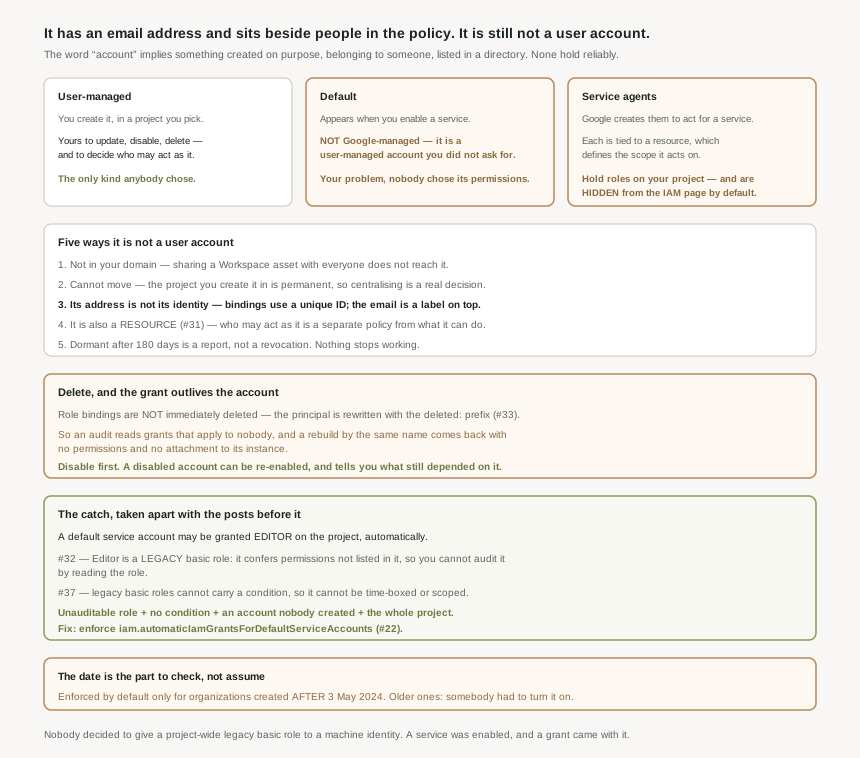
Three kinds, and who is responsible for each
| Kind | Created by | Your responsibility |
|---|---|---|
| User-managed | You, in a project of your choosing. | Everything — create, update, disable, delete, and who may use it. |
| Default | Automatically, when you enable or use certain services. | Also everything. They are user-managed accounts you did not ask for. |
| Service agents | Google, to let a service act on your behalf. | Not yours to manage, not listed with your service accounts, and not shown on the IAM page by default. |
The middle row is the one that causes trouble. A default service account is not a Google-managed account — it is a user-managed account that was created for you, which means it is your problem, with the specific hazard that nobody chose its permissions.
The five ways it is not a user account
- It is not in your domain. Service accounts do not belong to your Google Workspace domain, so domain-wide sharing does not reach them.
- It cannot move. After you create a service account, you cannot move it to a different project — so where you create it is a permanent decision, which is why centralising them in a dedicated project is a real architectural choice rather than tidiness.
- Its address is not its identity. Bindings use the unique ID. The email is a label on top of it.
- It is also a resource. As #31 covered, it has its own allow policy governing who may act as it — so "who can use this identity" is a separate question from "what can this identity do".
- It goes dormant rather than expiring. Dormant service accounts are service accounts that have been inactive for more than 180 days — a reporting state, not a revocation. Nothing stops working at 180 days.
When you delete a service account, its role bindings are not immediately deleted — they remain, with the principal rewritten to the deleted: prefix from #33. So the policy still lists the grant, the account is gone, and a new account at the same address picks up none of it. Two failure modes follow: an audit that reads the policy sees grants that no longer apply to anyone, and a rebuild that recreates the account by name comes back with no permissions and no attachment to its instance. Before deleting a service account, disable the service account instead — a disabled account can be re-enabled, and it tells you whether anything still depended on it.
Service agents, and the scope they carry
Service agents exist because services need to act on your behalf — Cloud Logging sinks writing to a bucket, Cloud Run reading a Pub/Sub topic. Each service agent is associated with a resource, typically a project, folder or organization, and that association defines the scope of what it acts on. They are not created in your projects and you cannot manage them directly.
Their invisibility is the operational point. They can hold roles on your project and the IAM page omits them by default. Combined with #34 — where a resource policy does not show inherited grants — there are now two distinct ways for the console to show you a complete-looking list of who has access that is not complete.
Why This Architecture Holds Up
Take the default service account grant apart using the posts that came before it.
The role granted is Editor. From #32: Editor is a legacy basic role, which means it confers permissions that are not listed in it, because services add permissions for holders of legacy basic roles. So you cannot audit what that account can do by reading the role. From #37: conditions cannot be applied to legacy basic roles, so you cannot time-box or scope the grant without replacing it entirely.
The principal granted it is an account nobody created deliberately — it appeared when a service was enabled. And by #31's argument, this is a single service account rather than a group, so the binding is to one durable identity that outlives whoever enabled the service.
Put together: an unaudited role, unable to carry a condition, held by an account nobody chose, on the whole project. The fix is a single organization policy constraint from #22 — iam.automaticIamGrantsForDefaultServiceAccounts — and the date is what makes it worth checking rather than assuming. Organizations created after 3 May 2024 have it enforced by default. Anything older does not, unless somebody turned it on.
That is a clean line to check your own estate against: if the organization predates May 2024, the constraint is a deliberate act that may never have happened.
What to do with this
- Check the constraint, and check the organization's age. The default is only safe for organizations created after 3 May 2024.
- Audit default service accounts for Editor specifically, since it is the grant most likely to be there without a decision behind it.
- Tick Include Google-provided role grants before believing an IAM page.
- Use a new, unique name for every service account, so a recreated name can never be mistaken for a restored identity.
- Disable before deleting, and treat the resulting silence as the evidence that nothing depended on it.
- Decide where service accounts live once. They cannot be moved, so the choice between "beside the resources" and "centralised in one project" is permanent per account.
Key Architecture Decisions
| Decision | Choose this | Because |
|---|---|---|
| Default service account permissions | Enforce the org policy constraint | It may otherwise be granted Editor on the project automatically. |
| An organization created before May 2024 | Verify the constraint by hand | Enforcement by default applies only to organizations created after 3 May 2024. |
| Naming service accounts | A new unique name every time | Bindings use the unique ID, not the email address. |
| Retiring a service account | Disable first, delete later | Disabled accounts can be re-enabled; deleted ones leave deleted: bindings behind. |
| Reading an allow policy after a deletion | Expect stale entries | Role bindings are not immediately deleted. |
| Auditing project access | Include Google-provided role grants | Service agents hold roles and are hidden by default. |
| Where to create one | Decide deliberately, once | You cannot move it to a different project afterwards. |
| Sharing a Workspace document with automation | Share explicitly, or delegate | Domain-wide sharing does not reach service accounts. |
| Treating 180 days of inactivity as expiry | No | Dormant is a reporting state; nothing stops working. |
Closing Thought
The word "account" is doing a lot of damage here. It suggests something created on purpose, belonging to somebody, sitting in your directory, identified by the address you see. A service account is none of those reliably: it may have been created by enabling a service, it may be a Google-managed agent you cannot touch, it is outside your Workspace domain, and the address in the policy is a label over an ID that policy actually uses.
Which reframes the automatic Editor grant from an awkward default into the predictable result of that gap. Nobody decided to give a project-wide legacy basic role to a machine identity. A service was enabled, an account appeared, and a grant came with it — and every property that would normally make such a grant visible was absent. It is not in a directory anyone reviews, it is not a person anyone recognises, and the role it holds is the one whose contents cannot be read from the role. The date in the documentation is the tell: Google changed the default in May 2024 because this was worth changing.
#40 takes the other half of the problem: service account keys, and why they are the wrong default — what a key actually is, what it never expires into, and the alternatives that have made it avoidable for years.
Comments