Business Challenge
Twenty-two posts on identity end with #60; this one opens the networking phase. And the right place to start is not the hub-and-spoke diagram everybody draws second — it is the arithmetic, because Azure quietly takes more addresses out of every subnet than most people budget for.
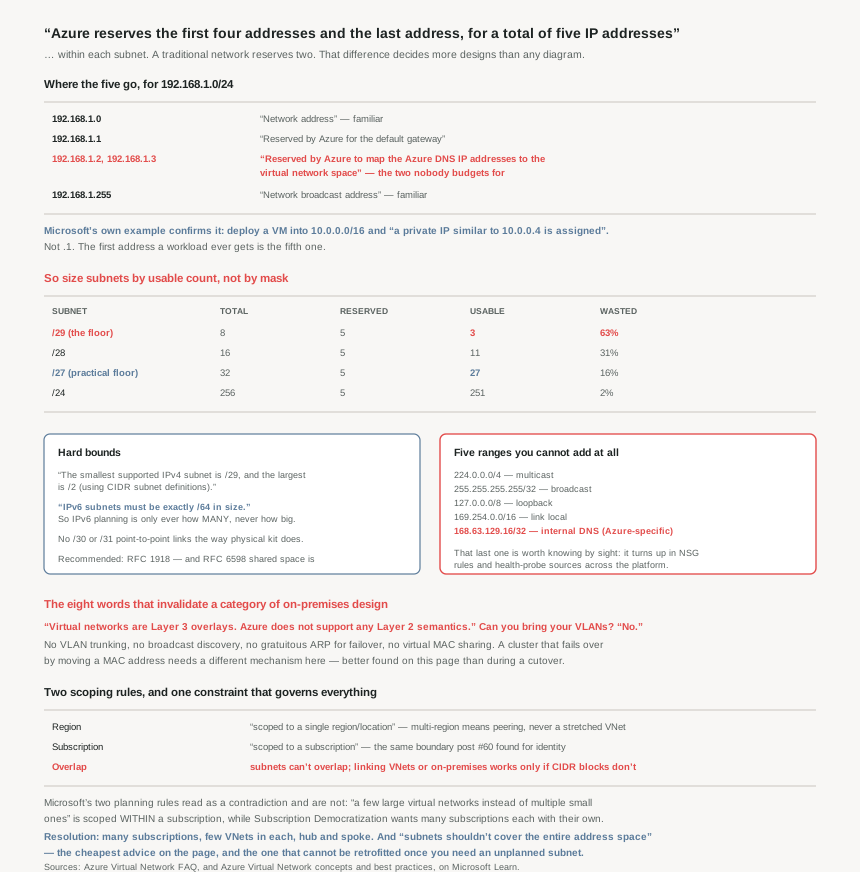
“Azure reserves the first four addresses and the last address, for a total of five IP addresses within each subnet.”
A traditional network reserves two per subnet: the network address and the broadcast address. Azure takes five. On a /24 that is a rounding error. On the small subnets people actually create when carving up a space carefully, it is most of the subnet:
| Subnet | Total addresses | Azure reserves | Usable | Wasted |
|---|---|---|---|---|
/29 (the smallest allowed) |
8 | 5 | 3 | 63% |
/28 |
16 | 5 | 11 | 31% |
/27 |
32 | 5 | 27 | 16% |
/24 |
256 | 5 | 251 | 2% |
For 192.168.1.0/24 the documentation names them individually:
192.168.1.0— “Network address.”192.168.1.1— “Reserved by Azure for the default gateway.”192.168.1.2,192.168.1.3— “Reserved by Azure to map the Azure DNS IP addresses to the virtual network space.”192.168.1.255— “Network broadcast address.”
The first and last are familiar. .1 is familiar enough. The two that catch people out are .2 and .3, which exist because Azure projects its platform DNS service into every subnet’s own address space rather than reaching it over a link-local address.
You can see the consequence in Microsoft’s own worked example, and it is a detail worth noticing: deploy a VM into 10.0.0.0/16 and “a private IP similar to 10.0.0.4 is assigned to the virtual machine.” Not .1. The first address a workload ever gets is the fifth one.
Architecture
A Layer 3 overlay with hard bounds, a short list of forbidden ranges, and two scoping rules that decide the whole topology.
The bounds, including the one that surprises IPv6 people
“The smallest supported IPv4 subnet is /29, and the largest is /2 (using CIDR subnet definitions).” A /2 is a quarter of the IPv4 internet, which is a theoretical ceiling rather than a design option, but the floor is a real constraint: you cannot make a /30 or /31 point-to-point subnet the way you would on physical kit.
And IPv6 is not a range, it is a single value: “IPv6 subnets must be exactly /64 in size.” No flexibility in either direction, which means IPv6 address planning in Azure is entirely about how many /64s you allocate and never about how big each one is.
Five ranges you cannot use at all
Separate from the per-subnet reservations, there are address ranges Azure refuses for a virtual network outright:
| Range | Why |
|---|---|
224.0.0.0/4 | multicast |
255.255.255.255/32 | broadcast |
127.0.0.0/8 | loopback |
169.254.0.0/16 | link local |
168.63.129.16/32 | internal DNS |
The first four are standard. The fifth is Azure-specific and worth knowing by sight, because 168.63.129.16 turns up in NSG rules, in load-balancer health probe sources and in agent traffic across the platform. It is a single host address that Azure has carved permanently out of the usable space, and an address plan that happens to include it will be rejected.
Two related facts in the same vein. Public addresses are allowed inside a VNet — “Yes… Public IP addresses are not directly accessible from the internet” — which is a sentence to read twice before anybody assumes a public range in a VNet is internet-facing. And the recommendation is RFC 1918 with an unusual extra option: “You can also deploy the shared address space reserved in RFC 6598” — the carrier-grade NAT range, 100.64.0.0/10, which is a genuine escape valve for organisations that have exhausted private space.
It is a Layer 3 overlay, and that is not a detail
The single most load-bearing sentence for anyone arriving from on-premises networking: “Virtual networks are Layer 3 overlays. Azure does not support any Layer 2 semantics.” Asked directly whether VLANs can be brought to Azure, the answer is a flat “No.”
Everything that depends on Layer 2 therefore does not work: no VLAN trunking, no broadcast-based discovery, no gratuitous ARP for failover, no virtual MAC sharing. A clustering product that fails over by moving a MAC address needs a different mechanism here. This is the constraint most likely to break a lift-and-shift, and it is better discovered on this page than during a cutover.
Two scoping rules that decide the topology
A VNet is bounded twice, and both bounds have consequences:
- Region. “A virtual network is scoped to a single region/location; however, multiple virtual networks from different regions can be connected together using Virtual Network Peering.” So multi-region is always multiple VNets plus peering — there is no stretched VNet.
- Subscription. “A virtual network is scoped to a subscription.” Which connects straight back to #60: the subscription is the identity and resource boundary, and now it is the network boundary too.
And the constraint that governs all of it, stated twice in two documents: “Subnet address spaces can't overlap one another”, and “You can link a virtual network to other virtual networks and on-premises networks as long as the CIDR blocks don't overlap.”
Why This Architecture Holds Up
Because the five addresses change how small a subnet can usefully be
Segmentation is the right instinct — “Segmentation improves address allocation efficiency”, and NSGs attach to subnets, so a subnet is the unit of network policy. The temptation is therefore to create many small subnets, one per tier or per workload.
The five-address overhead makes that expensive in a non-obvious way. A /29 is legal and almost useless: three usable addresses, before anything the platform injects. A tier that needs two VMs plus a load balancer front-end has already outgrown it. The practical floor for anything that might scale is a /27, where the overhead falls to 16%, and even then it is 27 addresses rather than the 30 a traditional calculation gives.
The honest design rule: size subnets by their usable count, not their mask. Write the arithmetic down in the address plan, because the difference between “8 addresses” and “3 usable” is the sort of gap that is invisible in a spreadsheet of CIDR blocks and painful during a scale-out.
Because you cannot pre-allocate, and that rules out a familiar habit
One short answer with real consequences: “Can I reserve a private IP address for a VM that I'll create at a later time? No.”
So the on-premises practice of maintaining an IP allocation sheet — .10 through .19 for database servers, .20 onwards for application servers — has no enforcement mechanism in Azure. Addresses are handed out from the subnet as resources are created, and the only way to guarantee a resource lands in a particular range is to give that range its own subnet. Which is another argument for subnets as the planning unit, and against trying to impose structure inside one.
Because Microsoft's own guidance pulls in two directions, and you have to pick
The best-practices page gives two recommendations that are in genuine tension, one immediately after the other. First: “Use a few large virtual networks instead of multiple small ones to reduce management overhead within a single Azure subscription.” Then: “follow the Azure landing zone design principle of Subscription Democratization… it is recommended to have many subscriptions, each with their own virtual network (possibly multiple), to help you achieve and implement Zero Trust.”
Read carefully, they are not contradictory — the first is scoped to within a single subscription and the second is about how many subscriptions to have. But the combination is easy to misread, and the resolution matters: many subscriptions, few VNets in each. Not one giant VNet shared across teams, and not dozens of tiny VNets inside one subscription.
The mechanism for making that work at scale is named: “Commonly a hub and spoke architecture is used to implement this at scale with a traditional virtual network approach or Virtual WAN.” Which is where this phase is heading, and why the address plan has to come first — peering requires non-overlapping CIDR, so hub-and-spoke is only available to estates whose address space was planned for it.
Because the one piece of advice everyone skips is the one that cannot be fixed later
“Your subnets shouldn't cover the entire address space of the virtual network. Plan ahead and reserve some address space for the future.”
This is the cheapest advice on the page and the most commonly ignored, because a fully-carved VNet looks tidy. The cost appears later: a new subnet for a service that needs its own delegation, a gateway subnet nobody budgeted for, a second NSG boundary that has to be a subnet because NSGs attach to subnets. With no free space inside the VNet, the options are resizing a subnet that has resources in it, or adding another address space and discovering whether it overlaps something on-premises.
Leave headroom in two places: unallocated space inside each VNet, and unallocated CIDR inside whatever block the organisation assigned to Azure. The second is what makes future peering possible at all, and it is the one that cannot be recovered without renumbering.
Because the platform holds a couple of things you might otherwise use
Two small reservations that occasionally matter for workloads doing something unusual: “UDP ports 4791 and 65330 are reserved for the host.” Port 4791 is RoCE — RDMA over Converged Ethernet — so this is the platform keeping room for its own high-performance networking. If an application binds either port, it will not behave as expected, and nothing in the VNet configuration will explain why.
Key Architecture Decisions
| Situation | Decision | Why |
|---|---|---|
| Sizing any subnet | Subtract five, then plan | Azure reserves the first four and the last. |
Tempted by a /29 |
Only for something permanently tiny | Three usable addresses out of eight. |
| A tier that might scale | /27 or larger |
Overhead falls to 16%; 27 usable. |
| Point-to-point link habits | No /30 or /31 |
/29 is the documented floor. |
| Planning IPv6 | Count /64s, never size them |
IPv6 subnets must be exactly /64. |
| Drafting the address plan | Exclude the five forbidden ranges | Including 168.63.129.16/32, which is Azure-specific. |
| Private space exhausted | Consider RFC 6598 shared space | Explicitly deployable in a VNet. |
| Lift-and-shift with Layer 2 dependencies | Redesign before you migrate | No Layer 2 semantics at all; VLANs are not supported. |
| Clustering that fails over a MAC | Find a Layer 3 mechanism | Same reason — it is an overlay. |
| Wanting one network across regions | Multiple VNets plus peering | A VNet is scoped to a single region. |
| Maintaining an IP allocation sheet | Use subnets instead | You cannot reserve an address for a future VM. |
| Reading the "few large VNets" advice | Scope it to within a subscription | Across subscriptions the principle is democratization. |
| Estate-wide design | Many subscriptions, few VNets each, hub and spoke | The two recommendations resolve this way. |
| Carving a VNet neatly to the last bit | Don't — leave headroom | Subnets shouldn't cover the entire address space. |
| Expecting to peer later | Reserve non-overlapping CIDR now | Peering requires non-overlapping blocks. |
| Putting a public range in a VNet | Do not assume it is reachable | Public IPs in a VNet are not directly accessible from the internet. |
| An app binding UDP 4791 or 65330 | Change the port | Both are reserved for the host. |
| Deciding where network policy attaches | The subnet | NSGs are assigned to subnets beneath the VNet. |
Closing Thought
Azure networking is usually taught topology-first — hub and spoke, peering, gateways — and the arithmetic gets treated as a detail to look up later. It is the opposite way round. Five addresses gone from every subnet, a /29 floor, a fixed /64 for IPv6, five forbidden ranges, no Layer 2, no address pre-allocation, and non-overlapping CIDR as the price of ever peering anything: those constraints decide what topologies are available to you before you draw one. An address plan made without them is a plan that will be renumbered.
The two that cost the most in practice are the quietest. The five-address reservation, because it is invisible in a spreadsheet of CIDR blocks and only shows up when a /29 runs out at three machines. And the advice not to carve the whole VNet, because the moment you need a subnet you did not plan — a gateway subnet, a delegated subnet for a PaaS service, one more NSG boundary — the absence of free space turns a five-minute change into a renumbering exercise. Both are cheap to respect on day one and expensive to retrofit, which is the definition of an architecture decision.
And the sentence I would put at the top of any Azure network design document is the Layer 3 one. “Azure does not support any Layer 2 semantics” is eight words that invalidate a whole category of on-premises design, and it is phrased as an FAQ answer rather than a warning. Finding it early is worth more than any amount of diagram.
#62 takes the planning half seriously: address planning that survives growth and peering — how to size a VNet you will still be able to extend in three years, and what overlapping CIDR actually costs when two estates merge.
Official Azure Reference
- Azure Virtual Network FAQ — the five reserved addresses with the worked example, the
/29to/2bounds and the/64IPv6 rule, the forbidden ranges, the Layer 3 answer and the host-reserved ports - Azure Virtual Network concepts and best practices — region and subscription scoping, the
10.0.0.4example, and the address-planning guidance including the headroom rule - Azure subscription and service limits — the networking limits the FAQ defers to for subnet and virtual network counts (no claims drawn from it)
Comments