Business Challenge
Twenty-one posts of this series have been about the directory. Conditional Access, PIM, ID Protection, access packages, lifecycle workflows, SSO — all of it governs identities, and none of it governs a virtual machine. That separation is deliberate and is stated more plainly than most architectural decisions in Azure:
“Microsoft Entra ID and Azure resources are secured independently from one another. That is, Microsoft Entra role assignments do not grant access to Azure resources, and Azure role assignments do not grant access to Microsoft Entra ID.”
Two control planes, two role models, two scopes. The subscription is “the scope where Azure resources and Azure role assignments are managed”; the tenant is “the directory that contains the identities used to sign in and receive access.” Which means a Global Administrator does not, by virtue of that role, have any access to your production estate — and an Owner of every subscription you have cannot read a user object.
Except there is one door, and this is the post about it.
“However, if you are a Global Administrator in Microsoft Entra ID, you can assign yourself access to all Azure subscriptions and management groups in your tenant… you are assigned the User Access Administrator role in Azure at root scope (/).”
One toggle, and the directory’s most privileged role reaches every management group and subscription in the tenant — with the permission to assign roles, not merely to read. It is a legitimate and necessary capability. It is also the single most consequential setting in this phase, and the one with the least governance around it.
So “identity governance across a multi-subscription estate” turns out to have a precise meaning: govern the two planes separately, know exactly where they touch, and watch that one place.
Architecture
One directory, many subscriptions, and a bridge that opens from only one side.
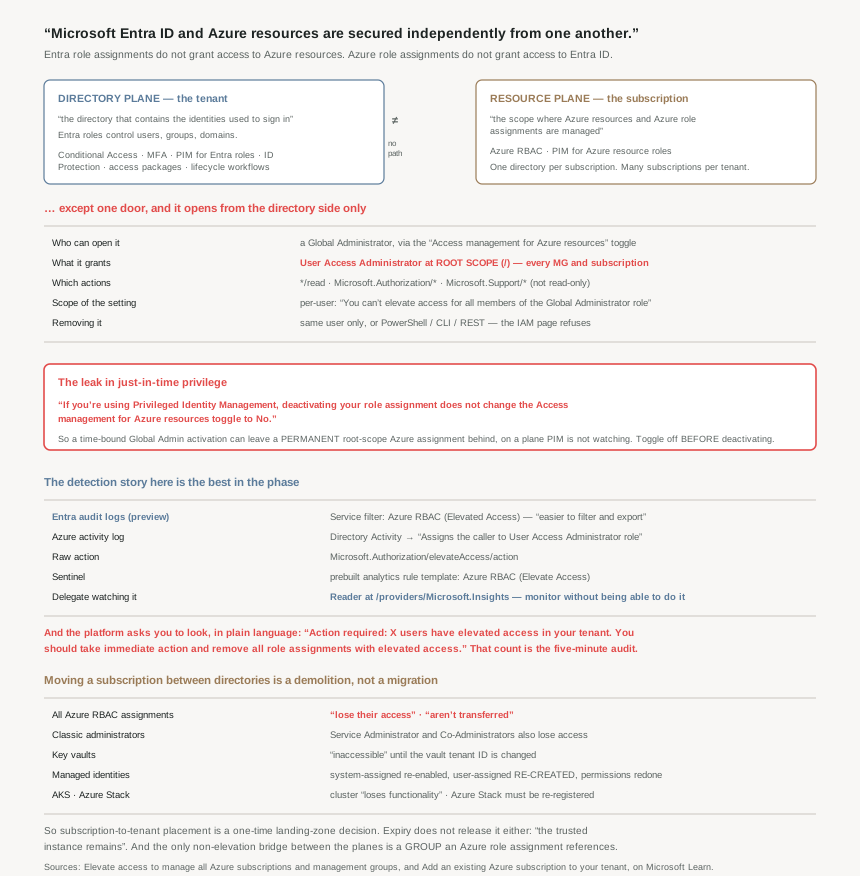
The boundary: one directory per subscription, forever
The cardinality is asymmetric and worth stating exactly, because estate designs routinely assume otherwise: “Subscriptions can only trust a single directory while one Microsoft Entra tenant might be trusted by multiple subscriptions.”
So a subscription cannot serve two tenants, which rules out the shared-subscription-between-organisations design people reach for after an acquisition. The supported shape is the reverse: many subscriptions, one directory, with people from elsewhere brought in as guests — “users might only have a single authentication home directory, [but] users might participate as guests in multiple directories.” Which is #53’s material doing load-bearing work in an estate design rather than a collaboration one.
And two clarifications that each close off a common assumption:
- Owning the subscription does not get you the directory: “Changing a subscription's directory… doesn't make the subscription owner a Global Administrator in the tenant”, and “when an owner of a subscription joins their subscription to an existing tenant, the owner isn't assigned to the Global Administrator role.”
- Letting a subscription lapse does not release the relationship: “When a subscription expires, the trusted instance remains, but the security principals lose access to Azure resources.”
The hierarchy above subscriptions, and the scope that is the bridge
Management groups are the scope that makes a multi-subscription estate manageable, and the numbers are generous: “A single directory can support 10,000 management groups” and “A management group tree can support up to six levels of depth… This limit doesn't include the root level or the subscription level.” Each group and subscription has “only one parent”, so the result is a single tree rather than a graph.
Their value for identity is inheritance: “Any Azure role can be assigned to a management group that inherits down the hierarchy to the resources… One assignment on the management group can enable users to have access to everything they need, instead of scripting Azure role-based access control (RBAC) over different subscriptions.” That is the correct answer to “how do I grant this team access to forty subscriptions”, and it is why the hierarchy is an identity artefact and not just a billing one.
The constraint that connects this back to the tenant boundary: “all subscriptions within a single management group must trust the same Microsoft Entra tenant.” So the hierarchy cannot span directories either — the tenant is the outermost boundary of everything in this post.
And at the top sits the scope that is the other half of the elevate-access story. “Each directory has a single top-level management group called the root management group”, whose “ID is the same value as the Microsoft Entra tenant ID”, which cannot be moved or deleted, and to which “New subscriptions automatically default… when they're created.” Then, stated from the management-group side rather than the RBAC side:
“No one has default access to the root management group. Microsoft Entra Global Administrators are the only users who can elevate themselves to gain access.”
Two documents, the same fact, and together they explain why the toggle exists at all: the root scope has no owner by construction, so the only way anybody ever gets there is elevation. Which also sets the standard for what belongs there — “Any assignment of user access or policy on the root management group applies to all resources within the directory… User access and policy assignments should be ‘must have’ only at this scope.”
Three smaller facts worth carrying, because each is a trap. Custom roles may name only one management group in their assignable scopes, “a limitation in place to reduce the number of situations where role definitions and role assignments are disconnected”; “Custom roles with DataActions can't be assigned at the management group scope”; and — this phase’s signature failure, one last time — “Azure Resource Manager doesn't validate the management group's existence in the role definition's assignable scope. If there's a typo or an incorrect management group ID, the role definition is still created.” A definition scoped to a management group that does not exist saves cleanly and assigns nowhere.
One more for anyone debugging a move: “Azure Resource Manager caches details of the management group hierarchy for up to 30 minutes”, so the portal not showing your change is usually the cache rather than a failure.
Moving a subscription between directories is a demolition
Because the trust is singular, re-homing a subscription means breaking and rebuilding every identity binding inside it. The documentation lists the damage rather than softening it, and this is the list to put in front of anyone who proposes it casually:
| What breaks | What the documentation says |
|---|---|
| All Azure RBAC assignments | “users who have roles assigned using Azure role-based access control lose their access”; “Role assignments from the previous directory aren't transferred” |
| Classic administrators | “Service Administrator and Co-Administrators also lose access” |
| Key vaults | “they'll be inaccessible, and you'll have to fix them after association” — by changing the vault tenant ID |
| Managed identities | System-assigned must be re-enabled; user-assigned must be re-created; permissions re-established |
| AKS | “causes the cluster to lose functionality due to lost role assignments and service principal's rights” |
| Azure Stack | “you'll have to re-register it after association” |
Two practical notes alongside it. The prerequisite is an account that “exists in both the current directory and in the new directory” with Owner on the subscription — so you need a guest account in place before you start. And the operation does not do what people often want it to: “Changing the subscription directory is a service-level operation, so it doesn't affect subscription billing ownership”, which must be transferred separately before the old directory can be deleted.
The honest conclusion is that subscription-to-tenant placement is a one-time architectural decision with a demolition cost to revisit. It belongs in the landing-zone design, not in a migration backlog.
Why This Architecture Holds Up
Because PIM does not contain the bridge, and the documentation says so twice
This is the finding that matters most in this post, and it undoes an assumption almost every mature tenant is built on. #45 established the model: nobody holds Global Administrator permanently; they activate it for a window and it expires. That model does not cover elevated Azure access.
“If you're using Privileged Identity Management, deactivating your role assignment does not change the Access management for Azure resources toggle to No. To maintain least privileged access, we recommend that you set this toggle to No before you deactivate your role assignment.”
Read what that means operationally. An administrator activates Global Administrator through PIM, elevates access, does the work, and lets the PIM activation expire. The directory role is gone. The User Access Administrator assignment at root scope is not — it is an ordinary Azure role assignment on their user object, with no expiry, granting Microsoft.Authorization/* over every subscription in the tenant.
So a time-bound privilege escalation leaves behind a permanent one, on a different plane, which PIM does not report because PIM is not looking at Azure RBAC root scope. The sequencing instruction — toggle off before deactivating — is the entire mitigation, and it is a human remembering to do something in the right order. Microsoft repeats the warning in both the elevate and the remove procedures, which is usually a sign that people get it wrong.
Because removal is per-user and the obvious way to remove it does not work
Three constraints make cleanup harder than it should be. The grant is per-user: “This setting is not a global property and applies only to the currently signed in user. You can't elevate access for all members of the Global Administrator role.” Good news for blast radius, bad news for auditing — there is no single switch whose state tells you the tenant is clean.
Removal requires the same person: “Since this is a per-user setting, you must be signed in as the same user as was used to elevate access.” If that person has left, you are into PowerShell, CLI or REST — and the portal actively misleads you first, because “If you try to remove the User Access Administrator role assignment on the Access control (IAM) page” it refuses and tells you to use the toggle or an API instead.
And removing it for other people has a bootstrapping problem: “To remove these role assignments, you must also have elevated access” — so cleaning up elevated access requires elevating your own. The portal feature for it is also not universal: “This capability is being deployed in stages, so it might not be available yet in your tenant.”
Because Microsoft tells you to go and look, in two banners it wrote for this
The platform knows this accumulates, and the wording of the warnings is unusually direct for Microsoft documentation. In the Entra properties page: “You have X users with elevated access. Microsoft Security recommends deleting access for users who have unnecessary elevated access.” And on any subscription’s access control page: “Action required: X users have elevated access in your tenant. You should take immediate action and remove all role assignments with elevated access.”
“Action required” and “immediate action” are not hedged language. If that banner is showing in your tenant, the count is the number of people who can assign themselves Owner on anything you run, and it is the single best five-minute audit in this phase. Note the asymmetry with #59’s certificate problem: that one warns you by email to one address and may not warn you at all; this one is a banner that is always true while the condition holds.
Because the detection story is good, and in two places for a reason
Unusually for this phase, the observability here is solid. “When access is elevated or removed, an entry is added to the logs” — and in both planes, which makes sense given the action spans both: “Elevate access log entries appear in both the Microsoft Entra directory audit logs and the Azure activity logs.”
Microsoft has a preference, and it is the one that matters for #58’s retention problem: “the directory audit logs are easier to filter and export. Also, the export capability enables you to stream access events, which can be used for your alert and detection solutions.” The specifics are worth writing down because they are the alert you should build:
| Where | What to look for |
|---|---|
| Entra audit logs (preview) | Service filter Azure RBAC (Elevated Access); entry “User has elevated their access to User Access Administrator for their Azure Resources” |
| Azure activity log | Activity list set to Directory Activity; operation “Assigns the caller to User Access Administrator role” |
| Raw | Microsoft.Authorization/elevateAccess/action at scope /providers/Microsoft.Authorization |
| Sentinel | Analytics rule template Azure RBAC (Elevate Access) |
There is a prebuilt Sentinel rule template for this, which tells you Microsoft considers it a detection-worthy event rather than routine administration. Treat it the same way: elevation is a legitimate action that should always generate a question.
One operational nicety worth copying, because it solves the least-privilege problem for the people who should watch this: you can delegate log reading without granting anything else, by assigning “the Reader role to the group who can only read logs at the tenant level, which are found at Microsoft/Insights” — scope /providers/Microsoft.Insights. A security team can monitor elevation without being able to perform it.
Because the phase's controls do not all apply at the same level, and now is the moment to map them
Closing twenty-two posts, the useful artefact is a map of which plane each control lives on — because the commonest governance error in a multi-subscription estate is assuming a directory control covers resource access, or vice versa.
| Control | Plane | Reaches resources? |
|---|---|---|
| Conditional Access, MFA, authentication strength | Directory | Only by gating the sign-in that precedes resource access |
| PIM for Entra roles | Directory | No — and does not contain elevated access |
| PIM for Azure resource roles | Resource | Yes, per scope |
| Access packages, lifecycle workflows | Directory | Only via group membership that an Azure role assignment references |
| ID Protection risk policies | Directory | No |
| Azure RBAC role assignments | Resource | Yes |
| Elevate access | Both | Yes — everything, at root |
The pattern that falls out is the one #56 hinted at: the only clean way to make a directory control govern resources is through a group. An access package or a lifecycle workflow manages membership; an Azure role assignment on that group turns membership into resource access. Everything else in the directory column stops at the sign-in.
Key Architecture Decisions
| Situation | Decision | Why |
|---|---|---|
| Have never audited it | Check the elevated-access banner today | The count is who can assign themselves Owner anywhere. |
| Using PIM for Global Administrator | Toggle elevation off before deactivating | Deactivation does not clear the toggle; the root assignment persists. |
| Writing the elevation runbook | Make removal a step, not a follow-up | Microsoft: remove it once you have made the changes. |
| The elevating admin has left | PowerShell, CLI or REST | The toggle needs that same user; the IAM page refuses. |
| Cleaning up someone else's elevation | Expect to elevate yourself first | Removal requires elevated access, and the portal UI is staged. |
| Building the one alert from this phase | Entra audit, service Azure RBAC (Elevated Access) |
Easier to filter and export than activity logs. |
| Running Sentinel | Enable the Azure RBAC (Elevate Access) template |
A prebuilt rule exists; this is a detection-worthy event. |
| Security team needs visibility only | Reader at /providers/Microsoft.Insights |
Watch elevation without being able to do it. |
| Relying on the Entra audit entry | Note it is in preview | No SLA, and not recommended for production workloads. |
| Two organisations sharing one subscription | Not possible | A subscription trusts a single directory. |
| Post-acquisition estate design | Many subscriptions, one directory, guests for the rest | The supported cardinality; users are guests elsewhere. |
| Proposing a subscription directory move | Treat it as a rebuild with an outage | RBAC, key vaults, managed identities, AKS and Azure Stack all break. |
| Planning that move | Create the guest Owner account first | The account must exist in both directories. |
| Expecting the move to change billing | It does not | Service-level operation; billing transfers separately. |
| Letting a subscription expire to cut the tie | It does not cut it | The trusted instance remains after expiry. |
| Wanting a directory control to govern resources | Route it through a group | Group membership is the only bridge that is not elevation. |
| Assuming Owner implies directory rights | It does not | Joining a subscription does not grant Global Administrator. |
Closing Thought
Twenty-two posts on identity, and the structural fact underneath all of them is the one stated in a single sentence on a how-to page: Entra and Azure resources are secured independently. Nearly every governance mistake I have seen in a multi-subscription estate is a failure to believe that sentence — a Conditional Access policy assumed to protect a storage account, a PIM configuration assumed to cover resource access, an access review assumed to reach a role assignment it has never seen. The planes are genuinely separate, the join is genuinely narrow, and a design that is explicit about which plane each control lives on is most of the way to being correct.
The narrowness is also the risk, because it concentrates. One toggle, available to one role, grants Microsoft.Authorization/* over every subscription and management group in the tenant. It is per-user, which limits the blast radius and defeats any attempt to audit it with a single setting. It must be removed by the same person who set it, or by an API. And — the thing I would put in front of anyone running PIM — the expiry of a time-bound directory role does not take it away. The whole architecture of just-in-time privilege has a documented leak, and the mitigation is a sentence about doing two things in the right order.
So if this phase leaves one habit, let it be the one its last two posts share. #59 ended on “open the certificate page and read the date”; this one ends on “open the properties page and read the count”. Both take five minutes, both answer a question nobody has asked, and both are the sort of thing that is obvious in hindsight and absent in practice. The platform is not hiding any of it — the banner says action required in plain language. Somebody just has to go and look.
#61 opens Phase 3 and leaves identity behind for a while: Azure networking, starting with VNets, subnets, and the five addresses Azure reserves in every subnet you create.
Official Azure Reference
- Elevate access to manage all Azure subscriptions and management groups — the independence of the two planes, the root-scope grant, the PIM interaction, the removal constraints, the banners and the full detection story
- Add an existing Azure subscription to your tenant — the single-directory trust, what survives expiry, and everything a directory move destroys
- Organize your resources with management groups — the hierarchy limits, the root management group and why only a Global Administrator can reach it, role inheritance, and the custom-role limitations
- Transfer an Azure subscription to a different Microsoft Entra directory — the procedure the articles above refer to for the move itself (no claims drawn from it)
Comments