Business Challenge
#31 covered principals and #32 covered roles. This post is the object that joins them, and it has exactly one arithmetic operation: addition.
Only if that binding was the only source. The effective allow policy for a resource is the union of the allow policy set at that resource and the allow policy inherited from its parent — so a binding at the folder or organization still grants what you just deleted at the project.
Correct approachTreat a revocation as unproven until you have checked every level above the resource. Removing a binding removes one term from a union, not the union.
This is the one that catches careful people. If a principal is bound to a role, and the role binding does not have a condition, then the principal always has that role. Adding the principal to a conditional role binding for the same role has no effect.
Correct approachA condition constrains the binding it sits on, nothing else. To time-box or scope an existing grant you must replace the unconditional binding, not supplement it.
Check which version it asks for. If the request does not specify an allow policy version, IAM assumes that the caller wants a version 1 allow policy — and version 1 cannot express conditions, so it returns the binding with _withcond_ and a hash appended to the role name, and the condition itself is not present.
Request version 3 explicitly on every read that might be written back. The console and the gcloud CLI set the version for you; libraries and raw REST calls do not.
The write committed; the access did not necessarily stop. Changes to access are eventually consistent — it takes time for access changes to propagate through the system.
Correct approachFor incident response, treat an IAM change as the start of revocation rather than the end of it, and prefer mechanisms that cut sessions directly when you need immediacy.
Architecture
An allow policy is a list of bindings plus some metadata. The bindings are where access lives; the metadata is where the traps are.
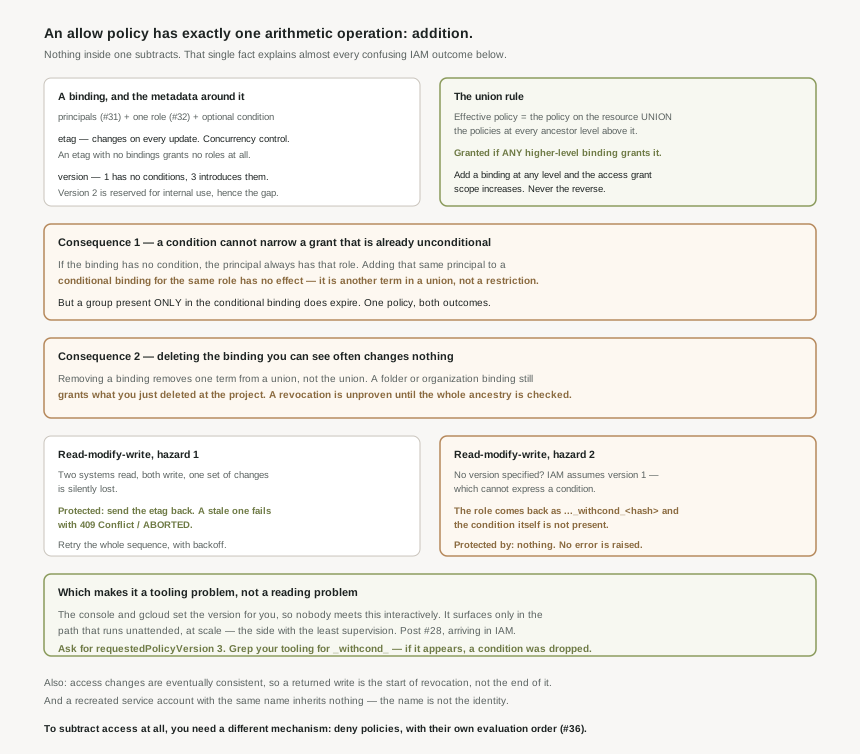
What a binding contains
Each role binding has principals (the subject of #31), a single role (the subject of #32), and optionally a condition — a logic expression constraining that binding on request attributes. A binding carrying one is a conditional role binding. Not every service accepts them, which is worth checking before designing around one.
Around the bindings sit two metadata fields that do real work:
etag— concurrency control. The value changes each time an allow policy is updated. A neat corollary: if an allow policy contains an etag field but no role bindings, then the allow policy does not grant any IAM roles. An empty policy is still a policy.version— the syntax schema. Version 1 has no conditions; version 3 introduces them. Version 2 is reserved for internal use, which is why the numbering appears to skip.
The union rule
Inheritance runs downward and access accumulates. The effective policy is the union of the policy set on the resource and the policies set at every ancestor level. Google states the evaluation consequence directly: a specific access request to the resource is granted if any of the higher-level role bindings grant access to the request. Each inherited binding is evaluated independently, and introducing a binding at any level means the access grant scope increases.
There is no operator in an allow policy that takes access away. That is the whole reason deny policies exist as a separate mechanism with its own evaluation order, which is #36.
Because evaluation is a union, a conditional binding is another term added to it — it cannot subtract from the unconditional binding already there. Google's worked example uses a service account in two bindings for the same role, one unconditional and one expiring: effectively, the policy always grants the role. The rule in one line: if the role binding does not have a condition, then the principal always has that role, and adding that principal to a conditional binding for the same role has no effect. A group present only in the conditional binding does get the time-boxed behaviour, which is what makes the failure so easy to miss — the same policy produces both outcomes depending on who else is listed where.
The counting rules, restated precisely
#31 covered the two limits. The policy documentation adds two refinements worth having:
- A group counts once, not per member. Each appearance of a domain or Google group is counted as a single principal, regardless of the number of individual members in the domain or group. This is the mechanical basis for the #31 argument — four bindings for four groups is sixteen principals whatever those groups contain.
- Conditions consume the budget. If you use IAM Conditions, or if you grant roles to many principals with unusually long identifiers, then IAM might allow fewer principals in the allow policy. The 1,500 is a ceiling, not an allowance.
Deleted principals do not hand their access on
When a principal is deleted, its identifier in the binding gains a deleted: prefix and a uid. If you create a new service account with the same name, the old bindings do not apply to it. The name is not the identity — the underlying unique ID is — which is the same lesson as #31's identifier formats, arriving from the other direction.
Why This Architecture Holds Up
Allow policies are updated by reading the whole policy, changing it, and writing the whole thing back. Two independent hazards live in that sentence, and they compound.
| Hazard | What happens | What protects you |
|---|---|---|
| Concurrent writers | Two systems read, both write, one set of changes is lost. | The etag. Send it back; a stale one fails with 409 Conflict and ABORTED. |
| Wrong version requested | Conditions are absent from what you read, so writing it back deletes them. | Nothing. There is no error — the read simply succeeds without them. |
The first hazard is well-engineered. Google's recommended response to a conflict is to retry the entire series of operations, and to do it properly: you should perform retries automatically, with exponential backoff, in any tools that you use to manage allow policies. The error message says as much in words.
The second has no safety net. Ask for a version the policy cannot be expressed in and IAM downgrades the answer rather than refusing it. The conditional binding still appears — IAM appends the string _withcond_ to the role name, followed by a hash value — so a policy that looks intact comes back with a role name no role registry contains and no condition attached. Write it back and you have removed every condition on the resource while believing you edited one binding.
The console and the gcloud CLI specify the version automatically, so nobody discovers this interactively. It surfaces only in the path that manages policies programmatically — which is the path that runs unattended, at scale, across many resources. The #28 pattern again: the interface is doing work for you that your automation has to do for itself, and the failure is silent on exactly the side with the least supervision.
What to do with this
- Request
requestedPolicyVersion: 3on every programmatic read that may be written back. Treat an unversionedgetIamPolicyin your codebase as a defect. - Grep your policy tooling for
_withcond_. If that string has ever appeared in a stored policy or a diff, a condition was dropped. - Send the etag and retry with backoff. Not optional at any scale where two systems touch the same policy.
- Verify revocations against the whole ancestry, not the resource you edited. #34 does exactly this tracing, and #38 covers the tools that answer it directly.
- Replace bindings to narrow them. Adding a conditional binding beside an unconditional one changes nothing.
Key Architecture Decisions
| Decision | Choose this | Because |
|---|---|---|
| Reading a policy programmatically | Always specify version 3 | Without a version, IAM assumes the caller wants a version 1 allow policy. |
| Narrowing an existing grant | Replace the binding | Adding the principal to a conditional role binding for the same role has no effect. |
| Confirming a revocation | Check every ancestor level | The effective policy is the union of the resource and its inherited policies. |
| Writing a policy | Include the etag, retry with backoff | Its value changes on every update; you should perform retries automatically. |
| Treating an IAM write as complete | No | It takes time for access changes to propagate through the system. |
| Budgeting principals | Leave headroom below 1,500 | With IAM Conditions or long identifiers, IAM might allow fewer principals. |
| Counting a group against the limit | Once per appearance | A group counts as a single principal regardless of its membership. |
| Recreating a deleted service account | Expect no inherited access | Old bindings do not apply to a new account with the same name. |
| Subtracting access | Deny policies (#36) | An allow policy has no operator that takes access away. |
Closing Thought
The union rule is usually taught as a fact about inheritance, and it is really a fact about arithmetic. An allow policy adds. Every level of the hierarchy adds. Two bindings for the same role add. A condition on one of them does not subtract from the other. Once you hold that, the confusing behaviours stop being surprising and start being predictable: the revocation that changed nothing, the condition that never applied, the expiry that never expired.
What is less defensible is the read path. A system that knows the caller asked for a schema which cannot represent the data could refuse, or warn, or return an error code. Instead it returns the data with the unrepresentable part removed and a hash appended to a role name as the only clue. Everything else in IAM is built to prevent a policy from being clobbered accidentally — the etag exists for exactly that reason — and then the default read quietly discards the field it cannot express. Specify the version. It is one line, and it is the difference between editing a policy and rewriting it.
#34 makes the union rule practical: tracing why an account has access — working up a hierarchy from a resource to find which binding at which level is actually granting it, and why the answer is rarely where you looked first.
Comments