Business Challenge
Phase 2 has spent three posts on human identity: what it costs, how it is contained, how it is automated. This post is the turn to workload identity, and it starts with the object model, because almost every confusion that follows in this phase begins here.
The confusion has a specific shape. Two portal pages — App registrations and Enterprise applications — appear to show the same applications, and administrators reasonably assume one is a filtered view of the other. They are not. They list two different object types, and the documentation is precise about which: the App registrations page lists the application objects in your home tenant, while the Enterprise applications page lists the service principals in a tenant.
That distinction is not a portal quirk. It is the whole design. A Microsoft Entra application is defined by its one and only application object, which lives in the tenant where the application was registered — its home tenant. From that single object, a service principal is created in every tenant where the application is used. The documentation offers the analogy directly: the application object is similar to a class in object-oriented programming, and each service principal is an instance of it.
So: one global definition, many local identities. And the consequential half is the local one, because the service principal defines what the app can actually do in the specific tenant, who can access the app, and what resources the app can access. The blueprint describes intent. The instance holds the permissions.
Every Microsoft first-party service, every SaaS product a colleague signed into, every multitenant tool anyone consented to — each has a service principal in your directory and an application object somewhere else entirely. You cannot edit their registrations, and you do not need to: what they may do in your tenant is decided by an object you own. Enterprise applications is the page that lists your actual workload-identity exposure. App registrations is the much shorter list of applications you happen to have authored.
Architecture
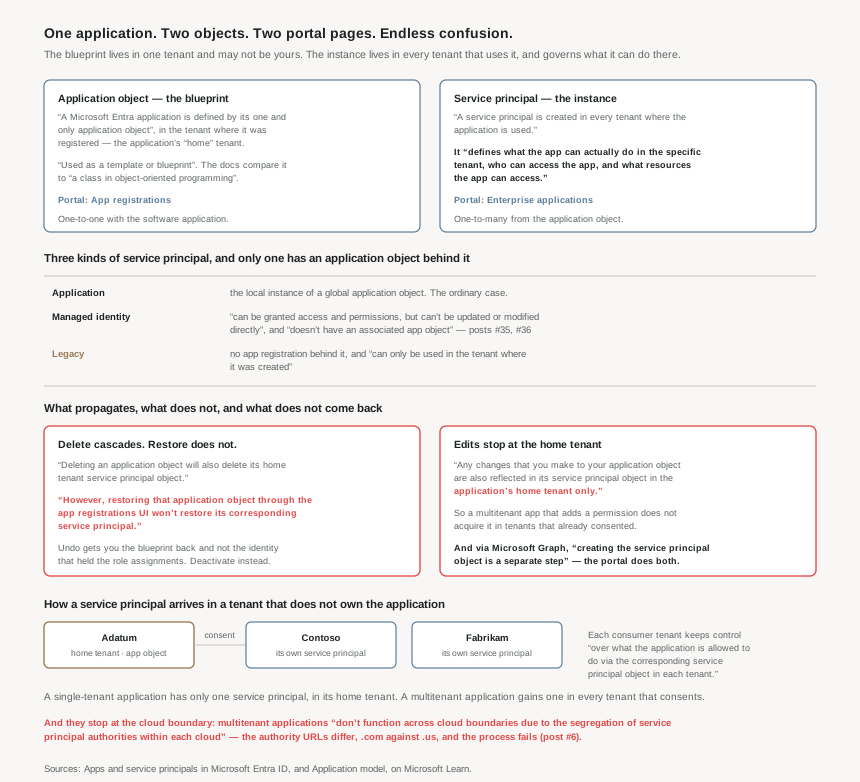
Two objects, and what each is for
Registering an application produces both, and a globally unique identifier for the pair: a globally unique instance of the app (the application object) that lives within your home tenant, and a globally unique ID for your app (the app/client ID). At registration you also choose whether it's single tenant or multitenant, which decides how many service principals can ever exist.
The application object describes three aspects of an application: how the service can issue tokens in order to access the application, the resources that the application might need to access, and the actions that the application can take. Note the modal verbs — might need, can take. It is a statement of what the application is designed to do, not a grant.
The grant lives in the service principal, which exists because to access resources that are secured by a Microsoft Entra tenant, the entity that requires access must be represented by a security principal — and that requirement is true for both users (user principal) and applications (service principal). Post #18 built the Azure RBAC model around principals; this is the object that makes an application one.
Three kinds of service principal, and only one has a registration behind it
| Type | What it is | The constraint that matters |
|---|---|---|
| Application | The local representation, or application instance, of a global application object in a single tenant. | The ordinary case. Created at registration, or by consent, or deliberately via PowerShell, CLI or Graph. |
| Managed identity | The principal behind a managed identity. | It can be granted access and permissions, but can't be updated or modified directly, and doesn't have an associated app object. Posts #35 and #36. |
| Legacy | An app created before app registrations were introduced or an app created through legacy experiences. | It doesn't have an associated app registration and can only be used in the tenant where it was created. |
Two of the three have no application object at all, which is worth holding on to. The mental model "every service principal has a registration you can go and inspect" is wrong for both managed identities and legacy principals — and in an old estate, legacy principals are exactly the ones you most want to inspect.
How a service principal arrives in a tenant that owns nothing
The mechanism is consent, and the documentation states it plainly: the Microsoft identity platform creates a service principal from an application object through consent. The flow, for a user in a tenant that does not own the app: they sign in, they are prompted to provide consent, and the Microsoft identity platform uses the application object in tenant A as a blueprint for creating a service principal in tenant B.
The three-tenant example in the docs makes the ownership split concrete. Adatum writes the HR app and holds its application object. When Contoso and Fabrikam administrators complete consent, a service principal object is created in their company's Microsoft Entra tenant and assigned the permissions that the administrator granted. Each consuming tenant keeps control over what the application is allowed to do via the corresponding service principal object in each tenant.
So consent is not a yes/no on someone else's software. It is the act of creating an identity in your directory — one that persists, holds permissions, can be assigned roles, and outlives the person who clicked. Post #33 argued that a rule which writes membership writes privilege. Consent is the same shape: a click that writes a principal.
The asymmetries
Three sentences in the documentation carry most of the operational risk in this post.
Edits stop at the home tenant. Any changes that you make to your application object are also reflected in its service principal object in the application's home tenant only. Adding a permission to a multitenant app's registration does not add it to the service principals in tenants that already consented — those are governed by what their administrators granted, when they granted it. Which is correct, and is also why "we updated the app" does not fix a customer's broken integration.
Delete cascades; restore does not. Deleting an application object will also delete its home tenant service principal object. However, restoring that application object through the app registrations UI won't restore its corresponding service principal.
Read that twice. The destructive operation is transitive and the recovery operation is not. You delete one object and lose two; you restore one object and get one back. The thing that does not come back is the security principal — the object that held the role assignments, the consented permissions, and the identity every other system knows the workload by.
The documented alternative is the one to reach for instead: for applications that need temporary suspension rather than permanent deletion, you can deactivate the application, which prevents new token issuance while preserving the application object and service principal for investigation or future reactivation.
If you register an application, an application object and a service principal object are automatically created in your home tenant. But: if you register/create an application using the Microsoft Graph APIs, creating the service principal object is a separate step. The portal does both; Graph does one. So infrastructure-as-code that creates registrations through Graph produces application objects with no principal to assign anything to — and the failure surfaces later, at the role assignment or the first token request, rather than at the point the object was created.
Why This Architecture Holds Up
Because the tenancy choice is made once and changes the object graph
At registration you choose whether it's a single tenant, or multitenant, and that choice determines the shape of everything afterwards. A single-tenant application has only one service principal (in its home tenant), created and consented for use during application registration. A multitenant application also has a service principal created in each tenant where a user from that tenant has consented to its use.
One object versus an unbounded, growing set of objects in directories you do not administer, each holding its own consented permissions, each surviving independently of the others. That is not a settings toggle; it is a decision about how many copies of your application's identity will exist and who will govern them.
Because multitenant stops at the cloud boundary
A constraint that catches sovereign-cloud work and is easy to discover far too late: multitenant applications (MTAs) don't function across cloud boundaries due to the segregation of service principal authorities within each cloud. The mechanism is stated: if the application object is hosted in the commercial cloud, the associated service principal is created locally during customer onboarding, and this process fails when crossing cloud boundaries because the authority URLs differ (e.g., .com vs .us), causing an incompatibility.
Post #6 dealt with regions, geographies and sovereignty on the resource side. This is the identity-plane equivalent, and it is harder: a region is a deployment choice you can revisit, but an application whose customers span commercial and government clouds needs separate registrations in each cloud, which means separate app IDs, separate secrets, separate consent, and a release process that knows the difference.
Because the interesting inventory is the one you did not create
Every consent event creates a principal. Over years, an estate accumulates service principals from Microsoft first-party services, SaaS tools, integrations, trials, and proofs-of-concept whose owners have left. None of them appear in App registrations, because none were registered there.
So for a security review, the useful question is not "what have we registered" but "what principals exist in our directory, and what has each been granted?" — which is the Enterprise applications list, and which the documentation confirms is where you see the service principal's permissions, user consented permissions, which users have done that consent, sign in information, and more.
The "which users have done that consent" part is the one to dwell on. It means the directory records who created each of these identities, which is exactly the audit trail you want, and exactly the one nobody reads until something has gone wrong.
Because credentials are the part the model does not solve
An application object can hold secrets and certificates — a confidential client application is an application that can hold credentials securely, and a trusted back-end server is required to store the credentials. Which means an ordinary app registration hands you a credential to protect, rotate, and eventually leak.
That is precisely what the next two posts are about. The managed identity service principal doesn't have an associated app object and can't be updated or modified directly — no registration, and so no secret to hold. Post #31 already noted the economics: managed identities have no licensing requirement at all. The object model here is the reason to prefer them, and it is worth seeing the shape of the problem before seeing the solution.
Key Architecture Decisions
| Decision | What to do | Why |
|---|---|---|
| Auditing workload identity | Start from Enterprise applications, not App registrations | Most principals in your tenant have their application object elsewhere. Enterprise applications is the real exposure list. |
| Retiring an application | Deactivate rather than delete, unless you are certain | Deletion also removes the home-tenant service principal, and restoring the registration won't restore its corresponding service principal. |
| Creating registrations in code | Create the service principal explicitly as a second Graph call | The portal does both; via Graph creating the service principal object is a separate step, and the gap shows up later. |
| Single-tenant or multitenant | Treat it as an object-graph decision, not a checkbox | One service principal you govern, against one per consenting tenant, each governed by someone else. |
| Shipping into sovereign clouds | Plan separate registrations per cloud from the start | Multitenant apps don't function across cloud boundaries because the authority URLs differ (#6). |
| Changing a published multitenant app | Do not assume existing customers inherit the change | Edits are reflected in the application's home tenant only; consented tenants keep what they granted. |
| Governing consent | Treat a consent click as principal creation, and review who performed it | Consent is how a service principal enters your directory, and Enterprise applications records which users have done that consent. |
| Old, unexplained principals | Expect some to have no registration at all | Legacy principals don't have an associated app registration and are confined to the tenant where they were created. |
| Anything running inside Azure | Reach for a managed identity before registering an app | No app object, no credential to hold, and no licence (#31). The next two posts. |
| Finding an app's principals | Filter service principals by appId, not by display name |
The app ID is the stable link between the one application object and its many service principals. |
Closing Thought
This phase keeps finding the same structural surprise in different clothes. Post #32: a container that holds a group without holding its members. Post #33: a rule whose real access-control list is the set of people who can write an attribute. And now an application that exists as two objects, where the one carrying the permissions is not the one you edit, and may not even be in your directory.
What unites them is that the Entra object model separates definition from authority in ways the portal's vocabulary hides. An application object says what an application is for. A service principal says what it may do here. Those are different questions with different owners, and the interface presents them as two tabs of the same thing.
The practical consequence is small and worth adopting: when someone asks what an application can do in your tenant, do not open its registration. Open its service principal. And when the answer matters enough to change, remember that the one irreversible action in this model is the delete — because the platform will happily give you the blueprint back, and not the identity.
#35 takes the object this post kept deferring to: managed identities, system-assigned against user-assigned — what the lifecycle difference actually costs, and why the choice is harder to reverse than it looks.
Comments