Business Challenge
Eight posts have built identities for workloads. This is the code path that decides which one a running process actually uses, and it has been quietly present in every one of them.
Only if nothing earlier answers first. ADC checks GOOGLE_APPLICATION_CREDENTIALS, then the local ADC file, and only then uses the metadata server to get credentials for the service where the code is running.
Check the environment before trusting the attachment. A stray variable in a systemd unit or a Dockerfile outranks the identity you designed.
Google says otherwise, explicitly: the order of the locations ADC checks is not related to the relative merit of each location. And the attached service account — checked last — is the preferred method for finding credentials in a production environment.
Correct approachRead the order as a search path, not a recommendation. The best option is last, so anything present earlier is an override whether or not you meant it as one.
Those are different credentials. The ones you provide to ADC by using the gcloud CLI are distinct from your gcloud credentials — the ones the CLI itself uses. gcloud auth login does not create an ADC file; gcloud auth application-default login does.
Remember there are two credential sets on a developer machine. A working gcloud command proves nothing about what a client library will find.
It is usually the opposite. By default, access tokens generated from a local ADC file created with user credentials include the cloud-wide scope https://www.googleapis.com/auth/cloud-platform — so the app runs with everything the developer can reach.
Use --scopes, or impersonate a service account for local work, so the laptop is not the most privileged place the code ever runs.
Architecture
ADC exists so that your code can run in either a development or production environment without changing how your application authenticates. It achieves that by searching, and the search is the whole design.
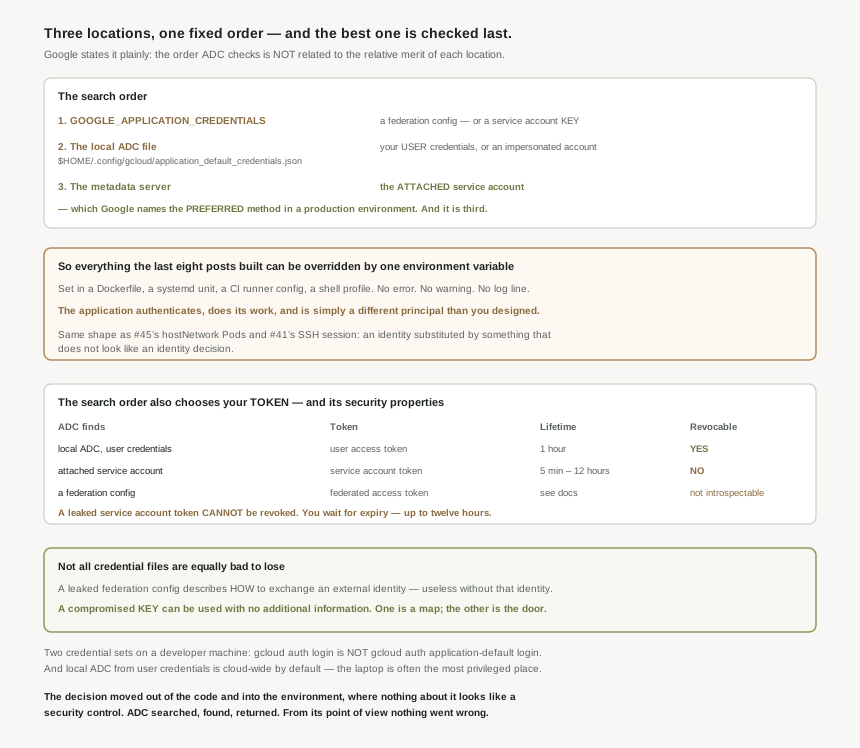
The three locations, in order
| # | Location | What it yields |
|---|---|---|
| 1 | GOOGLE_APPLICATION_CREDENTIALS — a path to a credential JSON file. |
A Workforce or Workload Identity Federation config, or a service account key. |
| 2 | The local ADC file from gcloud auth application-default login, at $HOME/.config/gcloud/application_default_credentials.json. |
Your user credentials, or an impersonated service account. |
| 3 | The metadata server, for the service where the code is running. | The attached service account — the preferred method in production. |
Those two facts together are the whole risk. The attached service account is what #46 attached, what #45's GKE workloads use, and what Google names as preferred for production — and ADC reaches it only after finding nothing in the environment variable and nothing in the well-known file. So everything the last eight posts built can be overridden by one environment variable set in a Dockerfile, a systemd unit, a CI runner config or a shell profile. There is no error, no warning and no log line. The application authenticates successfully, does its work, and is simply a different principal than the one you designed. That is the same shape as #45's hostNetwork Pods and #41's SSH session: an identity substituted quietly by something that does not look like an identity decision.
Not all credential files are equally bad to lose
The environment variable can point at three kinds of file, and the documentation draws a sharp line between them. Of service account keys it says: they create a security risk and are not recommended, and — the part worth quoting — unlike the other credential file types, compromised service account keys can be used by a bad actor without any additional information.
That is the precise reason a key is worse than a federation credential configuration, and it sharpens #40's argument. A leaked Workload Identity Federation config is a description of how to exchange an external identity for a Google one — useless without also holding that external identity. A leaked key is the identity. One is a map; the other is the key to the door.
Why This Architecture Holds Up
This is the part that gets missed. ADC does not only decide who the code is — it decides what kind of access token comes back, and those types have materially different security properties.
| If ADC finds… | Token type | Lifetime | Revocable |
|---|---|---|---|
| A local ADC file with user credentials | User access token | 1 hour | Yes |
| An attached service account | Service account access token | 5 minutes to 12 hours | No |
| A federation credential config | Federated access token | See the docs | Not introspectable |
Read the third column against the fourth. A user access token can be revoked; a service account access token cannot. So if a service account token leaks, there is no revocation — you wait for it to expire, and the expiry can be as long as twelve hours. Removing the role stops new tokens, not the one already issued.
That reframes #41's argument about short-lived credentials. The expiry is not merely a nice property; for service account tokens it is the only containment there is. And it means the incident response for "a token leaked" differs entirely depending on which of the three locations ADC happened to use — a detail decided by the environment, not by the code.
What to do with this
- Log which credential ADC selected at startup in anything that matters. It is the cheapest way to find an unintended override.
- Treat
GOOGLE_APPLICATION_CREDENTIALSas a red flag on a VM or in a cluster, where the attached identity should be winning. - Check container images for a baked-in ADC file. A developer's
application_default_credentials.jsoncopied in by a broadCOPYis a human identity running in production. - Scope local ADC deliberately. The default is cloud-wide and matches the developer, not the workload.
- Know that a leaked service account token cannot be revoked — plan the response around expiry, and prefer short lifetimes.
- Do not infer merit from order. Google states it is not a ranking; first found simply wins.
Key Architecture Decisions
| Decision | Choose this | Because |
|---|---|---|
| Production credential | The attached service account | It is the preferred method in a production environment. |
Setting GOOGLE_APPLICATION_CREDENTIALS in production |
Do not | It silently outranks the attached identity. |
| If the variable must be set | A federation config, never a key | A compromised key needs no additional information to use. |
| Local development | Impersonate, or set --scopes |
The default local ADC token is cloud-wide. |
| Verifying a developer is set up | Check for the ADC file | gcloud credentials and ADC credentials are distinct. |
| Building container images | Exclude the gcloud config directory | A copied ADC file becomes the container's identity. |
| Responding to a leaked token | Know which type it was | User tokens are revocable; service account tokens are not. |
| Debugging "wrong identity" errors | Check the search order first | The policy is usually right and the credential is usually wrong. |
Closing Thought
Application Default Credentials is one of the genuinely good ideas in this platform. The promise — write the code once, let it authenticate correctly on a laptop, in a pipeline and on a VM — is kept, and it is why none of the previous eight posts required the application to know anything about identity. That is a real achievement and it is easy to take for granted.
The cost is that the decision moved out of the code and into the environment, where it is made by whatever happens to be set. An environment variable is not obviously a security control. A file in a home directory is not obviously a production credential. Neither looks like an identity decision, and ADC will not tell you which one it took, because from its point of view nothing went wrong — it searched, it found, it returned. The search order is documented, unsurprising and fine. It is only dangerous because the thing you want it to find is the last place it looks.
#48 covers the identities nobody creates and few people can see: service agents — the accounts Google makes on your behalf, why they hold roles on your projects, and what happens when one is missing.
Comments