Business Challenge
Post #45 covered the mechanics of elevation: eligible versus active, the activation window, what the settings do and do not enforce. This post covers the two controls layered on top of that — the human gate in front of an activation, and the periodic question of whether any of these assignments should still exist.
The second one exists because of a slow problem rather than a dramatic one. The overview states it as a set of questions rather than a threat: as people move teams or leave the company, how do you make sure that their old access is removed? And the two consequences, which are not the same consequence: excessive access rights can lead to compromises, and excessive access rights can also lead to audit findings as they indicate a lack of control over access.
That second clause is worth noticing. An audit finding is not evidence that anything was breached. It is evidence that nobody could say who had access and why — which is a governance failure whether or not it is ever a security one. Access reviews are aimed at both, and the mechanism is the same: produce a record of a human being asked.
Both controls are well designed and both have a shape that people misread. Approval is not the two-person rule most organisations think they are buying. And a review is not a guarantee that a denial removes anything.
Delegated approvers have 24 hours to approve requests. If a request isn't approved within 24 hours, then the eligible user must re-submit a new request. The 24-hour approval time window isn't configurable.
So approval-gated elevation is not available to someone whose approver is on a plane. The request does not queue, it expires — which is the correct default, and it means the approver roster is an availability problem before it is a governance one.
Architecture
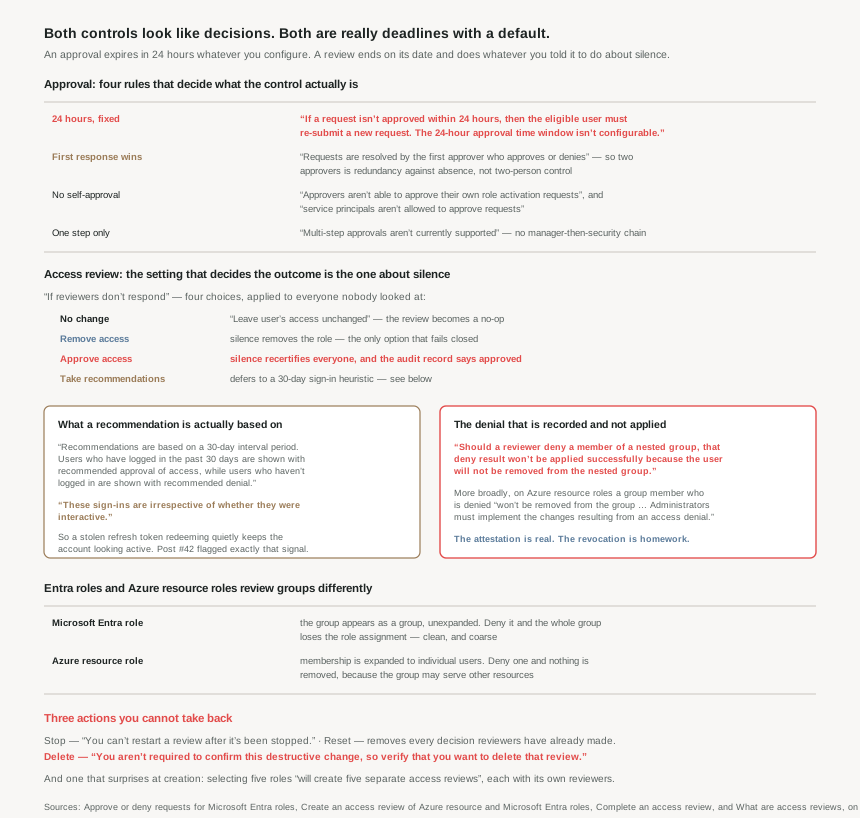
Approval is one step, and the first responder decides
Four rules define what the approval control actually is, and together they make it something narrower than it sounds.
| Rule | Consequence |
|---|---|
| Requests are resolved by the first approver who approves or denies | Naming two approvers buys redundancy against absence, not two-person control |
| Multi-step approvals aren't currently supported | No manager-then-security-team chain |
| Approvers aren't able to approve their own role activation requests | Self-approval is closed off at the platform |
| Service principals aren't allowed to approve requests | No automated rubber stamp |
The first row is the one most likely to appear in a control description incorrectly. #45's guidance was to name at least two approvers, and that advice is right — but its purpose is to ensure someone is reachable inside the twenty-four hours, not to require two people to agree. If a policy document says privileged elevation requires dual authorisation, PIM does not provide that.
What PIM does provide is a post-hoc check, and it is easy to miss: Global Administrators and Privileged Role Administrators are notified when an approved user becomes active in their role, and a Global Administrator or Privileged Role Admin who believes that an approved user shouldn't be active can remove the active role assignment. So the second pair of eyes exists — it just arrives after the elevation rather than before it. For a one-to-twenty-four-hour activation that is a meaningful window, and it makes those notifications something to route somewhere a person reads, rather than a mailbox rule.
Both outcomes are recorded: approving and denying each require the approver to enter the business justification before submitting. That is the artefact the audit finding above is actually asking for.
An access review is a scheduled question with a configurable default
A review has a scope, a set of reviewers, a duration, and — the part that decides the outcome in practice — an instruction about what to do with everyone nobody looked at.
Scope can be narrowed three ways that are worth knowing. By assignment type: eligible assignments only (regardless of activation status when the review is created), active assignments only, or all of them. By reviewer: Selected users, Members (self), or Manager with a fallback for people who have none. And by inactivity — you can review only users inactive for a given period, up to 730 days (two years).
One creation-time behaviour surprises people and changes how you plan the work: selecting more than one role will create multiple access reviews. For example, selecting five roles will create five separate access reviews. Five roles is five objects to track, five sets of reviewers, five end dates. Reviewing "the privileged roles" is not one task.
Frequency runs from One time through Weekly, Monthly, Quarterly, Annually, or Semi-annually, with a constraint that reveals the design: the maximum duration that you can set for a monthly review is 27 days, to avoid overlapping reviews. Two instances of the same review must never be open at once, because each one captures a snapshot of access at the beginning of each review instance.
Why This Architecture Holds Up
Because the setting that decides the outcome is the one about silence
Every access review carries an If reviewers don't respond setting, and it applies to everybody the reviewer never got to. Four options:
- No change — leave user's access unchanged. The review runs, produces a report, and alters nothing.
- Remove access — silence revokes. The only option that fails closed.
- Approve access — silence recertifies. The audit record then says these assignments were approved, when in fact nobody opened the email.
- Take recommendations — defers to a heuristic, discussed below.
The third is the one to think hardest about. It produces the most dangerous artefact in governance: a clean report that is not evidence of anything. A quarterly review completing at 100% approved, where half the approvals were a timeout, looks identical in the export to one where every assignment was genuinely examined — the Results page records users, outcome, reason, reviewed by, applied by, and apply result, and a defaulted outcome occupies the same column as a considered one.
There is an important limit on the setting: this setting doesn't impact users who were already reviewed. It governs the remainder, not the whole. And nothing happens early — no access rights are changed in the directory until the review is completed, after which denied users are removed in a few minutes once the status moves through Applying to Applied.
Because a recommendation is a sign-in heuristic, and it counts the wrong sign-ins
Recommendations are based on a 30-day interval period. Users who have logged in the past 30 days are shown with recommended approval of access, while users who haven't logged in are shown with recommended denial of access.
As a default that is reasonable — it surfaces dormancy, which is what the PIM stale-account alert from #45 is also looking for. But the next sentence matters more than it appears:
These sign-ins are irrespective of whether they were interactive.
A non-interactive sign-in is a token being redeemed — a background service, a cached client, or, per #42, a refresh token in somebody else's hands. #42 established that unfamiliar sign-in properties on a non-interactive sign-in deserves increased scrutiny due to the risk of token replay attacks. Here the same class of event counts as evidence the account is in legitimate use and produces a recommended approval.
So Take recommendations is not a safe default for a privileged-role review. It is a reasonable prompt for a human and a poor decision-maker, because the signal it reads is exactly the one a compromised account keeps producing. The mitigating detail is that the last sign-in of the user is also displayed along with the recommendation, so a reviewer who looks has the date in front of them.
Because a denial does not always remove anything
This is the failure with no symptom, and it lives in the difference between the two role systems this series has kept separate since #19.
Microsoft Entra roles handle groups cleanly. When a review is created on a Microsoft Entra role with role-assignable groups assigned, the group name shows up in the review without expanding the group membership. The reviewer can approve or deny access of the entire group to the role. Deny it, and denied groups lose their assignment to the role when review results are applied. Coarse, but it works.
Azure resource roles do the opposite, and the result is a decision that is recorded and not enforced:
When a reviewer denies a user that was assigned to the role via the security group, the user won't be removed from the group. This is because a group may be shared with other Azure or non-Azure resources. Administrators must implement the changes resulting from an access denial.
The reasoning is sound — removing someone from a group to revoke one role assignment could strip access they need elsewhere. But the consequence is that the review's export shows a denial while the person retains the access, and closing the loop is manual work nobody is prompted to do.
The nested case is worse because it is stated as an outright failure: should a reviewer deny a member of a nested group, that deny result won't be applied successfully because the user will not be removed from the nested group. And visibility is partial too — where a security group contains other groups, only the users assigned directly to the security group assigned to the role will appear in the review. People one level deeper are neither shown nor reviewed.
That is the same pattern this series has now met in four places: #41a's tokens issued when no control triggers, #42's device filter that does not apply, #43's method enabled in any one of three policies, and now a denial recorded against access that remains. Verifying that something is switched on is easy. Verifying that something was taken away requires checking the thing itself.
Because three of the review actions are irreversible and one has no confirmation
The management buttons on a review deserve reading before use.
- Stop finishes a review early, and you can't restart a review after it's been stopped.
- Reset removes all decisions that were made on it, after which all users are marked as not reviewed again — useful if the reviewer misunderstood the scope, and a way to discard real work.
- Apply removes denied users' access, and is always disabled if auto-apply was configured.
- Delete carries the warning: you aren't required to confirm this destructive change, so verify that you want to delete that review.
A destructive action with no confirmation dialogue, sitting next to three other buttons, on an object that is itself an audit artefact. Worth knowing before somebody goes looking for the one that clears the list.
Two more asymmetries to carry into a design. Fallback reviewers can only be added when reviewer type is manager, and fallback reviewers aren't removable by design — primary reviewers can be removed at any point, fallbacks never. And for recurring reviews there are separate settings under "Current" versus under "Series": editing the one in front of you changes this instance only. Fixing a mistake for good means editing the series.
Because the licensing lands in an unusual place
Access reviews sit outside the P1/P2 split most of this series has worked with. The feature requires Microsoft Entra ID Governance or Microsoft Entra Suite subscriptions, though some capabilities, within this feature, may operate with a Microsoft Entra ID P2 subscription. Specific capabilities are named as Governance-only: creating a review on inactive users, user-to-group affiliation recommendations, and multi-resource reviews.
And reviewing workload identities costs more again: using Access Reviews for Service Principals requires a Microsoft Entra Workload ID Premium plan in addition to a Microsoft Entra ID P2 or Microsoft Entra ID Governance license. After Storm-3168 in last week's roundup — a service principal holding Storage Account Contributor that nobody had looked at — that is the review most worth running and the one behind the most paywalls.
Key Architecture Decisions
| Situation | Decision | Why |
|---|---|---|
| Writing "dual authorisation" into a control description | Don't — PIM does not do it | Requests are resolved by the first approver who approves or denies. |
| Choosing how many approvers | At least two, for coverage inside 24 hours | The window isn't configurable; an unreachable approver means a re-submitted request. |
| Wanting a second pair of eyes | Route the activation notification to a monitored destination | GAs and PRAs are notified on activation and can remove the active role assignment. |
| Setting "If reviewers don't respond" | Remove access for privileged roles | It is the only option that fails closed; Approve access manufactures a clean report. |
| Using Take recommendations | Not for privileged roles | Sign-ins count irrespective of whether they were interactive — a replayed token reads as activity. |
| Reviewing five roles | Plan for five reviews | Selecting five roles will create five separate access reviews. |
| Reviewing an Azure resource role with groups | Expect to do the removal yourself | Administrators must implement the changes resulting from an access denial. |
| Groups nested inside groups | Flatten before reviewing | Only direct members appear, and denying a nested member won't be applied successfully. |
| Reviewing Microsoft Entra roles with groups | Know you are judging the group, not its members | The group appears unexpanded; denial removes the whole assignment. |
| Fixing a recurring review's settings | Edit Series, not Current | Current changes this instance only. |
| Naming a manager as reviewer | Add the fallback deliberately | Fallback reviewers aren't removable by design. |
| Tidying up old reviews | Treat Delete as unguarded | You aren't required to confirm this destructive change. |
| Reviewing service principals | Budget for Workload ID Premium | Required in addition to P2 or Governance. |
| Scoping a monthly recurring review | 27 days maximum | Instances must not overlap; each takes its own snapshot. |
Closing Thought
These two features are the point where identity stops being a technical control and becomes a process one, and the honest observation is that the process half is much harder to get right. The cryptography in #44 either works or it does not. A quarterly access review can complete, report success, and mean nothing at all.
Three settings decide which of those you have, and none of them is about security in the usual sense. What happens when a reviewer ignores the email. Whether the recommendation engine is trusted. Whether anybody follows up on the denials that the platform records but does not enforce. Each one is a choice about what to do when a human does not act, and in a governance control that is the only case that really matters — because the case where everyone does their job needs no design.
The approval side is cleaner and smaller than its reputation. Twenty-four hours, one step, first responder decides, no self-approval. That is a good control and it is not dual authorisation, and the gap between those two is where a lot of compliance documents quietly say something untrue.
Last week's Storm-3168 write-up is the argument for bothering with any of it. A service principal holding Storage Account Contributor, granted long before, exercised by nobody until it was exercised by an attacker. No review would have stopped the credential leaking. A review that actually ran, on an assignment type that costs an extra licence to review at all, would have asked whether that principal still needed to delete storage accounts — and the honest answer was available the whole time.
#47 takes the account that must work when every control in this phase has failed: break-glass accounts, and the exclusions that keep them usable.
Comments