Business Challenge
Three posts in this block leaned on the audit log without inspecting it. #48 found a principal that is visible only in audit logs. #55 recommended alerting on every policy-setting call because prevention was unavailable. #56 made detection the entire control for break-glass accounts. All three assumed the record is there. This post checks, and the answer is mostly yes — with two gaps that are both defaults rather than defects.
The half that matters most is not switchable. Admin Activity audit logs are always written — you cannot configure, exclude or disable them — and even if you disable the Cloud Logging API, Admin Activity audit logs are still generated. Every IAM policy change lands in there whether anybody set anything up or not.
Correct approachTreat "who granted what, and when" as available by default on any project, including ones nobody configured. That is the floor, and it is a good one.
They are not, by default, and the reason is mechanical. Methods that require an IAM permission with the type property value of ADMIN_WRITE generate Admin Activity audit logs; ADMIN_READ, DATA_READ and DATA_WRITE methods generate Data Access audit logs instead — and those are off unless enabled. google.iam.admin.v1.GetIAMPolicy is an ADMIN_READ method.
If "who enumerated our permissions" is a question you want answerable, enable Data Access logging for IAM specifically. It is not covered by the always-on half.
Partly. The always-on logs go to _Required and are kept 400 days, not configurable — generous. But at folder and organisation scope the _Default bucket is 30 days and also not configurable: to store log entries from a folder or organization for longer than 30 days, create a log sink and route those log entries to a log bucket in a project.
Build the aggregated sink on day one. Without it, anything that lands in _Default at org scope is gone in a month and cannot be extended in place.
There is a documented exemption, and it is the uncomfortable one. Publicly available resources that have the Identity and Access Management policies allAuthenticatedUsers or allUsers do not generate audit logs, nor does anything reachable without signing in. The stated reason is privacy: this helps protect end-user identities and information.
Correct approach
Treat a public binding as a decision to stop auditing that resource. If you need the access record, you cannot also have allUsers on it.
Architecture
Four log types, and the useful way to hold them is by two properties rather than by name. The best-practices page puts them in one table, and the pattern is immediately visible.
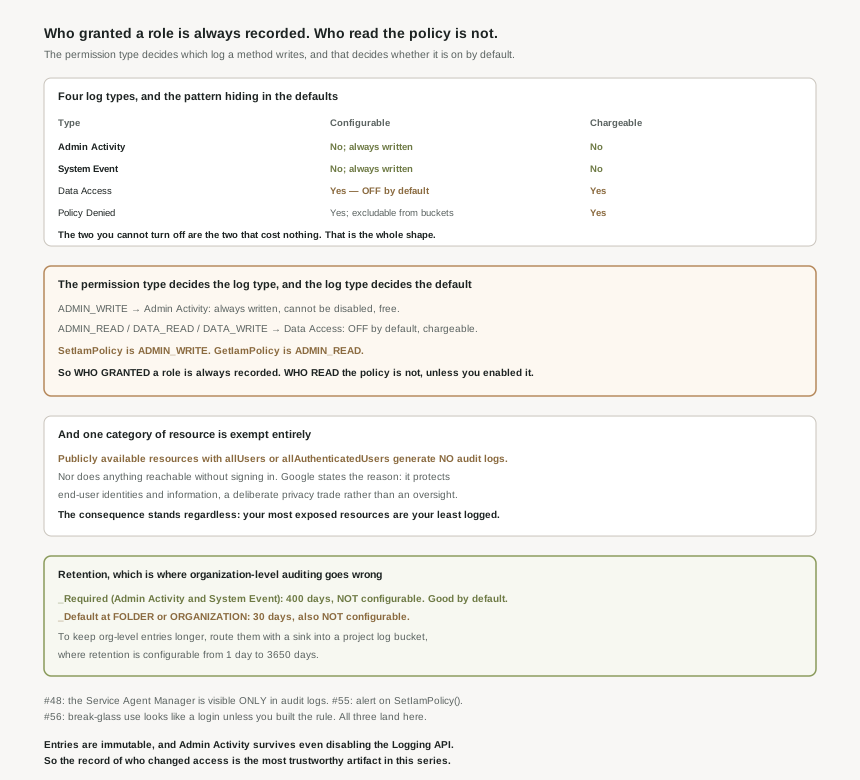
| Log type | Records | Configurable | Chargeable |
|---|---|---|---|
| Admin Activity | User-driven calls that change configuration or metadata — including IAM permission changes | No; always written | No |
| System Event | Google Cloud systems and managed service agents that modify the configuration of resources | No; always written | No |
| Data Access | Calls that read configuration or metadata, and reads or writes of your data | Yes — off by default | Yes |
| Policy Denied | When a Google Cloud service denies access to a user or service account because of a security policy violation | Yes; you can exclude these logs from being written to log buckets | Yes |
The two columns on the right correlate perfectly, and that is the design rather than a coincidence: the logs you cannot turn off are the free ones, and the logs that cost money are the ones you must opt into. Except for BigQuery, Data Access audit logs are disabled by default because they can generate large volumes of data, and Google is explicit that to record Data Access audit logs for Google Cloud services other than BigQuery, you must explicitly enable them. That is a defensible trade — nobody wants a surprise logging bill on a project they inherited — but it means the default audit posture is shaped by billing, not by what you would most like to know.
Policy Denied is the interesting middle case. It is generated by default and your Google Cloud project is charged for log storage, and you cannot disable it — but you can use exclusion filters to prevent Policy Denied audit logs from being stored in Cloud Logging. So a cost-reduction exercise can discard every denial record while technically leaving the logging enabled. Worth knowing before somebody tidies up a logging bill.
Two properties that make this record trustworthy
Both are worth stating because they are rare in this series. First, log entries written by Cloud Audit Logs are immutable. Second, Admin Activity survives active attempts to stop it: disabling the Logging API does not stop its generation. Set against twenty-eight posts of eventually-consistent, multi-authored, exemption-ridden policy, an immutable, undisableable, free record of every configuration change is the most dependable artifact the platform has offered.
Why This Architecture Holds Up
The permission-type mapping is the single rule that determines everything, so it is worth stating once precisely. Every audited method carries a permission with a type, and that type selects the log.
| Permission type | Goes to | On by default? | Example IAM method |
|---|---|---|---|
ADMIN_WRITE |
Admin Activity | Yes, always | SetIamPolicy — granting or revoking a role |
ADMIN_READ |
Data Access | No | google.iam.admin.v1.GetIAMPolicy — reading who has access |
DATA_READ / DATA_WRITE |
Data Access | No | Reading or writing resource data |
"Who granted what, and when" is answerable on any project, for 400 days, for free, with no setup. That is genuinely good and it validates what #55 and #56 asked of it. But the adjacent question — who enumerated the allow policy, listed the service accounts, read the roles — sits in Data Access logs, which are off. Those are precisely the calls an attacker makes first and a departing employee makes quietly, and they are also exactly the calls that generate enormous volume in normal operation, which is why they are off. Both halves of that are true. The actionable version is narrow rather than "turn everything on": enable Data Access logging for iam.googleapis.com alone and you capture policy reads without buying every storage read in the estate.
The public-resource exemption, which deserves to be read carefully
This is the finding I did not expect. Publicly available resources that have the Identity and Access Management policies allAuthenticatedUsers or allUsers do not generate audit logs at all, and neither does anything accessible without signing in to a Google account. The justification is given plainly, and it is a real one: this helps protect end-user identities and information. Logging anonymous access would mean recording identifiers for members of the public, which is worse.
I would not call it a flaw. But the consequence has to be designed around rather than discovered: the moment a binding becomes allUsers, that resource stops producing an access record. #33 and #34 treated public bindings as an over-permissioning problem; this adds a second dimension — they are also a visibility problem, and the two compound. A bucket shared with allUsers is both maximally exposed and minimally observed.
Retention, where the organisation-level trap lives
The headline numbers are good. Admin Activity and System Event go to _Required, retained 400 days, with custom retention not configurable — you cannot shorten it, which is the right way round for an audit record.
The trap is the other bucket. _Default holds 30 days, and at folder and organisation scope that is not configurable either. The instruction is explicit: to store log entries from a folder or organization for longer than 30 days, create a log sink and route those log entries to a log bucket in a project. In a project bucket, you can configure Cloud Logging to retain your logs between 1 day and 3650 days.
So the org-level aggregated sink is not an optimisation, it is the only way to retain anything that lands in _Default above the organisation. And note where Data Access logs go when you do enable them: they are written to the Google Cloud project whose data is accessed and stored in the _Default log bucket — 30 days, in whichever of hundreds of projects the access happened to touch, unless a sink is already collecting them.
Two smaller things that change how you read a log
Long-running operations produce two entries, not one: these methods usually generate two audit log entries: one when the operation starts and another when it ends. Counting entries therefore over-counts operations, which matters if you are alerting on a rate.
And access to the logs is itself tiered in a way that catches auditors. The Logs Viewer role is not sufficient for everything: with only that role, then you cannot view Data Access audit logs that are in the _Default bucket — Private Logs Viewer is required. Given the guidance that due to the sensitivity of audit logging data, it is especially important to configure the appropriate access controls, and that log views let you control who has access to the logs within your log buckets, the audit record has its own access-control problem. Which is fitting: the one trustworthy artifact in the stack is itself governed by the system it records.
Key Architecture Decisions
| Decision | Choose this | Because |
|---|---|---|
| Relying on grant history | Trust it; it is always on and immutable | Admin Activity cannot be disabled, even with the Logging API off. |
| Wanting to see policy reads | Enable Data Access logging for IAM only | GetIamPolicy is ADMIN_READ, so it is off by default. |
| Organisation-level retention | An aggregated sink into a project bucket | Folder and org _Default is 30 days and not configurable. |
| Long-term audit retention | A project log bucket, up to 3650 days | Only project and user-defined buckets take custom retention. |
| Resources bound to allUsers | Accept that access to them is unlogged | Public resources generate no audit logs at all. |
| Reducing a logging bill | Do not exclude Policy Denied | It cannot be disabled, but it can be excluded from storage. |
| Giving auditors access | Private Logs Viewer, or a log view | Logs Viewer cannot read Data Access logs in _Default. |
| Alerting on operation rates | Account for two entries per LRO | Long-running operations log a start and an end. |
| Where Data Access logs accumulate | Plan for the accessed project, not yours | They are written to the project whose data is accessed. |
| Auditing the auditors | Restrict log access deliberately | The documentation calls the data especially sensitive. |
The one to look at today
Check whether an aggregated sink exists at your organisation node, and where it writes. If there is one pointing at a project log bucket with a long retention, your audit position is sound and the rest of this post is background. If there is not, then everything above the project level that is not Admin Activity is being kept for thirty days, nobody chose that, and it cannot be changed in place — which is a five-minute check with a large difference in what you can answer in nine months.
Closing Thought
After twenty-eight posts of qualified answers, this one is mostly unqualified. The record of who changed access is written without being asked, cannot be switched off, is immutable, costs nothing, and is kept for over a year. Every claim the previous posts made about the audit log turned out to be supportable: #48’s invisible principal really is visible there, #55’s alert really does have something to fire on, #56’s detection-only control really is available. For the specific question in this post’s title, the platform is in good shape.
The two gaps are both defaults with reasons behind them, which is a different thing from a flaw and worth saying clearly. Data Access logging is off because it is expensive and voluminous; public resources are unlogged because logging anonymous access means logging strangers. Neither decision is wrong. What they produce together is an audit posture where the mutating half of the story is complete and the observing half is absent, and where the resources most likely to be exposed are the ones with no record at all. Both are fixable — one with a narrowly scoped configuration change, the other by not making the binding. The point of reading the page is knowing that you are choosing.
#60 closes the IAM block by assembling all of it: an IAM design for a multi-team organisation — the hierarchy, the groups, the break-glass accounts and the audit sink, as one set of decisions rather than twenty-nine.
Comments