Business Challenge
#34 covered what an app registration and a service principal are, and #38 covered roles, scopes and consent. This post is the configuration most people actually touch: you have added an application, and Entra asks you to pick a single sign-on method.
The menu presents six options at the same level of the hierarchy, which implies they are alternatives of the same kind. They are not. The selection rule is stated once and is the only sentence that matters: “Choosing an SSO method depends on how the application is configured for authentication.” Not on your preference, not on your maturity — on what the application already supports.
The split is between what runs in the cloud and what needs a proxy:
- “Cloud applications can use OpenID Connect, OAuth, SAML, password-based, or linked for SSO. Single sign-on can also be disabled.”
- “On-premises applications can use password-based, Integrated Windows Authentication, header-based, or linked for SSO. The on-premises choices work when applications are configured for Application Proxy.”
Linked appears in the SSO menu and does not sign anybody in: “The Linked option doesn't provide sign-on functionality through Microsoft Entra credentials.”
It places a tile in the portal that points somewhere else — another identity provider, a federated app, or “an app that doesn't require authentication” at all. It is a bookmark with a logo. Useful, correctly placed in the app catalogue, and worth nothing as an access control: a Conditional Access policy on that application governs nothing, because no token is issued.
So an inventory that counts “applications with SSO configured” and includes linked entries is overstating coverage. The useful question is narrower: how many issue a token Entra controls.
Architecture
Six modes, three categories, and one timer.
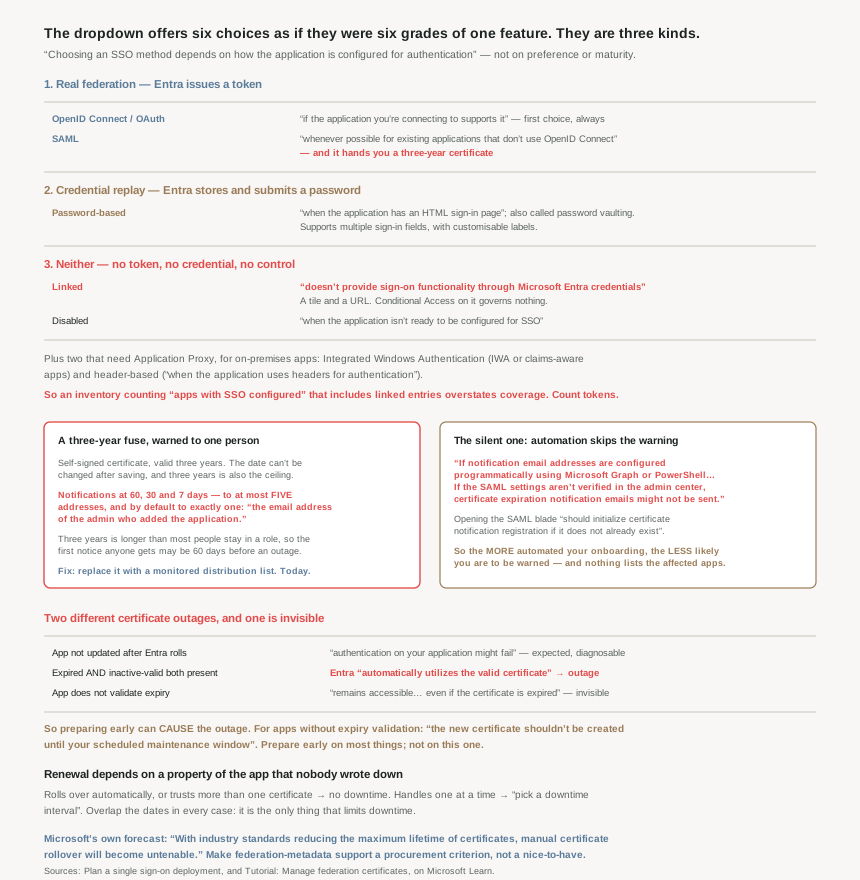
The six, sorted by what they actually do
| Mode | What happens | Choose it when |
|---|---|---|
| OpenID Connect / OAuth | Entra issues a token | “if the application you're connecting to supports it” |
| SAML | Entra signs an assertion with a certificate | “whenever possible for existing applications that don't use OpenID Connect or OAuth” |
| Password-based | Entra stores and replays a password | “when the application has an HTML sign-in page” |
| Integrated Windows Authentication | Kerberos, through Application Proxy | Apps using IWA, or claims-aware apps |
| Header-based | Proxy injects headers | “when the application uses headers for authentication” |
| Linked | Nothing — a tile and a URL | The app is federated somewhere else |
| Disabled | Nothing | “when the application isn't ready” |
The ordering in that table is the decision procedure. OIDC if it is offered; SAML if not; password-based only if the application has no federation at all; the proxy modes only for on-premises apps; linked and disabled are placeholders rather than choices. There is no scenario in which you prefer password-based to SAML for an app that supports both.
Password-based SSO is a password manager, and that is the right way to think about it
Microsoft names it plainly: “Password-based SSO is also known as password vaulting… enables you to manage user access and passwords to web applications that don't support identity federation.” Entra holds the credential and submits it into an HTML form.
It is more capable than it sounds. It “supports applications that require multiple sign-in fields… for applications that require more than just username and password fields”, and the field labels are customisable. So a legacy app with a username, a password and an account code can still be wrapped.
Its genuinely good use case is the one nobody plans for: shared accounts. “From the sign-in perspective, applications with shared accounts aren't different from enterprise applications that use password SSO for individual users” — and the pattern that follows is the best idea in this post:
- Create a security group per set of users sharing a credential.
- “Reset the shared credentials… individuals don't need the password of the shared account. Microsoft Entra ID stores the password and you should consider setting it to be long and complex.”
- And the part that makes it a control rather than a convenience: “Configure automatic rollover of the password if the application supports it. That way, not even the administrator who did the initial setup knows the password of the shared account.”
That turns a shared login — the thing every audit flags and nobody fixes — into a credential no human holds, with access governed by group membership and revoked by removing someone from a group. It is the closest thing in Entra to solving the social-media-account problem, and it is buried in a planning article.
Why This Architecture Holds Up
Because SAML hands you a three-year timer and no owner
Choose SAML and Entra generates “a self-signed certificate for the application that is valid for three years”. That is the whole of the configuration effort and the beginning of the operational one, because the certificate is a dated dependency in two systems at once.
The constraints around it are unhelpfully rigid. You cannot adjust it later: “you can't change the date of a certificate after you save it”, so shortening or extending means creating a new one, downloading it, uploading it to the application and activating it. And the ceiling is fixed: “You can set any date between the current date and three years after the current date.”
Notification exists, and it is thin: “Microsoft Entra ID sends an email notification 60, 30, and 7 days before the SAML certificate expires”, to at most “five email addresses” — and by default to exactly one, “the email address of the admin who added the application.”
Read those two facts together. A three-year expiry, and a warning that goes to whoever happened to click Add three years ago. Over three years that person changes role, team or employer more often than not, and the first notice anybody receives is 60 days before an outage. Microsoft’s own remedy is in the planning article — a “closely monitored email distribution list for certificate-related change notifications” — and the five-address cap is precisely why it says “use distribution list emails” rather than naming people.
Because the notification can silently fail to register
This phase has found a silent failure in almost every feature, and here is this post’s. If you automate application onboarding — which anyone with many SAML apps does — the notification may never be wired up:
“If notification email addresses are configured programmatically using Microsoft Graph or PowerShell, administrators should navigate to Enterprise applications > [Application] > Single sign-on > SAML and verify that the Notification email address is configured correctly… If the SAML settings aren't verified in the admin center, certificate expiration notification emails might not be sent.”
A configuration set by API that requires a human to open a blade before it takes effect is an unusual design, and the consequence is exactly backwards from intuition: the more automated your onboarding, the less likely you are to be warned. Opening the SAML certificate page “should initialize certificate notification registration if it does not already exist” — so the fix is a click per application, and nothing will tell you which applications need it.
Because there are two different certificate outages and one of them is invisible
The first is the ordinary one: “If your application certificate isn't updated after a new certificate is updated in Microsoft Entra ID, authentication on your application might fail.” Expected, diagnosable, fixed by uploading the certificate.
The second is subtler and is worth quoting exactly, because it is a failure caused by the platform doing something sensible: “If both an expired and an inactive valid certificate exist on the application, Microsoft Entra ID automatically utilizes the valid certificate. In this case, users might experience application outage.”
So creating the replacement certificate early — the responsible-looking move — can itself trigger the outage, because Entra starts signing with the new key while the application still only trusts the old one. Which is why the documentation gives a counterintuitive instruction for apps that do not validate expiry: “the new certificate shouldn't be created until your scheduled maintenance window for the certificate rollover.” Prepare early on most things; not on this.
And the invisible case, which is why some estates have no idea they have a problem: “If your app lacks certificate expiration validation and the certificate matches both Microsoft Entra ID and your app, it remains accessible. This condition is true even if the certificate is expired.” An application that does not check expiry keeps working past it, so the expired certificate is discovered not by an outage but by whatever eventually tightens validation.
Because the renewal procedure depends on a property of the application you must ask about
The correct rollover differs by whether the app can hold two certificates, and nothing in Entra tells you which kind you have:
| Application capability | Procedure | Downtime |
|---|---|---|
| Can roll over automatically | Create overlapping certificate, make it active | None |
| Handles more than one certificate | Upload any time, then activate | None |
| Handles one at a time | “pick a downtime interval” | Required |
The mitigation in every case is overlap: “using a date that overlaps with the existing certificate. That date limits the amount of downtime caused by the certificate expiration.” So the question to put on the application intake form, next to “which SSO mode”, is “how many signing certificates can you trust at once”. It determines whether renewal is routine or a change request, for three years.
Because Microsoft has published what it wants vendors to build, and it is an admission
The certificate article ends with ISV guidance that reads as a candid assessment of the current model. SAML certificates “typically expire every 1-3 years” and rotation “requires a Customer and SaaS ISV coordination to update a mutual certificate in both systems without downtime.” The recommended future is automatic discovery: customers generate the certificate, and “the SAML application automatically discover[s] it via the application's federation metadata endpoint”, adding it as secondary and promoting it after activation.
What Microsoft asks of vendors is specific — support “multiple signing certificates (primary and secondary) to avoid downtime, monitor metadata at least every 24 hours” — and the reason is a forecast worth taking seriously: “With industry standards reducing the maximum lifetime of certificates, manual certificate rollover will become untenable, especially for large organizations with many SAML enterprise applications.”
That is a vendor saying its own three-year manual process does not survive shorter certificate lifetimes. The practical consequence for an estate being built now: treat metadata-endpoint support as a procurement criterion. An application that cannot fetch federation metadata is an application whose certificate you will roll by hand, every year or two, forever — and the direction of travel is more often, not less.
Because the cheap part is the licence and the expensive part is the ownership
Worth stating because it surprises people in both directions: “SSO for preintegrated enterprise applications is free.” There is no per-application identity charge for gallery apps. Administratively it is also light — the recommended persona table assigns Cloud Application Administrator to the identity and infrastructure admins and “None” to help desk, application admin and business owner.
What it costs instead is ownership, and the planning article asks for it by name: an owner “for updating user properties in the application”, an “Owner On-Call for application troubleshooting support”, and the monitored distribution list. Three named responsibilities per application, for a feature with no licence fee. Multiply by the number of SaaS apps in a real estate and the recurring cost of SSO is entirely organisational.
One licensing trap to carry across from #56, since provisioning and SSO are configured on the same blade: “the roles assigned in Microsoft Entra ID must align with the number of licenses owned within the application. Improper number of licenses owned in the application might lead to errors during the provisioning or updating of a user account.” An access package that assigns more people than the vendor contract covers fails in the target system, not in Entra.
Key Architecture Decisions
| Situation | Decision | Why |
|---|---|---|
| App supports OIDC or OAuth | Use it | First choice whenever offered. |
| App federates but not with OIDC | SAML, “whenever possible” | Real federation; Entra issues the assertion. |
| App has only an HTML sign-in form | Password-based | It is vaulting, and it is the honest option. |
| A genuinely shared account | Password-based plus automatic rollover | Then no human knows the credential. |
| On-premises app behind a proxy | IWA or header-based | Both require Application Proxy. |
| App is federated to another IdP | Linked — and do not count it as SSO | It issues no token and governs nothing. |
| Reporting SSO coverage | Exclude linked and disabled | Otherwise the number overstates control. |
| Applying Conditional Access to a linked app | It will not apply | No Entra sign-in happens. |
| Any new SAML app | Replace the default notification address immediately | Defaults to one person, three years out. |
| Needing more than five notified | A distribution list | Five addresses is the hard cap. |
| Onboarding apps via Graph or PowerShell | Open the SAML blade once per app | Otherwise notifications might never be sent. |
| App cannot validate certificate expiry | Create the new certificate only in the window | An early inactive valid cert can cause the outage. |
| App trusts one certificate at a time | Book downtime for every rollover | Documented as requiring an interval. |
| Renewing anything | Overlap the dates | Overlap is the only thing that limits downtime. |
| Choosing a new SaaS vendor | Require federation metadata endpoint support | Manual rollover does not survive shorter lifetimes. |
| Auto-provisioning users into an app | Reconcile Entra assignments against purchased licences | A mismatch fails in the application, not in Entra. |
| Assigning administrative roles | Cloud Application Administrator, and no role for help desk | The documented persona split. |
Closing Thought
The menu is the problem. Presenting OIDC, SAML, password vaulting, a Kerberos proxy, a header proxy, a hyperlink and a no-op as seven peers of one setting invites the reading that they are degrees of the same thing, and they are not: three categories with different trust models wearing one label. Sorting them before you choose takes a minute and removes most of the confusion — does Entra issue a token, does Entra replay a credential, or does Entra do nothing. Only the first is what anybody means by single sign-on, and only the first makes Conditional Access, session control and the sign-in logs of #58 mean anything for that application.
The configuration is also not the work. SAML takes an afternoon and then leaves a certificate with a three-year fuse, a default notification list of one person, a registration step that can silently not happen, two distinct outage modes, and a renewal procedure that depends on a property of the application nobody wrote down. None of that is hard; all of it needs an owner, which is exactly what the planning article asks for and what no estate I have seen actually maintains per application.
If there is one thing to do after this, it is the smallest one: for every SAML application you have, open the SAML signing certificate page, read the expiry, and replace the notification address with a distribution list. That single pass fixes the default-of-one problem, initialises the notification registration that Graph onboarding may have skipped, and tells you which certificates are already closer than you thought. It is the cheapest audit in this phase and the one most likely to prevent an outage you would otherwise meet at 60 days' notice — or none.
#60 closes the identity phase by pulling it together: identity governance across a multi-subscription estate — where the directory boundary sits relative to subscriptions and management groups, and which of the last twenty-one posts' controls apply at which level.
Official Azure Reference
- Plan a single sign-on deployment — the six SSO options and when to choose each, the administrative persona table, the shared-account pattern, and the licensing split
- Manage federation certificates — the three-year default, the 60/30/7-day notifications and five-address cap, the notification-registration trap, both outage modes, and the ISV rollover guidance
- Single sign-on to applications in Microsoft Entra ID — the overview the two articles above both reference (no claims drawn from it)
Comments