Business Challenge
#55 ended on a power that IAM cannot reach, and gestured at what to do about it. This is that answer written out. Google publishes a dedicated page, and the enterprise foundations blueprint names the pattern: we recommend that you plan for breakglass accounts (sometimes called firecall or emergency accounts) that have highly privileged access to your environment in case of an emergency or when the automation processes break down. What makes it worth a whole post is how much of it contradicts the rest of your security standard.
The guidance says not to. It recommends you do not rely on a software-based password manager and that it is better to rely on physical security controls to protect the credentials and security keys of emergency access users. A password manager is a service, and these credentials exist for the case where services are unavailable.
Correct approachPhysical custody: a safe, in a building, with a documented procedure for opening it. That is the recommendation, not a fallback.
Avoid automation for password rotation. The reason is the interesting part: to rotate the password of a super-admin user, automation tools or scripts must also have super-admin privileges, and this requirement can cause the tools to be attractive targets for attackers. Automating the rotation creates a permanent super admin that is a piece of software.
Correct approachRotate manually, on a schedule somebody owns. And unless you rotate passwords manually, disable password expiration for all of the emergency access users — an expired break-glass password is a locked door.
Not these. Emergency access users are exempt from SSO by design, and the guidance goes further: exclude at least one emergency access user from all of the access levels in your access policies. #53 flagged that exemption as a recurring pattern; here it is the point rather than a concession.
Correct approachWrite the exemption deliberately, name the account, and record why — then alert on it, because you have just created the one principal your controls do not cover.
A single emergency access user is a single point of failure — a broken key, a lost password or a suspension takes your last resort with it. The recommendation is a range: a minimum of two and a maximum of five emergency access users for each Cloud Identity or Google Workspace account.
Correct approachTwo at least, five at most, and one set per environment — production and the staging environments whose loss would also hurt.
Architecture
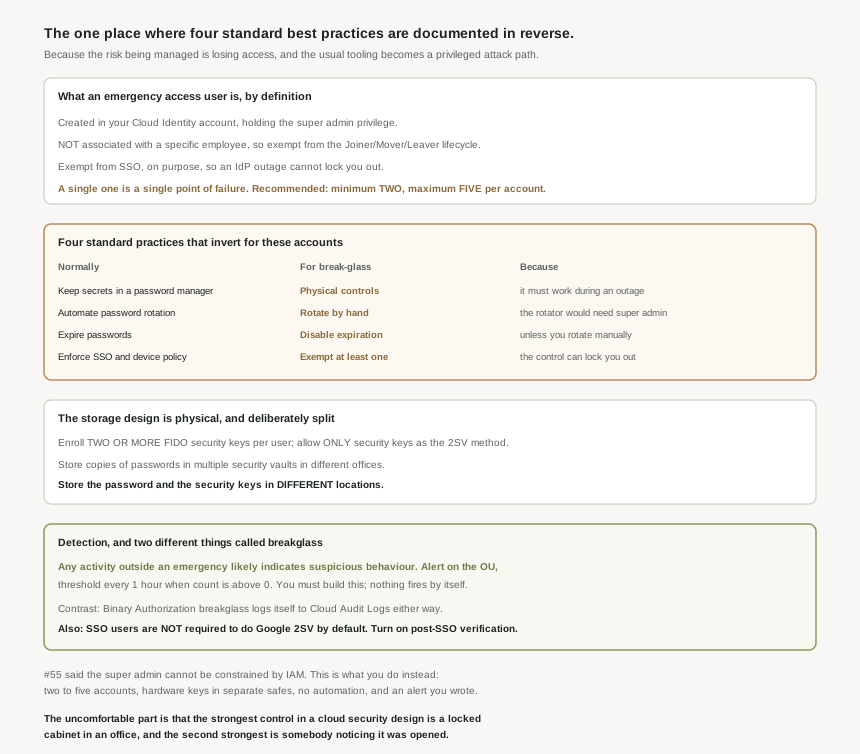
The definition is precise enough to design against. The purpose of emergency access is to enable last-resort access to Google Cloud resources and prevent situations in which you might lose access entirely, and an emergency access user has four defining properties: you create it in Cloud Identity or Google Workspace; it holds the super admin privilege, which provides users with sufficient access to resolve any misconfiguration that affects your Cloud Identity, Google Workspace, or Google Cloud resources; it is not associated with a specific employee, and is therefore exempt from the Joiner, Mover, and Leaver (JML) lifecycle of regular user accounts; and it is exempt from SSO.
That third property is the one that quietly solves a problem the previous posts kept running into. #50 showed a sync can delete accounts it cannot see; #55 showed suspension policies should be mirrored into the IdP. An account deliberately outside the joiner-mover-leaver lifecycle is an account no directory sync will tidy away, which is exactly what you want from a last resort — and exactly why it needs separate, deliberate review, since nothing else will ever prompt you to look at it.
The four purposes, which are not one account
The blueprint lists distinct break-glass purposes rather than a single god account, and the distinction is worth keeping: super admin access for identity and MFA failures; emergency access to the Organization Administrator role, which can then grant access to any other IAM role in the organization; foundation pipeline administrator access for when the CI/CD automation itself is broken; and operations or SRE access for incident response.
Those are different failures with different blast radii, and splitting them is the same separation-of-duties argument #55 made about super admin versus Organization Administrator. Note the second one honestly though: an Organization Administrator break-glass account is, per that sentence, a path to every role in the organisation. It is narrower than super admin only in that it cannot touch the directory.
Where they live, and why the OU matters
The recommendation is to use a dedicated organizational unit (OU) for emergency access users, and separately to use a dedicated OU for privileged users who need an authentication fallback. This is #52’s taxonomy earning its keep: OUs carry configuration, groups carry access, and a configuration that must apply to exactly these accounts and no others is precisely an OU-shaped problem. It is also what makes the alerting below expressible, because the OU is the filter.
Why This Architecture Holds Up
Listed together, the reversals look like carelessness. They are not: they all follow from one change in the threat model. Everywhere else in this series the risk being managed is unauthorised access. Here the risk being managed is losing access, and most of our habits optimise for the first at the expense of the second.
| Normal practice | For break-glass | Documented reason |
|---|---|---|
| Secrets in a password manager | Physical controls | The credential is for when services are down, and a password manager is a service. |
| Automated rotation | Manual rotation | The rotator would need super admin, which makes it an attractive target for attackers. |
| Password expiry | Expiry disabled | An expired emergency password fails exactly when it is needed. |
| Universal SSO and device policy | Deliberate exemption | The control itself can be the outage you are recovering from. |
The rotation one is the most instructive, because it is an argument against automation made on security grounds, which is rare and worth being able to reproduce in a design review. Any mechanism that can change a super admin credential must hold super admin authority permanently. A human with a procedure holds it only while they are doing the task. For this specific account, the manual process has the smaller standing attack surface, and that is the whole case.
Two instructions pull against each other on purpose. For availability: store copies of passwords in multiple physical locations, such as in multiple security vaults in different offices, and for each emergency access user, enroll two or more FIDO security keys. For security: store the password and security keys in different locations. So the design is multiple copies of each factor, in several buildings, with the two factors never in the same building — which means a single office being unreachable costs you nothing, and a single safe being opened by the wrong person yields half a credential. The second factor should be hardware: use Fast IDentity Online (FIDO) security keys for 2-Step Verification, and in that OU, configure 2-Step Verification to allow only security keys as the authentication method, so nobody can quietly downgrade to an app code.
Detection, which is the part you have to build
Prevention is not available here — that was #55’s conclusion — so detection carries the weight, and the premise is clean: any emergency access user activity outside of an emergency event likely indicates suspicious behavior. Because the accounts are in their own OU and are never used in normal operations, this is one of the few alerts in security that can be tuned to fire on anything at all rather than on a pattern.
The guidance gives a worked reporting rule: filter on the actor OU and the events — successful login, failed login, account password change — with threshold: Every 1 hour when count > 0, emailing the security team. A threshold of "more than zero" is the right design for an account whose expected usage is none.
Google Cloud uses "breakglass" for a second, entirely different thing, and the comparison is instructive rather than just confusing. In Binary Authorization, you use breakglass to deploy a container image that Binary Authorization blocks — a deploy-time override of policy enforcement. The part worth stealing: a breakglass event is automatically logged to Cloud Audit Logs, regardless of whether the deployment satisfies or violates the policy. The override announces itself, unconditionally, as a property of the mechanism. An emergency account has no such property; its use looks like a login. That asymmetry is the argument for building the reporting rule on day one rather than after the first unexplained sign-in — and if you are designing your own override anywhere else, the Binary Authorization model is the better one to copy.
When the account is fine and the IdP is not
Emergency access solves administrative lockout. It does not help the several thousand people who cannot sign in because the identity provider is down, and the page treats that as a separate problem with two answers.
The cheaper one is an authentication fallback for a subset: provision Google sign-in credentials in advance for privileged and business-critical users, then selectively disable SSO for them during an outage. Note who can do that: to selectively disable SSO for privileged users, a user must have super admin privileges — so the fallback for everyone else depends on the break-glass account working. Keep those two procedures in one runbook, in that order.
The thorough one is a backup IdP, prepared as a second SAML profile and swapped by changing SSO profile assignments. It does not need to be from the same vendor, but you should use a configuration that matches the configuration of your primary IdP, and the page is candid about the cost: if the backup IdP has weaker security than the primary IdP, the overall security posture of your Google Cloud environment might also be weaker during a failover, and if the two differ in how they issue SAML assertions, the IdP might put users at risk of spoofing attacks. A backup identity provider is a second front door; it needs the same lock.
One sentence here closes the thread #51 opened. #51 found that super admins bypass SSO, so IdP-enforced MFA does not reach them. This page supplies the other half: by default, when you set up SSO, your users are not required to perform Google 2-Step Verification at all. Although this practice is convenient, a compromised IdP introduces risk, and a user without post-SSO verification can become a target for credential forgery attacks. So in a default federated tenant, the second factor exists in exactly one place — the IdP — which means an IdP compromise is a complete authentication bypass for ordinary users and super admins alike, for opposite reasons. The fix is to turn it on: post-SSO verification helps you mitigate the potential effect of an IdP compromise because users must perform 2-Step Verification after each SSO attempt. It is the single highest-value setting in these two posts, and it is off unless you changed it.
Key Architecture Decisions
| Decision | Choose this | Because |
|---|---|---|
| Number of emergency accounts | Two to five, per Cloud Identity account | One is a single point of failure; many are a liability. |
| Which environments get them | Every one whose loss would hurt | Staging lockouts are disruptive too. |
| Credential storage | Physical controls, not a password manager | They are needed when services are unavailable. |
| Password and key placement | Multiple offices, the two factors kept apart | Availability and security pull in opposite directions. |
| Password rotation | Manual, owned by a person | An automated rotator would hold super admin permanently. |
| Password expiry | Disabled, unless you rotate by hand | Expiry turns the last resort into a locked door. |
| Second factor | Two or more FIDO keys, keys-only in that OU | It resists phishing and cannot be downgraded. |
| Context-aware access | Exempt at least one account, named | The policy can be the outage you are recovering from. |
| Detection | Alert on any activity, threshold above zero | Expected usage is none, so anything is a signal. |
| Federated tenants | Enable post-SSO verification | SSO users are not required to do Google 2SV by default. |
The one to look at today
Two questions, and the second is the one that catches people. First: do you have at least two emergency access accounts, and does anyone know where the keys physically are? Second: is there an alert that fires when one of them signs in? If the answer to the first is yes and the second is no, you have built the capability and none of the control — which is the worse of the two failure modes, because a break-glass account nobody watches is just a permanent unmonitored super admin with a good explanation attached.
Closing Thought
I did not expect this to be the post where a cloud provider recommends a safe. Taken together the guidance is: create a small number of accounts outside your identity lifecycle, exempt them from your authentication and access controls, give them hardware keys, write the passwords down, put the two halves in different buildings, do not automate anything about them, and watch them constantly. Every individual instruction would fail a generic security review. Together they are correct, and the reason is that this is the only part of the design where the thing you are protecting against is your own controls working as intended.
That is a reasonable place for the identity block to end. Nine posts ago the question was who a principal is; the answer turned out to involve a directory you do not fully control, a mutable join, an eventually-consistent policy with several authors, and a set of controls that each ship with an exemption. This post is the exemption built on purpose, with the honesty that implies: there is a cabinet, somebody can open it, and the best available answer is that two people know where it is and everybody finds out when it opens. The sophisticated machinery of the previous twenty-five posts rests on that, and it is better to have decided it deliberately than to discover during an outage that nobody did.
#57 turns from emergency access to the everyday excess it leaves behind: IAM Recommender and role right-sizing — what the recommendations are computed from, and what that means for how far you should trust them.
Comments