Business Challenge
#53 found a guest population that grows itself and has no expiry. #55 found that risk-based governance stops at the tenant boundary. Both posts ended at the same place: a guest account is permanent unless somebody remembers it. Entitlement management is the answer Microsoft actually ships for that, and it is worth being precise about what it adds, because it is not another way to grant access.
It adds a lifecycle. “Entitlement management is an identity governance feature that enables organizations to manage identity and access lifecycle at scale, by automating access request workflows, access assignments, reviews, and expiration.”
The unit of that lifecycle is an access package — “a bundle of all the resources with the access an identity needs to work on a project or perform their task” — and the sentence that makes this post worth writing is the one about what happens at the end of it:
“When an identity who isn't yet in your directory requests access, and is approved, they're automatically invited into your directory and assigned access. When their access expires, if they have no other access package assignments, their B2B account in your directory can be automatically removed.”
Invitation and removal become consequences of a request and its expiry, rather than acts somebody has to remember. The default is already reasonable: on losing a last assignment the account is “blocked from signing in for 30 days, and later removed.”
Which reframes #53’s central finding as a deliberate choice rather than an oversight. That post’s lead was that any user — including a guest — can invite more guests by default. Here is the governance documentation giving the same advice from the other side: “Allowing guests to invite other guests to your directory means that guest invites can occur outside of entitlement management. We recommend setting Guests can invite to No to only allow for properly governed invitations.”
Architecture
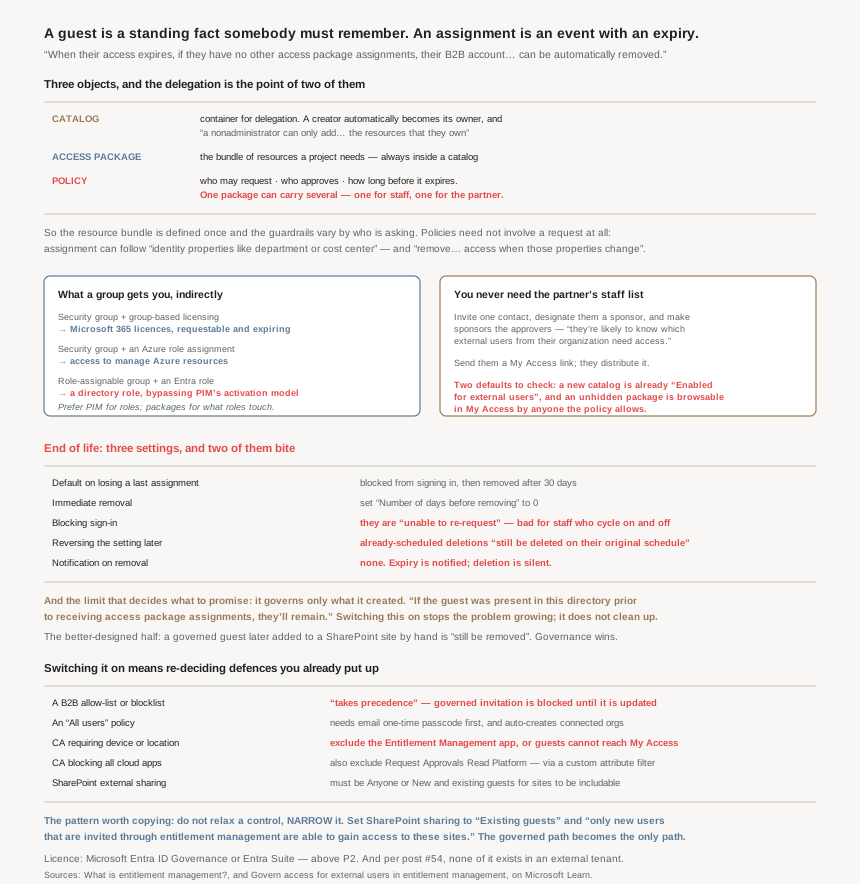
Four objects, and the delegation model is the point of three of them.
Catalogs exist so that IT stops being the bottleneck
The delegation model is the part most worth understanding, because it is the reason this feature scales where manual invitation does not. A catalog is “a container of related resources and access packages… used for delegation, so that nonadministrators can create their own access packages.”
And the boundary is enforced by ownership rather than by role alone: “An administrator can add resources to any catalog, but a nonadministrator can only add to a catalog the resources that they own.” A catalog creator “automatically become[s] the owner of that catalog”, and can then add co-owners or access package managers. So a department can publish, approve and expire its own access without an administrator in the loop, and without being able to give away anything it does not already control.
That is the answer to a scenario the documentation names explicitly: “Departments wish to manage their own access policies for their resources without IT involvement.”
What you can actually put in a package, including the indirect reach
The direct list is modest: Entra security groups, Microsoft 365 Groups and Teams, enterprise applications, SharePoint Online sites, plus API permissions for agent identities and SAP IAG business roles in preview.
The interesting part is what a group gets you, because three things compose through it and widen the feature considerably:
| Put this in the package | And you have governed |
|---|---|
| A security group with group-based licensing | Microsoft 365 licences, requestable and expiring |
| A security group with an Azure role assignment | Access to manage Azure resources |
| A role-assignable group with an Entra role assigned | Access to manage Microsoft Entra roles |
That third row deserves a pause. An access package containing a role-assignable group is a request-and-approve path to a directory role — which overlaps with PIM from #45 and should be a deliberate choice between the two, not an accident of how somebody built a package. If the thing being requested is privileged, the question is whether you want PIM’s activation model or entitlement management’s assignment model, and the answer is usually PIM for roles and entitlement management for the resources those roles touch.
One package, several policies — which is the design primitive
A policy is “a set of rules that defines the access lifecycle, such as how identities get access, who can approve, and how long they have access.” The useful move is that a package can carry more than one: “an access package could have two policies — one for employees to request access and a second for external identities to request access.”
So the resource bundle is defined once and the governance varies by who is asking. Employees get a short approval and a long expiry; the partner organisation gets a sponsor approval and ninety days. One package, one definition of what the project needs, two different sets of guardrails.
Policies also need not involve a request at all. Access can be assigned “automatically based on rules” — “based on identity properties like department or cost center”, with the complement that matters more: “remove an identity's access when those properties change.” That is attribute-driven joiner-mover-leaver behaviour, and it is where #57 picks up.
The external flow, and the two settings that decide its usefulness
The sequence is worth knowing because it explains an absence people report as a fault. A request is approved, and then: “Microsoft Entra ID automatically creates a B2B guest account for them, but won't send the user an email.” The invitation email of #53’s world does not appear; the delivery notification does.
Rather than knowing every partner contact, you nominate one. The recommended pattern is good and under-used: invite a contact from the partner, designate them a sponsor, and make sponsors the approvers, “since they're likely to know which external users from their organization need access.” Then you send them a My Access link and they distribute it. You never learn the partner’s staff list, which is the point.
Two defaults on the way through are worth checking rather than assuming. A new catalog is “enabled to allow external users to request access packages” — Enabled for external users is Yes. And a package that is not hidden is browsable: “any user allowed by the policy settings in that access package can browse for the access package in the My Access portal.” For a package aimed at one partner, hidden plus a shared link is the combination you want.
Why This Architecture Holds Up
Because it only governs what it created
This is the limitation that decides how much of your guest problem this actually solves, and it is stated plainly: “Entitlement management only removes external guest user accounts that were invited through entitlement management or that were added to entitlement management for lifecycle management by having their guest user account converted to governed.”
And explicitly: “If the guest was present in this directory prior to receiving access package assignments, they'll remain.” So turning this on does not clean up the population #53 described. It stops the population growing ungoverned, and it governs everyone from here. The existing guests need converting one by one, or reviewing by other means.
There is a sharp edge in the other direction too, and it is the better-designed half: “if the guest was invited through an access package assignment, and after being invited was also assigned to a OneDrive or SharePoint Online site, they'll still be removed.” Governance wins over ad-hoc sharing. Somebody adding a governed guest to a site by hand does not quietly extend that guest’s life.
Because the lifecycle settings have a one-way quality
Three settings control the end of life — Remove external user, Block external user from signing in, and Number of days before removing, which can be 0 for immediate removal. Two things about them need to be decided before they are switched on rather than after.
First, blocking is not a soft state. “If a user is blocked from signing in to this directory, then the user is unable to re-request the access package or request additional access in this directory. Don't configure blocking them from signing in if they'll later need to request access.” For a partner whose people cycle on and off a project, blocking creates a support ticket every time somebody comes back.
Second, reversing the setting does not reprieve anyone already condemned: “Changing the Remove external user setting to No only affects users who later lose their last access package assignment; users that were scheduled for deletion and are blocked from sign in will still be deleted on their original schedule.” So a configuration mistake with a thirty-day fuse is not fixed by correcting the configuration.
And the detail to put in the operational runbook, because it is the one that generates confused emails: “While an external user is notified when their access package expires, there's no notification when their account is removed.”
Because switching it on means relaxing things you may have hardened
This is the part that makes adoption an architecture exercise rather than a configuration one, and it is a genuinely awkward set of trade-offs. Entitlement management has to be able to invite, and several defensive settings prevent it:
- The B2B allow/blocklist wins. “Any B2B allow or blocklist settings you have takes precedence”, and a user whose domain is not allowed “aren't invited and can't be assigned access until the lists are updated.” The allow-list that #53 recommended as the blunt instrument for guest sprawl is the thing that blocks governed invitation.
- An “All users” policy requires email one-time passcode. “You must first enable email one-time passcode authentication for your directory.” And such a policy auto-creates connected organisations: “a connected organization will automatically be created for them when they request the package.” Convenient, and a long way from a controlled partner list.
- SharePoint has to allow guests at all. Org-level sharing must be Anyone or New and existing guests for sites to be includable.
That third constraint has an elegant answer that is the best pattern in this post. Set SharePoint’s org-level sharing to Existing guests, and “only new users that are invited through entitlement management are able to gain access to these sites.” Ad-hoc sharing cannot create a guest; entitlement management can. One setting turns governed invitation into the only door.
Because Conditional Access will lock guests out of the thing that governs them
The most consequential prerequisite, and a perfect restatement of #41a’s lesson: “Make sure to exclude the Entitlement Management app from any Conditional Access policies that impact guest users. Otherwise, a Conditional Access policy could block them from accessing MyAccess or being able to sign in to your directory.”
The reasoning is a concise summary of why external users break device-based policy, and it echoes #55 exactly: “guests likely don't have a registered device, aren't in a known location, and don't want to re-register for multifactor authentication (MFA), so adding these requirements in a Conditional Access policy will block guests from using entitlement management.”
And if your policy blocks all cloud apps, excluding one app is not enough — you also need Request Approvals Read Platform excluded, which has no exclusion UI. The documented route is to invent a custom security attribute, assign it to that service principal, and filter on it, needing four roles to do so: “Conditional Access Administrator, Application Administrator, Attribute Assignment Administrator, and Attribute Definition Administrator.” A governance feature whose prerequisite is a four-role, attribute-based Conditional Access exclusion is not a thing anybody configures by accident.
Because the licence is the gate, and it is above P2
Worth stating plainly because it changes who can even consider this: “This feature requires Microsoft Entra ID Governance or Microsoft Entra Suite subscriptions”, with only a hedge that “some capabilities, within this feature, may operate with a Microsoft Entra ID P2 subscription.”
Every post in this phase has leaned on P1 or P2. This one sits above both, which puts it in a different budget conversation. And recall from #54 that ID Governance is “Not available” in an external tenant — so none of this applies to your customer-facing directory. Entitlement management governs partners and employees, not consumers.
Key Architecture Decisions
| Situation | Decision | Why |
|---|---|---|
| Adopting entitlement management for partners | Set Guests can invite to No | Otherwise invitations keep happening outside governance. |
| Existing ungoverned guest population | Convert to governed, or review separately | Pre-existing guests are never removed by this feature. |
| You already use a B2B allow-list | Update it before expecting invitations to work | The list takes precedence over entitlement management. |
| Wanting governed invitation to be the only door to SharePoint | Set org-level sharing to Existing guests | Ad-hoc sharing then cannot create a guest; packages still can. |
| Guests report they cannot reach My Access | Exclude the Entitlement Management app from CA | Device and location conditions block them by design. |
| Conditional Access blocks all cloud apps | Also exclude Request Approvals Read Platform | Needs a custom security attribute and an app filter. |
| Partner staff cycle on and off a project | Do not block sign-in on last assignment loss | Blocked users cannot re-request access. |
| Wanting accounts gone immediately | Set days before removal to 0 | Default is blocked, then removed after 30 days. |
| Discovering a lifecycle misconfiguration | Expect already-scheduled deletions to proceed | Changing the setting does not reprieve them. |
| Users confused about vanished accounts | Document it — there is no notification | Only expiry is notified, not removal. |
| You do not know the partner's people | Invite a sponsor and make sponsors the approvers | They know who needs access; you never hold their staff list. |
| A package aimed at one partner | Mark it hidden and share a link | Unhidden packages are browsable by anyone the policy allows. |
| One bundle, two audiences | Two policies on one package | Resources defined once, guardrails per audience. |
| Departments want to self-serve | Give them a catalog, not an admin role | Non-admins can only add resources they own. |
| Requesting a privileged directory role | Prefer PIM; use packages for the resources | Role-assignable groups in a package bypass the activation model. |
| Access should follow department or cost centre | Automatic assignment policy | It also removes access when the attribute changes. |
| Customer-facing tenant | None of this is available | ID Governance does not exist in an external tenant. |
Closing Thought
The useful way to see entitlement management is as the feature that converts three nouns into one verb. A guest, a group membership and an application assignment are each a standing fact that somebody has to remember; an access package assignment is an event with an expiry date attached. Everything else — catalogs, sponsors, multi-stage approval, auto-assignment — is machinery for making that conversion survivable at scale and delegable to the people who actually know whether access is still needed.
What makes adopting it an architecture decision is that it does not layer cleanly on top of a defensively-configured tenant. The allow-list you added to contain guest sprawl blocks it. The Conditional Access policy requiring compliant devices blocks it. The SharePoint sharing setting you tightened prevents it including sites. Every one of those was a reasonable response to the problems of the last three posts, and each has to be re-decided in its terms rather than removed. The pattern worth copying is the SharePoint one: rather than relaxing a control, narrow it so that the governed path is the only path. Existing guests plus entitlement management is strictly better than either setting alone.
And the honest limit, because it determines what to promise after a deployment: this governs what it creates. Switching it on tomorrow stops the problem growing and does nothing about the guests already in the directory, who remain exactly as invisible as #53 left them. The first project is not the access package. It is deciding what happens to everyone who arrived before there was a lifecycle to arrive into.
#57 takes the automatic half of this further: lifecycle workflows for joiners, movers and leavers — what Entra can trigger off a hire date or a leaving date, and what it still expects a human to do.
Official Azure Reference
- What is entitlement management? — access packages, catalogs and policies, the resource types, the delegation model, the terminology table and the licence requirement
- Govern access for external users — the external lifecycle end to end, the three removal settings, what it will and will not govern, and every prerequisite that has to be relaxed first
- Delegation and roles in entitlement management — the catalog owner, access package manager and catalog creator roles referred to above
Comments