Business Challenge
Yesterday's post was about publishing a name to the world. This one is about the opposite, and the opposite is not as symmetrical as it sounds.
Private zones enable you to manage custom domain names for your virtual machine (VM) instances, load balancers, and other Google Cloud resources without exposing the underlying DNS data to the public internet. That is the pitch, and it is accurate. What it does not say is that a private zone is not additive. It wins a match for everything under its suffix, and what it does not contain, nobody in that network can resolve.
This is the one. Resolution inside a VPC network matches by longest suffix — Cloud DNS uses longest-suffix matching to find records — and once a private zone wins that match, the search is over. If the zone contains a record that exactly matches the query, Cloud DNS returns the record's data. If the zone doesn't contain a matching record, Cloud DNS returns NXDOMAIN.
The documentation is explicit that this beats the public answer: NXDOMAIN is returned if there's no record for myapp.gcp.example.com defined in the gcp.example.com private zone, even if there is a record for myapp.gcp.example.com defined in a public zone.
Correct approachBefore creating a private zone for a suffix that already resolves publicly, inventory every name under that suffix your workloads actually use — including the ones nobody remembers, like a status endpoint, a webhook callback, or a vendor's verification host. Each one you omit goes dark at the moment the zone is created, for VMs only, with no error anywhere.
Visibility is a list, and an empty list is a valid list. Only authorized networks are allowed to query your private zone; if you do not specify any authorized networks, you cannot query the private zone at all. The zone is created, it is billed, and it answers nobody.
Correct approach
Treat the authorized-network list as the zone's entire access control surface, and check it first when a private zone appears not to work — you must specify the list of authorized VPC networks that can query your private zone when you create or update it. Check second that the client is asking the right resolver: requests for DNS records in private zones must be submitted through the metadata server 169.254.169.254. A VM with a hand-edited resolv.conf pointing at a public resolver will never see a private zone, however correctly the zone is configured.
Working as designed, and worth knowing before it surprises someone. Scopes are a hierarchy: DNS resolution occurs at the most specific scope available, walking up the hierarchy when a zone is not found in a lower scope, and the cluster is the most specific scope, and Cloud DNS checks it first for a match.
Correct approachDecide the scope deliberately rather than inheriting it from whichever console page you happened to be on. A VPC-scoped DNS zone lets DNS names be available globally to the entire VPC network; a cluster-scoped one does not, and two clusters on one network can hold different answers for the same name. That is a feature when it is intended and a very confusing afternoon when it is not.
Architecture
One ordered list decides every answer a VM gets, and the public internet is the last entry in it.
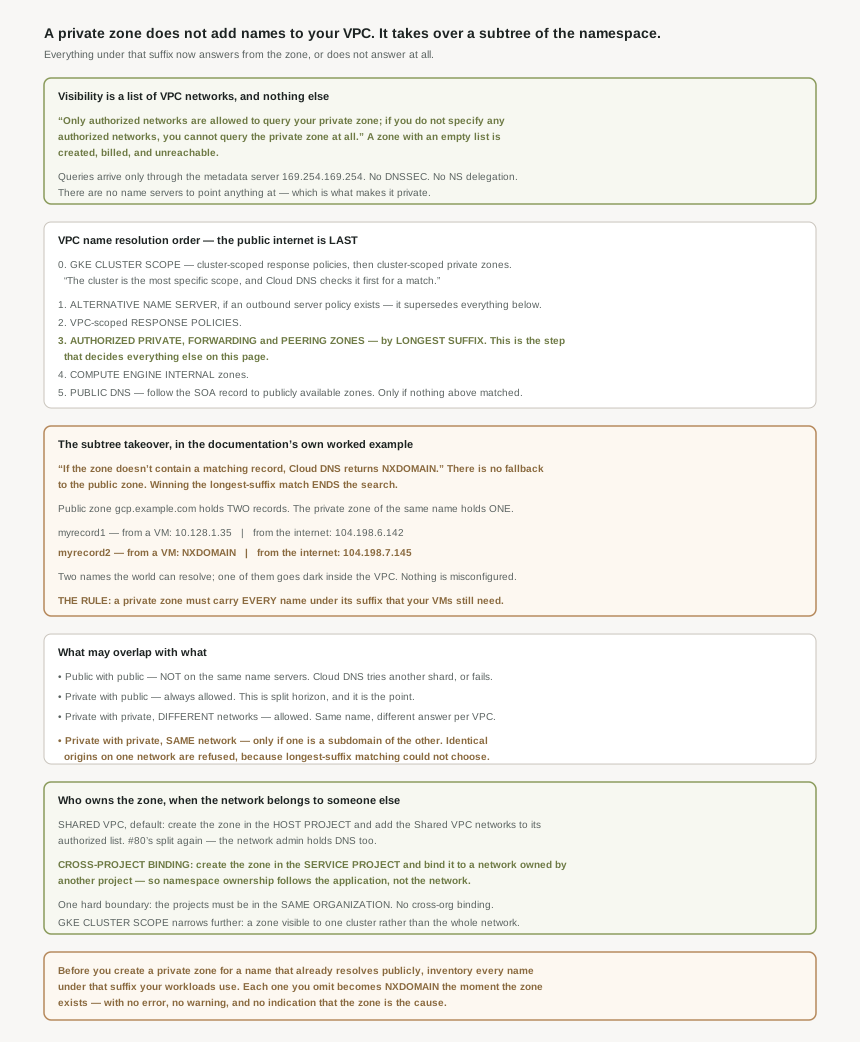
The resolution order, in full
Everything in this post is a consequence of one ordered list, so it is worth having whole. For a GKE node, Cloud DNS first attempts to match a query using cluster-scoped response policies and private zones; then, for every VM, the VPC network order runs: an alternative name server if an outbound server policy exists, then VPC-scoped response policies, then all managed private zones authorized for the VPC network, then match records in Compute Engine internal zones, and finally the public internet, where Google Cloud follows the start of authority (SOA) record to query publicly available zones, including Cloud DNS public zones.
Two things fall out of the ordering that matter more than the list itself. The public internet is reached only when nothing above matched — so a private zone is not consulted alongside public DNS, it is consulted instead of it. And the matching at step three is by suffix, not by name, which is what turns "I added one zone" into "I took responsibility for a subtree".
The subtree takeover, in the documentation's own numbers
The split-horizon example on the zones overview page is the clearest statement of this behaviour anywhere in the Cloud DNS documentation, and it is worth reading as a warning rather than as a feature description. A public zone gcp.example.com holds two records; a private zone of the same name, authorized for one VPC network, holds one.
| Query | From a VM in the authorized network | From the internet |
|---|---|---|
myrecord1.gcp.example.com |
10.128.1.35 | 104.198.6.142 |
myrecord2.gcp.example.com |
NXDOMAIN | 104.198.7.145 |
The first row is why people create private zones: private zones enable you to define different responses to a query for the same record when the query originates from a VM within an authorized VPC network. The second row is the cost, and it is not optional — a query for myrecord2.gcp.example.com from a VM in your VPC network returns an NXDOMAIN error because there's no record for myrecord2.gcp.example.com in the private zone gcp.example.com, while a query for myrecord2.gcp.example.com from the internet returns 104.198.7.145.
Of the two names the public zone answers, one goes dark inside the VPC. Not because of a mistake — because a private zone is a claim over a namespace, not a set of additional records.
Scope the private zone as narrowly as the namespace allows. Longest-suffix matching cuts both ways: queries for myapp.prod.gcp.example.com are resolved according to records in the private zone gcp.example.com because gcp.example.com is the longest common suffix between the requested DNS record and the available private zones.
So a private zone for internal.example.com shadows only that branch, while one for example.com shadows everything you own. The narrower zone is almost always the correct one, and the instinct to create the zone at the registrable domain is where the damage starts.
What may overlap with what
Two zones overlap with each other when the origin domain name of one zone is either identical to or is a subdomain of the origin of the other zone. The rules that follow are not symmetrical, and the asymmetry is informative:
Public with public — overlapping public zones are not allowed on the same Cloud DNS name servers. That is yesterday's shard constraint, seen from the other side.
Private with public — a private zone can overlap with any public zone. Unconditionally, because that is split horizon and it is the entire feature.
Private with private, different networks — private zones scoped for different VPC networks can overlap with each other. Two environments can each hold their own db.gcp.example.com and neither knows about the other.
Private with private, same network — the one refusal. Two private zones that have been authorized to be accessible from the same VPC network cannot have identical origins unless one zone is a subdomain of the other. Which is exactly the condition longest-suffix matching needs: a tie has no winner, so the configuration is rejected at creation rather than resolved arbitrarily at query time. A rule that fails early instead of answering ambiguously is worth noticing.
Who owns the zone when the network belongs to someone else
The default under Shared VPC puts DNS where the network is: you must create the zone in the host project, and then add one or more Shared VPC networks to the list of authorized networks for that zone. That is #80's split again — the host project's network admin ends up owning every application's namespace along with the subnets.
The alternative exists precisely to undo that coupling. Alternatively, you can set up the zone in a service project using cross-project binding, and the reason is stated plainly: cross-project binding lets you keep the ownership of the DNS namespace of the service project independent of the ownership of the DNS namespace of the entire VPC network. The application team creates and manages its own zone, in its own project, and binds it to a network it does not own.
One boundary applies and it is absolute: your projects need to be in the same organization, and you cannot associate a zone to a VPC network in a project outside the organization.
Why This Architecture Holds Up
The word invites you to think of a private zone as a public zone with the audience restricted. It is not. A public zone is authoritative for a domain the world delegated to it; a private zone is an override, inserted ahead of everything else in one network's resolution order, for a suffix nobody delegated to anybody.
That difference explains the restrictions, which otherwise read as arbitrary. Private zones do not support DNS security extensions (DNSSEC) or custom resource record sets of type NS, and private zones don't support delegation of subdomains to different name servers by using NS records. Both follow from the same fact: there is no delegation chain here and no name server to point at. DNSSEC authenticates a chain of trust that starts at the root; a private zone has no position in that chain. NS records delegate to a name server; a private zone is resolved by the metadata server, which has nowhere to send you.
Write it down as a sentence and it stops being surprising: a private zone is a namespace claim, scoped to a list of networks, that pre-empts public DNS for everything under its suffix.
Every behaviour in this post is already in that sentence. The NXDOMAIN, because a claim that wins is not a lookup that falls through. The empty-authorized-list failure, because the scope is the list. The ban on two identical origins in one network, because two claims to one namespace cannot both win. And the absence of DNSSEC and NS records, because a claim is not a delegation.
One number worth knowing
The ceiling is generous enough that it should not shape your design: number of managed zones bound to a VPC network 10,000. There is no reason to merge two namespaces into one zone to save zones, and every reason not to — a narrower zone shadows less. If a design pressure exists here it runs the other way, toward more and smaller zones than feel natural.
Key Architecture Decisions
| Situation | Decision | Because |
|---|---|---|
| Creating a private zone for a suffix you publish publicly | Inventory every name under it first | Anything missing becomes NXDOMAIN for your VMs, silently. |
| Choosing the zone's origin | Pick the narrowest suffix that covers what you need | Longest-suffix matching means a shorter origin shadows more. |
| A private zone appears not to work | Check the authorized-network list before anything else | An empty list means the zone cannot be queried at all. |
| A VM with a hand-edited resolver config | Point it back at the metadata server | Private zone queries must go through 169.254.169.254. |
| Wanting DNSSEC on an internal namespace | Not available; use network controls instead | Private zones do not support DNSSEC. |
| Wanting to delegate a private subdomain elsewhere | Use a forwarding or peering zone, not NS records | Private zones do not support NS delegation. |
| Two environments needing the same internal name | One private zone per VPC network, same origin | Private zones in different networks may overlap. |
| Two zones with the same origin on one network | Not possible — make one a subdomain of the other | Identical origins on one network are refused outright. |
| Running Shared VPC, default path | Create the zone in the host project | That is where the authorized-network list is managed. |
| Application teams should own their own namespace | Cross-project binding, zone in the service project | It decouples namespace ownership from network ownership. |
| Projects in different organizations | Cross-project binding is unavailable | Both projects must be in the same organization. |
| A name should resolve for one GKE cluster only | Cluster scope, not VPC scope | The cluster is the most specific scope and is checked first. |
| Tempted to consolidate zones to keep the count down | Do not | The ceiling is 10,000 per network; a wider zone shadows more. |
| Debugging "it works from my laptop" | That is expected, not evidence | Private zones are invisible outside the authorized networks. |
The one to look at today
For every private zone whose origin is also a domain you publish publicly, compare the record set in the private zone against the record set in the public one. Any name present publicly and absent privately is currently NXDOMAIN for every VM on the authorized networks. Some of those will be deliberate. The ones that are not have been failing quietly since the zone was created, and whoever reported it was almost certainly told it was a transient network problem.
Closing Thought
Yesterday's post ended on failures that live outside Google Cloud — a registrar, a registry, a resolver. This one is the mirror image: the failure lives entirely inside one project, in a single ordered list, and it is invisible from outside because from outside everything is genuinely fine. The public zone answers correctly. The internet is satisfied. Only the VMs are not, and only for names nobody thought to copy across.
What makes it worth a post of its own is that the fix is free and the diagnosis is expensive. Choosing internal.example.com instead of example.com costs nothing at creation time and removes the entire failure class. Discovering six weeks later that a payment webhook has been returning NXDOMAIN inside one VPC network, while resolving perfectly from every laptop used to test it, costs considerably more.
#99 takes the two zone types this post kept deferring: DNS peering and forwarding zones — how a VPC network borrows another network's resolution order, and why forwarding, unlike peering, refuses to be transitive.
Official Google Cloud Reference
- DNS zones overview
- Name resolution order
- Cloud DNS key terms
- Cloud DNS overview
- Create, modify, and delete zones
- Create a zone with cross-project binding
- Scopes and hierarchies
- Configure a GKE cluster scope
- Set and manage IAM policies for zones
- Records overview
- Best practices for Cloud DNS
- Cloud DNS quotas and limits
Comments