Business Challenge
#97 described how a request finds its way through this gateway. This post is about the thing underneath that: how many gateways there actually are, where they sit, and what the meter is counting.
The first fact resolves a question yesterday's post left open. #97 set out two different mechanisms for deciding which listener wins — rule order on v1, explicit priority on v2 — and presented them as a live choice. They are not:
“Microsoft announced the deprecation of Azure Application Gateway V1 on April 28, 2023. Application Gateway V1 retired on April 28, 2026, and Microsoft no longer supports V1 resources. There's no service-level agreement (SLA) for V1 resources. As Microsoft decommissions the hardware that supports V1, traffic passing through remaining V1 resources can't be guaranteed.”
So the listener-ordering tables that still carry a v1 column are documenting a SKU that retired seven months ago. The order question has one answer now: rule priority. The v1 column is history, kept because some deployments still exist — and the documentation is explicit about what happens to those: “Microsoft blocks the data path and deletes the resources”, after a notification.
That makes this the third retirement in four posts. #95: Basic Load Balancer, retired 30 September 2025. #96: default outbound access, changed 31 March 2026. Now Application Gateway v1. The Azure load-balancing family has had its entire first generation withdrawn inside about eighteen months, and in every case the documentation still reads as a comparison against the thing that is gone.
Architecture
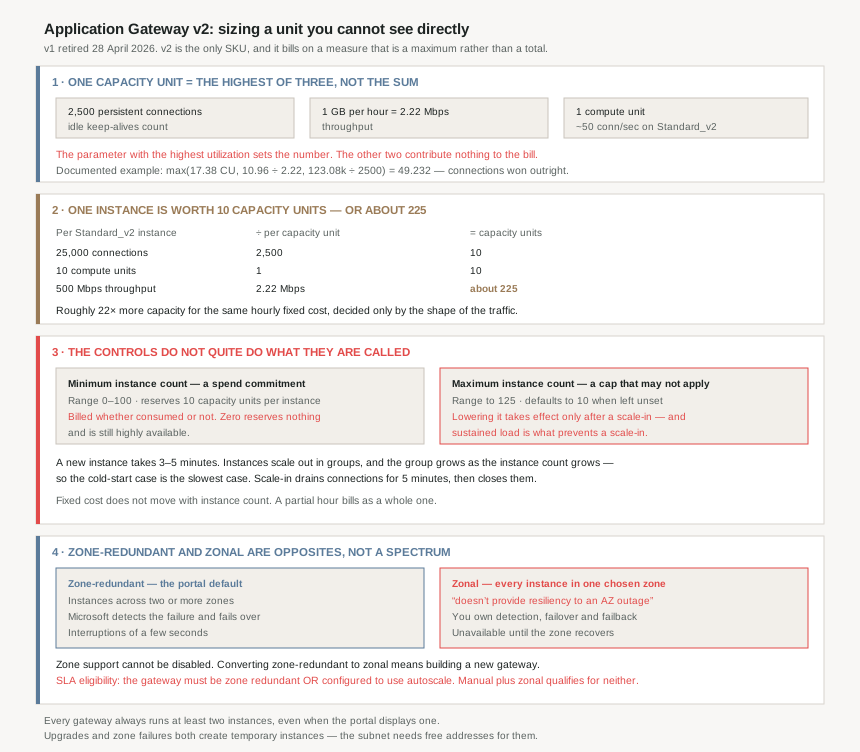
The capacity unit is a maximum, not a sum
“A single Capacity Unit consists of the following parameters: 2,500 Persistent connections · 1 GB per hour (2.22-Mbps) throughput · 1 Compute Unit. The parameter with the highest utilization among these three parameters is used to calculate capacity units for billing purposes.”
Three dissimilar measurements, and whichever is furthest along its own scale sets the number. The documented metrics example shows it working: compute units 17.38, throughput 10.96 Mbps, connections 123.08k — and the answer is max(17.38, 10.96/2.22, 123.08k/2500) = 49.232. Connections won, by a wide margin, and the other two measurements contributed nothing.
Which means capacity planning here cannot be done on an average. You need to know which of the three parameters your traffic maxes out first, because that one is your bill and the others are free.
What one instance is actually worth
| Parameter | Per Standard_v2 instance | Per capacity unit | Instance = how many CU |
|---|---|---|---|
| Persistent connections | 25,000 | 2,500 | 10 |
| Compute units | 10 | 1 | 10 |
| Throughput | 500 Mbps | 2.22 Mbps | ~225 |
The documentation states the consequence plainly: “in cases where the dominant factor is either compute units or persistent connections, each instance can handle 10 capacity units. In cases where the dominant factor is throughput, each instance can handle approximately 225 capacity units.”
That is a factor of roughly twenty-two in what the same hourly fixed cost buys you, decided entirely by the shape of your traffic. A gateway fronting large file downloads and a gateway fronting a chatty API with many idle keep-alives have nothing in common from a sizing perspective, even at identical request rates.
What the money looks like
| Component | Standard_V2 | WAF_V2 |
|---|---|---|
| Fixed, per hour (illustrative, East US) | $0.246 | $0.443 |
| Capacity unit, per hour | $0.008 | $0.0144 |
| Derived: WAF premium on the fixed component | 0.443 ÷ 0.246 = about 1.8× | |
| Monthly basis | 730 hours | |
Two structural properties of that table matter more than the rates, which are illustrative and will move.
First, “the number of instances running at any point of time isn't considered in calculating fixed costs” — the fixed component is per gateway, per hour, flat. Second, a partial hour is billed as a full hour. So a gateway that exists is costing money whether or not anything is talking to it, and the instance count moves only the variable half.
One cross-service note worth carrying from #87: “When Azure DDoS Network Protection is enabled on your application gateway with WAF you're billed at the lower non-WAF rates.” The DDoS subscription absorbs the WAF premium.
Why This Architecture Holds Up
Because the minimum instance count is a bill, not a safety net
“The manually set scale for instance count and the minimum instance count in autoscale config reserves 10 capacity units/instance. These reserved capacity units are billed as long as the application gateway is active regardless of the actual resource consumption.”
So a minimum instance count of 6 is a standing order for 60 capacity units an hour, forever, used or not. The documented billing metric makes the arithmetic explicit: Estimated Billed Capacity units is “the greater value between Current capacity units… and Fixed billable capacity units”.
The opposite choice is available and genuinely free of reservation: “Zero signifies no reserved capacity and is purely autoscaling in nature”, and “even if you configure autoscaling with zero minimum instances the service is still highly available, which is always included with the fixed price”. A gateway at minimum zero with no traffic bills the fixed cost and nothing else.
The cost of choosing zero is latency on the first burst, which brings us to the number that decides whether that is acceptable.
Because scale-out takes minutes and bursts do not wait
“Provisioning a new instance may take approximately three to five minutes.”
That is the whole argument for a non-zero minimum, and it is an argument about traffic shape rather than cost. A workload whose load ramps over tens of minutes can autoscale from zero reserved capacity and never notice. A workload that goes from quiet to peak in ninety seconds will be under-provisioned for the first few minutes of every such event, and no setting shortens that.
There is a partial mitigation built in, and it is unusual enough to note: “These instances scale out in groups, and the group size is increased proactively when the current instance count is higher.” A larger gateway adds instances in larger batches, so the service scales faster the bigger it already is. Which is the correct behaviour and also means the cold-start case is the slowest case.
On the way down, the behaviour is gentler and worth knowing for connection-sensitive workloads: “Application Gateway drains existing connections for 5 minutes on the instance that is subject for removal. After 5 minutes, existing connections are closed and the instance removed.” That is a hard ceiling on a connection's survival across a scale-in, independent of the connection draining setting #97 covered for backend pool changes.
Because lowering the maximum may never take effect
“If the maximum instance count is updated to a value less than the current instance count, the new setting will not take immediate effect. The newly updated maximum will only be enforced after a scale-in operation brings the current count below newly updated maximum count. If the scale-in operation does not occur because the autoscaling scale in thresholds are not met, the new maximum setting will not be applied.”
Read that as an operator reaching for the maximum to cap a cost overrun during sustained load. The change is accepted, the portal shows the new value, and nothing happens — because the condition for applying it is a scale-in, and sustained load is precisely what prevents one. The control works when you do not need it and does not when you do.
The companion default is worth checking on existing deployments too: “The default value for maximum instance count is 10 if not specified.” Ten instances is 100 capacity units of compute-bound or connection-bound headroom. A gateway that was never given an explicit maximum has one anyway.
Because “zonal” is not a weaker form of zone redundancy
| Zone-redundant | Zonal | |
|---|---|---|
| Placement | Instances across two or more zones | All instances in one zone you choose |
| Zone outage detection | Microsoft's, automatic | Yours |
| Failover | Automatic, no customer action | You fail over to a secondary gateway you built |
| Expected downtime | Interruptions of a few seconds | Unavailable until the zone recovers |
| Default in the portal | Yes | No |
The names suggest a spectrum. They are opposites: “By itself, a zonal gateway doesn't provide resiliency to an availability zone outage.” Zonal exists for one documented reason — “only recommended when cross-zone latency is too high for your needs” — and buying it means taking on detection, failover and failback yourself.
Two properties constrain how you get there. Availability zone support “can't be disabled”, so every gateway in a zone-capable region is one or the other. And the conversion is one-way in practice: “If you need to move from a zone-redundant gateway to a zonal configuration, you need to deploy a new gateway.”
A detail that resolves a common piece of confusion: “each gateway is always created with a minimum of two instances. However, the Azure portal may indicate that your gateway has a single instance, even though it actually has two.” The portal under-reports. Nobody is running one.
And the zone spread is a range rather than a guarantee: in a three-zone region a zone-redundant gateway has instances in “at least two of those zones… instances might be spread across two zones or three zones”, because the underlying scale set does “best-effort zone balancing” and “scaling operations might not occur when the capacity can't be evenly divided between zones (+/- 1 instance)”.
Because the SLA has a configuration condition
“For a gateway to be eligible for the Application Gateway availability SLA, it must… either be zone redundant, or it must be configured to use autoscale.”
A manually scaled, zonal gateway is outside the SLA. That is a configuration most people would describe as deliberate and conservative — a fixed instance count, pinned to a known zone — and it is exactly the combination that forfeits the guarantee. Either lever alone satisfies it.
Because the subnet has to have room for instances you never asked for
Autoscaling and maintenance both create instances, and instances need addresses:
“To maintain your expected capacity during an upgrade, the platform automatically adds extra instances of your gateway during the upgrade process. However, you need to ensure that the gateway's subnet has sufficient free IP address space for the temporary instances to be created.”
The same applies during a zone outage, where “the platform attempts to maintain the capacity of your gateway by creating temporary instances in other availability zones”. A subnet sized exactly to the current instance count works perfectly until the first platform upgrade or the first zone failure — which is to say, until the moment it matters. This is #62's address-planning argument arriving with a specific number attached to it.
Key Architecture Decisions
| Decision | Choice | Why |
|---|---|---|
| Running anything on v1 | Migrate now | V1 retired 28 April 2026, has no SLA, and remaining deployments face data-path blocking and deletion as the hardware is decommissioned. |
| Sizing method | Identify which of the three capacity unit parameters saturates first | A capacity unit is the maximum of connections, throughput and compute — not a blend. The other two contribute nothing to the bill. |
| Estimating instances needed | 10 capacity units per instance, unless throughput dominates | A throughput-bound instance carries about 225 capacity units — roughly 22 times more for the same fixed cost. |
| Minimum instance count | Set from burst shape, not from peak load | It reserves 10 capacity units per instance billed regardless of use. Zero is genuinely free of reservation and still highly available. |
| Minimum zero for spiky workloads | Avoid | A new instance takes three to five minutes, and scale-out batches are smallest when the instance count is lowest. |
| Using maximum instance count as a cost control | Don't rely on it under load | Lowering it below the current count is only applied after a scale-in, and sustained load prevents the scale-in from happening. |
| Leaving the maximum unset | Set it explicitly | The default is 10 instances, which is a cap whether or not anyone chose it. |
| Zonal deployment | Only for a measured cross-zone latency problem | It provides no resiliency to a zone outage by itself, and you own detection, failover and failback. |
| Converting zone-redundant to zonal | Treat as a rebuild | It requires deploying a new gateway; zone support cannot be disabled at all. |
| Manual scaling with a pinned zone | Avoid — it forfeits the SLA | SLA eligibility requires the gateway to be zone redundant or configured to use autoscale. |
| Gateway subnet sizing | Leave headroom beyond the maximum instance count | Platform upgrades and zone outages both create temporary instances that need free addresses in the subnet. |
| Multi-region availability | Separate gateways plus Front Door or Traffic Manager | Application Gateway v2 is a single-region service; if the region is unavailable, so is the gateway. |
| Reading instance count in the portal | Don't trust a displayed count of one | Every gateway runs at least two instances; the portal may show one. |
Closing Thought
The interesting thing about this service's scaling model is that it refuses to pretend capacity is one-dimensional. A capacity unit is openly a maximum across connections, bytes and compute, and the documentation publishes the arithmetic rather than hiding it behind a t-shirt size. That is more honest than most cloud sizing models, and it is also why nobody can size this gateway from a request-per-second figure alone.
What follows from that honesty is a set of controls that each do something slightly different from what their name suggests. Minimum instance count is a spend commitment. Maximum instance count is a cap that may decline to apply itself. Zonal is not a lighter zone redundancy, it is the absence of it. And the SLA is not automatic — it has a configuration predicate attached, which a cautious manual deployment can fail without ever being told.
The fixed component does not move with instance count. Scaling a v2 gateway up and down changes only the variable half, and a gateway that exists at all is billing its fixed hourly rate with a partial hour counted as a whole one. The expensive decision is not how big to make it — it is how many of them to have.
Which is the right note on which to leave the layer 7 gateway, because the next question in this series is what sits in front of several of them.
Official Azure Reference
- Understanding pricing for Application Gateway and WAF — the fixed and capacity unit components, the three capacity unit parameters and the maximum rule, compute unit guidance per SKU, per-instance traffic figures, the illustrative East US rates, the worked examples and the billing metrics
- Reliability in Azure Application Gateway v2 — the always-two-instances rule, zone-redundant versus zonal behaviour and their failure and recovery paths, best-effort zone balancing, the SLA eligibility condition, single-region scope, maintenance instance creation and the probe unhealthy threshold default
- Scaling and zone-redundant Application Gateway v2 — autoscaling and manual modes with their instance ranges, the reserved capacity per instance, the maximum-count update caveat, provisioning time, group scale-out behaviour and the five-minute scale-in drain
- Application Gateway V1 retirement and migration to V2 — the deprecation and retirement dates, the absence of an SLA for V1, and what happens to remaining V1 deployments
- Migrate Application Gateway and WAF from V1 to V2 — the migration procedure itself, for further reading (no claims drawn from it)
- Application Gateway metrics — the capacity unit, compute unit and throughput metrics used for sizing, for further reading (no claims drawn from it)
Comments