Business Challenge
Seventeen posts of private connectivity end here, at the one service in the block whose entire job is to be seen from the public internet. Cloud DNS is a high-performance, resilient, global Domain Name System (DNS) service that publishes your domain names to the global DNS in a cost-effective way.
The split is the familiar one: a public zone is visible to the public internet, while a private zone is visible only from one or more Virtual Private Cloud (VPC) networks that you specify. This post is the public half, and the honest framing is that creating the zone is the part that cannot go wrong. Everything that can is somewhere else.
Because nothing has told the internet to ask Google. Cloud DNS assigns a set of name servers when a public zone is created, and that assignment is inert on its own: for the DNS records in a public zone to be resolvable over the internet, you must update the name server setting of your domain registration at your registrar.
Correct approachTreat the registrar change as the deployment step, not as paperwork after it. And read your zone's own name servers rather than reusing a set from another zone — different managed zones have different name servers. Copying them from a previous project is a failure that looks like a propagation delay for as long as you are willing to wait.
It is the minimum, and the page says so in one breath and corrects it in the next. Typically, you must provide at least two Cloud DNS name servers to the domain registrar — then, immediately: to benefit from Cloud DNS's high availability, you must use all the name servers.
Correct approachEnter all of them. The minimum is what the protocol tolerates; the full set is what you are paying for. This costs nothing at setup and is tedious to discover later, because a two-name-server delegation works perfectly until one of the two is the one having a bad day.
Expected, and it is not Google's TTL that governs it. Resolvers could continue to use your old name servers until the TTL on the old NS records expire. The record controlling your cutover is one you no longer administer.
Correct approachLower the NS TTL at the old provider well before the migration, and keep the old zone serving correct answers until that TTL has drained. The window is set by a decision made on the old platform, possibly years ago, and the only way to shorten it is to go back and change it in advance.
Architecture
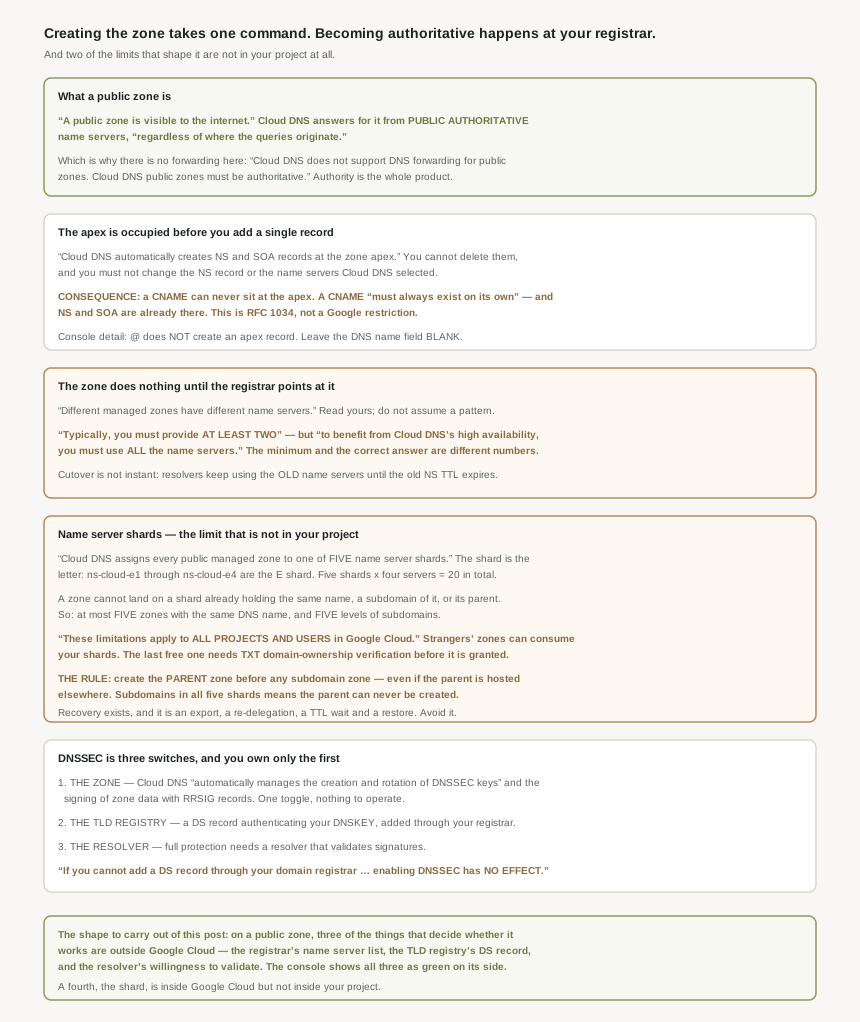
One zone, four things that decide whether it works, and three of them are not in Google Cloud.
Authoritative, and what that forbids
A public zone is visible to the internet. More precisely, Cloud DNS has public authoritative name servers that respond to queries about public zones regardless of where the queries originate.
That word authoritative is not decoration, and it removes an option you might otherwise reach for: Cloud DNS does not support DNS forwarding for public zones. Cloud DNS public zones must be authoritative. Everything in posts #98 through #100 — forwarding zones, peering zones, server policies — is private-zone machinery, and none of it applies here. A public zone knows the answer or returns nothing; there is no onward hop.
The apex is occupied before you write a record
Cloud DNS creates NS and SOA records for you automatically when you create the zone, and they are not yours to manage: do not change the name of your zone's NS record, and do not change the list of name servers that Cloud DNS selects for your zone. The records page is more absolute — Cloud DNS public zones are authoritative, and the name server ( NS ) and start of authority ( SOA ) record types are located at the zone apex, which is the root of that domain, Cloud DNS automatically creates NS and SOA records at the zone apex, and you cannot delete these types of records. For details, see RFC 1034.
From which one widely-hit consequence follows, and it is worth deriving rather than memorising. The only exception is a CNAME record, which must always exist on its own and can't share the same DNS name with any other record type. The apex already holds NS and SOA. Therefore a CNAME can never sit at the apex — not because Cloud DNS declines, but because the apex is already occupied by records nothing can remove.
Coming from almost any other DNS interface, the apex is written as @. Here: the at sign (@) does not automatically create an apex record. What you get is a record literally named @, which resolves for nobody.
The documented answer is unusual enough to be worth stating plainly — to create a resource record at the domain apex, leave the DNS name field blank. An empty field, not a symbol.
Name server shards, and the limit that is not in your project
This is the part of Cloud DNS with no analogue in the rest of this block, and the part most likely to be met as a surprise.
Cloud DNS assigns every public managed zone to one of five name server shards. The shard is readable from the name: shards are the letter before the number in an authoritative name server name, so ns-cloud-e1 through ns-cloud-e4 are the E shard. Five shards of four name servers each is twenty authoritative name servers in total, which is where the earlier "use all of them" advice gets its ceiling — a delegation is capped anyway at name servers per delegation 8.
The assignment is constrained: a new managed zone of a domain, for example domain.example.tld, cannot be assigned to a shard if any of the following already exists on the same shard — the same name, a subdomain of it, or its parent. Two numbers fall out of that, and both are small: you can create a maximum of five zones with the exact same DNS name, and for any parent domain, you can create a maximum of five levels of subdomains.
Then the sentence that changes how you read all of it: these limitations apply to all projects and users in Google Cloud. Not your project. Not your organisation. The shard a zone can occupy depends on zones created by people you will never meet. There is one mitigation in the other direction — non-delegated subdomains and delegations hosted on other DNS services don't count against this limit — and one guard rail at the boundary: before Cloud DNS creates a zone that occupies the last available name server shard, you must verify the zone domain ownership with a TXT record.
If you create such subdomains in each shard, you cannot create a zone for the parent domain example.tld. Five subdomain zones, placed across all five shards, lock you out of your own parent domain permanently — or rather, until you perform a migration to free one.
So: you can avoid these limitations by always creating managed zones for the parent domains before creating zones for their subdomains. And in the stronger form, from the key terms page: create managed public zones for parent domains in Cloud DNS before creating any public zones for their delegated subdomains. Including the case that sounds like it would not matter — do this even if you are hosting the parent domain on another DNS service.
Create an empty parent zone you have no intention of delegating to. It costs one zone-day of billing and it reserves the shard.
DNSSEC: three switches, one of them yours
The zone half is genuinely managed. If you enable DNSSEC for a zone, Cloud DNS automatically manages the creation and rotation of DNSSEC keys (DNSKEY records) and the signing of zone data with resource record digital signature (RRSIG) records. No key ceremony, no rotation calendar.
The other two are not. In your TLD registry, you must have a DS record that authenticates a DNSKEY record in your zone, and for full DNSSEC protection, you must use a DNS resolver that validates signatures for DNSSEC-signed domains. Neither is a Google Cloud setting. The registry half can simply be unavailable to you: both the registrar and registry must support DNSSEC for the TLD that you are using.
And so the catch: if you cannot add a DS record through your domain registrar to activate DNSSEC, enabling DNSSEC in Cloud DNS has no effect. The toggle succeeds. The zone really is signed. Nothing validates it, and nothing says so.
Why This Architecture Holds Up
Read the three traps in this post together and they are one trap wearing three hats.
A delegation that was never changed at the registrar. A DNSSEC toggle with no DS record behind it. A shard consumed by somebody else's zone. In each case the Google Cloud side is correct, complete and reporting success — and the system does not work, because the authority a public zone depends on is granted by a party outside the console.
That is the same shape as #96's default route, which exports cleanly and is ignored because a route in a network you do not own takes precedence. It is worth naming as a class, because the debugging instinct it defeats is the strongest one we have: check whether the thing is configured. Here the thing is configured. Configuration was never the question.
For a public zone, three queries answer more than any amount of console reading, and all three ask the internet rather than the project: what name servers does the parent delegation actually return for my domain, does the registry hold a DS record for it, and does a validating resolver return an answer. Each one interrogates a system outside Google Cloud, which is exactly where the answer lives.
A fourth question is inside Google Cloud but outside your project: which shard is this zone on, and does that leave room for the zones I have not created yet.
The shape of the service, in numbers
Two details worth holding, both from the limits table. There are no quotas for DNS query processing — the read and write quotas apply to the API, not to resolution, so serving is not something you capacity-plan. And responses are bounded: largest size of a DNS response (UDP) 1,440 bytes, with largest size of a DNS response (TCP) 65,533 bytes for anything beyond that. A zone with many records at one name, or DNSSEC signatures on top of a large record set, is pushing against the first of those long before the second.
Changes are batched rather than streamed — additions per change 1,000 — which matters only when a migration tool is writing a whole zone at once, and matters a great deal then.
One billing detail belongs with the shard advice: charges accrue for each zone for each day that the managed zone exists. An empty parent zone created to reserve a shard is a real line item, and a very small one next to the migration it avoids.
Key Architecture Decisions
| Situation | Decision | Because |
|---|---|---|
| Planning any subdomain zones | Create the parent zone first, even an empty one | Subdomains across all five shards lock you out of the parent. |
| The parent domain lives at another provider | Still create the parent zone in Cloud DNS | The documentation says to do this even then. |
| Handing name servers to the registrar | Give all of them, not two | Two is the minimum; all is what the high availability needs. |
| Reusing a name server list from another zone | Never — read this zone's own | Different managed zones have different name servers. |
| Migrating a domain onto Cloud DNS | Lower the NS TTL at the old provider first | Resolvers use the old name servers until that TTL expires. |
| Wanting a CNAME at the apex | You cannot have one; use an A or AAAA record | NS and SOA already occupy the apex and a CNAME must be alone. |
| Creating an apex record in the console | Leave the DNS name field blank | The at sign does not create an apex record. |
| Tempted to edit the zone's NS record | Do not | The documentation forbids changing it or the name server list. |
| Enabling DNSSEC | Confirm the registrar can add a DS record first | Without it, enabling DNSSEC in Cloud DNS has no effect. |
| A TLD whose registrar does not support DNSSEC | Transferring registrars is the documented route | Both registrar and registry must support it for that TLD. |
| Expecting a public zone to forward anywhere | It cannot | Public zones must be authoritative; forwarding is unsupported. |
| Capacity-planning query volume | Do not bother | There are no quotas for DNS query processing. |
| Bulk-loading a migrated zone | Batch within the per-change ceiling | Additions per change is 1,000. |
| Auditing why resolution fails | Query the delegation, the DS record and a validating resolver | Three of the four deciding factors are outside Google Cloud. |
The one to look at today
List your public managed zones and work out which shard each one is on, from the name server names. Then look at the domains you expect to add this year and ask whether a parent zone exists for each of them. If any parent is missing and its subdomains already exist, create the parent now while a shard is still free — that is a one-command fix today and a multi-step migration once the fifth shard goes.
Closing Thought
What makes this service unusual among everything in this block is where its failure modes live. VPC Network Peering fails inside your project. Private Service Connect fails between two projects you can both see. A public DNS zone fails at a registrar, in a TLD registry, or on somebody else's resolver — and the console reports green throughout, because by its own lights everything it controls is correct.
The shard limit is the sharpest version of it. A constraint that applies to all projects and users in Google Cloud is one you can hit without doing anything wrong, and the remedy — export, re-delegate, wait out TTLs, restore — is expensive enough that the right move is always the cheap preventive one. Create the parent zone first. It is one command and a few cents a day, and it is the only part of this story you get to decide.
#98 takes the same service private: Cloud DNS private zones, the authorized-network list that decides who can query them, and what "visibility" actually means when the zone has no name servers to point at.
Official Google Cloud Reference
- Cloud DNS overview
- Cloud DNS key terms
- Cloud DNS quotas and limits
- Create, modify, and delete zones
- Add, update, and delete records
- Update your domain's name servers
- DNS Security Extensions (DNSSEC) overview
- Manage DNSSEC configuration
- General DNS overview
- Best practices for Cloud DNS
- Set up DNS records for a domain name
- Cloud DNS pricing
Comments