Business Challenge
#95 and #96 covered a service that forwards packets without reading them. Application Gateway is the opposite: it terminates the connection, reads the request, and decides where it goes based on what is inside.
That buys routing on hostname and URL path. It also means four objects must line up before a single request reaches anything:
“A rule binds the frontend Listener, a Backend Setting and a Backend Pool.” — and “One listener can be attached to one rule.”
A listener decides whether a request is accepted. A rule decides where an accepted request goes. A backend setting decides how the gateway talks to whatever it chose. A backend pool is the set of things it can choose from. Misconfigure any one and the symptom shows up at a different link in the chain than the cause.
The sharpest edge is not in any of the four objects. It is in the question of which listener gets asked first — and the answer is different on each SKU.
“For the v1 SKU, requests are matched according to the order of the rules and the type of listener. If a rule with a basic listener comes first in the order, it processes first and accepts any request for that port and IP combination.”
A basic listener matches any host. So one rule in the wrong position does not merely take precedence — it consumes every request arriving on that port, and the carefully written multi-site listeners below it are never consulted.
Architecture
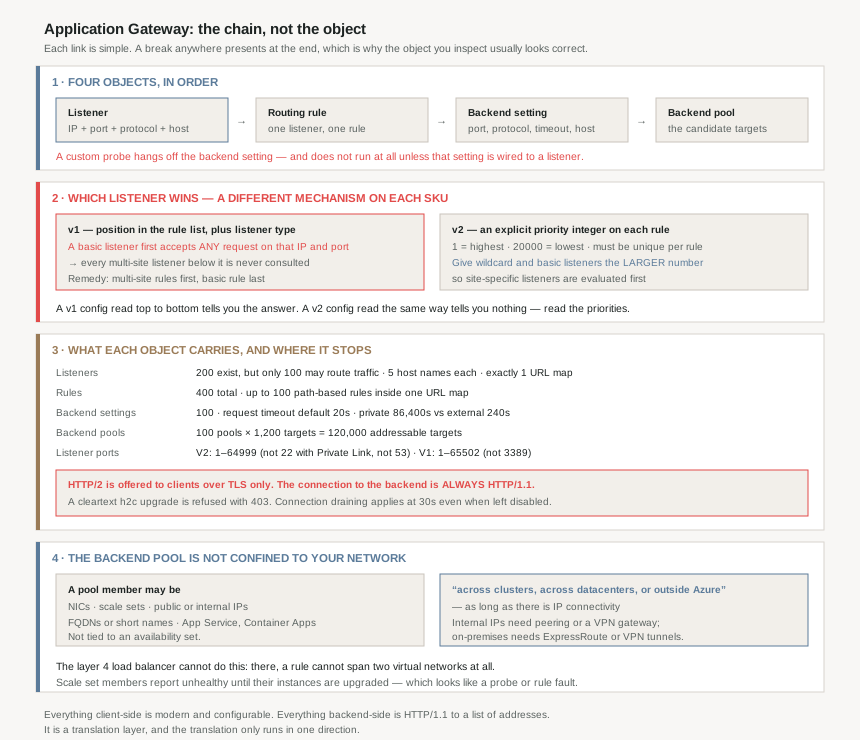
Which listener wins
| SKU | What determines order | Recommended configuration |
|---|---|---|
| v1 | The order of the rules and the type of listener. A basic listener first “accepts any request for that port and IP combination” | Multi-site rules first, basic rule last |
| v2 | Rule priority — an integer from 1 (highest) to 20000 (lowest), unique per rule | Give wildcard and basic listeners a larger number, so site-specific listeners run first |
These are not two expressions of one idea. On v1 the ordering is implicit in a list and is a property of the configuration's shape; on v2 it is an explicit integer and is a property of each rule. A v1 configuration reviewed by reading the rules top to bottom tells you the answer. A v2 configuration reviewed the same way tells you nothing — you have to read the priorities.
The v2 guidance also reads backwards on first encounter: “Define wildcard and basic listeners with a priority number greater than site-specific and multi-site listeners”, because a greater number means lower priority. The catch-all should be the last thing consulted, which means it needs the biggest number.
What the chain can hold
| Object | Limit | The detail that matters |
|---|---|---|
| HTTP listeners | 200, of which only 100 active | The ceiling is twice the number that may actually route traffic |
| Host names per listener | 5 | Wildcards allowed in multi-site listeners |
| URL maps per listener | 1 | One path-based routing table per listener, no more |
| Path-based rules per URL map | 100 | So 100 paths per listener, maximum |
| Routing rules | 400 | Four per active listener, on average |
| Backend HTTP settings | 100 | One per rule, or one per path on a path-based rule |
| Backend address pools | 100 | |
| Backend targets per pool | 1,200 | 120,000 addressable targets per gateway |
| Instances per gateway | V1 32 · V2 125 |
The listener figure is the one worth remembering. Two hundred may exist; one hundred may route. Everything else in the table is a number you would notice hitting; that one is a number you can configure past without being stopped.
Why This Architecture Holds Up
Because the backend pool is not confined to your network
#95 recorded a hard constraint on the layer 4 load balancer: a rule can't span two virtual networks, and all frontends and backend instances must be in a single virtual network. Application Gateway has no such rule.
“Application Gateway backend pool members aren't tied to an availability set. An application gateway can communicate with instances outside of the virtual network that it's in. As a result, the members of the backend pools can be across clusters, across datacenters, or outside Azure, as long as there's IP connectivity.”
A pool may hold NICs, scale sets, public or internal IP addresses, FQDNs or short names, and multitenant services like App Service and Container Apps. That is a different class of component from the load balancer — closer to a reverse proxy than to a network device — and it is why Application Gateway shows up in hybrid designs where the load balancer cannot.
The qualifications are worth holding onto. Internal IPs as members require virtual network peering or a VPN gateway; on-premises servers require ExpressRoute or VPN tunnels. And scale sets have a step that produces a confusing first deployment: “After you add virtual machine scale sets as a backend pool member, you need to upgrade virtual machine scale sets instances. Until you upgrade scale sets instances, the backend is unhealthy.”
Because HTTP/2 is a client-side feature only
“HTTP/2 protocol support is available to clients connecting to application gateway listeners only. The communication to backend server pools is always over HTTP/1.1.”
So HTTP/2 here is a client-experience optimisation, not an end-to-end protocol decision, and a backend built to exploit HTTP/2 multiplexing will never see it. Three related details compound that:
- It works only over TLS. A cleartext upgrade attempt is not downgraded, it is refused: “doesn't support HTTP/2 Cleartext (h2c) protocol upgrade attempts from HTTP/1.1 and returns a 403 Forbidden error”.
- The default disagrees with itself depending on how you create the gateway. The documented default is disabled; “When you create an application gateway resource through the Azure portal, the default option for HTTP2 is enabled”. That is the same portal-versus-API asymmetry #95 found in probe intervals, in a different service.
- Dedicated Backend Connection, the feature required for NTLM and Kerberos passthrough, “isn't supported with HTTP/2”.
That last one carries a cost #96 has already made concrete: “each client connection consumes a dedicated SNAT port, which increases the risk of SNAT port exhaustion”. Turning on Windows authentication passthrough converts a connection-pooling proxy into a one-connection-per-client proxy, and the bill arrives in the outbound port budget.
Because the two timeouts are off by a factor of 360
| Setting | Value |
|---|---|
| Request timeout, default | 20 seconds |
| Request timeout, private backend | 1 to 86,400 seconds (24 hours) |
| Request timeout, external backend | 1 to 240 seconds (4 minutes) |
| Derived | 86,400 ÷ 240 = 360× more patience for a private backend |
| Connection draining, not enabled | 30 seconds — it still applies |
| Connection draining, enabled | 1 to 3,600 seconds; 0 disables it |
The connection draining row is the subtle one. Leaving the feature off does not mean there is no draining timeout — it means there is a 30-second one. And a configuration update “will terminate ongoing connections after the connection draining timeout”, so for any workload serving long downloads, an unrelated gateway change cuts transfers at 30 seconds unless somebody raised a setting they were not using.
The documented symptom is specific enough to recognise: “If you observe intermittent 502 errors during deployments, rolling updates, or scale-in events, the connection draining timeout might be too short.”
Because the probe only runs if the whole chain is wired
“The custom probe doesn't monitor the health of the backend pool unless the corresponding HTTP setting is explicitly associated with a listener.”
A probe is attached to a backend setting; a backend setting is used by a rule; a rule is bound to a listener. Break any link and the probe exists as a resource, appears configured, and is never executed. This is the chain from the opening section producing a failure that is invisible at the object you would inspect.
The parallel with #95 is exact, incidentally: there, an inbound NAT rule needs no probe at all, and probe definitions go unvalidated outside the portal. In both services the health-checking machinery is the part most easily left not actually running.
Because the host header is a decision, not a passthrough
Two settings rewrite what the backend sees. Pick host name from backend address sets the host header to the backend pool member's own name; host name override replaces it with a literal you supply. Both exist because multitenant backends route on the header — App Service being the canonical case, where “an app service can only be accessed through the hostnames that are configured in the custom domain settings”.
The guidance against using them is unusually direct for a feature's own documentation:
“In production environments, it's a best practice to use the same hostname for the client to application gateway connection and application gateway to backend target connection. This practice avoids potential issues with absolute URLs, redirect URLs, and host-bound cookies.”
The failures named there all share a shape: the application generates something containing its own hostname — a redirect, an absolute link, a cookie domain — and that hostname is now the internal one, which the client cannot reach. Rewriting the host header is cheap to configure and expensive to debug, because the symptom appears in the browser several steps later.
TLS to the backend adds a second dependency on the same header: the gateway “uses the incoming request's host header as the SNI” by default and verifies the backend certificate's subject name against it. Override the host header and you have also changed which certificate the backend must present.
Because the affinity cookie is two cookies, and has been since 2020
Session affinity here is gateway-managed and cookie-based, with a default cookie name of ApplicationGatewayAffinity. Since 17 February 2020 there is also ApplicationGatewayAffinityCORS, carrying “SameSite=None; Secure” so that stickiness survives cross-origin requests — and a custom cookie name gets a matching CORS-suffixed twin.
Two operational consequences. The Secure attribute means affinity over CORS “must be sent over HTTPS”, so an HTTP-only workload cannot have it. And gateways in series collide: “if in your network topology, you deploy multiple application gateways in line, you must set unique cookie names for each resource” — a chained-proxy design that works fine until both gateways set a cookie called the same thing.
Because the port ranges are not what you would guess
| SKU | Listener port range | Exceptions |
|---|---|---|
| V2 | 1 to 64999 | Port 22 unsupported with Private Link-enabled gateways; port 53 |
| V1 | 1 to 65502 | Port 3389 |
Neither range reaches 65535, both stop at a different arbitrary-looking number, and the newer SKU has the smaller range. Backend ports, meanwhile, are the full 1 to 65535 — so the restriction is on what the gateway will listen on, not what it will connect to.
One more constraint that shapes deployments: “An application gateway supports one public or one private IP address”, and for dual-stack, four frontend IP configurations total — one public and one private of each family. Public and private IPv4 listeners may share a frontend port on v2; the IPv6 pair may not.
Key Architecture Decisions
| Decision | Choice | Why |
|---|---|---|
| Reviewing routing correctness | Read priorities on v2; read list order on v1 | The two SKUs determine evaluation order by entirely different mechanisms, and a v2 config read top-to-bottom tells you nothing. |
| Placing a basic (catch-all) listener | Last on v1; highest priority number on v2 | A basic listener matches any host, so first position on v1 means it accepts every request for that IP and port. |
| Planning listener capacity | Design against 100, not 200 | 200 listeners may exist but only 100 may actively route traffic. |
| Expecting HTTP/2 to reach the backend | It never does | Backend communication is always HTTP/1.1; HTTP/2 is TLS-only on the client side and h2c upgrades are refused with 403. |
| Enabling Dedicated Backend Connection for NTLM or Kerberos | Budget SNAT ports and instance count first | It is incompatible with HTTP/2 and consumes a dedicated SNAT port per client connection, which is the exhaustion risk from the previous post. |
| Connection draining | Set it explicitly, even if you think you do not need it | Leaving it disabled still applies a 30-second timeout, and configuration updates terminate connections at that point. |
| Request timeout for external backends | Design within 240 seconds | External backends cap at 4 minutes against a private backend's 24 hours — 360 times less headroom for the same setting. |
| Overriding the backend host header | Only for multitenant backends that require it | Documented best practice is matching hostnames; overriding breaks absolute URLs, redirects and host-bound cookies, and changes which certificate SNI validation expects. |
| Custom health probes | Verify the whole chain, not the probe object | A probe does not run unless its backend setting is associated with a rule bound to a listener. |
| Chaining two application gateways | Give each a unique affinity cookie name | Gateways in line otherwise collide on ApplicationGatewayAffinity. |
| Backend placement | Anywhere with IP connectivity | Unlike the layer 4 load balancer, members may be across datacenters or outside Azure — with peering or a gateway for internal IPs. |
| Scale set backends | Upgrade instances after adding the pool | The backend reports unhealthy until scale set instances are upgraded, which looks like a probe or rule fault. |
Closing Thought
The load balancer in #95 fails in ways you can reason about from a packet: a hash, a probe, a budget. Application Gateway fails in ways you can only reason about from a chain. The listener accepted or it did not; the rule matched or it did not; the setting rewrote something or it did not; the pool member answered or it did not. Each link is individually simple, and the diagnostic difficulty is entirely in the fact that a break anywhere presents at the end.
That is why so many of this service's documented traps are the same trap in different clothing. An orphaned probe that never runs. A basic listener that starves the listeners below it. A host header override that breaks a redirect three hops later. A connection-draining timeout that applies when the feature is off. In each case the object you would inspect looks right, because it is right — what is wrong is its relationship to something else.
Everything this gateway does on the client side is modern and configurable: HTTP/2, HTTP/3 in preview, TLS 1.3, WebSockets, custom error pages. Everything it does on the backend side is HTTP/1.1 to a pool of addresses. It is a translation layer, and the translation only runs in one direction.
Which is the right way to size it up against the alternatives. If the decision you need is “this hostname goes here, that path goes there”, this is the service. If the decision is about packets, ports or throughput, the previous two posts describe something cheaper that never opens the envelope.
Official Azure Reference
- Application Gateway listener configuration — basic versus multi-site, the v1 and v2 processing order tables, dual-stack frontend IPs and port sharing, TLS termination and the Key Vault disabled-listener behaviour, HTTP/2 over TLS and the h2c 403, HTTP/3 preview and its Alt-Svc header, WebSockets, custom error codes and TLS policy
- Application Gateway backend settings configuration — the affinity cookies and the CORS twin, connection draining defaults and range, request timeouts for private and external backends, backend TLS validation properties, custom probe association, host header behaviour, and Dedicated Backend Connection with its SNAT cost
- Application gateway components — what a backend pool may contain and where its members may live, the v1 and v2 listener port ranges and exceptions, listener types and wildcard host names, the one-listener-one-rule binding, and the scale set upgrade requirement
- Azure subscription and service limits — the Application Gateway limits, including the 200-versus-100-active listener split, host names and URL maps per listener, pools and targets, instance counts per SKU, and the HTTP/2 header and request ceilings
- Application Gateway request routing rules — the three rule types, the 1 to 20000 priority range and uniqueness requirement, basic versus path-based pool and setting association, the default pool for unmatched paths, and the redirection types and targets
- Multiple-site hosting in Application Gateway — wildcard host names and rule evaluation order in detail, for further reading (no claims drawn from it)
- Application Gateway health probes — default and custom probe behaviour, for further reading (no claims drawn from it)
Comments