Business Challenge
Eighteen posts have written bindings like user:alice@example.com and reasoned about them as though the left-hand side named a colleague. This post is about what that string actually refers to, which is narrower and less stable than it looks.
It is a binding to an identity, and the documentation separates the two carefully. An identity is a name that uniquely identifies the person who is interacting with a Google service, and Google uses email addresses for this purpose. The account is a different object: user accounts are identified by an ID that is not exposed externally, so the API has no way to let you name one directly.
Correct approachRead a binding as naming a slot, not an individual. Who occupies the slot is a separate question answered in Cloud Identity, not in the policy.
The relationship between user accounts and identities is not fixed. You can change the primary email address of a user account, which associates a different identity with the user — and as an administrator you can even swap the primary email addresses of two users. The binding is untouched; the account it resolves to is somebody else.
Correct approachTreat the directory as part of the access control surface. A policy diff is not sufficient evidence that effective access is unchanged.
Not until the domain is verified. When someone uses their corporate email address to create a Google Account, this account is an unmanaged account, and the person who created the consumer account has full control of the account and any data created by using the account. Managed user accounts are under the full control of an administrator; consumer accounts are fully owned and managed by the people who created them.
Correct approachVerify every domain your mail system accepts, then audit for accounts that were created before you did.
They are not, and the documentation says so twice over. On the resemblance to the resource hierarchy from #29: the two entities serve different purposes and are unrelated to another. And on using them for access at all: they are not intended to be used for managing access. A user account cannot belong to more than one OU, which makes OUs different from groups.
Correct approachUse OUs for configuration that should follow a person, and groups for access. Do not try to mirror your folder structure in OUs.
Architecture
Cloud Identity is the directory that gives the left-hand side of an IAM binding its meaning. The structural point worth getting right is that it is a directory rather than an account in the ordinary sense: a Cloud Identity or Google Workspace account is not a user account, but a directory of user accounts.
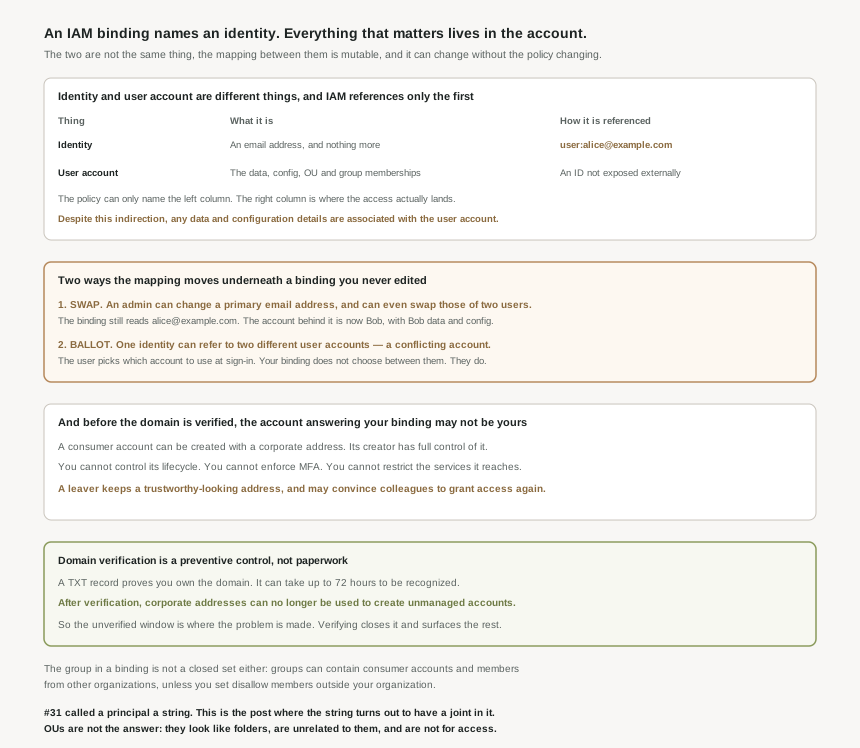
Identity, user account, and why the distinction is load-bearing
| Thing | What it is | How it is referenced |
|---|---|---|
| Identity | An email address, and nothing more. | Directly — user:alice@example.com in an allow policy. |
| User account | A data structure holding the attributes, activities and configuration that apply when that identity uses a Google service. | Never directly. It has an ID that is not exposed externally. |
One sentence in the documentation carries the whole consequence: despite this indirection, any data and configuration details are associated with the user account, not with the identity. The thing you can name is not the thing that holds the state.
The swap. An administrator can change the primary email address of a user account, which associates a different identity with the user, and can even swap the primary email addresses of two users. After a swap, every binding naming alice@example.com resolves to what was Bob’s account — his data, his configuration, his group memberships. Nothing in the allow policy changed, so nothing in a policy diff, a drift report or a Terraform plan shows it. In a federated setup you would not even need to reset passwords for the swap to take effect.
The ballot screen. It is also possible that one identity refers to two different user accounts — the conflicting-account case. The documentation recommends avoiding it, and describes what happens when it exists: a user is shown a ballot screen during authentication in which they select the user account to use. Your binding names one string; the human chooses which account answers to it.
Why an unverified domain is a live exposure, not an incomplete form
A consumer account can be created with any address the creator owns, including one on your corporate domain. The consequences are listed plainly, and each one is a control you would assume you had:
- You cannot control the lifecycle of the consumer account.
- You cannot enforce security policies like MFA verification or password complexity rules on the account.
- You cannot restrict which Google services can be accessed by using this user account.
The operational version of the first point is the one worth carrying into a review: an employee who leaves the company might continue to use the user account to access corporate resources or to generate corporate expenses. And revoking their IAM roles does not finish the job, because the address itself is the asset — the former employee might be able to convince current employees or business partners to grant access to resources again. The identity looks exactly like a colleague, because as far as the string is concerned it is one.
Why This Architecture Holds Up
Verification reads like a setup step: copy a value, add a DNS record, click confirm. You need to add a unique text (TXT) record in your domain settings, which proves you own your domain — a value beginning google-site-verification= — and it can take up to 72 hours for the new TXT records to be recognized.
What it does is more than prove ownership. After your domain is verified, users can no longer use their corporate email address to create unmanaged accounts. That is a preventive control with a date on it, and it reframes the whole task: the period before verification is when the problem gets manufactured, one self-service signup at a time, and verifying both stops new ones and makes the existing ones discoverable so they can be transferred or evicted.
Verification is per domain, and the exposure follows your mail system rather than your brand. Every domain and subdomain your mail accepts is a domain somebody could have signed up with, so a secondary domain left unverified leaves that surface open while the primary one looks finished. This is the same failure shape as a partially-applied org policy in #22: the control is real, the coverage is the thing that was never checked.
Groups, which are the next post and the bigger surface
Groups are how access should be managed — that is the documentation recommendation and it is what #52 will build on. Two properties matter before then, because both bear directly on bindings written today.
First, a group is not restricted to your organization. Groups can contain members from any Cloud Identity or Google Workspace account as well as consumer accounts. So a role granted to group:data-readers@example.com is granted to whoever is in that group, including consumer accounts and people in other organizations, and the membership list is not in the policy you reviewed. The containment exists but is opt-in: you can use the disallow members outside your organization setting to restrict members to user accounts of the same Cloud Identity or Google Workspace account.
Second, a group is not a container the way an OU is. A user account cannot belong to more than one OU, which makes OUs different from groups — and deleting a group does not delete its members. That asymmetry is why OUs carry configuration and groups carry access, and why trying to express access through OUs produces a model that cannot represent someone needing two things at once.
One prerequisite that catches federation projects
Looking ahead to #51, there is a sequencing requirement that surprises people who expect single sign-on to create accounts as users arrive. To link an identity and enable it for sign-on, your Cloud Identity account must contain a user account using that identity, and this user account must exist before the first single sign-on attempt. Federation authenticates against an account; it does not conjure one. That is what provisioning — #50 — is for.
Worth noting alongside it: managed user accounts are intended to be used by human users rather than machine users. The machine-user path is the service account work of #39 to #48, and the two should not be mixed in the directory.
Key Architecture Decisions
| Decision | Choose this | Because |
|---|---|---|
| Which domains to verify | Every domain your mail system accepts | An unverified domain can still be used to create unmanaged accounts. |
| Evidence that access has not changed | A policy diff plus a directory review | A primary email address change moves the account under an unchanged binding. |
| Handling a leaver with a consumer account | Transfer or evict the account, not just the roles | The address keeps working as a trustworthy-looking identity. |
| Managing access | Groups | OUs are explicitly not intended for managing access. |
| Applying configuration to people | Organizational units | Settings apply by OU and are inherited by child OUs. |
| Groups named in IAM bindings | Enforce disallow members outside your organization | Otherwise the group may contain consumer and external accounts. |
| Modelling your folder hierarchy in OUs | Do not | The two are unrelated and serve different purposes. |
| Order of work for single sign-on | Provision accounts first, then federate | The user account must exist before the first sign-on attempt. |
| Investigating a duplicate-login complaint | Suspect a conflicting account | One identity can refer to two accounts, with a ballot screen between them. |
The one to look at today
List every domain and subdomain your mail system will accept, and compare it with the verified domains in your Admin console. The gap is not an administrative loose end; it is the set of domains on which somebody can still create an account that uses your company name, holds its own data, takes no policy you set, and cannot be deprovisioned by you. That gap tends to be made of acquisitions, retired brands and regional domains — the ones nobody owns.
Closing Thought
There is a real design here and it is not an accident. Using email addresses as identities is what lets one Google identity work across every Google service and federate to an external provider, and keeping state on the account rather than the address is what makes it possible to rename a person without destroying their history. Both choices are right. The indirection is the price of them.
What the series has to absorb is that the allow policy is one half of an answer. Eighteen posts reasoned about principals as though the string were the subject; the string is a reference, resolved elsewhere, by a system with its own administrators and its own change history. #48 found that the policy has an author you cannot see. This one finds that it has a referent you cannot name — and that the join between the two can be re-pointed by a directory change that leaves the policy, and every diff of it, entirely unchanged.
#50 covers how managed accounts actually get into the directory at scale: directory synchronisation from on-premises, what it reconciles, and what it does when it meets an account that already exists.
Comments