Business Challenge
Forty-eight posts of this series have assumed a cloud directory. Most organisations running Entra do not have one — they have Active Directory, and a mechanism that copies parts of it upward. This post is about that mechanism, and about a separation it took me a while to see clearly.
Microsoft states it in a scope note that is easy to skim past:
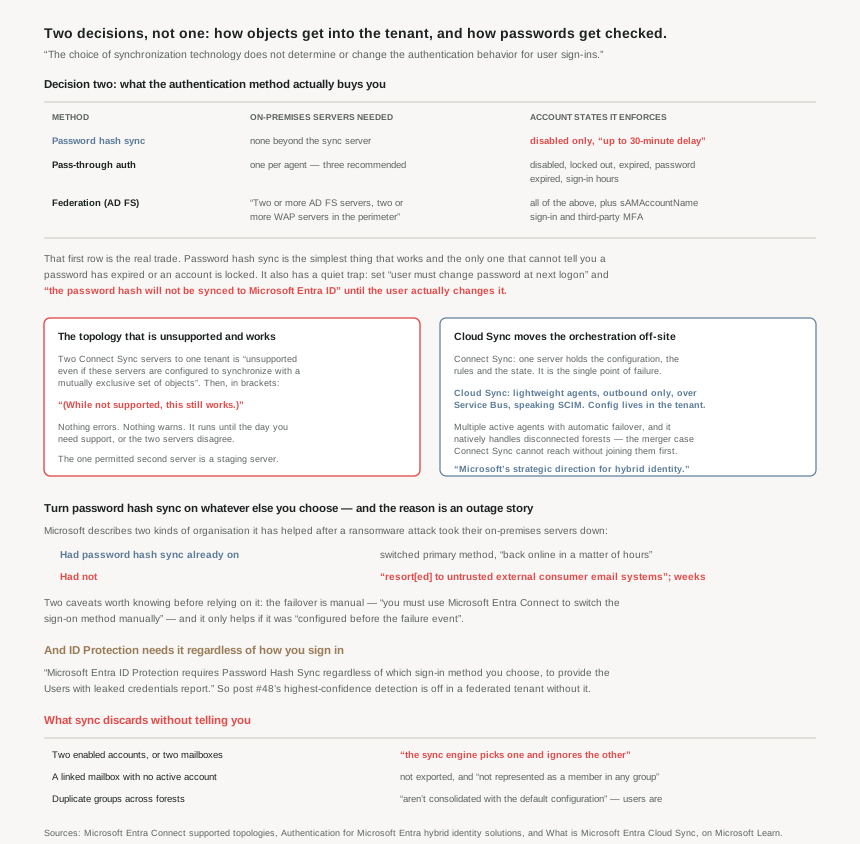
These authentication methods apply independently of the synchronization technology used (Microsoft Entra Connect Sync or Cloud Sync). The choice of synchronization technology does not determine or change the authentication behavior for user sign-ins.
So there are two orthogonal decisions. How do objects arrive? — Connect Sync or Cloud Sync, and in what topology. How is a password checked? — password hash synchronisation, pass-through authentication, or federation. Any sync choice composes with any authentication choice, and the failure modes of the two are completely different.
The second decision gets all the attention because it has a security story. The first one is where the quiet damage happens, because the sync engine resolves ambiguity by discarding things and does not tell you.
On running two Connect Sync servers against one tenant: it is unsupported even if these servers are configured to synchronize with a mutually exclusive set of objects. And then, in brackets:
(While not supported, this still works.)
An unsupported configuration that fails loudly is a nuisance. One that runs correctly for two years and then needs a support case is a different kind of problem.
Architecture
The topology rules, which are mostly one rule
Connect Sync's supported topologies all follow from a single constraint: one sync server owns the relationship between a directory and a tenant. Everything else is a consequence.
- Multiple forests, one tenant is supported — but all forests must be reachable by a single Microsoft Entra Connect Sync server, and the server must be joined to a domain. Reachability is a hard prerequisite, which is why mergers are painful.
- Multiple sync servers, one tenant is not supported, with one exception: a staging server.
- One server, multiple tenants is also not possible — one Microsoft Entra Connect server can't synchronize to more than one Microsoft Entra tenant, so multi-tenant means one server per tenant.
The staging server is the sanctioned second machine, and it is more useful than its name suggests. It reads data from all connected directories but doesn't write anything, while using the normal synchronization cycle — so it holds a current copy without touching anything. That makes it three things at once: a disaster-recovery standby, a safe place to test a configuration change against real data, and the mechanism for replacing the active server. You can have more than one staging server.
The catch is operational rather than technical: you must manually copy any configuration change made on the primary server to the second server. A standby that silently drifts from the primary is a standby that fails over into a surprise.
What the authentication choice actually buys
| Password hash sync | Pass-through auth | Federation | |
|---|---|---|---|
| Servers beyond the sync server | None | One per agent — three recommended | Two or more AD FS servers, two or more WAP servers in the perimeter |
| Account states enforced | Disabled only, up to 30-minute delay | Disabled, locked out, expired, password expired, sign-in hours | |
| TLS certificate required | No | No | Yes |
| sAMAccountName sign-in | No | No | Yes |
| Third-party MFA | Entra MFA or Conditional Access custom controls only | Yes | |
The account-states row is the one that decides real deployments. Password hash sync doesn't immediately enforce changes in on-premises account states, so a user has access to cloud apps until the user account state is synchronized. Disable someone in AD and they can keep working in Microsoft 365 for up to half an hour. If that is unacceptable — and for some organisations it genuinely is — the choice is made for you.
It also carries a trap worth knowing before an offboarding runbook relies on it: the password expired and account locked-out states aren't currently synced to Microsoft Entra ID with Microsoft Entra Connect. And more sharply: when you change a user's password and set the "user must change password at next logon" flag, the password hash will not be synced to Microsoft Entra ID with Microsoft Entra Connect until the user changes their password. A reset that sets that flag leaves the cloud password as it was.
Why This Architecture Holds Up
Because the sync engine resolves ambiguity by discarding
Connect Sync's default configuration rests on four assumptions, and the interesting part is what happens when your directory does not match them. The assumptions are that each user has only one enabled account, that each user has only one mailbox, that the mailbox forest has the best attribute data, and that a linked mailbox implies a sign-in account elsewhere.
When those do not hold:
- If you have more than one active account or more than one mailbox, the sync engine picks one and ignores the other.
- A linked mailbox with no other active account isn't exported to Microsoft Entra ID. The user account isn't represented as a member in any group.
- And on groups: the consolidation is configured only for users. Duplicated groups aren't consolidated with the default configuration.
None of those produce an error. A person with two enabled accounts across an account-resource topology gets one of them in the cloud, chosen by the engine, and the other simply is not there. After a merger — which is exactly when multi-forest topologies appear — that is a lot of quiet decisions being made by a default.
This is the same shape as #46's access-review denial that is recorded and not applied, and #41a's device filter that does not apply to an unregistered object. The system resolves an edge case by doing less, silently, and the only way to know is to go and count.
Because Cloud Sync removes the single point of failure rather than making it redundant
Connect Sync's architecture puts the configuration, the rules and the state on one Windows server you own. Making that resilient means a staging server you must manually keep in step. Cloud Sync inverts it: provisioning orchestration occurs entirely in Microsoft Online Services rather than on-premises infrastructure, and the on-premises piece becomes lightweight agents that are just bridges.
The consequences are the interesting part:
- Multiple active agents. Cloud sync supports multiple active provisioning agents deployed across different servers, providing automatic failover without configuration changes. No staging mode, no manual promotion, no configuration drift — because the configuration is not on the agents.
- Disconnected forests work natively. Cloud sync natively handles multiple disconnected Active Directory forests without requiring complex configurations or multiple synchronization instances. This is the merger scenario Connect Sync cannot reach without first making every forest reachable from one server.
- Managed from anywhere. Administrators can modify settings, monitor status, and troubleshoot issues from any location without VPN access.
- It can provision downward. Cloud sync enables cloud-to-AD provisioning scenarios, including group provisioning to Active Directory — Entra as the authoritative source, which is a different architecture rather than a different tool.
Mechanically it is a provisioning connector rather than a sync engine: SCIM over a persistent outbound connection through Azure Service Bus, with the agent built on the same proven technology as Microsoft Entra Application Proxy and Pass-Through Authentication. Outbound only — no inbound firewall rules, which is most of why it is easier to deploy.
Microsoft is direct about the trajectory: Cloud Sync represents Microsoft's strategic direction for hybrid identity. That is not a deprecation notice for Connect Sync, which still does things Cloud Sync does not. It is a clear statement of where the investment is going.
Because the multi-tenant rules are a list of things that can only happen once
Syncing one Active Directory into several tenants is supported and is mostly a catalogue of singletons. Worth reading before any merger, divestiture, or sovereign-cloud project:
- The same Source Anchor can be used for a single object in separate tenants (but not for multiple objects in the same tenant).
- Only one Microsoft Entra tenant sync can be configured to write back to Active Directory for the same object — device writeback, group writeback and hybrid Exchange are all once-only. Password writeback is the single exception, and it can be enabled on multiple tenants, with password hash sync propagating a change made in one tenant out to the others.
- It's not supported to add and verify the same custom domain name in more than one Microsoft Entra tenant, in any cloud.
- It's not supported to configure hybrid experiences that utilize forest level configuration in AD, such as Seamless SSO and Microsoft Entra hybrid join … with more than one tenant. Doing so would overwrite the configuration of the other tenant, making it no longer usable.
- And a neat distinction: you can synchronize device objects to more than one tenant but a device can be Microsoft Entra hybrid joined to only one tenant.
The fourth bullet is the dangerous one, because the failure is retroactive. Configuring Seamless SSO for a second tenant does not fail — it overwrites what the first tenant was using, and breaks something that was working.
Because password hash sync is a resilience control, whatever else you run
The recommendation is unambiguous: use or enable password hash synchronization with whichever authentication method you choose. The reason is not a feature comparison. It is an observation about incidents:
Organizations that previously also turned on password hash synchronization on top of federated or pass-through authentication changed their primary authentication method to then use password hash synchronization. They were back online in a matter of hours.
Organizations that didn't previously enable password hash synchronization had to resort to untrusted external consumer email systems for communications to resolve issues. In those cases, it took them weeks to restore their on-premises identity infrastructure, before users were able to sign in to cloud-based apps again.
Hours against weeks, on the same class of incident, decided by a checkbox set before anything happened. That is the same shape as #47's break-glass account: a control whose entire value is that it was configured in advance, and which is worthless if you reach for it during the emergency.
Two caveats keep it honest. The failover is not automatic — you must use Microsoft Entra Connect to switch the sign-on method manually. And it only helps if it was configured before the failure event. So this belongs in the same quarterly drill as the break-glass accounts: not "is it enabled", but "does someone know how to switch it, and have they".
There is a second reason that connects straight to yesterday's post. Microsoft Entra ID Protection requires Password Hash Sync regardless of which sign-in method you choose, to provide the Users with leaked credentials report. #48 established that leaked credentials is the one detection that is verified credential exposure, not a heuristic signal — always high risk, because Microsoft matched the breach dump against your actual password hashes. Without password hash sync there is nothing to match, so a federated tenant that skipped it has ID Protection's highest-confidence detection switched off and no indication that it is.
Because pass-through authentication's requirements are sharper than they look
PTA reads as the middle option — cloud simplicity, on-premises enforcement — and its deployment constraints are stricter than either neighbour.
Pass-through Authentication requires unconstrained network access to domain controllers, and the agents need outbound access to the Internet and access to your domain controllers. For this reason, it's not supported to deploy the agents in a perimeter network. So the agents sit inside, with broad access to the DCs, talking outbound — a placement some network teams will push back on, and correctly.
The agent count is specified with its reasoning: three, because when you have three agents deployed, one agent can still fail when another agent is down for maintenance. Two gives redundancy only when nothing is being patched.
And it inherits a limitation from cloud authentication generally: organisations needing MFA with PTA must use Microsoft Entra multifactor authentication or Conditional Access custom controls and can't use a third-party or on-premises multifactor authentication method that relies on federation. If a third-party MFA provider is the requirement, that requirement selects federation, and the rest of the comparison is moot.
Key Architecture Decisions
| Situation | Decision | Why |
|---|---|---|
| Any hybrid tenant, any sign-in method | Turn on password hash sync | Hours versus weeks after an on-premises outage; and ID Protection needs it. |
| Relying on it as a backup | Rehearse the switch | Failover is manual and only works if configured beforehand. |
| Offboarding must take effect immediately | Pass-through auth or federation | Password hash sync enforces disabled accounts with up to 30-minute delay. |
| A password reset that must reach the cloud | Don't set "must change at next logon" | The hash isn't synced until the user actually changes it. |
| Two sync servers for load or reach | Don't — it works and is unsupported | The only sanctioned second server is a staging server. |
| Running a staging server | Copy every config change by hand | Nothing replicates configuration between them. |
| Disconnected forests after a merger | Cloud Sync | Connect Sync needs every forest reachable from one server. |
| Wanting sync high availability | Cloud Sync's multiple active agents | Automatic failover, no configuration drift. |
| Account-resource forest with duplicate accounts | Audit what actually arrived | The engine picks one and ignores the other without an error. |
| Groups duplicated across forests | Expect duplicates in the tenant | Only users are consolidated by default. |
| Second tenant for a sovereign cloud | One Connect server per tenant | One server cannot serve two tenants. |
| Seamless SSO or hybrid join with two tenants | Not possible — and it breaks the first | Forest-level config; the second overwrites the first. |
| Deploying PTA agents | Three, and not in the DMZ | Perimeter deployment is unsupported; three survives maintenance. |
| Third-party MFA provider is mandatory | Federation, and stop comparing | Cloud authentication can't use federation-dependent MFA. |
Closing Thought
The thing worth separating out of this material is the one Microsoft puts in a scope note: sync and authentication are independent. You can run Cloud Sync with federation, or Connect Sync with password hash sync, or any other pairing, and the decisions should be made against different criteria. Sync is about where objects come from and what gets lost on the way. Authentication is about what happens at the moment someone signs in, and what still works when your building does not.
Of the two, the sync half is the one that damages quietly. Every rule in those topology pages exists because a default made a choice: the engine picked one of two accounts, dropped a linked mailbox, left duplicate groups alone, overwrote another tenant's Seamless SSO. None of them error. The posts in this phase have found the same pattern in Conditional Access, in access reviews, in device filters and now here — the platform resolves ambiguity by doing less, and the only signal is an absence.
The authentication half has a cleaner answer than its reputation suggests, and it is in the incident story rather than the feature table. Hours versus weeks, decided by whether a box was ticked before anything went wrong. That is not really a technical argument; it is the same argument as the break-glass account in #47 and the contingency policies beside it. The controls that matter in a crisis are the ones that were already there, and the cost of having them is almost always smaller than it looks from the far side.
#50 closes this phase with the write-back direction and the edges around it: password writeback, device writeback, and what it means to let the cloud change the directory.
Comments