Business Challenge
Four posts on Cloud Router, dynamic routing and Cloud VPN have had one thing in common: everything in them was a resource you could create in a console on a Tuesday afternoon. Dedicated Interconnect is the point where that stops. The prerequisites are not configuration at all — your network must physically meet Google's network in a colocation facility, and you must provide your own routing equipment.
That changes what kind of decision this is. The availability tier is not a dropdown you can revise after a bad quarter; it is a count of circuits in named facilities. And one of the two numbers everyone quotes turns out to depend on a setting from #84 that has nothing to do with Interconnect.
You cannot. The link type that you select when you create a Dedicated Interconnect connection cannot be changed later. The documentation spells out the consequence with the exact example people plan for: if you select a 10-Gbps link type and need a 100-Gbps link type later, you must create a new Dedicated Interconnect connection with the higher capacity.
Correct approachPick the link type against a three-year view, not this year's traffic, because the upgrade path is a new order, new cross-connects and a new provisioning cycle. There is room to grow within a link type — 1 x 10-Gbps (10 Gbps) circuit up to 8 x 10-Gbps (80 Gbps) circuits — so the real question is not "how much bandwidth do we need" but "which ceiling are we comfortable being stuck under", 80, 800 or 3200 Gbps.
Selecting the option is the easy half. The reliability option is a declaration; the tier is earned by the topology. For the multi-region 99.99% configuration you need at least four Dedicated Interconnect connections, placed so that at least two interconnect connections must be in one metro, and at least two interconnect connections must be in a different metro, using both edge availability domains of each metro, plus four VLAN attachments where at least two VLAN attachments must be in one region of the VPC network, and at least two VLAN attachments must be in a different region of the VPC network.
Correct approachCost the tier as hardware before promising it to anyone. Four circuits in two metros is roughly four times the 99.9% footprint, which asks only for at least two Dedicated Interconnect connections, distributed strategically between a pair of facility and edge availability domain combinations within a single metro. If four circuits is not in the budget, the honest answer is that you are buying 99.9%, and that is a conversation to have at design time rather than after an incident.
Some of it will not. VLAN attachments can have a maximum transmission unit (MTU) of 1440, 1460, 1500 or 8896 bytes, and 8896 is jumbo frames — but requests to Google API Client Libraries automatically use 1440 MTU packets, even if your VLAN attachment is set to a higher MTU value, including jumbo frames.
Correct approachChoose the MTU for the traffic that will actually benefit — bulk transfer, replication, backup — and do not expect it to improve calls made through Google's client libraries. And keep it uniform: we recommend that you use the same MTU for all VLAN attachments that are connected to the same VPC network. A mixed-MTU estate produces fragmentation problems that are genuinely unpleasant to diagnose, because they present as selective slowness rather than as failure.
Architecture
Physical prerequisites, a capacity ladder with one irreversible rung, and two availability tiers priced in circuits.
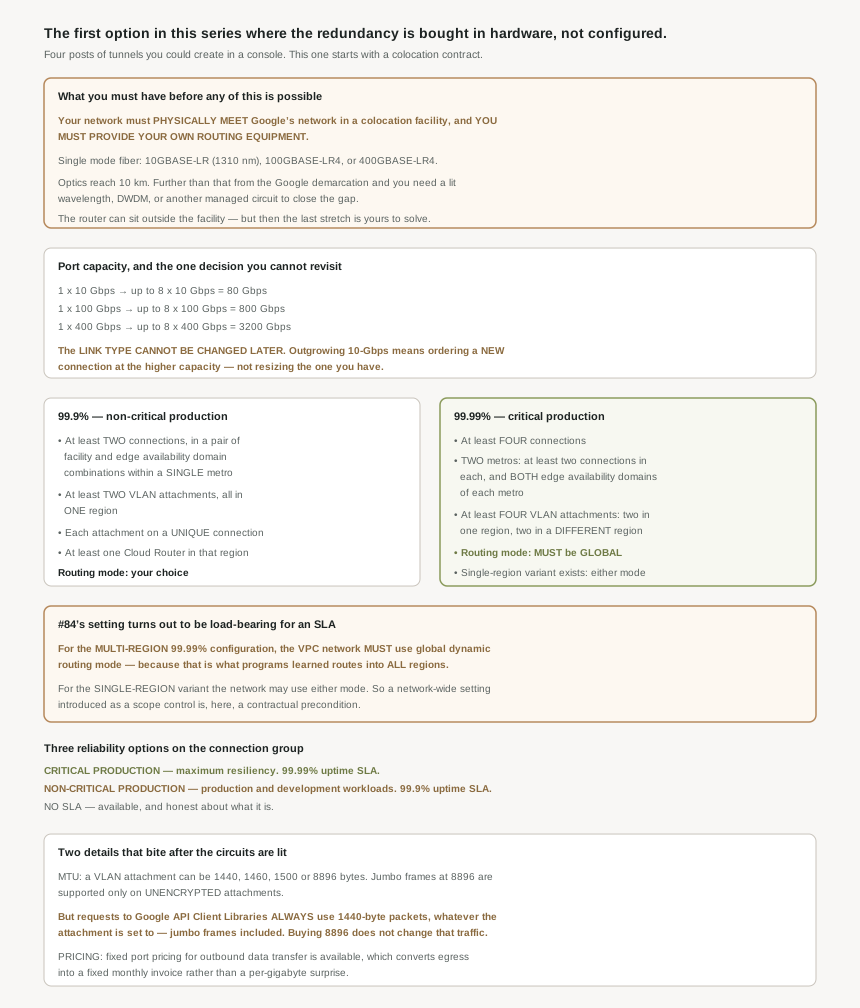
What has to exist before Google Cloud is involved at all
The three prerequisites are physical, commercial and operational in that order. Your network meets Google's inside a colocation facility; you bring the routers; and the optics constrain the geometry. Your on-premises router is typically located in the colocation facility, though however, you can also extend your connection to a router outside of the colocation facility — at which point the last stretch becomes your engineering problem.
The fiber requirements are specific enough to hand to a network team as a shopping list: 10-Gbps circuits, single mode fiber, 10GBASE-LR (1310 nm), 100-Gbps circuits, single mode fiber, 100GBASE-LR4, and 400-Gbps circuits, single mode fiber, 400GBASE-LR4.
The maximum supported fiber length for 10GBASE-LR, 100GBASE-LR4, or 400GBASE-LR optics is 10 km. And past it, the problem changes category rather than degree: if your on-premises router is more than 10 km away from the Google demarcation, you must use a lit wavelength, DWDM , or other managed circuit to complete your connection.
That is the sentence that decides whether this project involves one vendor or two. Inside 10 km you buy a cross-connect. Outside it you are also buying a managed circuit from a carrier, with its own contract, its own lead time and its own availability characteristics sitting underneath a Google SLA that does not cover it. Worth measuring before anyone commits to a date.
Capacity, and the rung you cannot climb
Each link type has a different maximum capacity, and the ladder has three rungs: up to 8 x 10-Gbps (80 Gbps) circuits, up to 8 x 100-Gbps (800 Gbps) circuits, and up to 8 x 400-Gbps (3200 Gbps) circuits. Eight ports at each speed, so the arithmetic is clean — eight 100-Gbps circuits aggregate to the 800 Gbps the page states, and eight 400-Gbps circuits to 3200.
What makes the ladder interesting is that you can only move along one rung, never between them. Growing from one 10-Gbps circuit to eight is an order against the existing connection; growing from 10-Gbps to 100-Gbps is a new connection. So the link type is the longest-lived decision in the whole design, and it is made at the moment you know least about your traffic.
Two tiers, priced in circuits
The reliability options are set on the connection group, and the descriptions are blunt about intent. Critical production: choose this option for critical production workloads that require maximum resiliency, and this option provides a 99.99% uptime SLA. Non-critical production: choose this option for non-critical production and development workloads, and this option provides a 99.9% uptime SLA. There is also a no-SLA option, which is at least honest about what it is.
The 99.9% requirements are modest and internally consistent: two connections in one metro across a pair of facility and edge availability domain combinations, at least two VLAN attachments, all in one region, where each VLAN attachment must depend on a unique interconnect connection and collectively, the VLAN attachments must use all configured interconnect connections. Plus the routing: you must use at least one Cloud Router in the region where VLAN attachments are configured.
Those last two conditions are worth reading as a pair, because together they forbid the shortcut everyone reaches for. Two attachments on one connection does not qualify, and two attachments on two connections while a third connection sits unused does not qualify either. Every circuit you have must be carrying an attachment.
The 99.99% tier comes in two shapes. The multi-region one needs four connections across two metros and four attachments across two regions, as above. The single-region one needs at least four Dedicated Interconnect connections, distributed strategically between a pair of facility and edge availability domain combinations within a single metro — same circuit count, one metro — but with a qualification that will decide it for most people: only certain supported metros qualify for the single-region 99.99% SLA.
Why This Architecture Holds Up
Here is the finding that made this post worth writing. The multi-region 99.99% configuration carries a requirement that is not about Interconnect at all: the VPC network must use global dynamic routing mode. The reason given is exactly the mechanism #84 described: global dynamic routing ensures that Cloud Router learned routes are programmed as dynamic routes in all regions of the VPC network.
And the contrast is explicit, because for the single-region variant the VPC network can use either regional or global dynamic routing mode.
#84 presented dynamic routing mode as a scope setting with a reasonable default and a recommendation, and argued that global is usually right while regional is occasionally necessary — for a peer with a tight prefix limit, for a regulatory constraint, or to keep a regional failure regional. That argument still holds. What #87 adds is that in one configuration the choice is not yours to make: if you want the multi-region four-nines SLA, the mode is specified.
Dynamic routing mode is a field on the VPC network, editable by anyone with network admin rights, with no reference to Interconnect anywhere near it. So a team that decides to tighten blast radius by switching a network from global to regional — a defensible decision, and one #84 gave real reasons for — can take a multi-region Interconnect out of SLA compliance without touching the Interconnect, without a change to any VLAN attachment, and without anything reporting a problem. All four circuits stay up. All four attachments stay up. Every BGP session stays established. The routes simply stop being programmed into the other region, which is the thing the SLA was counting on.
If you operate a multi-region 99.99% Interconnect, the dynamic routing mode of that VPC network is a controlled setting, and it belongs in whatever mechanism you use to prevent silent drift — an org policy constraint, a Terraform lifecycle rule, or at minimum a documented note on the network itself. It is the cheapest nine on this page to lose by accident.
How the attachments map onto what #83 described
One detail connects the physical layout to the routing behaviour from earlier in this block. VLAN attachments are distributed between two BGP software tasks based on the edge availability domain of the interconnect connection each attachment depends on. #83 established that in legacy best path selection mode AS path is relevant only within a single BGP task, and that Google warns against relying on AS-path length when different Cloud Router tasks are involved for the same prefix.
Put those together and the edge availability domain requirement stops looking like box-ticking. Spreading connections across both domains is what puts your attachments on different BGP tasks, which is what makes the redundancy independent in the control plane rather than only in the fiber. It also means that if you are doing anything clever with AS-path manipulation across a redundant Interconnect, you are doing it across task boundaries, where #83's warning applies.
The commercial detail worth knowing early
Dedicated Interconnect offers fixed port pricing for outbound data transfers for VLAN attachments, and the benefit is stated plainly: this lets you get a fixed monthly invoice for outbound data transfers. For an estate whose egress is both large and variable, converting it into a fixed line item is often worth more to a finance team than a lower per-gigabyte rate, because it makes the number forecastable. Worth raising before the first invoice rather than after.
Key Architecture Decisions
| Situation | Decision | Because |
|---|---|---|
| Choosing a link type | Decide against a three-year ceiling, not current traffic | The link type cannot be changed later; upgrading means a new connection. |
| Needing more bandwidth within a speed | Add circuits, up to eight | 80, 800 and 3200 Gbps are the per-link-type ceilings. |
| Router more than 10 km from the demarcation | Budget a lit wavelength, DWDM or managed circuit, and a second vendor | The optics do not reach, and that carrier sits under a Google SLA that does not cover it. |
| Promising 99.99% to a stakeholder | Cost four circuits in two metros first | The tier is a topology requirement, not a dropdown. |
| Four circuits is not affordable | Say you are buying 99.9%, at design time | 99.9% needs only two connections in a single metro. |
| Wanting 99.99% without two metros | Check whether your metro supports the single-region variant | Only certain metros qualify for the single-region 99.99% SLA. |
| Adding a circuit without an attachment | Attach it | Collectively the attachments must use all configured connections. |
| Two attachments on one connection | Rebuild so each has its own | Each attachment must depend on a unique interconnect connection. |
| Running a multi-region 99.99% Interconnect | Treat the network's dynamic routing mode as a controlled setting | Global mode is required for that SLA, and switching to regional breaks it silently. |
| Single-region 99.99% or 99.9% | Either routing mode is allowed | The requirement is explicit only for the multi-region configuration. |
| Spreading connections across edge availability domains | Do it, and understand why | It places attachments on different BGP tasks, not just different fiber. |
| Buying jumbo frames for API traffic | Do not expect a gain | Google API client library requests use 1440-byte packets regardless. |
| Several attachments on one VPC network | Give them all the same MTU | It is the documented recommendation, and mixed MTUs present as selective slowness. |
| Large, variable egress | Ask about fixed port pricing | It converts outbound transfer into a fixed monthly invoice. |
The one to look at today
If you already run Dedicated Interconnect, check two things that nothing will alert you about. First, does every interconnect connection you pay for have a VLAN attachment depending on it — because an unattached circuit is both wasted money and a disqualification from the tier you think you hold. Second, if you are multi-region, what is the dynamic routing mode of that VPC network right now, and does anyone outside the network team know that changing it has contractual consequences. Both are configuration facts rather than health facts, so the only way to learn them is to look.
Closing Thought
The honest summary of Dedicated Interconnect is that the Google Cloud part is the small part. The circuits, the colocation facility, the optics budget, the 10 km radius, the carrier contract if you fall outside it, the four-circuit footprint if you want four nines — none of that is in a console, and all of it has lead times measured in weeks. Against that, creating the VLAN attachments and pointing a Cloud Router at them is an afternoon.
What I did not expect was the dependency running the other way. Five posts ago the dynamic routing mode looked like an interesting piece of network scoping with a mechanism worth admiring. It turns out to be a line item in an availability SLA, enforced nowhere, editable by anyone with network admin rights, and capable of quietly invalidating a six-figure hardware commitment while every dashboard stays green. The thing about a system where everything composes is that the compositions include the ones nobody documented in both directions.
#88 takes the other door into the same building: Cloud Interconnect, Partner — where a service provider owns the circuits, and the availability conversation acquires a third party.
Official Google Cloud Reference
- Dedicated Interconnect overview
- Establish 99.99% availability for Dedicated Interconnect
- Establish 99.9% availability for Dedicated Interconnect
- Cloud Interconnect overview
- Cloud Interconnect terminology
- Dedicated Interconnect provisioning overview
- Order Dedicated Interconnect connections
- Create VLAN attachments
- Create redundant Dedicated Interconnect connections
- Change reliability options
- Choose colocation facilities
- MACsec for Cloud Interconnect
- Failure scenarios and impacts
- Best practices for Cloud Interconnect
Comments