Business Challenge
#86 covered inbound inspection at the application layer, and #84 covered it at layers 3 and 4 for traffic that reaches a firewall. Neither helps with the attack that does not try to get through anything — it just tries to use up the capacity in front of it.
The division of labour is stated plainly, and it is the sentence that makes this a two-product problem:
“Azure DDoS Protection protects at layer 3 and layer 4 network layers. For web applications protection at layer 7, you need to add protection at the application layer using a WAF offering.”
So a volumetric flood is this product's problem and an HTTP flood is #86's. The two are sold separately, measured separately, and — as the pricing turns out to show — discounted against each other.
The tier question is where most of the confusion lives, because the portal offers two and there are really three. Below both paid tiers sits something you already have and may not know the shape of.
Architecture
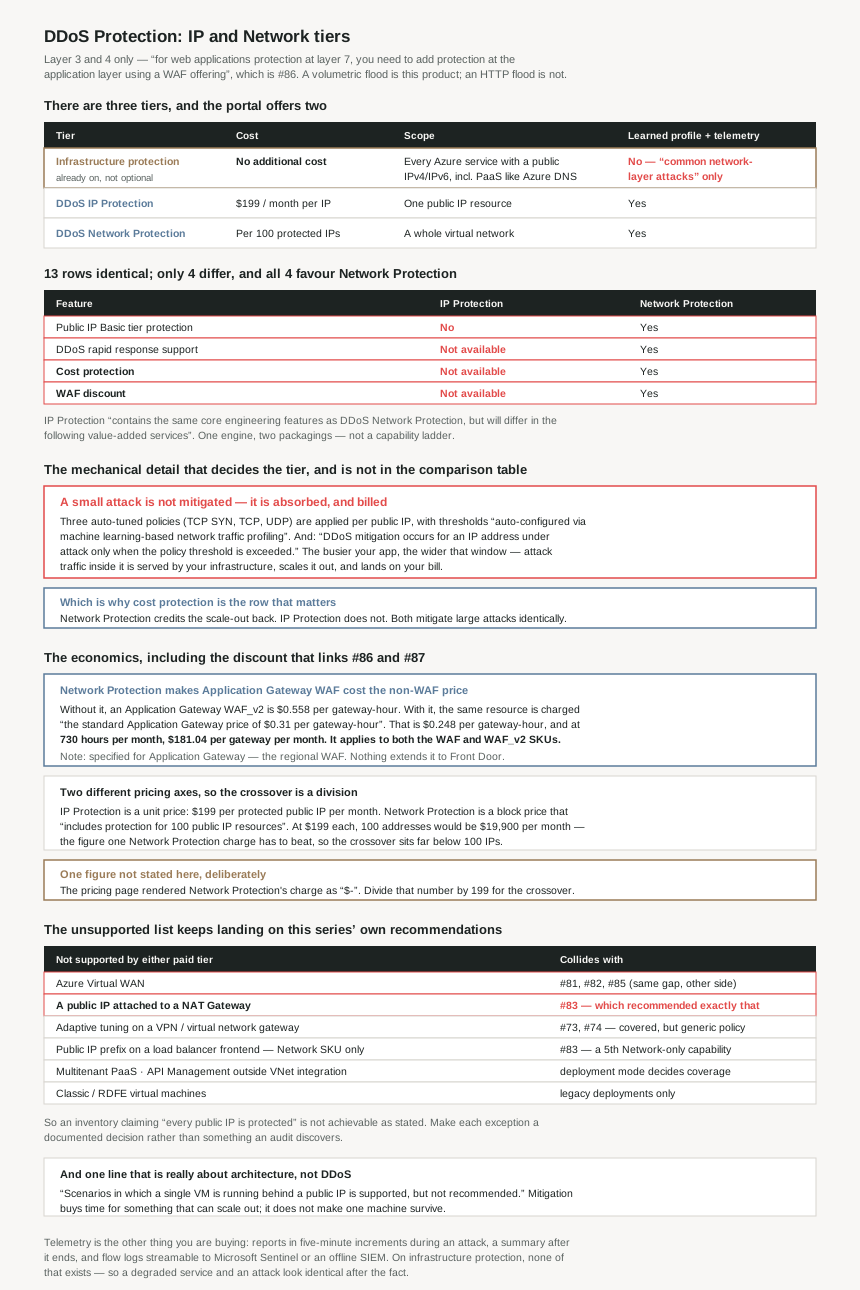
The three tiers
| Infrastructure protection | DDoS IP Protection | DDoS Network Protection | |
|---|---|---|---|
| Cost | No additional cost | Per protected IP | Per 100 protected IP addresses |
| Scope | Every Azure service using public IPv4 and IPv6, including PaaS such as Azure DNS | An individual public IP resource | Enabled at the virtual network level — all protected resource types inside it |
| What it defends | “common network-layer attacks” — the platform | Your application's learned profile | Your application's learned profile |
| Traffic profile learned from your app | No | Yes | Yes |
| Metrics, alerts, reports, flow logs | No | Yes | Yes |
| Configuration required | None — and none possible | Per public IP | Per virtual network |
Where the two paid tiers actually differ
Thirteen rows of the official comparison are identical. Four are not, and all four favour Network Protection:
| Feature | DDoS IP Protection | DDoS Network Protection |
|---|---|---|
| Public IP Basic tier protection | No | Yes |
| DDoS rapid response support | Not available | Yes |
| Cost protection | Not available | Yes |
| WAF discount | Not available | Yes |
| Price | Per protected IP | Per 100 protected IP addresses |
Everything else — detection, mitigation, the learned policies, metrics, alerts, reports, flow logs, Firewall Manager integration, the Sentinel connector, cross-subscription protection — is the same on both. The documentation says so directly: IP Protection “contains the same core engineering features as DDoS Network Protection, but will differ in the following value-added services”. So this is not a capability ladder. It is one engine sold two ways, with three commercial services and one legacy-IP capability attached to the more expensive packaging.
Why This Architecture Holds Up
Because the free tier protects Azure, not your application
The most common misconception here is that DDoS protection is something you either buy or go without. You do not go without:
“At no additional cost, Azure DDoS infrastructure protection protects every Azure service that uses public IPv4 and IPv6 addresses… including platform as a service (PaaS) services such as Azure DNS… requires no user configuration or application changes.”
That is real protection and it is always on. What it is not is tuned to you. The overview draws the line in one clause: for services outside a protected virtual network, “the default infrastructure-level DDoS protection applies, which defends against common network-layer attacks.” Common ones. The paid tiers add “intelligent traffic profiling” that “learns your application's traffic over time”, and with it the metrics, alerts, reports and flow logs that let you know an attack happened at all.
That last part is the practical difference. On infrastructure protection you get no telemetry, which means an attack that degrades your service but stays below Azure's platform-wide thresholds is indistinguishable from your application being slow. The paid tiers are, among other things, the instrument that tells you which of those it was.
Because mitigation only starts once your own normal traffic is exceeded
This is the single most important mechanical detail in the product, and it follows from the thing that makes the paid tiers good:
“The policy thresholds are auto-configured via machine learning-based network traffic profiling. DDoS mitigation occurs for an IP address under attack only when the policy threshold is exceeded.”
Three auto-tuned policies — “TCP SYN, TCP, and UDP” — are applied per public IP, with thresholds derived from your traffic. The consequence is that the busier your application, the larger an attack must be before anything happens. An attack sized just under your learned baseline passes through, is served by your infrastructure, and scales it out. You pay for that traffic.
Which is exactly why one of the four differentiating rows is a financial instrument rather than a feature.
Because cost protection is insurance, and it is the row people skip
“Receive data-transfer and application scale-out service credit for resource costs incurred as a result of documented DDoS attacks”, and from the pricing page in plainer terms: “If the resource is protected with Network Protection, any scale out costs during a DDoS attack are covered and customer will get the cost credit back for those scaled out resources.”
Put that next to the threshold behaviour and the two facts combine into the real argument for Network Protection. Sub-threshold attack traffic is absorbed by your autoscaling, and autoscaling has a bill. On Network Protection that bill is credited back; on IP Protection it is not. The tier difference is not whether you are protected during a large attack — both mitigate identically — it is who pays for the small ones.
The third commercial row works the same way: “DDoS rapid response support” gives access to “the DDoS Rapid Response (DRR) team, who can help with attack investigation during an attack and post-attack analysis”. Not available on IP Protection. So during an incident, the cheaper tier mitigates just as well and leaves you to interpret it alone.
Because the WAF discount makes the two products partly pay for each other
The fourth differing row is the one that changes the arithmetic, and the pricing page quantifies it:
“When Azure Application Gateway with WAF is deployed in a protected virtual network, there are no additional charges for WAF — you pay for the Application Gateway at the lower non-WAF rate… This discount applies to both Application Gateway WAF and WAF_v2 SKUs.”
With figures: “if you are not using Network Protection and deploy an Application Gateway WAF_v2, you are charged $0.558 per gateway-hour. If you deploy the same resource type… and you are using Network Protection to protect that VNet, you will be charged the standard Application Gateway price of $0.31 per gateway-hour.”
That is $0.248 per gateway-hour, and at the “730 hours per month” the page bases its prices on, $181.04 per Application Gateway WAF_v2 per month. It is not a rounding error, and it is the reason the two products should be costed together rather than in sequence: #86's WAF becomes cheaper precisely when #87's Network Protection is enabled on the virtual network it sits in.
Note which WAF, though. The discount is specified for Application Gateway, which is the regional WAF of #86. Front Door's WAF is a different product in a different place, and nothing on this page extends the discount to it. So the architecture that gets the discount is the one where the WAF lives inside the protected virtual network — which is also the architecture #85 showed you cannot build in a secured virtual hub, since WAF on Application Gateway there is “currently supported in spoke network” rather than the hub.
Because the pricing shapes are different units, and the crossover is computable
The two tiers are not priced on the same axis. IP Protection is “a fixed monthly charge per public IP resource protected” of $199 per month. Network Protection is a single charge that “includes protection for 100 public IP resources”, with “overage charges (more than 100 public IP resources)… per resource per month”.
So the comparison is a block price against a unit price. At $199 per IP, 100 protected addresses on IP Protection would cost $19,900 per month — which is the number one Network Protection charge has to beat, and it beats it comfortably at any realistic plan price. The crossover sits far below 100 IPs.
The Azure DDoS Protection pricing page rendered the Network Protection monthly charge and its overage rate as $- placeholders at the time of writing, while the IP Protection figure rendered as $199. So the exact crossover IP count is not stated here. Look up the one number on the pricing page and divide it by 199 — that quotient is the number of protected IPs at which Network Protection becomes the cheaper tier, before any of the three value-added services are counted.
And the services tilt it further. The WAF discount alone is worth $181.04 per month per Application Gateway WAF_v2, so two such gateways in the protected virtual network return roughly the cost of two protected IPs before the plan has defended anything. Cost protection is unpriced and unbounded in your favour.
One more structural difference matters at scale. For Network Protection, “under a tenant, a single DDoS protection plan can be used across multiple subscriptions, so there's no need to create more than one”, and it is “enabled at the virtual network (VNet) level” with “all protected resource types within the virtual network… automatically protected”. One plan, many subscriptions, protection by inclusion. IP Protection has no plan object at all and is enabled per address, so its administrative cost grows with every public IP anyone creates.
Because the unsupported list keeps landing on this series' own recommendations
The limitations are where a design meets reality, and three of them hit architectures earlier posts here recommended.
| Limitation | Which earlier post it affects |
|---|---|
| “Azure Virtual WAN aren't currently supported” | #81, #82, #85 — #85 found the same gap from the Firewall Manager side, where DDoS was a known issue with the route in being a customer-provided public IP in preview. This confirms it from the DDoS side. |
| “Protecting a public IP resource attached to a NAT Gateway isn't supported” | #83 — which recommended “an Azure NAT gateway with availability zone support” for egress on all four NVA designs. That gateway's public IP cannot be DDoS-protected. |
| “VPN gateway or Virtual network gateway is protected by a DDoS policy. Adaptive tuning isn't supported at this stage” | #73, #74 — the gateway is covered, but with a generic policy rather than one learned from its traffic. The feature that distinguishes the paid tiers does not apply to it. |
| “Protection of a public IP address prefix linked to a public load balancer frontend is supported with the Network Protection SKU” | #83 — a fifth Network-only capability, not listed in the comparison table, and it applies to the load balancer design that post recommended. |
The NAT gateway one deserves emphasis because it is a direct collision. #83's advice was to put a NAT gateway in front of egress; the public IP on that gateway is explicitly outside both paid tiers. It is not a catastrophe — outbound SNAT addresses are a smaller target than inbound service endpoints, and infrastructure protection still applies — but it means an inventory of “every public IP is protected” is not achievable as stated, and the exception should be a documented decision rather than a gap someone finds during an audit.
Two more worth knowing. Multitenant PaaS is out, including “Azure API Management in deployment modes other than APIM with virtual network integration” — so the deployment mode decides whether your API gateway can be protected. And the guidance closes with a sentence that is really about architecture rather than DDoS: “Scenarios in which a single VM is running behind a public IP is supported, but not recommended.” DDoS mitigation buys time for something that can scale; it does not make one machine survive.
Because the two layers have to be bought together to mean anything
The product is explicit that it is half of a pair: “When deployed with a web application firewall (WAF), Azure DDoS Protection protects both at the network layer (Layer 3 and 4, offered by Azure DDoS Protection) and at the application layer (Layer 7, offered by a WAF).”
That matters because the two failure modes look identical from outside. An application that stops responding under a volumetric flood and one that stops responding under an HTTP request flood both present as an outage, and only one of them is this product's job. Buying DDoS Protection and leaving #86's WAF in detection mode — which that post noted is the easy thing to let happen — produces an estate that is protected against the attack type that is cheaper for an adversary to mount and unprotected against the one that is harder to distinguish from traffic.
The telemetry is the part to actually use. “Detailed reports in five-minute increments during an attack, and a complete summary after the attack ends”, with flow logs streamable “to Microsoft Sentinel or an offline… SIEM system”. Those reports are the only way to answer, after the fact, whether an outage was an attack at all — and on infrastructure protection they do not exist.
Key Architecture Decisions
| Decision | Choose | Because |
|---|---|---|
| Tier, when the estate has more than a handful of public IPs | Network Protection | A block covering 100 IPs against $199 per IP per month. 100 addresses on IP Protection would be $19,900/month, so the crossover sits far below 100. |
| Tier, when you run Application Gateway WAF | Network Protection | The WAF discount is worth $0.248 per gateway-hour, or $181.04 per gateway per month at 730 hours. Two gateways nearly fund two protected IPs before the plan defends anything. |
| Tier, when autoscaling absorbs attack traffic | Network Protection — for cost protection | Mitigation only starts once your learned threshold is exceeded, so sub-threshold attacks are absorbed and billed. Only Network Protection credits the scale-out back. |
| Tier, for one or two internet-facing addresses | IP Protection is defensible | Same detection and mitigation engine. You are giving up three commercial services and Basic-tier public IP support, not protection quality. |
| Protecting a Basic-tier public IP | Network Protection only | Public IP Basic tier protection is a plain No on IP Protection — the one capability difference rather than a commercial one. |
| Expecting layer 7 coverage from this product | Do not — add a WAF | It protects L3 and L4 only. An HTTP flood is #86's problem, and a WAF left in detection mode leaves that half unprotected. |
| Assuming no protection without a plan | Infrastructure protection is already on | It covers every Azure service with a public IP at no cost, including PaaS like Azure DNS. What you are buying is the learned profile and the telemetry. |
| An inventory claiming every public IP is protected | Document the exceptions | NAT Gateway public IPs, Virtual WAN, multitenant PaaS, API Management outside VNet integration and Classic VMs are all outside both paid tiers. |
| Relying on adaptive tuning for a VPN gateway | Do not | Gateways get a DDoS policy but “adaptive tuning isn't supported at this stage” — a generic profile, not one learned from your traffic. |
| Protecting a public IP prefix on a load balancer frontend | Network Protection SKU | Stated in the limitations rather than the comparison table, so it is easy to miss when choosing a tier from the feature grid alone. |
| Plan topology for Network Protection | One plan per tenant | A single plan works across multiple subscriptions and protection is by virtual network inclusion, so there is no reason to create more than one. |
| VMSS per-instance DDoS telemetry | Flexible orchestration mode | Per-instance telemetry is only available there, which is a scale-set design decision made long before the DDoS one. |
| A single VM behind a public IP | Redesign it | Supported but “not recommended”. Mitigation buys time for something that can scale out; it does not make one machine survive. |
Closing Thought
The two paid tiers are the same product. Thirteen rows of the comparison table are identical, the documentation says IP Protection carries the “same core engineering features”, and nothing suggests a large attack is mitigated differently on one than the other. What you buy with Network Protection is a block price, one legacy-IP capability, and three commercial services — a support team during an incident, a credit for the bill an attack runs up, and a discount on a WAF you were probably buying anyway.
Which makes the choice unusually tractable, and the arithmetic worth doing rather than guessing. The WAF discount is $181.04 per Application Gateway WAF_v2 per month. IP Protection is $199 per address per month. Those two numbers are close enough that in an estate with a few Application Gateways, the WAF discount alone can carry a meaningful share of the plan. I could not get Network Protection's own figure to render, and I have left it unstated rather than recalled — but the division to do is that number over 199, and the answer is where the tier decision actually sits.
The detail I would act on first, though, is not commercial. It is that “mitigation occurs for an IP address under attack only when the policy threshold is exceeded”, and the threshold is learned from your own traffic. The protection you are buying does not engage below your normal volume. For a busy application that window is wide, everything inside it is served and billed, and the only tier that gives you the money back is the expensive one. That is the sentence that decides the tier, and it is not in the comparison table.
#88 leaves the perimeter for name resolution: Azure DNS public zones — how a zone is hosted, delegated and secured, and what the platform guarantees about it.
Official Azure Reference
- Azure DDoS Protection tier comparison — the full feature table across DDoS IP Protection and DDoS Network Protection, the four differing rows covering Basic-tier public IP support, rapid response, cost protection and the WAF discount, the per-IP versus per-100-IP pricing axes, the no-additional-cost infrastructure protection note, and the complete limitations list covering multitenant PaaS, Virtual WAN, NAT Gateway, Classic and RDFE virtual machines, gateway adaptive tuning, public IP prefixes on load balancer frontends, and VMSS orchestration mode
- Azure DDoS Protection overview — the layer 3 and 4 scope with layer 7 requiring a WAF, the two tiers and the statement that IP Protection carries the same core engineering features, always-on monitoring and adaptive real-time tuning, the three auto-tuned mitigation policies per public IP and the threshold-exceeded condition, attack analytics in five-minute increments with Sentinel and SIEM streaming, rapid response, turnkey protection, the cost guarantee, infrastructure-level protection for services outside a virtual network, the single-plan-per-tenant model, and the custom policy preview
- Azure DDoS Protection pricing — the $199 per month per protected public IP resource for IP Protection based on 730 hours per month, the Network Protection charge including 100 public IP resources with per-resource overage, the virtual-network-level enablement and single-plan-across-subscriptions model, the WAF discount with the $0.558 WAF_v2 and $0.31 standard Application Gateway gateway-hour rates, and the scale-out cost credit during an attack
- DDoS Protection reference architectures — the supported architectures and PaaS services in full (no claims drawn from it)
- Azure DDoS Protection custom policy — the preview feature for fine-tuning detection thresholds per protocol (no claims drawn from it)
- Fundamental best practices — the scalability guidance behind the single-VM recommendation (no claims drawn from it)
Comments