Business Challenge
The trap in this topic is that Partner looks like Dedicated with the hard parts outsourced. In the console it nearly is: the same VLAN attachments, the same Cloud Routers, the same two availability figures. What changes is what those figures cover, and the documentation is unusually direct about it.
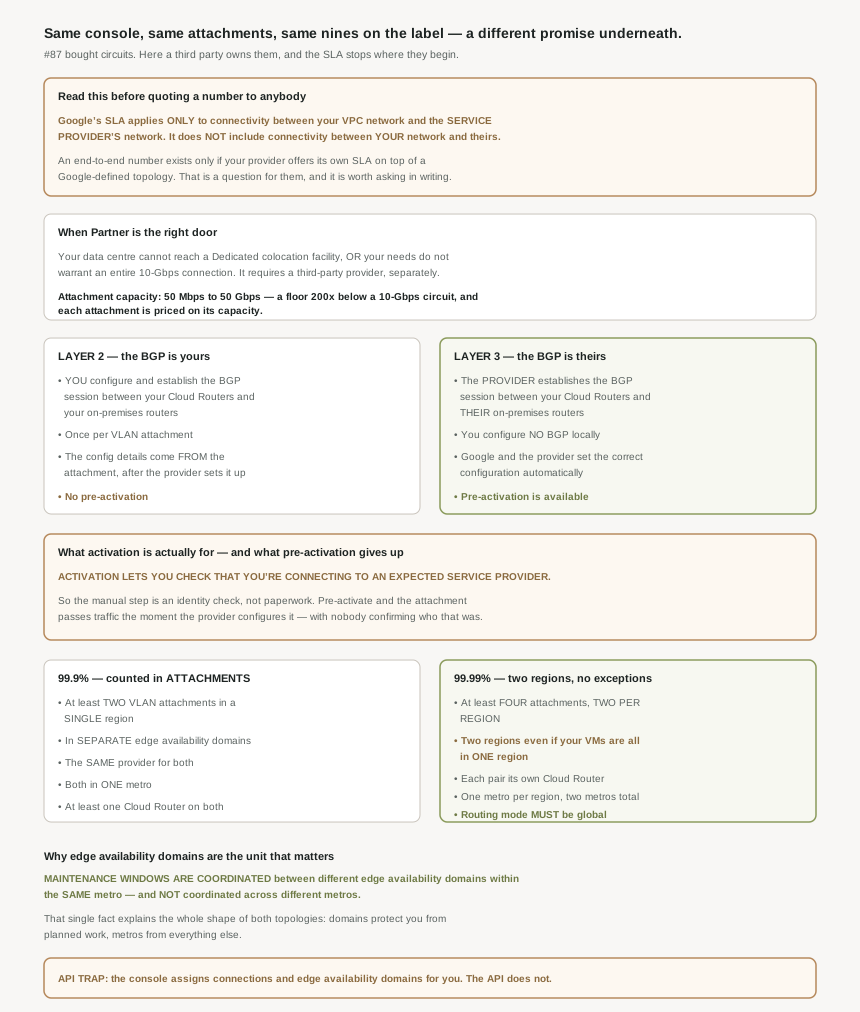
Google offers an SLA that applies only to the connectivity between your VPC network and the service provider's network. And then, so there is no room for optimism: the SLA doesn't include the connectivity between your network and the service provider's network.
You have 99.99% on one segment of it. The uncovered segment is the one running through a third party's equipment to your building — which is, by most people's incident history, the half that actually fails. There is a route to a complete number, and it runs through the provider rather than Google: if your service provider does offer an SLA, you can get an end-to-end SLA based on the Google-defined topologies.
Correct approachAsk the provider for their SLA in writing, and ask specifically whether it is predicated on one of the Google-defined topologies, because that is the condition the sentence attaches. Then quote two numbers internally, or quote the weaker one. A single "99.99%" in a design document is the kind of claim that survives unchallenged for years and then fails an audit, because nobody wrote down which segment it described.
You skipped a check rather than a step. Activation lets you check that you're connecting to an expected service provider. That is what the manual stage is for — it is a confirmation of the counterparty, and the page draws the conclusion itself: if you want to verify who you're connecting to, don't pre-activate. With pre-activation on, the VLAN attachments are active as soon as the service provider configures them.
Correct approachPre-activate only where somebody has already verified the provider out of band, and never as a default for a first connection. The failure this guards against is not a provider going rogue; it is a pairing key going to the wrong account, or a provider's own provisioning error attaching you to a connection you did not order. Activation is the one moment a human looks at who is on the other end.
Not for four nines. The requirement is at least four VLAN attachments, two per Google Cloud region, and the documentation anticipates exactly this objection: even if you only have virtual machine (VM) instances in a single region, you must use two regions. The reasoning is given too — if a region-wide issue occurs, Google Cloud can reroute traffic through the other region to your VMs.
Correct approachBudget the second region's attachments as part of the tier, not as future expansion, and note that this is where Partner diverges from Dedicated in kind rather than degree. Dedicated's 99.99% has a single-region variant in supported metros; Partner's does not. If two regions is unacceptable, you are buying 99.9%.
Architecture
One structural difference drives everything else: you do not own the circuits, so the tiers are counted in attachments.
What you are buying, and what it costs
The third party is not optional and not incidental: Partner Interconnect requires that you separately obtain services from a third-party network service provider. Which makes the first task a procurement one, and the documentation's advice is plain — work with your service provider to understand their offerings and requirements.
The capacity story is where Partner earns its place. This capacity can range from 50 Mbps to 50 Gbps, and the capacity depends on your bandwidth requirements and what's offered by your service provider. That range spans a factor of 1000 from floor to ceiling, and the floor is the point: a 50 Mbps attachment is a reasonable thing to buy, where #87's smallest unit was an entire circuit. That is the actual reason most estates belong here — not that Dedicated is hard, but that one circuit is more connectivity than a branch office will ever use.
The pricing model follows the same logic: pricing for each VLAN attachment is based on its capacity. So capacity is a per-attachment dial rather than a per-circuit commitment, which is the opposite of #87's irreversible link type. Where Dedicated forces a ten-year guess, Partner lets you be wrong cheaply.
Layer 2 or Layer 3, which is really "who owns BGP"
Supported service providers offer Layer 2 connectivity, Layer 3 connectivity, or both, and the difference is not about the transport. It is about which organisation configures the routing.
On Layer 2, the work is yours: for Layer 2 connections, you must configure and establish a BGP session between your Cloud Routers and on-premises routers for each VLAN attachment that you create. Per attachment — so the four attachments that four nines requires are four BGP sessions you build and own.
On Layer 3, it is theirs: for Layer 3 connections, your service provider establishes a BGP session between your Cloud Routers and their on-premises routers for each VLAN attachment. Note the subtle change of counterparty in that sentence — the session terminates on their routers, not yours. And you don't need to configure BGP on your local router, because Google and your service provider automatically set the correct BGP configurations.
On Layer 3 you do not hold the BGP session, which means the levers from #83 and #86 are not yours either. Route priorities, MED values, AS-path manipulation, the active-active versus active-passive decision — all of those are expressed in BGP attributes, and on a Layer 3 Partner connection the session is configured by the provider. #86 established that active-active versus active-passive is decided by what MED values the peer advertises; on Layer 3 that peer is your provider's router, under their configuration management.
That is not an argument against Layer 3. It is an argument for knowing, before you sign, whether your traffic-engineering requirements are things you will need to ask a third party to implement. The ECMP condition is stated on the Partner page itself: the Cloud Routers used by the VLAN attachments must receive the same announcement with equal cost (the same CIDR range and the same MED values). On Layer 2 you can satisfy that yourself. On Layer 3 it is a service request.
Pre-activation, and what it actually gives up
Pre-activation is offered only on one side of that split: because the BGP configuration for Layer 3 connections is fully automated, you can pre-activate your connections (VLAN attachments). The mechanism is as described — when you enable pre-activation, the VLAN attachments are active as soon as the service provider configures them.
What makes this worth a section rather than a footnote is what the activation step is for. It is not a formality, and the documentation does not treat it as one: activation lets you check that you're connecting to an expected service provider. Then, plainly: if you want to verify who you're connecting to, don't pre-activate.
So the convenience and the control are the same stage. Pre-activation removes a human confirmation of the counterparty at the moment a third party's network begins carrying your traffic, and it is available precisely where the automation is most complete. Worth a conscious decision rather than a default.
Why This Architecture Holds Up
Both tiers are counted in VLAN attachments rather than circuits, which follows from not owning the circuits. #87's 99.9% asked for two interconnect connections; Partner's asks for at least two VLAN attachments in a single Google Cloud region , in separate edge availability domains (metro availability zones), with two constraints that are easy to violate by accident: you must select the same supported service provider for both of the VLAN attachments in the separate edge availability domains, and the attachments must connect in one metropolitan area (metro). Plus at least one Cloud Router, connected to both VLAN attachments.
The same-provider requirement is the counter-intuitive one. Diversifying providers feels like the more resilient choice, and for the circuit underneath it may be — but it does not satisfy this topology, and the tier is defined by the topology.
Four nines scales that up and adds the two-region rule: four attachments, two per region, where each pair of VLAN attachments must have its own Cloud Router (two different Cloud Routers) and the VLAN attachments in one region must connect to a Partner Interconnect connection in one metropolitan area (metro), and attachments in the other region must connect to a connection in another metro. Two Cloud Routers is a floor, not a ceiling — even though only two Cloud Routers are required, topologies with four Cloud Routers, one for each VLAN attachment, also meet the SLA requirement.
And the routing mode requirement returns, stated twice: the dynamic routing mode for the Virtual Private Cloud (VPC) network must be global, and, as an instruction, for 99.99% availability, you must set the dynamic routing mode of your VPC networks to global. Same condition as #87's multi-region tier, same silent-failure exposure — a field on the network, editable by anyone with network admin rights, with contractual consequences and no warning attached.
The documentation explains the whole shape of both topologies while justifying an API caveat: this is because maintenance windows aren't coordinated across different metros, but they are coordinated for different edge availability domains within the same metro.
That is the cleanest statement of the design I have found in this block. Within a metro, the two edge availability domains are a planned-work boundary — Google will not take both down at once. Across metros there is no such coordination, which is why four nines needs two of them: domains protect you from maintenance, metros protect you from everything else. Every requirement in both tiers follows from those two facts, and knowing them means you can reason about a proposed topology instead of pattern-matching it against a diagram.
The API caveat that silently downgrades you
The console does the placement for you. The API does not, and the warning is explicit at both tiers: if you use the API, you must manually assign each attachment to a different connection and to a different edge availability domain, and at 99.9%, if you use the API, you must manually assign each attachment to a different edge availability domain.
This is the most likely way to be out of compliance while believing otherwise. A topology built by hand in the console, verified by eye, and then reimplemented in Terraform or a provisioning script is exactly the path where the automatic assignment disappears. Nothing fails. The attachments come up, BGP establishes, traffic flows, and two attachments sit in the same edge availability domain where the SLA required two. The only symptom arrives during a maintenance window that was never going to be coordinated for you.
One related detail worth carrying from the tier definitions: when Cloud Router is connected to VLAN attachments in different edge availability domains, Google Cloud uses two software tasks for redundancy. That is #83's BGP task appearing again, and it is the control-plane reason the domain separation matters rather than just a facilities argument — separate domains put your attachments on separate software tasks.
Key Architecture Decisions
| Situation | Decision | Because |
|---|---|---|
| Data centre cannot reach a colocation facility | Partner Interconnect | It is the documented case for it, alongside needs below a whole 10-Gbps connection. |
| Needing far less than 10 Gbps | Partner, sized per attachment | Attachment capacity runs from 50 Mbps, and pricing is based on that capacity. |
| Quoting an availability figure | Quote the segment, or quote two numbers | Google's SLA covers VPC to provider only, not provider to you. |
| Wanting an end-to-end number | Get the provider's SLA in writing, on a Google-defined topology | That is the stated condition for an end-to-end SLA. |
| You need to control MED, priorities or AS path | Prefer Layer 2 | On Layer 3 the provider owns the BGP session, so those are service requests. |
| You want no BGP configuration on your side | Layer 3 | The provider establishes the session and the configuration is automatic. |
| Offered pre-activation on a first connection | Decline it | Activation is the check that you are connecting to an expected provider. |
| All VMs in one region, wanting 99.99% | Build attachments in two regions anyway | Two regions is required even for single-region workloads. |
| Two regions unacceptable | You are buying 99.9% | Partner has no single-region 99.99% variant, unlike Dedicated. |
| Tempted to use two providers for 99.9% | Use the same provider for both attachments | The topology requires it, however counter-intuitive. |
| Reimplementing a console-built topology in code | Assign connections and edge availability domains explicitly | The API does not assign them for you, and nothing reports the gap. |
| Running 99.99% Partner | Treat the network's dynamic routing mode as controlled | Global is required, and switching to regional breaks it silently. |
| Deciding how many Cloud Routers | Two is the floor; four also qualifies | One per attachment is explicitly permitted. |
| Reasoning about a proposed topology | Ask what each boundary protects against | Domains are a maintenance boundary; metros are not coordinated at all. |
The one to look at today
If you run Partner Interconnect, open the attachments and read two fields per attachment: its edge availability domain and its region. Then compare that against the tier you believe you hold. If the topology was ever rebuilt through the API or Terraform, this is the check most likely to come back wrong, and it comes back wrong silently. While you are there, find out whether anyone has the provider's own SLA on file — because without it, the number in your design document covers a segment that ends at somebody else's router.
Closing Thought
Partner Interconnect is the better choice for most estates and the harder one to describe honestly. Better, because a 50 Mbps attachment priced on its capacity is a reasonable thing to buy and a 10-Gbps circuit in a colocation facility usually is not. Harder, because the availability figure on the label measures a shorter distance than the one it looks identical to, and the difference is a third party's network.
The sentence I will keep is the one about maintenance windows. Two posts have now described edge availability domains as a thing to spread attachments across, and the reason finally appears in a note explaining an API caveat: domains are coordinated for planned work and metros are not. Everything else — two attachments, two domains, two regions, two metros — falls out of that. It is a good reminder that the requirement lists are consequences of something, and the something is usually one sentence somewhere less prominent.
#89 finishes the Interconnect block with Cross-Cloud Interconnect — the one where the far end is another cloud provider's network rather than your own.
Official Google Cloud Reference
- Partner Interconnect overview
- Establish 99.99% availability for Partner Interconnect
- Establish 99.9% availability for Partner Interconnect
- Request Partner Interconnect connections
- Activate Partner Interconnect connections
- Partner Interconnect provisioning overview
- Create VLAN attachments for Partner Interconnect
- Create redundant VLAN attachments
- Configure on-premises routers for Partner Interconnect
- Supported service providers
- Cloud Interconnect overview
- Cloud Interconnect terminology
- Best practices for Cloud Interconnect
- Failure scenarios and impacts
Comments