Business Challenge
#87 finished the perimeter: four posts on firewalls, WAF and volumetric protection, all of which assume traffic has already arrived at an address. DNS is the step before that, and it is the one layer where a mistake redirects users rather than exposing them.
Azure DNS is also narrower than its name suggests, and the scoping sentence is worth having first:
“Azure DNS provides an authoritative DNS service. It doesn't provide a public recursive DNS service.”
And: “the zone must be created in Azure and delegated to Azure's authoritative DNS servers with a domain registrar. Azure DNS isn't the domain registrar.” It also “currently doesn't support purchasing of domain names.”
So hosting a domain here is a three-party arrangement: you own the name at a registrar, Azure answers queries for it, and a recursive resolver somewhere else does the asking. Azure owns exactly one of those three roles, and the consequences of that division run through everything below.
The sharpest consequence is stated as a note rather than a warning:
“You do not have to own a domain name to create a DNS zone with that domain name in Azure DNS. However, you do need to own the domain to configure the Azure DNS name servers as the correct name servers for the domain name with the domain name registrar.”
Creating a zone is a resource-creation operation in your subscription. It validates nothing about the outside world. A zone named after a domain you do not control is a perfectly healthy Azure resource that answers no real queries, and nothing in the portal will tell you which kind you have.
Architecture
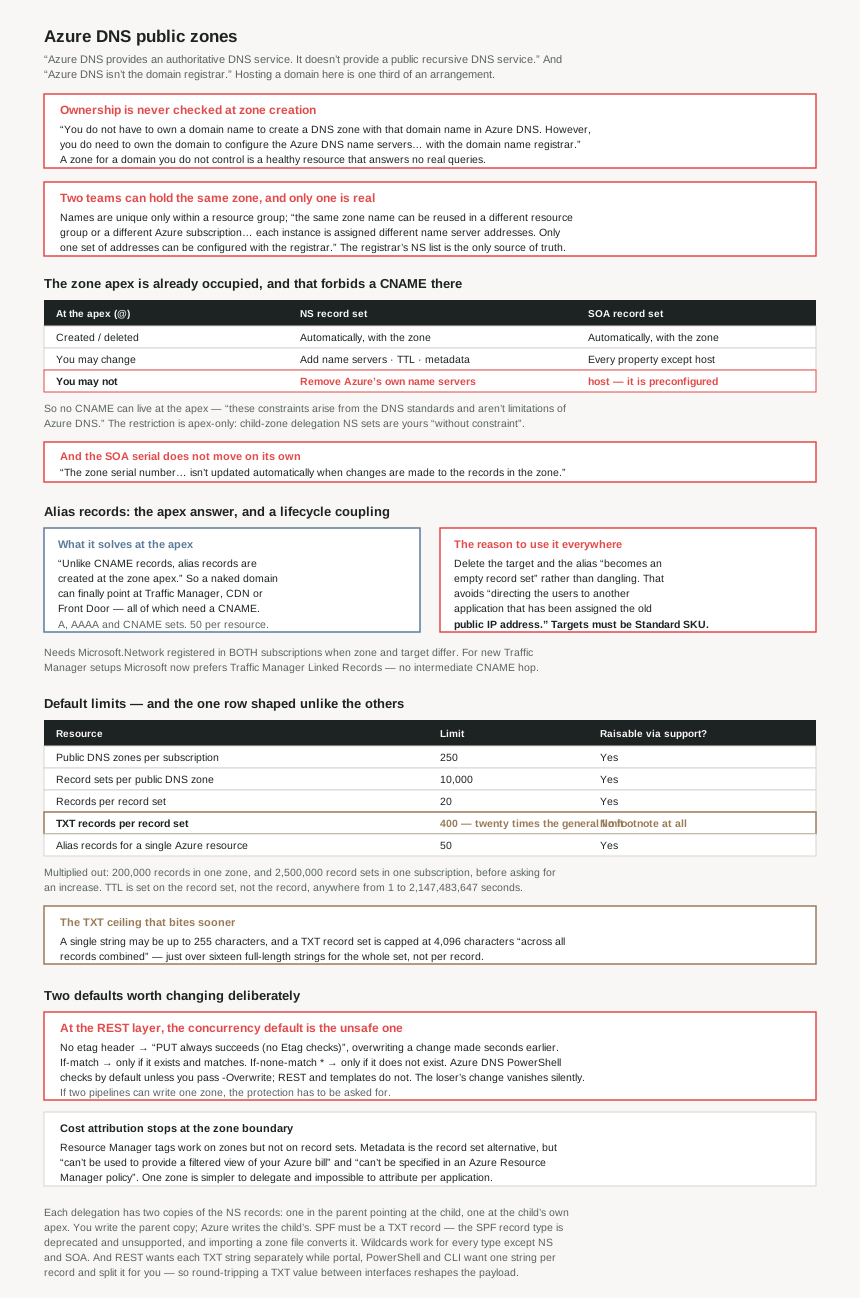
What the zone apex already contains, and what that forbids
At the apex (@) | NS record set | SOA record set |
|---|---|---|
| Created | Automatically with the zone | Automatically with the zone |
| Deleted | Automatically with the zone — cannot be deleted separately | Automatically with the zone — cannot be created or deleted separately |
| What you may change | Add further name servers; change TTL and metadata | Every property except host |
| What you may not | Remove or modify the prepopulated Azure name servers | host — preconfigured to Azure's primary name server |
| Consequence | The apex is occupied, so no CNAME can be created there. “These constraints arise from the DNS standards and aren't limitations of Azure DNS.” | |
Default limits for public zones
| Resource | Limit | Raisable via support? |
|---|---|---|
| Public DNS zones per subscription | 250 | Yes |
| Record sets per public DNS zone | 10,000 | Yes |
| Records per record set | 20 | Yes |
| TXT records per record set | 400 | No footnote — the only row without one |
| Alias records for a single Azure resource | 50 | Yes |
Those multiply out usefully: 200,000 records in a single zone, and 2,500,000 record sets across a subscription, before anyone has to ask Azure Support for anything.
Why This Architecture Holds Up
Because two teams can hold the same zone and only one of them is real
Zone names are unique only within a resource group: “The name of the zone must be unique within the resource group… The same zone name can be reused in a different resource group or a different Azure subscription.” Which is reasonable — and then:
“Where multiple zones share the same name, each instance is assigned different name server addresses. Only one set of addresses can be configured with the domain name registrar.”
So the failure looks like this: two teams each create a contoso.com zone in their own resource group. Both are valid resources. Both accept records. Both show green. One is delegated and answers the internet; the other is an elaborate notepad. Azure has no way to tell you which, because the thing that decides it is a setting at a registrar Azure does not talk to.
The practical defence is not technical. It is that the registrar's name server list is the authoritative record of which zone is live, and it belongs in the same document as the zone's resource ID. A zone whose name servers are not in that list should be treated as a draft, whatever its contents.
Because the apex is already occupied, and that is why alias records exist
Two record sets appear at the apex the moment a zone is created, and both are partly outside your control. The consequence is the constraint everyone meets eventually: “Since the zone apex (name = '@') contains the NS and SOA record sets… you can't create a CNAME record set at the zone apex.”
That matters because the things you most want at the apex are CNAME-shaped. “Since using a Traffic Manager profile requires creation of a CNAME record, it's not possible to point to Traffic Manager profile from the zone apex” — and the same applies to a CDN endpoint or a Front Door endpoint. A naked domain cannot be a CNAME, so contoso.com cannot point at a load-balanced front end the ordinary way.
Alias records are the answer, and they are “qualifications on a DNS record set” rather than a record type of their own. They apply to A, AAAA and CNAME sets, and “unlike CNAME records, alias records are created at the zone apex”. Targets are specific Azure things: a Standard SKU public IP, a Traffic Manager profile, an Azure CDN endpoint, an Azure Front Door endpoint, or another record set of the same type in the same zone.
Note the SKU qualifier on the first of those — “a Standard SKU public IP resource”. #87 found that DDoS IP Protection also cannot protect a Basic-tier public IP. Basic public IPs are now excluded from both, which makes the SKU of an address a decision with consequences two layers away from where it is made.
Because an alias record is a lifecycle coupling, not a DNS feature
The apex problem is the headline, but the more interesting property is what alias records do when things are deleted:
“Alias records prevent dangling references by tightly coupling the life cycle of a DNS record with an Azure resource… If you delete those underlying resources, the DNS alias record becomes an empty record set. It no longer references the deleted resource.”
And the reason that matters is stated plainly, which is unusual: an alias updating itself “can potentially avoid the security risks of directing the users to another application that has been assigned the old public IP address.”
That is the whole subdomain-takeover problem described from the defender's side. A plain A record pointing at a released public IP keeps pointing there, and Azure will eventually hand that address to someone else. The documentation is also candid about why this happens organisationally rather than technically: “a role might have the authority to delete a CNAME or IP address that belongs to an application. But they don't have sufficient authority to update the DNS record that points to those targets.” Alias records do not fix the permissions split; they make it harmless.
Two operational details attach. The limit is “50 alias record sets per resource”, which binds in exactly the fan-out case where one Front Door endpoint fronts many customer domains. And creation requires “the Microsoft.Network resource provider” registered — “if the DNS zone and the alias target resource are in different subscriptions, both subscriptions must be registered”, which is the sort of prerequisite that surfaces as an opaque failure in a pipeline rather than a clear message.
One recommendation has moved, and it was news a few days ago: “For new Traffic Manager-backed DNS configurations, consider using Traffic Manager Linked Records instead of alias records… without an intermediate CNAME hop”. Alias-to-Traffic-Manager “remain supported for backward compatibility” — so this is a new-build default change, not a migration.
Because the SOA serial number does not move on its own
This is the detail most likely to break something downstream, and it is one sentence:
“The zone serial number in the SOA record isn't updated automatically when changes are made to the records in the zone. It can be updated manually by editing the SOA record, if necessary.”
In conventional DNS the serial is how the outside world detects that a zone changed — secondaries compare it to decide whether to transfer, and monitoring systems watch it as a change signal. In Azure DNS it is an editable field that nothing increments. Any tooling that treats a static serial as “nothing has changed” will be wrong about an Azure-hosted zone, permanently and silently.
This is a reasonable design for a service where there is no zone transfer to coordinate — the records are the API, and the API is always current. It is only a problem if something upstream assumed otherwise, which is why it is worth knowing before a monitoring integration is built rather than after it reports nothing for a month.
Because the apex NS set is half yours, and that is deliberate
The apex NS record set is the one place where Azure's control and yours overlap in the same object. You may “add more name servers to this NS record set, to support cohosting domains with more than one DNS provider”, and change its TTL and metadata. You may not remove or modify what Azure put there: “removing or modifying the prepopulated Azure DNS name servers isn't allowed.”
So multi-provider DNS is supported by addition only. You can run Azure DNS alongside another provider for the same domain; you cannot use Azure DNS to express a migration away from Azure by removing its own name servers from the apex. That has to happen at the registrar, which is consistent with everything else here — the registrar is where authority lives.
The restriction is also precisely scoped, and the scoping is the useful part: “This restriction only applies to the NS record set at the zone apex. Other NS record sets in your zone (as used to delegate child zones) can be created, modified, and deleted without constraint.” Child delegation is entirely yours. Which is how the two-copy structure works: “Each delegation actually has two copies of the NS records; one in the parent zone pointing to the child, and another in the child zone itself.” You write the parent copy; Azure writes the child's apex copy.
Because TXT limits are a different shape from every other type
The limits table has one row that does not match its neighbours in either value or footnote. Records per record set is 20. TXT records per record set is 400 — twenty times as many. And where 250, 10,000, 20 and 50 all carry the footnote “If you need to increase these limits, contact Azure Support”, the 400 does not.
So TXT gets far more headroom and, uniquely, no documented path to more. That is a sensible shape once you remember what TXT record sets hold: SPF, DKIM selectors, domain-verification tokens from every SaaS product the organisation has ever trialled. The apex TXT set is where unrelated systems accumulate, and 400 is generous precisely because nobody curates it.
There is a second TXT ceiling that bites sooner and is easier to miss. A single string may be “up to 255 characters in length”, and “Azure DNS supports a total string length of up to 4,096 characters in each TXT record set (across all records combined)”. That budget is just over sixteen maximum-length strings for the whole record set — not per record. A long DKIM key is a substantial fraction of it.
Two related traps in the same area. SPF must be a TXT record: “The obsolete SPF record type isn't supported”, and importing a zone file silently converts any SPF-typed records to TXT. And the API and the portal disagree about strings: “When calling the Azure DNS REST API, you need to specify each TXT string separately. When you use the Azure portal, PowerShell, or CLI interfaces, you should specify a single string per record”, which is then auto-split. So the same TXT value expressed through two interfaces is two different payloads, and a tool that round-trips between them can reshape a record without changing its meaning — or change its meaning if the splitting is wrong.
Because etags are the only thing standing between two pipelines
Azure DNS has optimistic concurrency, and it is on by default in exactly one place. “By default, Azure DNS PowerShell uses Etags to block concurrent changes to zones and record sets. The optional -Overwrite switch can be used to suppress Etag checks, in which case any concurrent changes that occurred are overwritten.”
At the REST layer it is opt-in, and the default is the unsafe one:
| Header | Behaviour |
|---|---|
| None | PUT always succeeds (no Etag checks) |
If-match <etag> | PUT only succeeds if resource exists and Etag matches |
If-match * | PUT only succeeds if resource exists |
If-none-match * | PUT only succeeds if resource doesn't exist |
A REST call or ARM template that sends no etag wins unconditionally, including over a change made two seconds earlier by someone else. With DNS that is not an abstract concern: the losing change is often the one that was correct, and the symptom is a record that reverts for no visible reason. If two pipelines can write the same zone, the protection has to be asked for — If-match on updates, If-none-match * on creates — and the reason to ask is that the consequence of not asking is invisible until someone notices the record is wrong.
Because the things you tag are not the things you bill on
A small governance asymmetry with a real effect: “Azure DNS supports using Azure Resource Manager tags on DNS zone resources. It doesn't support tags on DNS record sets”, where metadata is the alternative — but “unlike tags, metadata can't be used to provide a filtered view of your Azure bill and can't be specified in an Azure Resource Manager policy.”
So cost attribution and policy enforcement stop at the zone boundary. If one zone serves several teams or applications — which is the normal case, since a zone is a domain and a domain usually spans an organisation — there is no supported way to attribute its cost or govern its contents per application. The alternative is more zones, and the limit on those is 250 per subscription. That is the governance trade to make deliberately: one zone is simpler to delegate and impossible to attribute.
Key Architecture Decisions
| Decision | Choose | Because |
|---|---|---|
| Confirming a zone is actually live | Check the registrar's name server list, not the portal | Ownership is never validated at zone creation, duplicates are allowed across resource groups, each gets different name servers, and only one set can be delegated. Azure cannot tell you which zone is real. |
| Pointing a naked domain at Traffic Manager, CDN or Front Door | An alias record set | NS and SOA occupy the apex so no CNAME can exist there — a DNS standard, not an Azure limit. Alias records can be created at the apex; CNAMEs cannot. |
| Any A/AAAA record pointing at an Azure public IP | Make it an alias record | It empties rather than dangles when the target is deleted, which is the documented defence against users being sent to whoever is assigned that address next. |
| Public IP SKU for anything DNS points at | Standard | Alias targets must be Standard SKU, and per #87 DDoS IP Protection also excludes Basic-tier public IPs. Basic is now excluded from both. |
| New Traffic Manager-backed DNS | Traffic Manager Linked Records, not alias | Microsoft's current recommendation — endpoint IPs returned directly with no intermediate CNAME hop. Alias remains supported for existing configurations. |
| Monitoring an Azure-hosted zone for change | Do not watch the SOA serial | It is not updated automatically when records change. Tooling that reads a static serial as “unchanged” will be silently wrong forever. |
| Running Azure DNS alongside another provider | Add name servers to the apex NS set | Supported by addition only — the prepopulated Azure name servers cannot be removed or modified. Leaving Azure is a registrar action, not a zone edit. |
| Delegating child zones | Freely — the apex restriction does not apply | Non-apex NS record sets can be created, modified and deleted without constraint. Remember both copies exist: parent and child apex. |
| Planning the apex TXT record set | Budget against 4,096 characters, not 400 records | The character ceiling is across all records combined — about sixteen maximum-length strings for the whole set. A long DKIM key consumes a real share of it. |
| Expecting the TXT limit to be raised | Do not count on it | 400 TXT records per record set is the only row in the limits table without the “contact Azure Support” footnote. |
| Writing TXT records from automation | Pick one interface and stay on it | REST wants each string separately; portal, PowerShell and CLI want one string per record and split it automatically. Round-tripping between them reshapes the payload. |
| Two pipelines that can write the same zone | Send etags explicitly | A REST PUT with no etag header always succeeds and overwrites concurrent changes. PowerShell checks by default; everything else does not. |
| Per-application cost attribution inside a zone | Not available — decide whether to split zones | Tags work on zones, not record sets; record set metadata cannot drive billing views or ARM policy. More zones means attribution, against a 250-per-subscription limit. |
| SPF configuration | TXT records only | The SPF record type is deprecated and unsupported, and importing a zone file converts SPF-typed records to TXT. |
Closing Thought
Almost everything surprising about Azure DNS public zones follows from one division of responsibility: Azure is authoritative for a zone, and a registrar decides whether anyone asks Azure. That is why ownership is never validated, why duplicate zones are allowed and only one can be live, why you can add name servers to the apex but not remove Azure's, and why leaving Azure DNS is not an operation Azure DNS offers. The service is deliberately one third of the arrangement, and it behaves consistently with that everywhere.
The thing to change today, if it is not already true, is that every A or AAAA record pointing at an Azure public IP should be an alias record. Not for the apex — for the deletion behaviour. A plain record keeps pointing at a released address, Azure reassigns that address, and the documentation says what happens next in unusually direct language: users get “directed… to another application that has been assigned the old public IP address”. The permissions split that causes it — whoever can delete the IP often cannot fix the record — is organisational and will not be solved. Alias records make it not matter, and they cost nothing.
The quieter one to write down somewhere is the SOA serial. It does not increment. Nothing in Azure is wrong because of that, and any monitoring built on the assumption that it does will report a calm, unchanging zone no matter what happens inside it. That is the kind of error that holds for a year and then matters once.
#89 takes the same service inward: private DNS zones and virtual network links — how a zone that resolves only inside Azure is attached to networks, and what auto-registration does and does not cover.
Official Azure Reference
- DNS zones and records overview — zone name uniqueness per resource group and the duplicate-name name server rule, the note that domain ownership is not required to create a zone, relative and apex record names, the supported record types and the DNSSEC additions, record sets and the SOA and CNAME single-record exceptions, TTL on the record set with its 1 to 2,147,483,647 second range, wildcard support excluding NS and SOA, the CNAME coexistence and apex restrictions, the apex NS and SOA automatic creation rules and what may be modified, the static zone serial number, SPF via TXT only, TXT string and record set character limits, tags versus metadata, the etag model and its four REST behaviours, and the full default limits table
- Alias records overview — alias as a qualification on A, AAAA and CNAME record sets, the Microsoft.Network resource provider requirement across both subscriptions, the Standard SKU public IP target, the 50 alias record sets per resource limit, the Traffic Manager, CDN, Front Door and same-zone record set targets, the Traffic Manager Linked Records recommendation for new configurations, the dangling-record and IP-reuse security rationale, alias records at the zone apex, and the Akamai CDN apex exclusion
- Azure DNS delegation overview — the requirement to delegate at a registrar and that Azure DNS is not one, authoritative versus recursive servers and Azure DNS providing only the former, the Azure-provided recursive service for VMs, NS records as the delegation mechanism, and the two copies of the NS records in parent and child
- DNSSEC in Azure DNS — zone signing and the record types it enables (no claims drawn from it)
- Traffic Manager linked records — the recommended replacement for alias-to-Traffic-Manager (no claims drawn from it)
- Import and export a DNS zone file — the import path that converts SPF-typed records to TXT (no claims drawn from it)
Comments