Business Challenge
Cloud NAT is the first service in this block whose central behaviour is arithmetic. When a Cloud NAT gateway performs source network address translation (SNAT) on a packet sent by a VM, it changes the packet's NAT source IP address and source port — and since ports are finite, how they are handed out decides what your fleet can and cannot do.
Three parts of that hand-out surprise people, and all three are documented. This post is the mechanism; the sizing arithmetic and the exhaustion failure are #102.
They are off by 1,024 per address, every time. TCP and UDP each support 65,536 ports per IP address, but Cloud NAT doesn't use the well-known (privileged) ports (0 through 1,023) — so each NAT IP address on a Cloud NAT gateway (both Public NAT and Private NAT) offers 64,512 TCP source ports and 64,512 UDP source ports.
Correct approachUse 64,512 in every calculation, and note the second half of that sentence too: TCP and UDP have separate budgets of 64,512 each, not a shared pool. A workload that is heavily UDP does not eat into the TCP allocation.
Because it did. For Public NAT, Google Cloud allocates NAT source IP address and source port tuples using multiples of powers of two, so the number of NAT source IP address and source port tuples is greater than or equal to the minimum ports per VM instance that you specify. Any value that is not already a power of two is rounded up to the next one, and the gateway consumes the rounded figure.
Correct approachChoose powers of two deliberately, so your configured number and the allocated number are the same and your capacity planning describes reality. A value chosen for readability rather than for the allocator understates consumption, always in the direction that runs out of addresses sooner.
It supports considerably more than that, or considerably fewer, depending on where the connections go — and this is the single most consequential sentence on the page. The Cloud NAT gateway can process 1,024 simultaneous connections to each unique destination 3-tuple.
A destination is narrow: a unique destination means a unique 3-tuple consisting of a destination IP address, a destination port, and an IP protocol (such as TCP or UDP). A connection is the pairing: a connection means a unique 5-tuple consisting of the NAT source IP address and source port tuple combined with a unique destination 3-tuple.
Correct approachSize against your most concentrated destination, not your total connection count. A fleet whose connections are spread thinly across hundreds of endpoints is comfortable on a small allocation; a fleet concentrating the same number on one API endpoint is not, at any total volume. The question is never "how many connections", it is "how many to the busiest single destination".
Architecture
One number, transformed four times on its way from your configuration to the gateway.
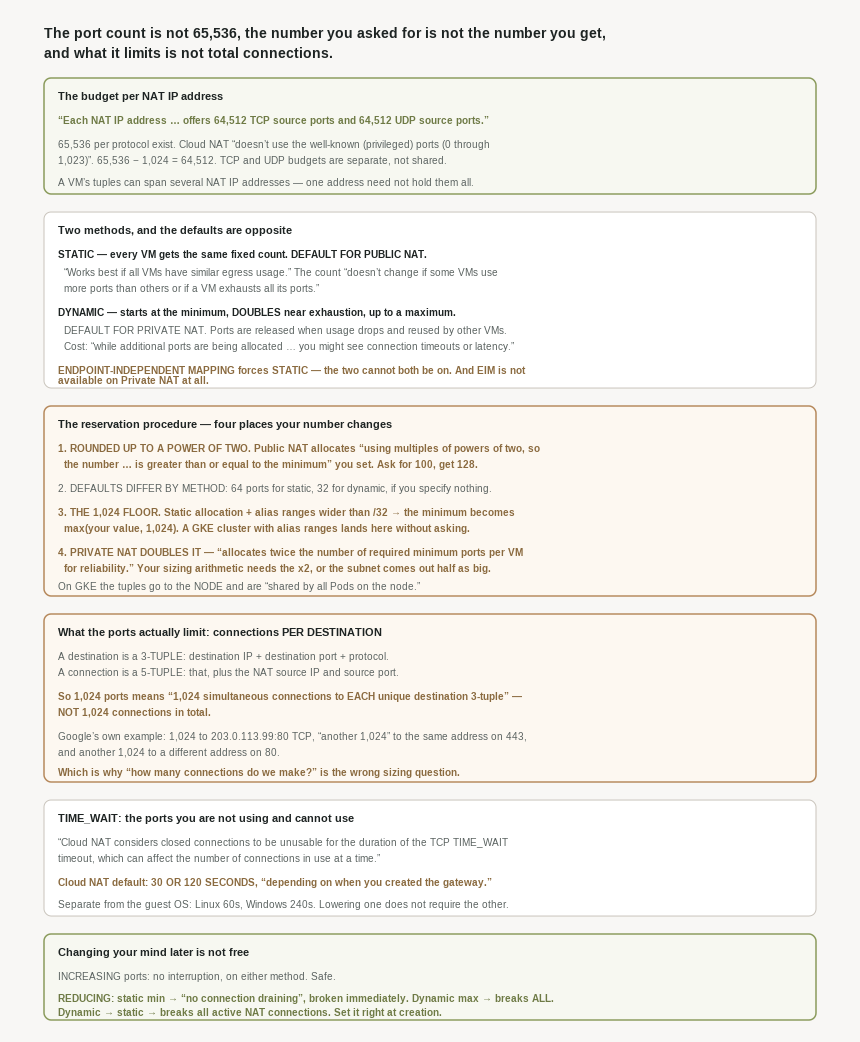
Static and dynamic, with opposite defaults
When you create a Cloud NAT gateway, you choose whether to use static port allocation or dynamic port allocation. The two behave differently and — the detail worth writing down — the default depends on which kind of NAT you are creating.
Static port allocation is enabled, by default, for Public NAT. Private NAT, on the other hand, uses dynamic port allocation by default. The page says it again from the other side, which suggests Google knows people get it wrong: dynamic port allocation is enabled, by default, for Private NAT. Public NAT uses static port allocation by default.
Static is uniform and unyielding. Because all VMs are allocated the same number of ports, static port allocation works best if all VMs have similar egress usage, and the number of ports allocated to each VM is fixed and doesn't change if some VMs use more ports than others or if a VM exhausts all its ports. A single busy VM cannot borrow from idle neighbours, however much slack the gateway has.
Dynamic responds, by doubling. Initially, a VM is allocated the minimum number of ports per VM instance. If a VM is close to exhausting all the ports that are allocated to it, the number of ports assigned to the VM is doubled, and the VM can repeatedly request more ports up to the maximum number of ports per VM instance. It gives back, too: when the port usage significantly decreases, the ports are deallocated and can be allocated to other VMs that use the same NAT gateway.
The cost of that elasticity is stated plainly and is easy to miss when choosing: while additional ports are being allocated to VMs, you might see connection timeouts or latency. Dynamic allocation trades a hard ceiling for a soft edge — instead of failing when a VM exceeds its allocation, it stalls briefly while growing. For a batch job that is strictly better. For a latency-sensitive service it is a decision, not a free upgrade.
Endpoint-independent mapping and dynamic allocation are mutually exclusive, stated twice from both directions: if you want to configure endpoint-independent mapping (EIM) on your Public NAT gateway, you must use static port allocation, and if endpoint-independent mapping is enabled on the Cloud NAT gateway, you cannot configure dynamic port allocation.
So if anything in your stack needs a stable outbound mapping — the usual case being a peer-to-peer or signalling protocol that assumes a consistent source — the allocation method is already decided for you, and the elasticity is not available. Worth discovering at design time rather than after a migration to dynamic is planned.
And on the other side of the service: endpoint-independent mapping is not available for Private NAT gateways at all.
The reservation procedure: four places the number changes
Between the value you configure and the tuples the gateway reserves, the number passes through four transformations. Three of them increase it.
Nothing specified, so a default applies — and it differs by method. If you do not specify the minimum ports per VM instance, then the default value is used: 64 for static port allocation and 32 for dynamic port allocation. Dynamic starts lower precisely because it grows.
Rounded up to a power of two. As above. This is the one that quietly breaks spreadsheets.
A floor of 1,024, in a case most clusters hit. If static port allocation is configured, and the gateway performs NAT for alias IP ranges that have more than one address (netmask smaller than /32), Cloud NAT adjusts the minimum ports per VM to be the maximum of these two values — the value you set, and 1,024. Any GKE cluster whose nodes carry Pod alias ranges lands here without asking, which means a configured minimum of 64 becomes an effective 1,024, and the number of VMs one NAT IP address can serve drops by a factor of sixteen.
Private NAT doubles it. For Private NAT, Google Cloud allocates twice the number of required minimum ports per VM for reliability. Leave the × 2 out of a Private NAT subnet calculation and the subnet comes out half the size it needs to be.
One transformation does not change the number but changes where it comes from: if the Cloud NAT gateway uses two or more NAT IP addresses, then it's possible for the NAT source IP address and source port tuples to span more than one NAT IP address, because a single NAT IP address might not have enough available source ports to accommodate the number of NAT source IP address and source port tuples that a VM needs. A VM is not pinned to one address — a single VM that uses the gateway can get the required ports from any of the assigned NAT IP addresses.
The NAT source IP address and source port tuples are assigned to the node VM, shared by all Pods on the node. So the per-VM allocation is really a per-node allocation divided by Pod density, and raising the Pods-per-node count reduces the ports available to each one without touching the NAT configuration at all.
Combined with the 1,024 floor above, a GKE cluster's effective port maths is quite different from a plain VM fleet's: a higher per-node floor, shared among everything scheduled there.
What the allocation actually limits
The documentation's three-line example is the clearest statement of this behaviour and worth reproducing, because the repetition of "another 1,024" is the whole point. For a VM with 1,024 reserved tuples:
| Destination 3-tuple | Simultaneous connections |
|---|---|
203.0.113.99 : 80 : TCP |
1,024 |
203.0.113.99 : 443 : TCP — same address, different port |
another 1,024 |
| a different address : 80 : TCP | another 1,024 |
So the allocation is not a connection budget at all. It is a per-destination concurrency limit, and the same number means wildly different things for different traffic shapes. UDP is folded into the same model with a caveat: because the UDP protocol is connectionless, the concept of connection is reduced to a 5-tuple associated with a unique UDP datagram.
TIME_WAIT: ports you are not using and cannot use
One more subtraction, and it is the one that makes a gateway look fine in a metrics dashboard while connections fail. However, Cloud NAT considers closed connections to be unusable for the duration of the TCP TIME_WAIT timeout, which can affect the number of connections in use at a time.
There are two independent timers, and knowing which is which matters because only one of them is yours to change in the gateway. On the Cloud NAT side: the default value for the Cloud NAT TIME_WAIT is either 30 seconds or 120 seconds, depending on when you created the gateway. That is an unusually candid sentence — two gateways in the same project, configured identically, can behave differently because of when they were created.
On the guest side: Linux systems use a default TIME_WAIT of 60 seconds, and Windows systems use a default TIME_WAIT of 240 seconds. The relationship between them is stated, and it is permissive in the useful direction: the client VM's TIME_WAIT can be greater than or equal to the Cloud NAT TIME_WAIT, and lowering the Cloud NAT TIME_WAIT timeout doesn't require a corresponding reduction in the client VM's TIME_WAIT. You can shorten the gateway's window without touching every guest OS.
If you are relying on source port unpredictability, read this carefully: increasing the minimum number of ports per VM instance assigns a range of ports randomly to each VM; however, the source port chosen from that range is sequential.
The range placement is random; the walk through it is not. So more ports per VM widens the space an observer must guess, but it does not make the next port unguessable to anyone who has seen the last one. The documentation's alternative is blunt — assign an external IP address to the VM instead of using Public NAT.
Why This Architecture Holds Up
The change behaviour is asymmetric, consistently, and once you see why it is obvious.
Increasing is safe. If you have configured a Cloud NAT gateway with static port allocation, when you increase the minimum ports per VM on the gateway, there is no interruption to traffic. The same holds for raising either bound under dynamic allocation.
Every reduction is disruptive, and the documentation does not soften it. Static: if you have configured a Cloud NAT gateway with static port allocation, and you reduce the minimum ports per VM on the gateway, there is no connection draining, and established NAT connections are broken immediately and clients must establish new TCP connections. Dynamic: reducing the maximum number of ports per VM breaks all existing NAT connections immediately, and the number of allocated ports for all VMs is temporarily reset to the value specified for the minimum number of ports per VM. And abandoning elasticity: disabling dynamic port allocation and switching to static port allocation is disruptive, and it breaks all active NAT connections.
The reason is that a port allocation is not a quota, it is a set of reserved tuples, and live connections are using specific members of that set. Growing the set adds tuples nobody is using. Shrinking it must remove tuples, and the gateway has no way to know which are idle — so it takes them all back. The absence of draining is not an oversight; there is nothing to drain into.
Port allocation is a creation-time decision that behaves like a one-way ratchet. Up is free; down costs every established connection in the gateway.
Which argues for a specific habit: pick the method deliberately at creation, choose a power of two, and err generous on the minimum. Over-allocating costs NAT IP addresses, which are cheap and can be added without disruption. Under-allocating costs an outage to correct, because correcting it downward later is the one operation with no safe path.
And three facts have to be in the calculation from the start, because none of them is visible in the number you typed: the floor of 1,024 if static allocation meets alias ranges, the × 2 on Private NAT, and the TIME_WAIT window holding closed ports out of service.
One figure for the Private NAT side
Private NAT draws its addresses from a subnet rather than from reserved external addresses, and two constants govern how many it gets. Four IP addresses are unusable in every subnet's primary IPv4 address range, and the minimum subnet size that you can create is eight IPv4 addresses, which is a subnet mask of /29. A /29 therefore yields four usable NAT addresses, not eight — and with the doubling above, a small Private NAT subnet goes further than it looks in one direction and much less far in the other. The full capacity arithmetic is #102's subject.
Key Architecture Decisions
| Situation | Decision | Because |
|---|---|---|
| Any capacity calculation | Use 64,512 ports per address, per protocol | Ports 0–1,023 are never used; TCP and UDP budgets are separate. |
| Choosing a minimum ports value | Pick a power of two | Anything else is rounded up, so your plan and reality diverge. |
| Sizing for connection volume | Size against the busiest single destination 3-tuple | The limit is per destination, not total. |
| VMs with similar, predictable egress | Static allocation | Uniform allocation matches uniform usage. |
| VMs with uneven or bursty egress | Dynamic allocation | It reallocates idle ports to busy VMs. |
| Latency-sensitive service on dynamic | Raise the minimum so growth is rare | Growing the allocation can cause timeouts or latency. |
| Anything requiring endpoint-independent mapping | Static only — the choice is made for you | EIM and dynamic allocation are mutually exclusive. |
| Wanting EIM on Private NAT | Not available | EIM is a Public NAT feature only. |
| GKE nodes with Pod alias ranges, static allocation | Plan for 1,024 minimum, not your configured value | The floor applies to alias ranges wider than /32. |
| Raising Pods per node | Re-check ports per Pod | Tuples go to the node and are shared by all its Pods. |
| Sizing a Private NAT subnet | Include the factor of two | Private NAT allocates double the required minimum. |
| Rapid connect/disconnect to one endpoint | Consider a shorter Cloud NAT TIME_WAIT | Closed ports are unusable for that window. |
| Two gateways behaving differently on identical config | Check the TIME_WAIT default | It is 30 or 120 seconds depending on creation date. |
| Relying on source port randomisation | Do not; use an external IP if it matters | The range is random but the port within it is sequential. |
| Needing to reduce ports per VM | Schedule it as a disruptive change | Every reduction breaks established connections, with no draining. |
The one to look at today
For each Cloud NAT gateway, write down three numbers: the minimum ports per VM you configured, the effective value after the power-of-two rounding and any 1,024 floor, and the number of simultaneous connections your busiest workload opens to a single destination address and port. If the third exceeds the second, that workload is already dropping connections under load — and the metric you would look at first, total ports in use, will not show it.
Closing Thought
Twenty-one posts of networking produced a recurring theme: configuration that succeeds while meaning something other than you intended. Cloud NAT is the same theme in arithmetic rather than in routing. You type 100 and the system reserves 128; you type 64 on a GKE cluster and the system reserves 1,024; you type 1,024 on Private NAT and the system consumes 2,048. None of those is wrong, all of them are documented, and none of them is visible in the configuration you can read back.
The per-destination limit is the sharpest version. It means two fleets with identical port allocations and identical total connection counts can have completely different failure behaviour, decided entirely by how concentrated their destinations are. There is no number in the NAT configuration that captures that, which is why the useful question is about your traffic shape rather than about the gateway.
#102 turns this mechanism into capacity: how many VMs a gateway actually serves, how to size the addresses and the subnet, and what port exhaustion looks like when it happens — which is not an error message.
Comments