Business Challenge
#87 and #88 were about reaching your own network: a colocation facility and your own routers, or a service provider's circuit. This one closes the Interconnect block by pointing the same machinery somewhere else entirely. Cross-Cloud Interconnect is a product that helps you establish high-bandwidth dedicated connectivity between Google Cloud and another CSP.
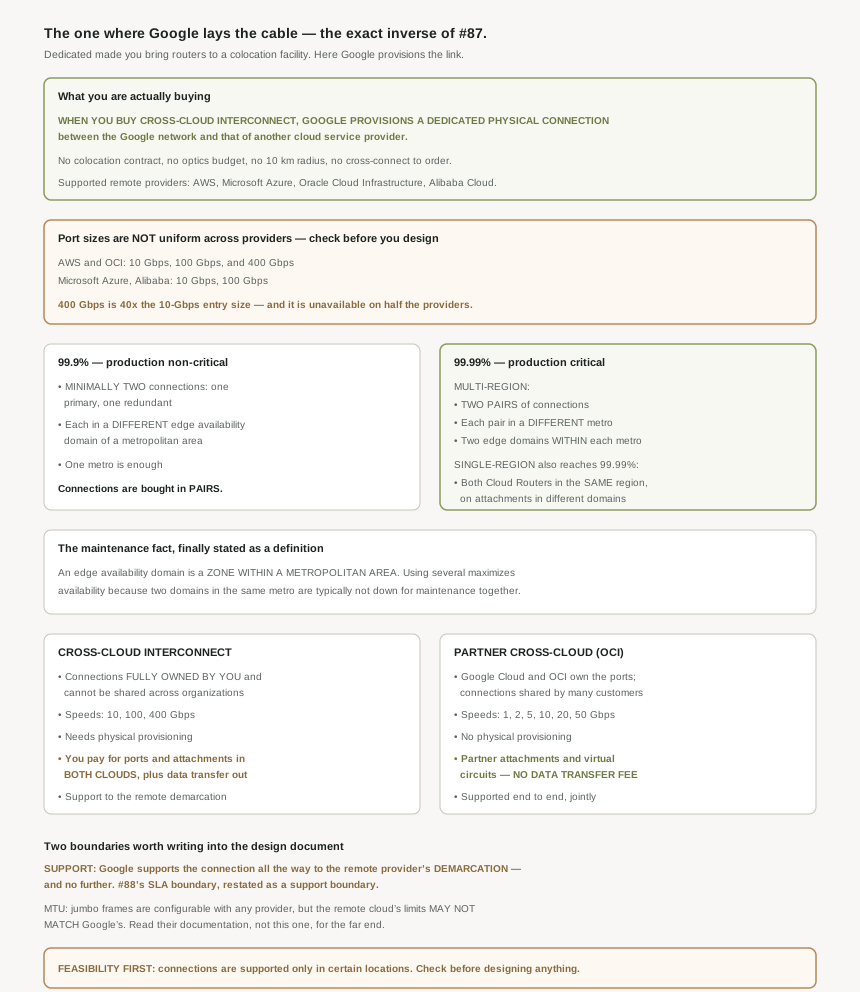
And the provisioning model inverts. When you buy Cross-Cloud Interconnect, Google provisions a dedicated physical connection between the Google network and that of another CSP. Which means every prerequisite that made #87 a procurement project — the facility, the routers, the optics, the 10 km radius — simply does not apply here. You buy a connection; Google builds it.
That is a genuinely better deal than it first appears, and the cost shows up in three places people do not look until late.
Port sizes are per provider, not per product. For AWS and Oracle Cloud Infrastructure the sizes are 10 Gbps, 100 Gbps, and 400 Gbps. For Microsoft Azure, Alibaba Cloud the list is shorter — 10 Gbps and 100 Gbps. So a design standard that assumes the top size is portable across remote providers is wrong for half of them.
Correct approachSettle the remote provider before the capacity, not after. A 400 Gbps port is 40 times the 10 Gbps entry size, so the gap between the ends of the range is large enough that discovering it late changes the topology rather than the order form: reaching 400 Gbps of capacity to a provider capped at 100 means four connections where you planned one.
Up to a point, and the point is named: Google supports the connection all the way to the OCI demarcation. All the way to, and no further. The partner variant is explicitly the different arrangement — Google Cloud and OCI partner on supporting the solution end to end.
Correct approachWrite the demarcation into the runbook before you need it, with the remote provider's support entry point beside it. The failure mode is procedural rather than technical: an incident on a cross-cloud path where both sides are reachable and neither owns the middle, and nobody established in advance which organisation to call for which segment. If that prospect is unacceptable, the jointly supported partner option is the answer, and it is a design-time choice.
There are two sides and both bill you. You pay for ports and attachments in both clouds and data transfer out for traffic leaving Google Cloud. Three line items, one of which is traffic-dependent and therefore not knowable from the order form.
Correct approachBudget ports in both clouds, attachments in both clouds, and egress on the Google side, then ask the remote provider what their egress costs on the return path — because that is their pricing, not Google's, and a cross-cloud design usually moves traffic in both directions. Worth noting that the partner variant changes this materially: you pay for Google Cloud partner attachments and OCI virtual circuits. There is no data transfer fee. For a chatty bidirectional workload that difference can dominate the port saving.
Architecture
One product, four possible far ends, and a set of boundaries that all sit at the same place.
The far ends, and the vocabulary
Google supports the following cloud service providers for use with Cross-Cloud Interconnect: Amazon Web Services (AWS) Microsoft Azure Oracle Cloud Infrastructure (OCI) Alibaba Cloud. The documentation then adopts a neutral term for whichever one you chose, and it is worth using in your own design documents because it keeps the architecture readable when the far end changes — the pages refer to such cloud service providers as your remote cloud service provider.
The product also composes with itself rather than forcing a single far end. The overview's own example is a two-provider estate: you can establish one pair of Cross-Cloud Interconnect connections to reach the Azure network and another to reach the AWS network. One Google Cloud network, two independent cross-cloud paths, no transitivity implied between them — which, after #81, is the assumption to check rather than make.
Pairs, and the tiers built from them
The unit of purchase is a pair, and the lower tier is exactly that pair: the Cloud Interconnect SLA requires you to have, minimally, two connections: a primary connection and a redundant connection, each in a different edge availability domain of a metropolitan area. And this approach gives you 99.9% availability.
Four nines offers a choice, which is the first time in this block that it has: to achieve 99.99% availability, you can use either a multi-region or a single-region topology. The multi-region shape is the familiar one — configure two pairs of connections. Each pair must be located in a different metropolitan area, and within each metropolitan area, you must use two different edge availability domains. That gives four connections, and this approach gives you 99.99% availability.
The single-region route is the interesting one: this configuration requires both Cloud Routers to be in the same region, connected to VLAN attachments in different edge availability domains. Note what that does and does not demand. Two Cloud Routers, one region, attachments in different domains — and no second metro.
Whether you can buy four nines without a second region has had a different answer in each of the last three posts, and it is the kind of detail a design standard gets wrong by generalising. Dedicated Interconnect has a single-region 99.99% variant, but only certain supported metros qualify. Partner Interconnect has none — it requires two regions even when all your VMs are in one. Cross-Cloud Interconnect offers a single-region topology without attaching a metro qualification to it in the overview.
So "four nines needs two regions" is true for one of the three, conditional for another, and not stated for the third. If you carry one rule across all three, you will either over-build or claim a tier you do not hold.
The definition that two posts implied
#87 and #88 both required attachments spread across edge availability domains without quite saying what one is. This page says it plainly: an edge availability domain is a zone within a metropolitan area. And it gives the same reason #88 buried in an API footnote: using multiple edge availability domains maximizes availability because two domains in the same metropolitan area are typically not down for maintenance at the same time.
Worth noticing the hedge. "Typically not down for maintenance at the same time" is weaker than #88's "are coordinated", and the two sentences describe the same mechanism. If you are writing a resilience argument that depends on it, the stronger wording is on the Partner tutorial page and the definition is here — cite whichever actually supports the claim you are making, and do not upgrade "typically" into a guarantee.
Why This Architecture Holds Up
The overview carries a comparison with the partner variant, and the rows are a good map of what you are actually choosing between.
Tenancy. On Cross-Cloud Interconnect, connections are fully owned by you and can't be shared across organizations. On the partner variant, Google Cloud and OCI own ports; connections can be used by multiple customers. That is the whole difference in one row: a private physical path versus a share of someone else's.
Speeds. Cross-Cloud Interconnect is coarse — 10, 100 or 400 Gbps. The partner variant is granular: 1 Gbps, 2 Gbps, 5 Gbps, 10 Gbps, 20 Gbps, 50 Gbps. Which is the same trade #88 described: dedicated capacity in large units, or a right-sized slice of shared capacity. If you need 5 Gbps, one of these two products is designed for you and the other is not.
Cost. Already quoted, and the distinction that matters is the last clause of each. Ports and attachments in both clouds plus egress, against partner attachments and virtual circuits with no data transfer fee. A design document that compares only the port prices will reach the wrong conclusion for any workload that moves meaningful volume.
Support. To the demarcation, or jointly end to end. This is the row I would put in front of an operations team before a procurement team.
Three posts, three framings of one line. #87: a managed circuit beyond 10 km sits under a Google SLA that does not cover it. #88: Google's SLA applies only between your VPC network and the service provider's network, and explicitly not beyond. #89: Google supports the connection as far as the remote provider's demarcation.
Each time, the thing Google is responsible for ends where somebody else's infrastructure begins — which is both entirely reasonable and consistently absent from the summaries people actually read. The practical habit worth forming is to ask, of any hybrid or cross-cloud design, where the responsibility boundary sits and who owns each side of it. In this block the answer has never been "the whole path".
MTU, where the far cloud sets its own rules
Cross-Cloud Interconnect lets you configure jumbo maximum transmission units (MTUs) with any of the cloud providers, which is more permissive than it sounds given #87's four-value MTU ladder. But the caveat is the important half: for larger MTUs, refer to the remote cloud provider's documentation as they may not be the same as Google's.
That is the only sensible position Google could take, and it does mean the MTU decision cannot be made from Google's documentation alone. Combined with #87's recommendation to keep a uniform MTU across attachments on the same VPC network, a cross-cloud estate has an MTU constraint set by whichever participant is least generous — and finding out which one that is requires reading somebody else's docs.
The limitation to check before anything else
Cross-Cloud Interconnect connections are supported only in certain locations. That single sentence decides feasibility, and it comes with per-provider location lists rather than one list. It belongs at the top of a feasibility assessment, not in the limitations section at the bottom — the same way #87's 10 km radius does. Both are geography, both are checkable in an afternoon, and both can end a project that has already been designed.
Key Architecture Decisions
| Situation | Decision | Because |
|---|---|---|
| Connecting Google Cloud to another cloud privately | Cross-Cloud Interconnect | Google provisions the physical connection between the two networks. |
| Starting a design | Check supported locations for your remote provider first | Connections are supported only in certain locations, listed per provider. |
| Settling capacity | Pick the remote provider first | 400 Gbps exists for AWS and OCI; Azure and Alibaba stop at 100 Gbps. |
| Needing a size between 10 and 100 Gbps | Consider the partner variant | It offers 1, 2, 5, 10, 20 and 50 Gbps increments. |
| Needing a private, unshared path | Cross-Cloud Interconnect | Connections are fully owned by you and cannot be shared across organizations. |
| Workload moves heavy bidirectional volume | Price the partner variant too | It has no data transfer fee, which can outweigh the port cost. |
| Budgeting | Count ports and attachments in both clouds, plus Google egress | That is the stated cost model, and egress is traffic-dependent. |
| Writing the incident runbook | Record the demarcation and the remote provider's support path | Google supports the connection only as far as that demarcation. |
| You need one organisation accountable end to end | The partner variant | Google Cloud and the provider support that solution jointly. |
| 99.9% is sufficient | One pair, two edge availability domains, one metro | Primary plus redundant in different domains is the stated minimum. |
| 99.99% with a second metro available | Two pairs, two metros, two domains each | That is the multi-region topology. |
| 99.99% within one region | Both Cloud Routers in that region, attachments in different domains | The single-region topology is offered without a metro qualification here. |
| Reusing a four-nines rule across Interconnect products | Do not | Dedicated, Partner and Cross-Cloud give three different answers on single-region. |
| Choosing an MTU | Read the remote provider's documentation | Their limits may not match Google's, and the lowest one governs. |
| Reaching two different clouds | One pair of connections each | The overview's own example, and no transitivity is implied. |
The one to look at today
If a cross-cloud path exists or is being designed, write down two facts and circulate them: where the demarcation is, and who to contact on the far side of it. Then check the supported-locations list for the specific remote provider you need, because that is the constraint most likely to invalidate a design that is otherwise finished. Neither takes long, and both are the sort of thing discovered at the worst possible moment when they are not written down.
Closing Thought
Cross-Cloud Interconnect is the easiest of the three to buy and the one that needs the most care in how it is described. Google provisions the link, which removes everything that made #87 a project with lead times. What replaces it is not difficulty but division: the ports are billed in two clouds, the MTU is governed by whichever participant is least generous, the port sizes depend on which provider is at the far end, and support reaches a demarcation rather than a destination.
Closing this block, the pattern across seven posts is clearer than any individual post made it. Every hybrid and cross-cloud product draws a line somewhere and stops, and the documentation is scrupulous about saying where — in a footnote, in a comparison table row, in the last clause of a cost sentence. The summaries are not. If there is one habit worth taking from #83 to #89, it is to read any availability or support claim as a question rather than a number: four nines of what, measured between which two points, supported by whom.
#90 leaves hybrid connectivity for private access to Google's own services: Private Google Access — reaching Google APIs from instances that have no external IP address at all.
Official Google Cloud Reference
- Cross-Cloud Interconnect overview
- Partner Cross-Cloud Interconnect for OCI overview
- Partner Cross-Cloud Interconnect for managed cloud partners
- Connect to AWS: overview
- Connect to Microsoft Azure: overview
- Connect to Oracle Cloud Infrastructure: overview
- Connect to Alibaba Cloud: overview
- Choose your locations
- Order Cross-Cloud Interconnect connections
- Configure traffic differentiation
- Use connections in other projects
- View connection details
- Cloud Interconnect overview
- Cloud Interconnect terminology
Comments