Business Challenge
#88 turned on one division of labour: Azure is authoritative for a zone and a registrar decides whether anyone asks Azure. Private DNS zones remove the registrar entirely, and every consequence follows from what replaces it.
There is no delegation. Nothing in the public hierarchy points at a private zone, so the question “who is allowed to resolve this” cannot be answered by NS records. It is answered by an explicit attachment:
“To resolve the records of a private DNS zone from your virtual network, you must link the virtual network with the zone. Linked virtual networks have full access and can resolve all DNS records published in the private zone.”
Full access, all records. There is no partial link and no per-record scoping — a virtual network either sees the entire zone or none of it. That makes the set of links the only security boundary the zone has, which is worth knowing before a zone becomes the place several teams keep their internal names.
The second structural surprise is where the zone lives:
“When you create a private DNS zone, Azure stores the zone data as a global resource. This process means that the private zone isn't dependent on a single virtual network or region. You can link the same private zone to multiple VNets in different regions.”
So “private” describes who can query it, not where it is. The zone is a subscription-level object that happens to answer only to networks you have attached, and it survives a regional failure of any one of them.
Architecture
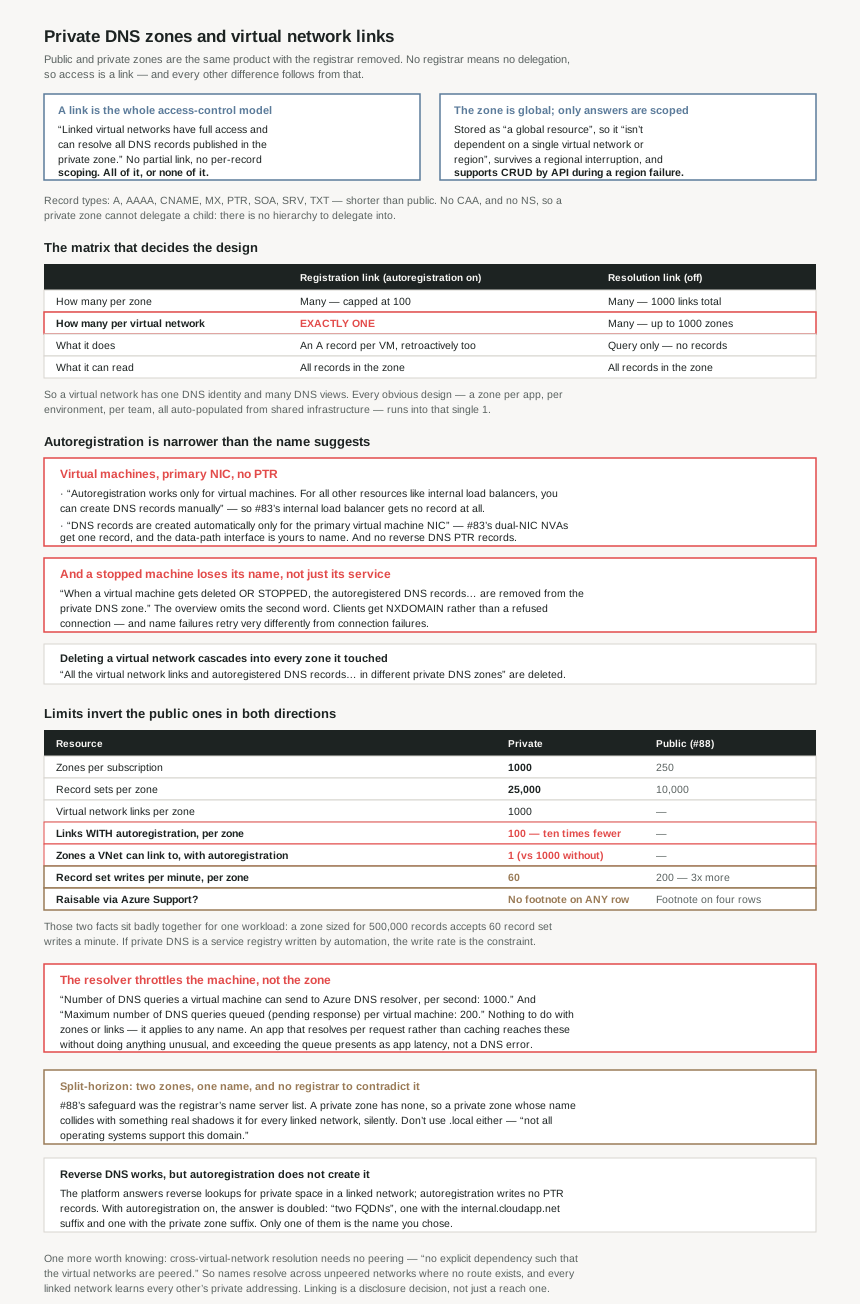
Registration and resolution: the matrix that decides the design
| Registration link (autoregistration on) | Resolution link (autoregistration off) | |
|---|---|---|
| How many per zone | Multiple — capped at 100 | Multiple — capped at 1000 links total |
| How many per virtual network | Exactly one | Multiple — up to 1000 zones |
| What it does | Creates an A record per VM, including for VMs already deployed | Query only — no records created |
| What it can read | All records in the zone | All records in the zone, including other networks' autoregistered ones |
One cell in that table does all the work. “A private DNS zone can have multiple registration virtual networks. However, every virtual network can only have one registration zone associated with it.”
Limits, against the public zones of #88
| Resource | Private | Public (#88) |
|---|---|---|
| Zones per subscription | 1000 | 250 |
| Record sets per zone | 25,000 | 10,000 |
| Records per record set | 20 | 20 |
| Virtual network links per zone | 1000 | — |
| Links with autoregistration per zone | 100 | — |
| Zones a VNet can link to | 1000 | — |
| Zones a VNet can link to with autoregistration | 1 | — |
| Record set writes per minute, per zone | 60 | 200 |
| Raisable via support? | No footnote on any row | Footnote on four rows |
Private zones are more generous on capacity and stricter on everything else: four times the zones, 500,000 records possible in one zone, and roughly three times less write throughput.
Why This Architecture Holds Up
Because a virtual network can auto-register into exactly one zone, ever
This is the constraint to design around, and the limits table states it as bluntly as possible: “Number of private DNS zones a virtual network can get linked to with autoregistration enabled: 1”, against 1000 without.
So a virtual network has one DNS identity and many DNS views. If a VM in vnet-prod auto-registers into corp.internal, it cannot also auto-register into apps.internal — that second zone can be linked for resolution, but the machines will not appear in it. Anything that needs a name in a second zone is a record you write and maintain yourself.
That has a specific organisational consequence. Where a platform team owns one zone and application teams want their own, the application zones can only ever be resolution zones over shared infrastructure, or the application teams need their own virtual networks. There is no arrangement where one set of machines automatically populates two zones, and discovering that after the zones are built is expensive, because the names are already in configuration files.
The ratio at the other end is worth noting too: a zone takes 1000 links but only 100 with autoregistration — ten times fewer. A hub-and-spoke estate of 300 spokes can resolve one zone from all of them and auto-register from at most a third.
Because autoregistration covers virtual machines and almost nothing else
The feature is usually described as “Azure keeps your DNS up to date”. The restrictions list is narrower than that:
“Autoregistration works only for virtual machines. For all other resources like internal load balancers, you can create DNS records manually…”
“DNS records are created automatically only for the primary virtual machine NIC. If your virtual machines have more than one NIC, you can manually create the DNS records for other network interfaces.”
“Autoregistration doesn't support reverse DNS pointer (PTR) records.”
Each of those lands somewhere this series has already been. #83 spent most of its length on dual-NIC network virtual appliances and the routing tables they need for health probes; those appliances get exactly one autoregistered record, for the primary interface, and the data-path NIC is yours to name. #83's internal load balancer — the thing every spoke routes through — gets no record at all.
The gap matters most for things that are not virtual machines but behave like endpoints. Internal load balancers are called out by name. Anything else with a private IP and no VM behind it is in the same position, which is the shape of a great deal of modern Azure.
Because stopping a virtual machine removes it from DNS
Two pages describe the removal trigger and they do not say the same thing. The overview: Azure updates the zone “whenever a virtual machine gets created, changes its IP address, or gets deleted.” The autoregistration page adds a word:
“When a virtual machine gets deleted or stopped, the autoregistered DNS records associated with this virtual machine are removed from the private DNS zone.”
That is a meaningful difference in behaviour. A deallocated virtual machine — stopped overnight to save money, stopped for patching, stopped by an autoscale rule — does not merely stop answering. Its name stops resolving. The failure a client sees is NXDOMAIN rather than a refused connection, and those are handled very differently: a connection failure usually retries, a name failure often does not, and the error surfaces as a configuration problem rather than an availability one.
For anything on a schedule — dev environments that stop at night, batch workers that scale to zero — this is the behaviour to design for. Either the name is not how you reach the machine, or the record is a manual one that survives the machine's absence.
Because deleting a virtual network cascades into every zone it touched
The link is a child resource of the zone, but its lifecycle follows the network: “When you delete a virtual network, all the virtual network links and autoregistered DNS records associated with it in different private DNS zones are automatically deleted.”
So a virtual network deletion reaches into up to a thousand zones, potentially across subscriptions, and removes records from each. That is correct behaviour — the alternative is a thousand zones full of stale names — but it means the blast radius of deleting a network includes DNS answers that other networks were relying on. The zone that loses records is not necessarily owned by whoever deleted the network.
It is also the cleanup you cannot do any other way: there is no supported path to remove one network's autoregistered records while keeping the link, because you did not create them.
Because the zone is global and the answers are not
A private zone being “a global resource” that “isn't dependent on a single virtual network or region” is a genuine resiliency property, and it comes with an unusual guarantee: “In the event of a regional failure, Private DNS zones support CRUD operations via API call” using the SDKs. The management plane survives a region.
The resolution path has a different shape. Records resolve only from linked networks, and cross-network resolution works without peering: “For cross-virtual network DNS resolution, there's no explicit dependency such that the virtual networks are peered with each other.”
That last point is more significant than it reads. DNS resolution crosses the link boundary, not the network boundary — so two unpeered virtual networks linked to the same zone can resolve each other's machine names while having no route between them. Name resolution succeeds and the connection then fails, which is a confusing pair of symptoms and a small information disclosure: the zone tells every linked network the private addressing of every other. With “full access” to “all DNS records” as the only setting, linking a network to a zone is a decision about what that network is allowed to learn, not just what it can reach.
Because the limits invert the public ones in both directions
Capacity is more generous. 1000 private zones per subscription against 250 public — four times as many; 25,000 record sets per zone against 10,000; and with the same 20 records per set, 500,000 records possible in one zone.
Throughput is stricter. Private record set writes are 60 per minute per zone for create, delete and update, against 200 per minute for public zones — roughly three times less. Private zone operations are 40 per minute per subscription, and virtual network link operations 60 per minute per zone, with list by virtual network down at 20 per minute.
Those two facts sit badly together for exactly one workload: bulk record management. A zone sized to hold half a million records is rate-limited to sixty writes a minute, so populating it is a job measured in hours, and a pipeline that loops record-by-record will be throttled long before the zone is full. If private DNS is being used as a service registry written by automation, the write rate is the design constraint, not the record count.
One difference in the tables is easy to miss and worth the same attention #88 gave the TXT row: the public limits carry the footnote “If you need to increase these limits, contact Azure Support” on four rows. None of the private DNS rows carries a footnote at all. The capacity is larger and the documented path to more capacity is absent.
Because the resolver throttles the machine, not the zone
Filed under DNS limits rather than compute limits, and therefore rarely found by the people it affects:
“Number of DNS queries a virtual machine can send to Azure DNS resolver, per second: 1000”
“Maximum number of DNS queries queued (pending response) per virtual machine: 200”
This has nothing to do with zones, links or records. It is a limit on the client, and it applies whether the name is in a private zone, a public zone, or neither. An application that resolves a hostname per request rather than caching — which is the default behaviour of a surprising number of HTTP clients and almost every shell script in a loop — can reach a thousand queries a second on one machine without doing anything unusual.
The queue depth is the sharper of the two. Two hundred in-flight queries is not many for a machine running a few hundred concurrent workers, and the symptom of exceeding it is latency and timeouts in name resolution, which presents as the application being slow rather than as a DNS problem. It is the kind of ceiling worth knowing the number of before an incident, because nothing in the application's own metrics will name it.
Because split-horizon means two zones, one name, and no warning
Private zones support “zones with the same name that resolve to different answers from within a virtual network and from the public internet”, which is a real and useful capability — the documented scenario is “a dedicated version of a service for use inside your virtual network”.
It also means the safeguard #88 relied on does not exist here. For public zones, the registrar's name server list is the one external source of truth about which zone is live. A private zone has no registrar, so a private contoso.com and a public contoso.com are two unrelated resources that happen to share a name, and which one a query reaches depends entirely on where the query came from. That is the feature. But it also means a private zone created with a name that collides with something real will shadow it for every linked network, silently and completely, and the only evidence is that resolution differs inside and outside.
The related trap is smaller and avoidable: “As a best practice, don't use .local domain for your private DNS zone. Not all operating systems support this domain.” It is a common choice for exactly this purpose and it conflicts with multicast DNS on several platforms.
Because reverse DNS works but autoregistration does not create it
Two statements that look contradictory are both true, and the distinction is where the records come from. “Reverse DNS lookup is supported within the virtual-network scope”, and separately, “Autoregistration doesn't support reverse DNS pointer (PTR) records.”
The platform answers reverse lookups for private addresses in a linked network; autoregistration does not write PTR records into your zone to do it. And the answer is doubled where autoregistration is on: reverse DNS “returns two FQDNs: one with the default suffix internal.cloudapp.net and another with the private zone suffix.”
Anything that uses a reverse lookup as an identity check — log enrichment, some mail software, forward-confirmed reverse DNS — needs to handle two answers for one address, only one of which is the name your organisation chose. And “reverse DNS works only for private IP space in the linked virtual network”, so the behaviour changes depending on which network asks.
Worth noting alongside this: the private record type list is shorter than the public one. Private zones support “A, AAAA, CNAME, MX, PTR, SOA, SRV, and TXT” — #88's public list also included CAA and NS. No NS is the structural point: a private zone cannot delegate a child zone, because there is no hierarchy for it to delegate into.
Key Architecture Decisions
| Decision | Choose | Because |
|---|---|---|
| Which zone a virtual network auto-registers into | Decide once — it cannot be two | The limit is literally 1. Every other zone the network links to is resolution-only, and machines will not appear in it. |
| Per-application private zones over shared infrastructure | Resolution links, with records you maintain | There is no arrangement where one set of machines populates two zones. Either accept manual records or give the application its own virtual network. |
| Autoregistration in a large hub-and-spoke estate | Plan against 100, not 1000 | A zone takes 1000 links but only 100 with autoregistration — ten times fewer. Resolution scales further than registration. |
| DNS names for load balancers, private endpoints, anything not a VM | Manual records | Autoregistration “works only for virtual machines”, with internal load balancers called out by name. |
| DNS for a multi-NIC appliance | Register the non-primary NICs by hand | Only the primary NIC is autoregistered. #83's dual-NIC NVA designs get one record and the data-path interface is yours to name. |
| Machines that stop on a schedule | Do not depend on their autoregistered name | Records are removed when a VM is deleted or stopped. Clients get NXDOMAIN rather than a refused connection, and name failures retry differently from connection failures. |
| Linking a network to a shared zone | Treat it as a disclosure decision | A link grants “full access” to “all DNS records” — there is no per-record scoping. Resolution also crosses the link boundary without peering, so names resolve where routes do not exist. |
| Deleting a virtual network | Expect DNS to change in zones you do not own | All its links and autoregistered records are deleted across every private zone it touched, potentially across subscriptions. |
| Bulk-loading records into a private zone | Size the job on 60 writes per minute | A zone holds up to 500,000 records and accepts 60 record set writes per minute per zone — a third of the public zone rate. The write rate is the constraint, not the capacity. |
| Assuming private limits can be raised | Do not | No private DNS row carries the “contact Azure Support” footnote that four public rows do. |
| Applications that resolve per request | Cache, and know the two client numbers | 1000 DNS queries per second per VM, and only 200 queued pending response. Exceeding the queue presents as application latency, not as a DNS error. |
| Naming a private zone | A name you control, and never .local |
Split-horizon means a private zone shadows a colliding public name for every linked network, with no registrar to contradict it. And “not all operating systems support” .local. |
| Anything relying on reverse DNS | Handle two answers per address | With autoregistration on, reverse lookup returns both the internal.cloudapp.net name and the private zone name, and only works for private space in the linked network. |
| Delegating a child zone inside a private zone | Not possible | The private record type list has no NS. There is no hierarchy to delegate into. |
Closing Thought
Public and private zones are the same product with the registrar removed, and almost every difference is downstream of that. No registrar means no delegation, so access is a link; no delegation means no NS records, so a private zone cannot have children; no external authority means split-horizon is free and a colliding name shadows the real one with nothing to contradict it. #88's safeguard — check the registrar's name server list to find out which zone is real — has no equivalent here, because the thing that makes a private zone real is a list of links you maintain yourself.
The constraint to settle before building anything is the one the limits table states as a bare 1: a virtual network can auto-register into exactly one private zone. Every DNS design that looks obvious — a zone per application, a zone per environment, a zone per team, all populated automatically from shared infrastructure — runs into it. The zone that gets autoregistration is the virtual network's DNS identity, and everything else is a view with records somebody has to write.
The detail I would actually go and check, though, is the stop behaviour. “Deleted or stopped” appears once, on the autoregistration page, and the overview omits the second word. Any environment that deallocates machines on a schedule is removing names from DNS every evening and putting them back every morning, and the resulting failures look like configuration errors rather than the intended consequence of a cost-saving policy. Nothing is broken; it is simply not what the word “autoregistration” suggests.
#90 takes the piece this post kept deferring: the Azure DNS Private Resolver and hybrid resolution — inbound and outbound endpoints, forwarding rulesets, and how on-premises and Azure finally resolve each other's names.
Official Azure Reference
- Azure Private DNS overview — the link requirement and full-access resolution model, the global resource property and regional-failure CRUD guarantee, the supported record types, split-horizon support, automatic hostname record management, cross-virtual-network resolution without peering, reverse DNS scope and the two-FQDN behaviour, the one-registration-zone-per-network rule, the
.localadvice, and conditional forwarding requiring the Private Resolver - Azure subscription and service limits, Azure DNS section — the private DNS limits for zones per subscription, record sets per zone, records per record set, virtual network links and links with autoregistration, and zones a network can link to with and without autoregistration; the public DNS limits for comparison including which rows carry the support footnote; the private and public zone and record set operation rate limits; the virtual network link operation limits; the per-virtual-machine resolver query and queue limits; and the DNS Private Resolver limits
- Virtual network link subresource — registration versus resolution virtual networks and the cardinality of each, the retroactive registration of already-deployed machines, the single-link-per-network-per-zone rule, link name uniqueness, the Link Status field and the delay before a link is operational, the classic deployment model exclusion, and the cascade when a virtual network is deleted
- Autoregistration in Azure DNS private zones — the A record created per virtual machine, removal on delete or stop, the virtual-machines-only restriction with internal load balancers named, the primary-NIC-only restriction, and the absence of PTR record support
- Azure Private DNS zone resiliency — the global storage model in full (no claims drawn from it)
- What is Azure DNS Private Resolver — the conditional forwarding and hybrid resolution service this post defers to #90 (no claims drawn from it)
Comments