Business Challenge
Posts #70 to #74 built up a firewall model with four places a rule can live and no mechanism at all for noticing that a rule has stopped mattering. Rules accumulate; nothing retires them. Firewall Insights helps you understand and optimize your firewall rules, and it provides insights, recommendations, and metrics about how your firewall rules are being used. It even guesses forward: Firewall Insights also uses machine learning to predict future firewall rules usage.
The thing worth knowing before you act on any of it is that the report has two halves with different epistemic status. One insight is computed from your configuration and is therefore always complete. Five are computed from your logs, and are complete only to the extent that your logging was. The failure mode is not a false alarm — it is silence.
Or your logs were off. The data provided by these insights is from Firewall Rules Logging, and the qualification is explicit: this data is accurate only if you enabled Firewall Rules Logging for the entire observation period. If it was not, otherwise, the number of rules in each insight category could be higher than indicated.
Correct approachEstablish logging coverage first, then read the insights. A short list means one of two very different things, and the report does not distinguish them. The direction of the error is the uncomfortable part: incomplete logging makes the estate look cleaner than it is, which is exactly the answer nobody questions.
There is nothing to query. Cloud Monitoring stores data for the firewall_hit_count metric only if the rule had hits because of TCP or UDP traffic, and the consequence is stated outright: Cloud Monitoring does not store data about rules that had no hits. A rule with no time series looks identical to a rule that does not exist.
Correct approachUse the metric for what is used and the insight for what is not. The insight starts from your rule configuration and works down to usage, so it can enumerate the rules with nothing against them; the metric starts from traffic and structurally cannot. This is a real asymmetry in the data model, not a console limitation you can work around with a cleverer query.
Sometimes the correct action is to leave an unhit range exactly where it is. The documentation names the case: your project might have firewall rules that allow access from certain IP address blocks for load balancer health checks or for other Google Cloud functionality. And then, plainly: these IP addresses might not be hit, but they should not be removed from your firewall rules.
Correct approachKeep a documented allowlist of ranges that are permitted to look dead, and check every proposed deletion against it. Health check probes are the standard example, and a rule allowing them can sit unhit for a long window and still be load-bearing the moment a backend goes unhealthy.
Architecture
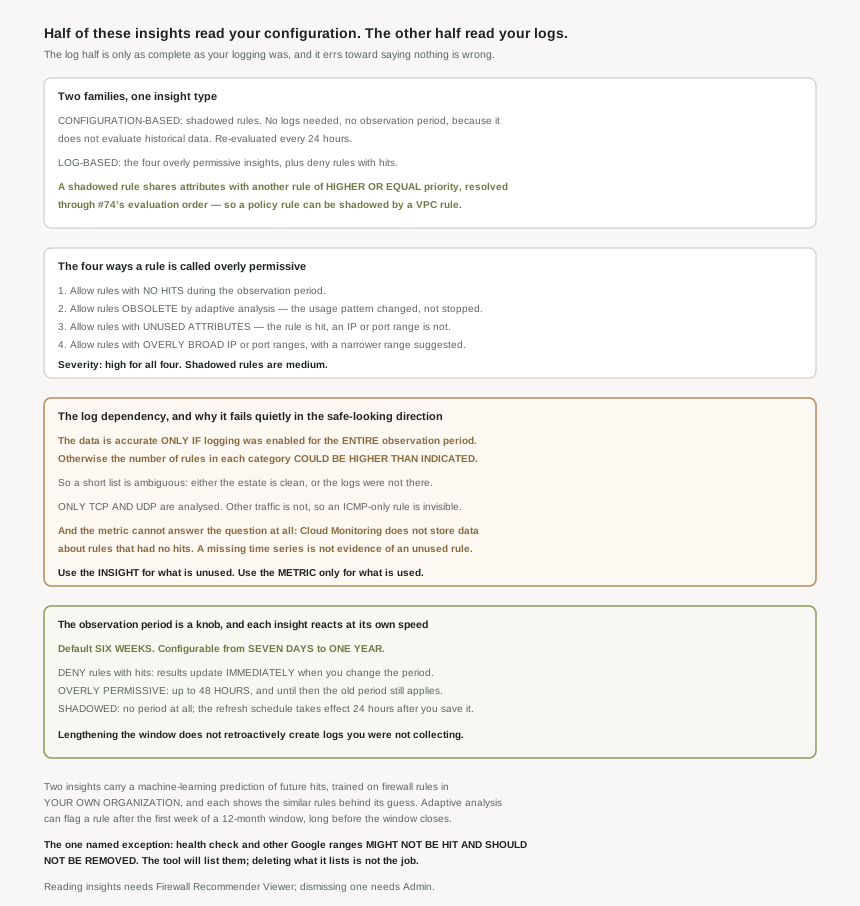
One insight type, two families, and a dependency that only applies to one of them.
It is a Recommender insight type, not a product surface of its own
Mechanically this is Recommender rather than a bespoke API. Firewall Insights uses Recommender, and the specific type is named: insights analyze your firewall rule configuration and usage by using the google.compute.firewall.Insight insight type. That matters more than it sounds, because it is what gives the insights a lifecycle. Each one has a state, and dismissing it is a real operation: the insight is dismissed and no longer shown to any user on any active insight list.
Note the scope of that sentence. Dismissal is not per-viewer. One engineer deciding a flagged rule is intentional removes it from everyone's list, and the only record that it was ever flagged is the Dismissed History page. If this becomes a review workflow for a team, dismissal needs a convention attached to it, because the tool treats it as a shared mutation of global state.
The configuration half: shadowed rules
One insight needs no logs at all. Configuration-based insights are generated based on data about how you configured your firewall rules, and the single member of that family is shadowed rules: shadowed rules share attributes, such as IP addresses, with other rules with higher or equal priority, called shadowing rules.
"Higher or equal" is doing work there. Equal-priority shadowing is possible because of the #74 finding that priorities need only be unique within a policy — two rules in different policies, or two VPC firewall rules, can share a number. And the analysis spans the whole evaluation order rather than one object: the documentation's fourth worked example turns on exactly the attribute #74 was about, noting that the firewall policy enforcement order of policy Y is AFTER_CLASSIC_FIREWALLS and concluding that a policy rule is shadowed by a plain VPC firewall rule. Change the enforcement order and that shadowing relationship inverts.
Its timing is different too, and better. Shadowed rule insights do not have an observation period because they do not evaluate historical data, and shadowed rule analysis evaluates your existing firewall rule configuration every 24 hours. So this is the one insight that is correct the day after you deploy a rule, with no logging prerequisite and no warm-up.
Firewall Insights does not identify all possible shadowing rules. Specifically, it does not identify that multiple tags from other firewall rules have shadowed the tags of a firewall rule. So a rule whose target tags are collectively covered by several other rules' tags will not be flagged. Given how much of #72 was about tag-based targeting, that is the shape of shadowing most likely to exist in a tag-heavy estate and least likely to be reported. An empty shadowed-rules list is evidence about IP ranges, not about tags.
The log half: five insights, one dependency
Everything else reads Firewall Rules Logging. Four of the five are the overly permissive family — Firewall Insights identifies rules that it classifies as overly permissive — and the fifth is the inverse signal: this insight provides details about deny rules that had hits during the observation period, which exists because these insights provide you with firewall packet-drop signals. That one is not hygiene at all; it is detection. A deny rule suddenly taking hits is either a misconfiguration upstream or somebody probing you.
All five share two constraints worth stating before the table. Overly permissive rule insights evaluate TCP and UDP traffic, and other types of traffic are not analyzed. And the severity split is fixed: the severity level is high for overly permissive rule insights, while for shadowed rule insights, the severity level is medium. Google rates the ones that depend on your logging as the more urgent ones.
Why This Architecture Holds Up
The four overly permissive subtypes sound like degrees of the same thing and are not. Two are about the rule, two are about its attributes, and two carry a prediction.
| Insight | What it measures | Prediction? |
|---|---|---|
| Allow rules with no hits | Allow rules that had no hits during the observation period | Yes |
| Obsolete by adaptive analysis | Allow rules that are less likely to be active based on usage patterns and adaptive analysis — the pattern changed, not necessarily stopped | Yes, and early |
| Unused attributes | Allow rules that have attributes such as IP address and port ranges that were not hit during the observation period — the rule is live, part of it is not | Yes |
| Overly permissive ranges | Allow rules that might have overly broad IP addresses or port ranges, with a narrower combination suggested | No — it suggests a replacement |
| Deny rules with hits | Deny rules that had hits during the observation period — a packet-drop signal, not a hygiene finding | No |
The third row is the one most worth acting on and the one least likely to be noticed, because the rule itself looks healthy. A rule that is hit constantly on one of its port ranges while another of its ranges has never matched anything reports as a working rule in every dashboard; only this insight separates the rule's liveness from its attributes' liveness. That is also where the quota arithmetic from #74 bites, since an unused attribute is still a counted attribute.
The second row is the subtle one. The insight is produced by a machine learning analysis considering the average hit count in the last six weeks and recent hit counts adaptive analysis, so it fires on a change in usage rather than on absence of usage. A rule hit heavily for a month and then not for several days qualifies. That makes it closer to an anomaly signal than a cleanup queue, and treating its output as a delete list would remove rules whose traffic is merely seasonal.
Why a short report is ambiguous and a long one is not
This is the part I would put in front of anyone planning a firewall cleanup. The log-based insights can only under-report, never over-report, because a rule whose traffic was never logged looks exactly like a rule whose traffic never happened. Two sentences establish it. From the insight side: this data is accurate only if you enabled Firewall Rules Logging for the entire observation period, and otherwise, the number of rules in each insight category could be higher than indicated. From the metric side: the metrics are available only for rules that have Firewall Rules Logging enabled and are accurate only for the time during which Firewall Rules Logging is enabled.
Add the protocol filter and the blind spot widens. Data is logged and metrics are generated only for TCP and UDP traffic, so an ICMP-only or ESP-only rule cannot be assessed at all. The two halves of the tooling even handle that case differently, which is worth knowing if the numbers disagree: the metric page says of the hit-count metric that this behavior differs from the allow rules with no hits insight, because when that insight identifies rules with no hits, it omits firewall rules that are configured to allow traffic other than TCP or UDP, even if those rules also allow TCP or UDP traffic. The insight excludes the mixed-protocol rule; the metric includes its TCP hits. Neither is wrong, and they will not match.
There are two hard start dates underneath all of it, which matter when you widen the window. For firewall rules in hierarchical firewall policies and global network firewall policies, insights are generated based on firewall logging data gathered only after February 27, 2023, and for firewall rules containing IPv6 address ranges, insights are generated based on firewall logging data gathered only after June 17, 2022. Those are floors on the history, independent of your own logging.
For the rule you are about to delete, ask whether Firewall Rules Logging was enabled on it for the whole observation period, and whether the rule permits anything other than TCP or UDP. If the answer to the first is no or the second is yes, "no hits" means "no evidence", not "no traffic". That distinction is the whole difference between rule hygiene and an outage.
The observation period, and the three speeds it runs at
The default observation window is six weeks, and you can configure the observation period between seven days to one year. Six weeks is forty-two days, which is a reasonable default and a poor fit for anything with a monthly or quarterly cycle — a rule used only at quarter close will show no hits for most settings in that range.
Changing it does not take effect uniformly, and the spread is large enough to confuse a review session. When you configure the observation period for deny rules with hits, Firewall Insights updates the insight results immediately, but when you update the observation period for overly permissive rule insights, Firewall Insights can take up to 48 hours to update existing results — and in the interim the old period still applies, so the page shows figures computed under a setting it is no longer displaying. Shadowed rules, having no period, are unaffected. If you reconfigure and the numbers do not move, the answer is usually that you are inside that 48-hour window.
Two smaller timing facts complete the picture. Traffic log data from the last 24 hours might not be included when generating insights, so this is never a live view. And the refresh cycle for shadowed rules is itself schedulable, where the default cycle frequency is one day (24 hours) and the new insight generation schedule takes effect 24 hours after saving changes to the schedule.
The API path is worth noting for anyone wiring this into a pipeline, with one asymmetry. Overly permissive insights can be configured through the Recommender API's updateConfig method, where the observation period is passed in seconds — Google's own example uses 604800s, which is seven days, the minimum of the supported range. The deny-rule period cannot be set that way at all; that one is console-only. Setting the config needs recommender.computeFirewallInsightTypeConfigs.update.
The predictions, and what they are trained on
Two of the insights do not merely report the past. To generate predictions, Firewall Insights trains a machine learning model by using firewall rules in the same organization, and the output appears as a likelihood: on the rule list, this column provides a percentage that indicates the likelihood that this rule will be hit in the future.
Being trained on your own organization's rules cuts both ways, and it is worth being clear-eyed about it. It means the prediction reflects your conventions rather than a generic baseline, which is genuinely useful. It also means a consistently bad habit looks normal to the model: if broad allow rules are routine in your estate, the patterns the model learns as "likely to be hit" are patterns drawn from that estate. The insight mitigates this by showing its working — each prediction lists the similar rules behind it, so the judgement stays with you rather than with the percentage.
Adaptive analysis has a useful property here: it does not wait for the window. You might start getting insights based on adaptive analysis after the first week of your observation period, even if your observation period is 12 months. So a long observation period for accuracy and early signal from adaptive analysis are not in tension — you can have both.
Reading and acting are different grants
The role split mirrors the pattern this block keeps finding. Viewing insights is available through either Firewall Recommender Viewer role ( roles/recommender.firewallViewer ) or the admin role, while view and modify insights grant the Firewall Recommender Admin role ( roles/recommender.firewallAdmin ) — and the permission that separates them, projects.locations.insightTypes.insights.markAccepted, is the one that changes shared state. Given that dismissal hides an insight from every user, the viewer role is the right default for a review audience and the admin role should be deliberate.
One last thing worth building rather than browsing: the deny-rule signal is alertable. You can choose to be alerted when the hit count of a particular rule increases by a certain percentage, through a Cloud Monitoring policy on the hit-count metric. That is the one part of this post that belongs in automation rather than in a quarterly review, because a deny rule's hit count climbing is time-sensitive in a way that an unused port range is not.
Key Architecture Decisions
| Situation | Decision | Because |
|---|---|---|
| Starting a firewall cleanup | Turn on Firewall Rules Logging and wait out a full observation period first | The log-based insights are accurate only for the period logging was enabled, and under-report otherwise. |
| Looking for unused rules | Use the insight, never the hit-count metric | Cloud Monitoring stores no data for a rule that had no hits. |
| Wanting a finding that needs no logging | Shadowed rules | It is computed from configuration and re-evaluated every 24 hours. |
| A tag-heavy rule set | Do not treat an empty shadowed-rules list as proof | Multi-tag shadowing is explicitly not detected. |
| Rules with monthly or quarterly traffic | Raise the observation period above the six-week default | A quarter-close rule shows no hits across most of the supported range. |
| Reconfigured the period and nothing changed | Wait up to 48 hours before concluding anything | Overly permissive results lag the setting; deny results do not. |
| A rule permitting ICMP or ESP | Assess it by hand | Only TCP and UDP traffic is analysed. |
| An unhit range flagged for removal | Check it against health check and Google service ranges first | Those might not be hit and should not be removed. |
| Reducing a rule rather than deleting it | Prefer the unused-attributes insight | It separates a live rule from its dead attributes, which is the lower-risk edit. |
| Giving a team access to review | Firewall Recommender Viewer, not Admin | Dismissing an insight hides it from every user, not just the one who dismissed it. |
| Deny hit counts rising | Alert on it in Cloud Monitoring | It is a packet-drop signal and time-sensitive, unlike the hygiene findings. |
The one to look at today
Before opening the Firewall Insights page at all, list your firewall rules and work out for how long each has had Firewall Rules Logging enabled. That number, not the insight count, is the confidence interval on everything the page will tell you. If a rule has had logging off, or has been logging for less than the observation period, it is excluded from the evidence and included in the reassuring total. Establish that first and the rest of the tool becomes trustworthy; skip it and a clean report is just a report.
Closing Thought
What makes this post different from the five before it is that it is the first piece of the firewall story that is about evidence rather than about mechanism. Rules either match or they do not; that is decidable. Whether a rule is needed is not decidable from configuration, so the tool goes and looks at traffic — and the moment it does, it inherits every gap in the observation. The shadowed-rules insight is the exception that proves the point: it is the one finding derived from configuration alone, and it is the one finding that is simply correct, with no warm-up, no logging prerequisite and no window.
The detail I will carry forward is that the hit-count metric stores nothing for a rule with no hits. It is a small data-modelling decision and it quietly inverts the obvious approach: the metric that looks purpose-built for finding dead rules is the one artifact that structurally cannot see them. Fifteen posts into the networking block, that is a familiar shape in a new place — the interface suggests an answer the data model never had, and only the documentation says so.
#76 takes the dependency this post kept running into and makes it the subject: Firewall rules logging — what it records, what it costs, and the specifications that decide which traffic ever reaches a log in the first place.
Official Google Cloud Reference
- Firewall Insights overview
- Firewall Insights categories and states
- Firewall Insights roles and permissions
- Configure observation period and refresh cycle
- View Firewall Insights metrics
- Review and optimize firewall rules
- View and understand Firewall Insights
- Manage and export insights
- Firewall Rules Logging overview
- Firewall policy rule evaluation order
- Using insights in Recommender
Comments