Business Challenge
#72 established why you would choose ExpressRoute: “Because ExpressRoute connections don’t go over the public internet, they offer more reliability, faster speeds, consistent latencies, and higher security.” This post is about what you are actually buying, and it is less like a resource than it looks.
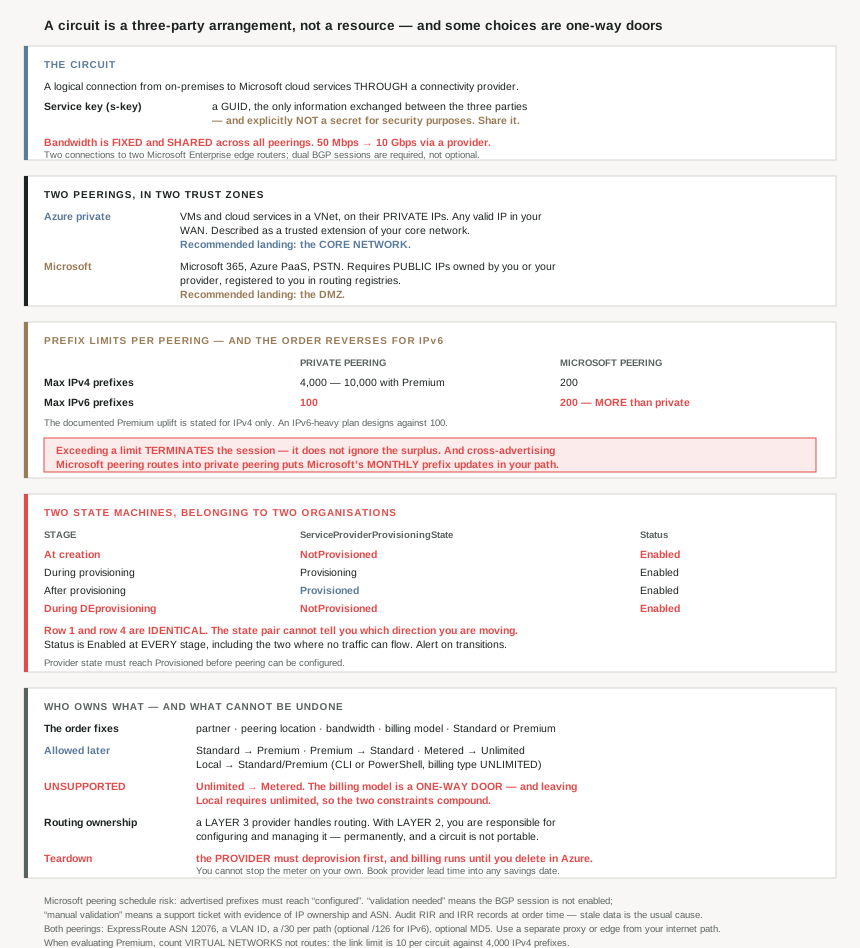
“An ExpressRoute circuit is a logical connection between your on-premises infrastructure and Microsoft cloud services through a connectivity provider.” Three parties, and the Azure resource you create is one party's record of an arrangement the other two have to complete. That shapes everything about how it fails and how long it takes.
The consequence that surprises people most is the state reporting. A circuit tracks two states, and they belong to different organisations:
Status: Enabled does not mean the circuit works
“Status: Microsoft’s provisioning state, set to Enabled when the circuit is created.”
So at creation time, before the provider has touched anything, the documented state is ServiceProviderProvisioningState: NotProvisioned with Status: Enabled. The circuit reports itself enabled and carries no traffic. “Must be Provisioned to configure peering.”
And several of the decisions you make in the first conversation with the provider are permanent. The order itself fixes five things — “Select the ExpressRoute partner… the peering location… the bandwidth… the billing model… standard or premium add-on” — and one of those five cannot be reversed later at all.
That is the theme of this post: the parts of ExpressRoute that are cheap to get right on day one and expensive or impossible to change on day two hundred.
Architecture
The circuit, and the key that identifies it
“ExpressRoute circuits are identified by a standard GUID called a service key (s-key). The s-key is the only information exchanged between Microsoft, the connectivity provider, and you. It isn’t a secret for security purposes. Each ExpressRoute circuit has a unique s-key.”
That last-but-one sentence is unusually direct and worth taking at face value, because the s-key looks exactly like a credential and gets treated as one. It is an identifier — the shared reference the three parties use to talk about the same circuit. Emailing it to your provider is the documented workflow step: “Provide the service key (s-key) to the provider.” Building a secret-rotation process around it solves nothing, and refusing to share it stalls provisioning.
The bandwidth figures match #72's, and one property of them matters here: “Each circuit has a fixed bandwidth that’s shared across all circuit peerings and is mapped to a connectivity provider and a peering location.” Shared, not per-peering. That is the same pattern #73 found in VPN Gateway, where all tunnels share the gateway's bandwidth, and it has the same consequence: turning on a second peering does not come with a second allocation.
Two peerings, in two trust zones
“New ExpressRoute circuits can include two independent peerings: Private peering and Microsoft peering. Each peering consists of a pair of independent BGP sessions, configured redundantly for high availability. An ExpressRoute circuit can have one or both peerings enabled.”
| Azure private peering | Microsoft peering | |
|---|---|---|
| Carries | VMs and cloud services inside a VNet, on their private IPs | Microsoft 365, Azure PaaS, Microsoft PSTN services |
| Described as | “a trusted extension of your core network” | Public-IP connectivity between your WAN and Microsoft |
| Addressing | “Any valid IP address within your WAN” | “Public IP addresses owned by you or your connectivity provider” |
| Interface IPs | RFC1918 or public | “Public IP addresses registered to you in routing registries” |
| Lands in | The core network | The DMZ |
That last row is a recommendation rather than a mechanism, and it is the most useful sentence on the page for anyone drawing the design: “The recommended configuration is to connect private peering directly to the core network, and Microsoft peering links to your DMZ.”
The logic follows from the addressing. Private peering is private addresses reaching your own virtual networks — an extension of the trusted estate. Microsoft peering is public addresses reaching Microsoft's public services, which is internet-shaped traffic that happens to take a private path. Treating them as one trust zone because they arrive on the same circuit is the mistake the recommendation exists to prevent.
They are also genuinely separate to operate: “Each peering requires separate BGP sessions (one pair for each peering type).” Four BGP sessions for a circuit with both peerings enabled, and the redundancy is per peering.
Why This Architecture Holds Up
Because the state pair cannot tell you which direction you are moving
The two states are documented with their values at each stage, and reading the four stages together turns up something the page does not call out. Here are the states at creation and at teardown:
| Stage | ServiceProviderProvisioningState | Status |
|---|---|---|
| At creation time | NotProvisioned | Enabled |
| During provisioning | Provisioning | Enabled |
| After provisioning | Provisioned | Enabled |
| During deprovisioning | NotProvisioned | Enabled |
The first and last rows are identical. A circuit the provider has never touched and a circuit the provider has just torn down report the same two values, so the state fields alone do not tell you whether you are waiting for provisioning to start or watching it end. The direction of travel is not in the data.
In practice that means a monitoring rule written as “alert when ServiceProviderProvisioningState is NotProvisioned” fires identically for a new circuit mid-order and a production circuit that has just been deprovisioned — one of which is routine and one of which is an outage. Distinguishing them needs history: what the state was a minute ago, not what it is now.
And Status: Enabled should be read as “the Azure resource exists” rather than “the circuit is up”. It is Enabled at every stage in the table, including the two where no traffic can flow.
Because the billing model is a one-way door chosen during procurement
The supported SKU and billing transitions are published as two short lists, and the asymmetry is the whole story:
| Allowed | Unsupported |
|---|---|
|
Standard → Premium Local → Standard or Premium (CLI/PowerShell, billing type unlimited) MeteredData → UnlimitedData Premium → Standard |
UnlimitedData → MeteredData |
You can move to unlimited billing and you can never move back. #72 framed metered and unlimited as a choice between variable and fixed cost; this is the part that framing missed. It is a choice you make once. If your traffic profile falls — a workload migrates, a datacentre closes, a chatty application gets fixed — the fixed monthly fee is what you keep paying.
Worse, the constraints compound. Leaving the Local SKU requires unlimited billing: “Upgrade from Local to Standard or Premium SKU (using Azure CLI or Azure PowerShell, with billing type as unlimited).” So a circuit that starts on Local and later needs the reach of Standard is pushed onto unlimited billing as a condition of the upgrade, and unlimited is terminal. Two reversible-looking decisions chain into one that is not.
Note also what is absent from the allowed list. Premium downgrades to Standard, but no transition back to Local is listed. I will not claim it is impossible from a list of supported workflows, but if Local's lower cost matters to you, treat leaving it as a decision rather than a step.
One clarification on what “unlimited” covers, because it does not mean what the word suggests: “ExpressRoute doesn’t charge separately for inbound or outbound data transfer. When you access Azure services over Microsoft peering, charges associated with the Azure service or resource might still apply… separate from ExpressRoute data-transfer charges.” The circuit's transfer is unlimited; the services you reach across it still bill their own way.
Because you cannot stop the meter on your own
Decommissioning has a mandatory ordering between two organisations, and the cost of the gap is yours:
“A circuit can’t be deleted when the ServiceProviderProvisioningState is Provisioning or Provisioned. The provider must deprovision the circuit first. Microsoft continues billing until the circuit is deleted in Azure.”
So the sequence is: raise a ticket with the provider, wait for them to deprovision, then delete the Azure resource. You pay for every day of that, and the duration is set by someone else's queue.
This is the opposite of how almost every other Azure resource behaves, where deleting the resource ends the charge immediately. It makes circuit decommissioning a project with a lead time rather than a cleanup task, and it is worth knowing before a cost-reduction exercise promises savings from a date.
The symmetry with provisioning is the useful mental model: a circuit takes two parties to create and two parties to destroy, in a fixed order, and the Azure resource is the second half of both.
Because Microsoft peering can block on a human reading an email
Private peering needs addressing and a VLAN. Microsoft peering needs those plus proof that you own what you are advertising, and the validation has three states with very different consequences:
| Advertised public prefixes state | What it means |
|---|---|
configured | “must be configured for routing to work” |
validation needed | “the BGP session isn’t enabled” |
manual validation | “open a support ticket… and provide evidence of IP address ownership and associated ASN” |
The third state is the one that wrecks a plan. It is not a configuration you can correct, a quota you can raise, or a retry that eventually succeeds — it is a support case whose resolution depends on Microsoft accepting your evidence. There is no documented duration, and nothing about it can be automated or scheduled.
The thing that makes it avoidable is also the thing teams skip, because it lives outside Azure entirely: “RIR / IRR for IP and ASN validation” is listed among Microsoft peering's requirements. Your prefixes and ASN need to be correctly registered in the internet routing registries before you configure the peering. Registry records that are stale, held by a predecessor company, or never created are the usual reason a circuit lands in manual validation.
So the sequencing advice is concrete: if Microsoft peering is in scope, audit your RIR and IRR records at the same time as you place the circuit order, not when you reach step five. That is weeks of lead time either way, and only one of the two orderings puts them in parallel.
One more Microsoft peering requirement that is easy to miss and causes an intermittent fault rather than a clean failure: “Ensure separate proxy/edge for ExpressRoute and Internet to avoid asymmetric routing.” Microsoft peering and your internet connection reach overlapping destinations by different paths, and a design where return traffic can pick the wrong one produces the kind of fault that passes every point-in-time test.
Because a prefix limit that terminates sessions can be tripped by Microsoft's own schedule
The prefix limits differ sharply between the two peerings, and they contain an inversion:
| Max prefixes per peering | Private peering | Microsoft peering |
|---|---|---|
| IPv4 | 4,000 default, 10,000 with Premium | 200 |
| IPv6 | 100 | 200 |
On IPv4, private peering carries twenty times what Microsoft peering does. On IPv6, Microsoft peering carries twice what private peering does. The ordering reverses, and the documented Premium uplift is stated for IPv4 only — the IPv6 row carries no equivalent note. If your address plan is IPv6-heavy, the figure to design against is 100 on private peering, and buying Premium is not documented as moving it.
That makes #62's advice about contiguous, summarisable allocation load-bearing here in a way it is not elsewhere. A hundred prefixes is not many for an estate that grew by acquisition.
The failure mode is the part to internalise, because it is not graceful:
“The default behavior when BGP session prefix limits are exceeded is to terminate the session. If you choose to advertise prefixes received over Microsoft Peering to Private Peering, there is a risk of exceeding these limits, as Microsoft prefixes are updated monthly and can increase significantly.”
Not “excess prefixes are ignored”. The session goes down. And if you have cross-advertised, the thing that pushes you over the line is Microsoft publishing a larger prefix list on its own monthly cadence.
This is a configuration that works for months and then takes your private peering down on a day you changed nothing. Microsoft's own mitigation is explicit and worth doing in all three parts: “Implement appropriate monitoring to detect prefix changes and consider upgrading the SKU or summarizing routes.”
The simpler mitigation is not to cross-advertise. Microsoft peering's prefixes exist so your WAN can reach Microsoft's public services over the circuit; pushing them into private peering as well is a choice, and it imports a dependency on a third party's monthly publication schedule into the stability of your core network path.
Because the layer the provider sells you decides who owns routing
This is the single most consequential thing about provider selection, and it is one sentence: “If you’re connecting through layer 2 connectivity providers, you’re responsible for configuring and managing routing.” And from the workflow: “If the provider manages Layer 3 configuration, they handle routing. Otherwise, follow Routing requirements… yourself.”
| Layer 3 provider | Layer 2 provider | |
|---|---|---|
| BGP configuration | The provider | You |
| You need | To supply details | BGP competence on your edge, permanently |
| Troubleshooting a session | Their ticket | Your problem |
Both are legitimate choices, and the right one depends on whether your network team wants to own BGP peering with Microsoft for the life of the circuit. What makes this an architecture decision rather than a procurement detail is that it is hard to change: switching the responsibility boundary later means a different commercial arrangement, possibly a different provider, and a circuit is not portable between providers.
Either way the parameters are the same, and they are short enough to settle in one meeting. Both peerings need a /30 per path for IPv4 — two paths, because of the dual-MSEE requirement #72 covered — an optional /126 per path for IPv6, a VLAN ID, an ASN, and an optional MD5 hash. On Microsoft's side the ASN is a constant worth memorising: “ExpressRoute ASN = 12076”, the same for both peerings.
MD5 is available on both peerings and optional on both. On a layer 2 arrangement, where the BGP session crosses a provider's shared infrastructure to reach your own router, declining it is a decision rather than a default worth accepting quietly.
Because the one thing Premium changes here is not the route limit
Premium's route increase is the headline, but the limit that bites first in a hub-and-spoke estate is a different one: the add-on “increases the number of virtual network links per circuit from 10 to a larger limit depending on the bandwidth of the circuit”.
Ten virtual network links on a Standard circuit, against 4,000 IPv4 prefixes on private peering. Those two ceilings are hundreds of times apart in scale, and the estate that hits the smaller one is any organisation with more than ten spokes needing circuit access — which is most of them. “You can connect multiple virtual networks to the private peering domain” is true, and ten is the number before Premium.
So when Premium gets evaluated, the question to ask is not “do we advertise more than 4,000 prefixes”. It is “how many virtual networks will link to this circuit”, and that number is usually known from the subscription design long before anyone counts routes.
Key Architecture Decisions
| Decision point | Choose | Because |
|---|---|---|
| Billing model at order time | Metered unless you are confident | MeteredData to UnlimitedData is allowed; the reverse is unsupported. |
| Starting on the Local SKU | Know that leaving it forces unlimited billing | The Local upgrade path requires billing type unlimited, which is then terminal. |
| Reading circuit health | Read ServiceProviderProvisioningState, not Status |
Status is Enabled from creation, including when nothing flows. |
| Alerting on circuit state | Alert on transitions, not values | Creation and deprovisioning report an identical state pair. |
| Treating the s-key | As an identifier you share with the provider | Documented as not a secret for security purposes; withholding it stalls provisioning. |
| Planning a decommission | Book provider lead time into the savings date | The provider must deprovision first and billing runs until you delete in Azure. |
| Microsoft peering in scope | Audit RIR and IRR records at order time | Bad registry data lands you in manual validation, which is a support case with no stated duration. |
| Microsoft peering alongside internet egress | Separate proxy or edge for each | Shared edge risks asymmetric routing, which point-in-time tests pass. |
| Cross-advertising Microsoft peering prefixes into private peering | Don’t | Microsoft’s prefixes update monthly and exceeding the limit terminates the session. |
| If you do cross-advertise | Monitor prefix counts as a leading indicator | Microsoft names monitoring, SKU upgrade and summarisation as the mitigations. |
| An IPv6-heavy address plan | Design against 100 prefixes on private peering | The Premium uplift is documented for IPv4 only. |
| Advertising many on-premises prefixes | Summarise before buying Premium | Summarisation is free; Premium is not. |
| Evaluating Premium | Count virtual networks, not routes | The link limit is 10 per circuit; the route limit is 4,000. |
| Where each peering lands on your network | Private to core, Microsoft to DMZ | Microsoft’s own recommendation, and it follows from the addressing. |
| Enabling a second peering | Re-check your bandwidth | Bandwidth is fixed and shared across all peerings. |
| Provider layer | Layer 3 unless you want to own BGP permanently | With layer 2 you are responsible for configuring and managing routing. |
| MD5 on the BGP sessions | Enable it, especially on layer 2 | Supported and optional on both peerings; the session crosses provider infrastructure. |
| Microsoft 365 over the circuit | Only for specific scenarios | Microsoft states it was built to be accessed over the internet. |
| Production resilience | Multiple circuits | You can have multiple circuits through different providers and locations. |
| Monitoring the peerings themselves | Connection Monitor plus Network Insights | Connection Monitor covers private and Microsoft peering health specifically. |
Closing Thought
The mental model that makes ExpressRoute behave predictably is to stop treating the circuit as an Azure resource. It is a three-party arrangement in which the Azure object is one party's bookkeeping, and nearly every surprise follows from that. The resource exists and reports Enabled before the provider has done anything. It cannot be deleted until the provider has finished. The state fields describe two organisations' progress and cannot, on their own, tell you which way the circuit is moving.
The decisions worth slowing down for are the ones made in the procurement conversation, because that is where the irreversible ones hide. Bandwidth, location and partner are visibly consequential and get attention. The billing model looks like a pricing preference and is a one-way door — metered to unlimited is supported, unlimited to metered is not — and the Local SKU's upgrade path quietly walks you through that door as a precondition. Nobody notices a constraint that only matters when a requirement reverses.
The operational detail I would carry furthest is the prefix limit, not because the numbers are tight but because of what trips them. Exceeding a BGP prefix limit terminates the session rather than ignoring the surplus, and the one configuration that puts Microsoft's own monthly prefix publication in series with your core network path is cross-advertising Microsoft peering routes into private peering. That is a stable-for-months, down-on-a-Tuesday failure caused by a change nobody at your organisation made. Declining to build it is cheaper than monitoring it.
#76 takes the three ExpressRoute capabilities this post deliberately left alone: ExpressRoute Direct, FastPath and Global Reach — what each one bypasses, and why two of the three are about removing a hop rather than adding bandwidth.
Official Azure Reference
- ExpressRoute circuits and peering — the s-key, the two peerings and their shared bandwidth, the full prefix and addressing comparison, the SKU and billing transition lists, and the cross-advertising prefix hazard
- ExpressRoute circuit configuration workflow — the six provisioning steps and who performs each, both state machines with their values at every stage, the deletion ordering and billing note, the peering parameters and ASN 12076, and the advertised-prefix validation states
- ExpressRoute overview — the private-connection claim, the dual-MSEE requirement, and the Premium virtual network link limit
- ExpressRoute prerequisites and checklist — the full prerequisite list referenced by the workflow (no claims drawn from it)
- ExpressRoute routing requirements — the detailed routing configuration for layer 2 arrangements (no claims drawn from it)
Comments