Business Challenge
Twenty-one posts have been building toward this one. #49 recommended groups over direct bindings, #51 noted that a group in a binding can contain people you do not control, and the guidance throughout is consistent: grant roles to a group and manage membership. That advice is correct. This post is about what it costs and what it moves out of view.
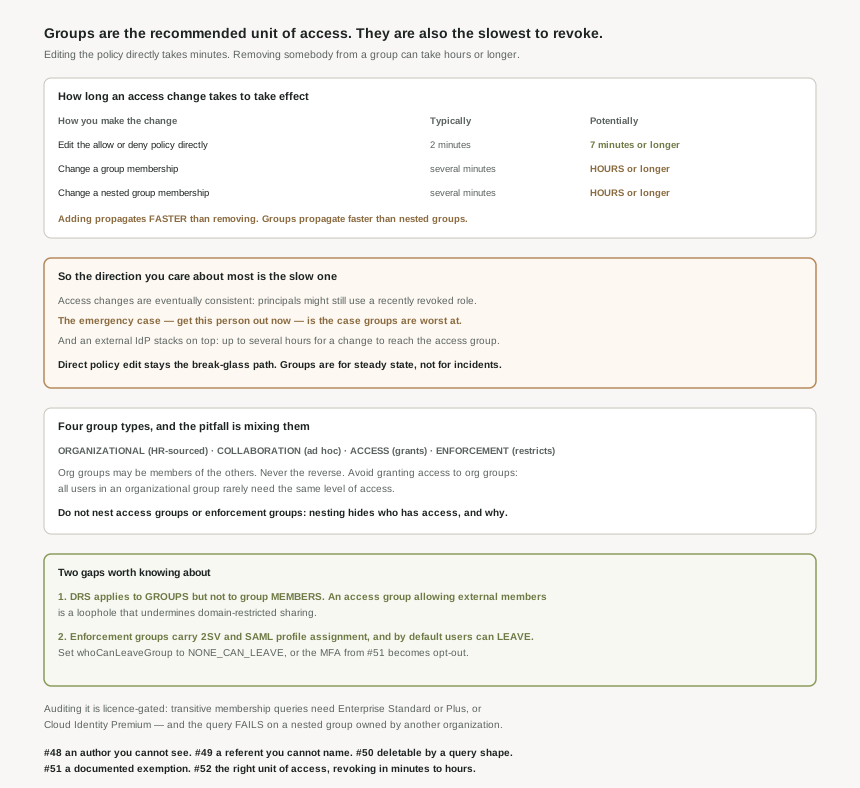
Eventually. Access changes are eventually consistent, which means principals might still be able to use a recently revoked role or a recently denied permission. A group membership change is typically several minutes, potentially hours or longer — and in general, adding a principal to a group propagates faster than removing a principal from a group.
Correct approachFor an urgent revocation, edit the policy or use a deny policy directly. Keep group removal for routine change, and never report an incident closed on the strength of a group edit alone.
The guidance explicitly advises against it: avoid using organizational groups to provide access to resources, because all users in an organizational group rarely need the same level of access to resources. Granting to org.engineering-all is the single most common version of this.
Put the organizational group inside an access group rather than granting to it, and keep the roles granted that way narrow.
It depends entirely on the type. For access groups, nesting access groups can make it difficult to determine who has access to what resources, and worse, nesting access groups with different access policies might let principals bypass strict access group membership policies. For enforcement groups, nesting enforcement groups can make it difficult to determine why a principal is being denied access.
Correct approachNest organizational groups freely, nest collaboration groups only where membership policies match, and do not nest access or enforcement groups.
Not through a group. The documentation names it as a loophole: because domain-restricted sharing (DRS) policy constraints apply to groups, but not to group members, access groups that allow external members can create a loophole that undermines DRS.
Correct approachUse Cloud Identity security groups and group restrictions to disallow external members on access groups, and name the exceptions distinctly so they are visible.
Architecture
The useful part of the guidance is a taxonomy, and it is worth adopting because it turns a vague instruction into four different things with four different rules. None of these types is a Google Groups attribute — they are a discipline you impose, which is why naming them is part of the advice.
The four types
| Type | Purpose | Membership driven by | Nesting |
|---|---|---|---|
| Organizational | Communication, and structure | HR data, or an external source of truth | Nest freely; mirror the org chart |
| Collaboration | Workgroups and topics | Self-service, often unrestricted | Only where membership policies match |
| Access | Used for the sole purpose of providing access | Group owners, approval or request | Do not nest |
| Enforcement | Restriction — used to enforce access restriction policies rather than providing access | Rules on clearance, location, role | Do not nest |
The one directional rule to remember: organizational groups can be members of the other three types, and nothing should be a member of an organizational group. That keeps the HR-sourced structure clean and lets you reuse it without granting through it.
Enforcement groups are the half people forget
An access group grants; an enforcement group takes away. The second kind carries more weight than it appears to, because it is how several controls get targeted: enforcement groups are also used to apply authentication controls such as SAML profile assignment or 2-Step Verification (2SV), alongside deny policies, principal access boundary policies and Chrome Enterprise Premium access bindings.
#51 ended on enforcing Google 2-step verification for super admins, because the external IdP cannot reach accounts that bypass single sign-on. If that enforcement is targeted at a group, then the control is only as strong as the membership — and by default a member can walk out. The guidance is blunt that this defeats the point: allowing users to leave an enforcement group goes against the principles of mandatory access control. The fix is a specific, non-default setting: use the Groups Settings API to set the whoCanLeaveGroup property to NONE_CAN_LEAVE. Worth checking on any group that carries a 2SV or SAML profile assignment, because an opt-out MFA policy is not an MFA policy.
Why This Architecture Holds Up
Here is the comparison that makes this post worth writing. The groups guidance and the propagation guidance are separate documents, and the second one prices the first.
| How you change access | Typically | Potentially |
|---|---|---|
| Edit an allow or deny policy directly | 2 minutes | 7 minutes or longer |
| Add or remove somebody from a group in a policy | several minutes | hours or longer |
| Add or remove somebody from a nested group | several minutes | hours or longer |
Then two asymmetries on top, both stated as general rules rather than guarantees. In general, adding a principal to a group propagates faster than removing a principal from a group. And in general, group membership changes propagate faster than nested group membership changes.
Granting access — the non-urgent operation, where a few minutes of delay costs somebody a coffee break — is the fast direction. Revoking access, which is the operation with a clock on it when somebody is dismissed or an account is compromised, is the slow direction of the slower mechanism. And if the group is populated from an external IdP, that delay stacks: it can take up to several hours for changes made in the external IdP to be reflected in the access group, before IAM propagation even starts. None of this is hidden, but it is on a page most people reach only after something has gone wrong.
What to do about it, which is not "stop using groups"
Groups remain right for steady state: they are what makes a job function reviewable instead of a hundred individual bindings. The adjustment is to stop treating group membership as the only lever.
- Urgent revocation goes through the policy, or a deny policy, not the group. Two minutes beats hours, and a deny policy overrides the grant rather than waiting for it to drain.
- Suspending the account is faster than any of this for a leaver, and is the lever #50 was really about.
- Do not nest the groups that carry access or enforcement. The nested case is slower as well as less legible.
- Prefer expiry to removal. The guidance recommends you require users to re-join an access group or extend their membership after a period of time, and says this best practice is critical for achieving the goal of Zero Standing Privileges (ZSP). Expiry turns revocation from an urgent action into a default.
One exception the guidance is careful about, and it matters given #46 through #48: do not auto-expire service accounts out of access groups, because removing service accounts from an access group can result in service interruptions. A machine identity has no renewal ritual to perform.
Auditing it is where the licence shows up
A group model is only as good as your ability to answer "who is actually in this". Transitive queries do exactly that — security auditors can assess the security risk of a member by viewing all of their direct and indirect group memberships — with the useful reminder that a group membership can belong to an individual, a service account, or another group.
Two caveats sit on that capability. It is tiered: these features are only available to Google Workspace Enterprise Standard, Enterprise Plus, and Enterprise for Education, and Cloud Identity Premium accounts. And it can fail outright, because the user or service account that is making the query must have permission to view the memberships of all groups that are part of the query, otherwise the request will fail — especially if one of them is a group owned by another organization. A single externally-owned nested group can make the effective membership of your access group unanswerable, which is a second, independent reason not to nest.
Two smaller things worth carrying away
On naming, there is a real attack rather than a tidiness argument. Where groups are mapped from an IdP by a derived pseudo-email address, collisions are possible, and this naming collision could be exploited by a bad actor to create security groups that masquerade as another, less scrutinized group type. A dedicated secondary domain for provisioned groups removes the ambiguity.
And on pipelines, an echo of #48’s warning about borrowing powerful roles: the Groups Admin role authorizes group creation, but it also lets any principal with that role manage all groups in the Cloud Identity account. If Terraform needs to create groups, give it a service account with the one permission, not the role.
Key Architecture Decisions
| Decision | Choose this | Because |
|---|---|---|
| Urgent revocation | Policy edit, deny policy, or suspend the account | Group removal is the slow direction of the slow method. |
| Routine access management | Access groups per job function | It is what makes access reviewable at all. |
| Granting to an HR-sourced group | Do not; nest it inside an access group | Its members rarely all need the same access. |
| Nesting access or enforcement groups | Do not | It hides who has access, and can bypass membership policy. |
| External members on access groups | Disallow, and name any exceptions | DRS applies to the group, not to its members. |
| Groups carrying 2SV or SAML assignment | Set whoCanLeaveGroup to NONE_CAN_LEAVE | By default a member can leave and shed the control. |
| Standing membership | Auto-expiry, with re-join | It is called critical for Zero Standing Privileges. |
| Service accounts in access groups | Exempt from auto-expiry | Removing them can cause service interruptions. |
| Where access groups are managed | In Cloud Identity, not the external IdP | IdP changes can take hours to reach the group. |
| Terraform that creates groups | One permission, not Groups Admin | That role manages every group in the account. |
The one to look at today
Find every group named in an IAM binding at organisation or folder scope, and ask two questions of each: is it an access group, or is it an HR or communication group that acquired a role because it already existed; and can its members leave it. The first question finds over-granting that no policy review will show, because the binding looks deliberate and the membership is somewhere else. The second finds any enforcement that is really opt-in. Both are answerable in an afternoon and neither requires changing anything to learn the answer.
Closing Thought
Groups are the right answer and this post is not an argument against them. Without them, least privilege at organisational scale is a filing exercise that nobody completes; with them, a job function becomes a thing you can name, own, review and expire. The four-type taxonomy is genuinely good advice, and the enforcement-group half of it is the part most estates have not built at all.
What is worth holding onto is the shape of the trade. Twenty-two posts in, every layer of this system has turned out to answer a slightly narrower question than its name implies. The allow policy has an author you cannot see, a referent you cannot name directly, a deletion path driven by the shape of an LDAP result, and an authentication gate with a deliberate exemption. Groups add the last piece: the membership that actually decides access does not live in the policy, and when you change it, the change arrives on a timescale measured in hours. None of that makes the model wrong. It does mean the honest answer to "who can do what here" is assembled from five systems and is accurate as of several minutes ago — and that the first person to say so out loud in a review is doing everyone a favour.
#53 moves from who the principal is to the conditions under which it may act: context-aware access — device posture, location and the difference between authenticating and being allowed in from here.
Comments