Business Challenge
The last three posts have been about an on-premises directory feeding a cloud tenant. This one inverts the premise: you have an application that needs Kerberos, NTLM or an LDAP bind, it is moving to Azure, and there is no appetite for running domain controllers to serve it. Entra Domain Services is the answer Microsoft offers, and it is a genuinely good one — for a narrower set of applications than its name implies.
The framing that gets people into trouble is “managed versus self-managed”, as though the only axis were operational effort. It is not. A managed domain is a projection of your Entra tenant into AD-shaped protocols, and projections are read-only:
“A managed domain is largely read-only except for custom OUs that you can create. You can't make changes to user attributes, user passwords, or group memberships within a managed domain.”
That single sentence disqualifies an entire class of migration. Any application that manages its own users in AD — creates them, resets their passwords, writes attributes, maintains its own groups — cannot use a managed domain for those objects. It is not a permissions problem you can solve with a better admin account, because there is no Domain Admin to escalate to: the comparison table lists “Domain or Enterprise administrator privileges” as present in self-managed AD DS and absent in a managed domain.
Domain Services authenticates users with legacy NTLM and Kerberos hashes, which means it depends on exactly what #51 and #50 depended on. If the tenant is federated:
“If on-premises AD DS and Microsoft Entra ID are configured for federated authentication using AD FS, then there's no (current/valid) password hash available… As a result, Domain Services won't be able to validate the users credentials.”
Third post in a row where password hash synchronisation turns out to be the hidden dependency of a feature that has nothing to do with passwords on the surface. At this point it is not a caveat, it is a platform assumption.
Architecture
Two managed domain controllers you cannot log in to, fed one way from your tenant, flattening everything on the way in.
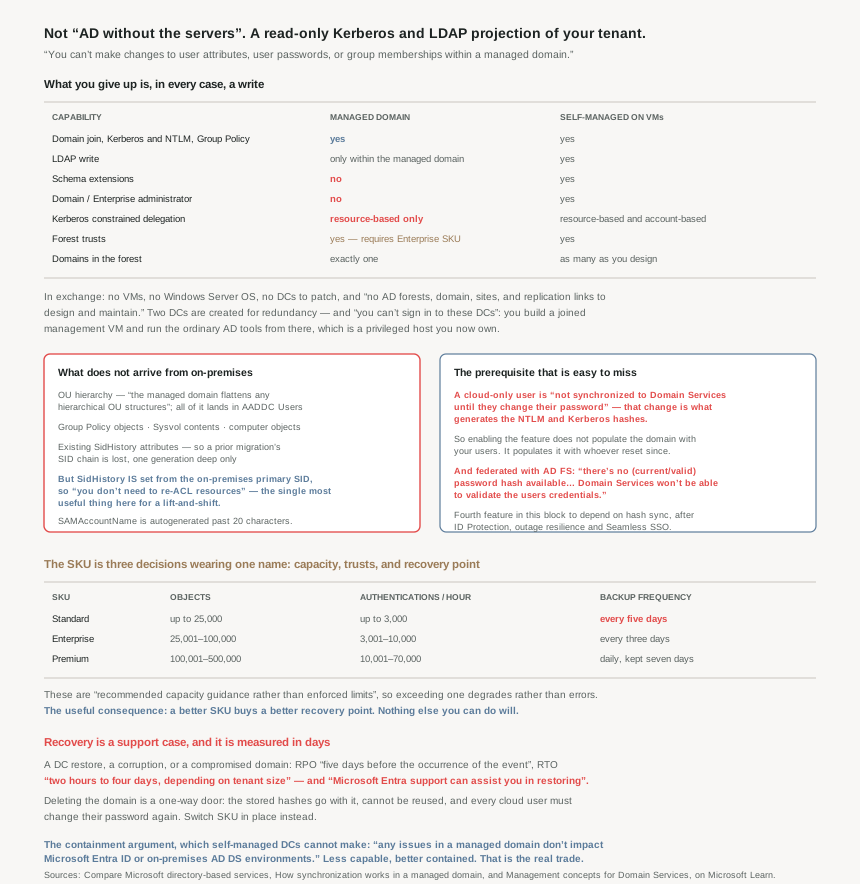
What you get, and the four absences that decide the migration
The supported list is longer than people expect: domain join, “Domain authentication using NTLM and Kerberos”, Group Policy, a custom OU structure, secure LDAP, LDAP read, geo-distributed deployments, and LDAP write — the last one qualified as “within the managed domain”. Forest trusts are available but gated: “Requires Enterprise SKU”.
The absences are what you check an application against:
- No schema extensions. An application whose installer extends the AD schema cannot run against a managed domain. This is binary and it is common in older line-of-business software.
- No Domain or Enterprise Admin. There is no account that can do what those groups do, by design.
- Resource-based Kerberos constrained delegation only. Self-managed AD DS offers “Resource-based & account-based”; a managed domain offers only the former. An app whose delegation is configured on the front-end account — the classic pattern — has to be reconfigured from the resource side.
- One domain, one forest. “In Domain Services, the forest only contains one domain.” No child domains, no multi-domain forest.
On the other side of the ledger, what you stop owning is real: “You don't deploy, manage, patch, and secure the AD DS infrastructure for components like the VMs, Windows Server OS, or domain controllers”, and “there are no AD forests, domain, sites, and replication links to design and maintain.” For a lift-and-shift that just needs a Kerberos ticket, that is most of the work gone.
You cannot log in to the domain controllers
This is the first operational surprise, and it changes the runbook rather than just the access model. “For redundancy, two DCs are created as part of a managed domain. You can't sign in to these DCs to perform management tasks.”
Instead: “you create a management virtual machine (VM) that's joined to the managed domain, then install your regular AD DS management tools” — ADAC, the MMC snap-ins, Group Policy editing. So the tools are the familiar ones and the box they run on is yours to build and secure. Budget a VM, and note that it is now a privileged management host in your estate, which is the sort of thing a managed service is supposed to remove.
The sync is one way, and it flattens
“When you first deploy Domain Services an automatic one-way synchronization is configured… No synchronization occurs from Domain Services back to Microsoft Entra ID.” The initial pass “may take a few hours to a couple of days, depending on the number of objects”, which is worth knowing before a cutover window is booked.
The flattening is the part that breaks assumptions carried over from on-premises:
| What you have on-premises | What arrives in the managed domain |
|---|---|
| A hierarchical OU structure | Nothing — “The managed domain flattens any hierarchical OU structures”; everything lands in AADDC Users |
| Group Policy objects | Nothing — “aren't synchronized to Domain Services”; you author new ones |
| The Sysvol folder | Nothing — so scripts and GPO files referenced from it do not come either |
| Computer objects | Nothing — only machines explicitly joined to the managed domain appear |
| Existing SidHistory attributes | Nothing — “aren't synchronized”, so a prior migration's SID chain is lost |
| The primary SID | Regenerated — “the managed domain has a different SID namespace” |
That SID row has a redeeming half, and it is the single most useful thing in the feature for a lift-and-shift: “The SidHistory attribute for users and groups in Domain Services is set to match the corresponding primary user or group SID in an on-premises AD DS environment. This feature helps make lift-and-shift of on-premises applications to Domain Services easier as you don't need to re-ACL resources.” File-server ACLs carried over from on-premises keep working. But only one generation deep, because prior SidHistory is not carried.
One naming detail that produces support tickets: SAMAccountName comes from mailNickname, and “if the user's mailNickname or UPN prefix is longer than 20 characters, the SAMAccountName is autogenerated to meet the 20 character limit” — as it also is when two users share a mailNickname. Microsoft's own advice is therefore to sign in with the UPN, because the generated SAMAccountName “isn't always a reliable way to sign in.”
A cloud-only user does not exist here until they change their password
This is the prerequisite most likely to be discovered during a pilot rather than during planning. Entra does not hold NTLM or Kerberos hashes until Domain Services is enabled, and it cannot generate them from something it does not store:
“When a user is created in Microsoft Entra ID, they're not synchronized to Domain Services until they change their password in Microsoft Entra ID.” And flatly: “All cloud user accounts must change their password before they're synchronized to Domain Services.”
So enabling the feature does not populate the domain with your existing cloud users. It populates it with the ones who have changed a password since. For a hybrid estate the equivalent step is enabling legacy hash sync in Connect — and note the ordering trap: “Microsoft Entra Connect only synchronizes legacy password hashes when you enable Domain Services for your Microsoft Entra tenant.”
Where those hashes live is better than the phrase “legacy hashes in the cloud” suggests: they are “always stored in an encrypted manner”, “the encryption keys are unique to each Microsoft Entra tenant”, and “no other service or component in Microsoft Entra ID has access to the decryption keys.” If NTLM is not actually needed, Microsoft says to turn that half off: “If your legacy applications don't use NTLM authentication or LDAP simple binds, we recommend that you disable NTLM password hash synchronization.”
Why This Architecture Holds Up
Because the recovery objectives are measured in days, and you cannot improve them
This is the number that should decide whether a managed domain sits under something important, and it is easy to miss because it is in a management-concepts page rather than an SLA:
| Issue | RPO | RTO |
|---|---|---|
| Data loss or corruption, a compromised domain, or anything needing a DC restored | Five days before the event | Two hours to four days, depending on tenant size |
| Issues identified by Microsoft Support domain diagnostics | Zero (0 minutes) | Two hours to four days, depending on tenant size |
A four-day RTO on the directory that authenticates your lift-and-shift estate is a different risk posture from a pair of DCs you can restore yourself, and the restore is not self-service: “Microsoft Entra support can assist you in restoring from backup.” You open a case.
The five-day RPO is not fixed, though, and this is where the SKU choice stops being about performance. Backup frequency is a SKU property:
| SKU | Recommended objects | Recommended authentications/hour | Backup frequency |
|---|---|---|---|
| Standard | Up to 25,000 | Up to 3,000 | Every five days |
| Enterprise | 25,001–100,000 | 3,001–10,000 | Every three days |
| Premium | 100,001–500,000 | 10,001–70,000 | Daily; retained seven days, every third retained 30 days |
Two things follow. First, these are “recommended capacity guidance rather than enforced limits” — you will not get an error at 25,001 objects on Standard, you will get worse performance, which is a harder failure to diagnose. Second, and more usefully: you can buy a better RPO. If a five-day recovery point is unacceptable, the lever is the SKU, not a backup job you write. And since Enterprise is also what forest trusts require, the SKU decision is really three decisions wearing one name — capacity, trusts, and recovery point.
Because deleting the managed domain is not reversible in the way people assume
A managed domain reads like infrastructure you can tear down and stand up again. The credential state says otherwise:
“If you delete the managed domain, any password hashes stored at that point are also deleted. Synchronized credential information in Microsoft Entra ID can't be reused if you later create another managed domain — you must reconfigure the password hash synchronization to store the password hashes again. Previously domain-joined VMs or users can't immediately authenticate.”
So a rebuild is not a restore. It is a re-enrolment: every cloud-only user changes their password again, hybrid hash sync is reconfigured, and nothing authenticates until that has propagated. Treat deletion as a one-way door and the SKU switch — which is supported in place — as the normal way to change course.
Because “it is just AD” is true of the protocols and false of the object model
The protocol compatibility is genuine, which is exactly why the object-model differences surprise people. Three of them have real consequences:
- Custom OUs are invisible to the cloud. You can create them, and service accounts in them, but “none of the objects created in custom OUs are synchronized back to Microsoft Entra ID… aren't visible using Microsoft Graph PowerShell cmdlets, Microsoft Graph API, or using the Microsoft Entra admin center.” Every governance control this series has covered — access reviews from #46, Conditional Access from #41a, risk detection from #48 — cannot see them. A service account created there is outside the identity governance plane entirely.
- Password policy applies unevenly. “Settings like account lockout policy apply to all users… but a few settings, like minimum password length and password complexity, only apply to users created directly in a managed domain.” So the complexity rules you set in the managed domain do not govern your synchronised users — theirs come from Entra or from on-premises, which is the same lesson as #50, arriving from the opposite direction.
- Connect must never be installed in the managed domain. “It's not supported to install Microsoft Entra Connect in a managed domain to synchronize objects back to Microsoft Entra ID.” Stated twice across two pages, which usually means somebody tried it.
Because the blast radius is genuinely smaller, and that is the strongest argument for it
One consequence of the one-way design deserves to be stated as a benefit rather than a limitation, because it is the thing self-managed DCs cannot offer: “As synchronization only occurs one way from Microsoft Entra ID, any issues in a managed domain don't impact Microsoft Entra ID or on-premises AD DS environments and functionality.”
Compare that with the alternative in the same document — promoting Azure VMs as replica domain controllers of your on-premises domain, which “effectively extended” the domain into Azure. That design gives the application everything it wants, and it also puts a writable copy of your corporate directory in a cloud subnet, replicating both ways. Read next to #51’s point about a single key with directory-wide reach, a projection that cannot write back is a meaningful containment boundary.
So the honest comparison is not managed-equals-easy against self-managed-equals-powerful. It is: a managed domain is less capable and better contained, and the question is whether the application needs the capability it gives up.
Because the network model is not optional
One line decides whether this is usable for the clients you have in mind: Domain Services-joined devices “Must be connected to, or peered with, the virtual network where the managed domain is deployed”, against Entra joined devices which “Work over the internet”. Microsoft’s own summary of who each suits is blunt and correct — Entra join is “great for… End-user mobile or desktop devices”, Domain Services for “Server VMs deployed in Azure”.
Which is the sentence to take away from the whole comparison. This is a service for servers. If you reached for it to give laptops a domain, you have the wrong tool and #51’s subject is the right one.
Key Architecture Decisions
| Situation | Decision | Why |
|---|---|---|
| App installer extends the AD schema | Self-managed DCs on VMs | Schema extensions are not available in a managed domain. |
| App creates users, resets passwords or writes attributes in AD | Self-managed DCs on VMs | A managed domain is read-only for synchronised objects. |
| App uses account-based constrained delegation | Reconfigure to resource-based, or self-manage | Only resource-based delegation exists in a managed domain. |
| Tenant is federated with AD FS | Enable password hash sync first | Without a valid hash, Domain Services cannot validate credentials. |
| Users sign in only with smart cards | Not a fit | Direct authentication needs synchronisable password hashes. |
| Cloud-only users, pilot about to start | Force a password change before testing | An account is not synced until its password changes. |
| Legacy app needs neither NTLM nor LDAP simple bind | Disable NTLM hash sync | Microsoft's own recommendation; smaller credential surface. |
| Lift-and-shift with file ACLs by SID | Managed domain is a good fit | SidHistory is populated, so no re-ACLing. |
| Estate already migrated once, SID history matters | Check it, do not assume | Existing SidHistory attributes are not carried over. |
| Depending on an on-premises OU hierarchy or GPOs | Plan to re-author them | OUs, GPOs and Sysvol contents do not synchronise. |
| Five-day recovery point unacceptable | Buy Enterprise or Premium | Backup frequency is a SKU property, not a setting. |
| Forest trust to on-premises required | Enterprise SKU minimum | Trusts are gated on the SKU. |
| Directory outage would be business-critical | Weigh a two-hour-to-four-day RTO | Restore is a support case, not a self-service action. |
| Tempted to delete and recreate the domain | Switch SKU instead | Deletion destroys the hashes and forces re-enrolment. |
| Service accounts for in-domain apps | Custom OU — and record them elsewhere | They are invisible to Graph, the portal and all governance. |
| Needing a domain for laptops and mobile | Entra join, not Domain Services | Managed-domain clients need VNet connectivity. |
| Managing the managed domain | Budget a joined management VM | You cannot sign in to the two managed DCs. |
Closing Thought
The useful reframing is to stop reading the feature table as a list of conveniences and read it as a list of writes you give up. No schema extension, no Domain Admin, no attribute or password or group-membership changes, no account-based delegation, no second domain. Everything a managed domain cannot do is something that would involve writing to the directory in a way the projection cannot represent. Once you see it that way the fit test is quick: what does this application write to AD? If the answer is nothing — it binds, it gets a ticket, it reads a group — the managed domain is the better engineering choice and the smaller blast radius. If the answer is anything at all, you are looking at domain controllers on VMs and you should cost them honestly.
The recovery numbers deserve to be part of that costing rather than a footnote to it. A five-day recovery point and an RTO of up to four days, restored by a support case, is a real constraint that a pair of your own DCs would not impose. It is buyable — a better SKU buys a better RPO — and it is not negotiable beyond that. A managed service trades control for effort in both directions, and the recovery path is where this one charges you.
And the thread that has run through this entire hybrid block closes here too. Password hash synchronisation has now turned out to be the hidden prerequisite for ID Protection’s best detection, for resilience after an on-premises outage, for Seamless SSO’s whole mechanism, and now for a managed domain being able to authenticate anyone at all. Four features, four different problem domains, one dependency. If you run hybrid identity and have it switched off, the honest summary is not that you have declined one feature — it is that you have quietly opted out of a platform assumption.
#53 moves to the other population in your tenant: B2B collaboration and guest access governance — what a guest actually is in Entra, and what they can see before anybody grants them anything.
Official Azure Reference
- Compare Microsoft directory-based services — the managed versus self-managed feature table, the Entra join comparison, and the AD FS credential gap
- How synchronization works in a managed domain — the one-way design, the attribute mappings, SID handling, and the full list of what does not synchronise
- Management concepts for Domain Services — the two unreachable DCs, password policy scoping, the SKU table, and the published RPO and RTO figures
Comments