Business Challenge
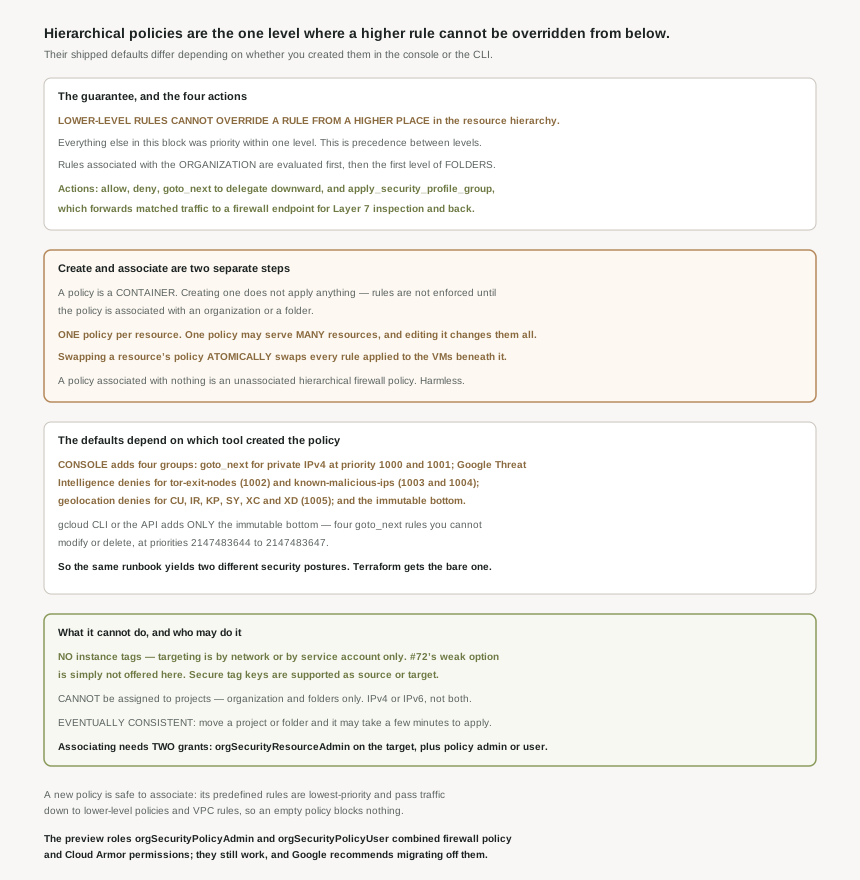
Three posts have established that within a firewall rule set, priority is the only ordering and specificity never decides. This post moves up a level, and the rule changes: hierarchical firewall policies let you create and enforce a consistent firewall policy across your organization, and the guarantee is categorical rather than numerical — lower-level rules cannot override a rule from a higher place in the resource hierarchy.
That is the first thing in this block where a higher position beats a lower one outright, and the stated purpose follows from it: this lets organization-wide admins manage critical firewall rules in one place. Two things about how these policies work are easy to get wrong, though, and one of them means your infrastructure-as-code pipeline produces a different security posture from the console.
They are not. Hierarchical firewall policies are containers for firewall rules, and creating a policy does not automatically apply the rules to the organization or folder. Enforcement begins at a second, separate step: the rules defined in a firewall policy are not enforced until the policy is associated with a resource (an organization or a folder). Until then it is just an unassociated hierarchical firewall policy.
Correct approachTreat creation and association as two deployments, and check the association rather than the policy when verifying that a control is live. The separation is a feature, not an oversight — it is what lets you build and review a policy before it affects anything, and what makes the swap below safe.
They are not, and this is the finding I would most want a reader to leave with. If you create a firewall policy using the Google Cloud console, Cloud NGFW adds the following rules to the new policy — goto_next rules for private IPv4 ranges, Google Threat Intelligence deny rules, geolocation deny rules, and the lowest-priority goto_next rules. But if you create a firewall policy using the Google Cloud CLI or the API, Cloud NGFW adds only the lowest possible priority goto-next rules to the policy.
Correct approachWrite the threat-intelligence and geolocation rules explicitly in code rather than relying on them being there. A console-created policy denies traffic from Tor exit nodes and known malicious IP lists out of the box; a Terraform-created one does not, and nothing in either artifact announces the difference. If your organization has both, the two paths have produced two different postures under the same policy name.
It will block nothing. When you create a hierarchical firewall policy, Cloud Next Generation Firewall (Cloud NGFW) adds predefined rules with the lowest priority to the policy, and those rules are permissive by delegation: these rules are applied to any connections that don't match an explicitly defined rule in the policy, causing such connections to be passed down to lower-level policies or network rules.
Correct approachAssociate early and add rules incrementally, because the fail-open-downward default makes that safe. Note the documentation draws the distinction explicitly — these predefined rules in firewall policies are different from the implied and prepopulated VPC firewall rules — so #71's material does not transfer here.
Architecture
The shape is a container you build, then attach. Everything else follows from that split.
Where they live, and where they cannot
Hierarchical firewall policies are created at the organization and folder level, and the exclusion is explicit: hierarchical firewall policies cannot be assigned to projects, only to the organization or folders. So the hierarchy this reaches across is the one from #01 — organization, folders, projects — and it stops one level above where VPC networks live. Evaluation follows that shape: rule evaluation is hierarchical based on resource hierarchy, and all rules associated with the organization are evaluated, followed by those of the first level of folders.
| Property | Behaviour |
|---|---|
| Policies per resource | Only one firewall policy can be associated with a resource |
| Resources per policy | A single policy can be associated with multiple resources |
| Editing a shared policy | If you modify a rule in a policy, that rule change applies to all associated resources |
| Replacing a policy | You can swap policies for a resource, which atomically swaps all the firewall rules applied to virtual machine (VM) instances under that resource |
| Taking effect | When you associate a policy with the organization or a folder, all rules are immediately applied |
| Consistency | Hierarchical firewall policies are eventually consistent |
The atomic swap is worth dwelling on, because nothing else in this block offers it. VPC firewall rules are individual resources: changing a policy expressed in twenty of them is twenty API calls and twenty moments where the set is half-old and half-new. Swapping one hierarchical policy for another changes every rule beneath a resource in one step. That makes a reviewed, versioned policy genuinely deployable — and it makes rollback a single operation rather than a reverse migration.
One policy can serve many folders, and editing it changes all of them at once. That is the mechanism that makes "manage critical firewall rules in one place" real, and it is also the blast radius: a single rule edit propagates to every associated resource with no staged rollout and no per-resource review. The atomic swap is the mitigation — version the policy, associate the new one, and keep the old to swap back to.
The four actions, and the one that is new
Allow and deny behave as they do in VPC rules. The third is the hierarchy's own: hierarchical firewall policy rules can delegate evaluation to lower-level policies or VPC network firewall rules with a goto_next action. That is what makes a restrictive organization policy workable — the top of the hierarchy can assert what must never happen and hand everything else downward.
The fourth is a different kind of thing entirely. You create a firewall policy rule by using the apply_security_profile_group action and name of the security profile group, and then the traffic matching the firewall policy rule is intercepted and transparently forwarded to the firewall endpoint for Layer 7 inspection, and back. URL filtering and intrusion detection and prevention run there.
That is the third answer this block has produced to a question #61 opened. #61 found no choke point between subnets, because firewall rules are enforced at the VM. #69 found that a policy-based route can pre-empt a subnet route and send traffic to a load balancer for inspection. This is the other: a firewall policy rule that diverts matched traffic to an inspection endpoint and returns it, declared at the organization or folder level rather than per network. The model has no in-path appliance, and it has acquired three distinct ways to insert one.
Targeting, and the option that is missing
By default the reach is total: by default, all hierarchical firewall policy rules apply to all VMs in all projects under the organization or folder where the policy is associated. Narrowing is done with two mechanisms — hierarchical firewall policy rules can be targeted to specific VPC networks and VMs by using target resources for networks and target service accounts for VMs — plus secure tags, since rules in hierarchical firewall policies support secure tag keys as source secure tags or target secure tags.
And one thing is absent, which reads as a deliberate answer to yesterday's post: hierarchical firewall policy rules don't support targeting by instance tags. #72 established that a network tag is an arbitrary attribute changeable by anyone who can edit an instance. At the organization and folder level, where the entire point is that lower levels cannot override, Google simply does not offer the mechanism that a project-level admin could subvert. The weaker option is not deprecated here; it was never provided.
Target networks are also the feature that distinguishes these from the policies #74 will cover: hierarchical firewall policies support target networks, while global network firewall policies don't, and combined with goto_next or allow , specifying target networks lets you create exceptions for specific networks when you want to define an otherwise restrictive policy. The structural difference behind that is scope — hierarchical firewall policies are organization-level resources, while global network firewall policies are project-level resources.
Why This Architecture Holds Up
This is the section I would read twice. A new policy is not empty, and what it contains depends on how you made it.
| Predefined rule group | Created in the console | Created by gcloud or the API |
|---|---|---|
| goto_next for private IPv4 ranges — destination IPv4 ranges 10.0.0.0/8, 172.16.0.0/12, 192.168.0.0/16 , priority 1000 for egress, 1001 for ingress | Yes | No |
| Google Threat Intelligence denies — iplist-tor-exit-nodes , priority 1002; iplist-known-malicious-ips , priority 1003 ingress and 1004 egress | Yes | No |
| Geolocation denies — geolocations CU , IR , KP , SY , XC , and XD , priority 1005 | Yes | No |
| Lowest-priority goto_next rules, at priorities 2147483644 to 2147483647 | Yes | Yes |
Every one of these is overridable by design, except the last: all predefined rules in a new firewall policy purposefully use low priorities (large priority numbers) so you can override them by creating ingress or egress rules with higher priorities. The bottom four are fixed — the documentation lists them under you cannot modify or delete the following rules, ending with an ingress rule with source IPv4 range 0.0.0.0/0 , priority 2147483647 , and goto_next action.
#70 recorded that a firewall policy rule's priority range is 0 to 2,147,483,547. These immutable rules sit at 2147483644 through 2147483647 — above that ceiling. Google has reserved the top 100 priority values for itself, which is why the final goto_next can never be outranked or removed: there is no number you are allowed to use that is larger. It is the policy-level equivalent of #66's reserved addresses, and it is why a hierarchical policy always ends by delegating downward rather than denying.
The operational conclusion is uncomfortable but simple. If your organization provisions policies through Terraform — which is the configuration most mature estates aim for — you do not have the threat-intelligence or geolocation denies unless somebody wrote them. A reviewer comparing a console-created policy in one folder with a code-created policy in another would see two rule sets that differ by five rules nobody authored, with no record of the decision. Writing them explicitly costs little and makes the posture legible either way.
Who may do what, and a migration still in progress
Association is the step with split permissions, and it is worth naming because it enforces a separation of duties. It requires the Organization Security Resource Admin role ( roles/compute.orgSecurityResourceAdmin ) on the target resource, plus firewall policy admin or user on the policy itself. So owning a folder does not let you attach any policy to it, and owning a policy does not let you attach it anywhere — both grants are needed.
There is also a live role migration to be aware of. The preview roles combined permissions for hierarchical firewall policies and Google Cloud Armor, which is why they are being replaced, and the guidance is unambiguous: the prior roles continue to work, but we recommend migrating to the new roles as soon as feasible. Anything granting the old compute.orgSecurityPolicyAdmin is granting Cloud Armor permissions as a side effect, which is exactly the kind of accidental bundling the IAM posts in this series kept finding.
Two limits worth knowing before designing around this
First, consistency: hierarchical firewall policies are eventually consistent, and specifically if you move projects or folders, it might take a few minutes for hierarchical firewall policies to be applied. A project moved into a restricted folder is not immediately restricted. That is the third place this block has met eventual consistency, after route propagation to per-VM controllers in #68 — and here the window is stated in minutes rather than left vague.
Second, the same address-family constraint as VPC rules: a hierarchical firewall policy rule can include either IPv4 or IPv6 ranges, but not both. Dual-stack organizations write every organization-level rule twice, at both levels of the hierarchy they use.
Key Architecture Decisions
| Situation | Decision | Because |
|---|---|---|
| Provisioning policies as code | Write the threat-intelligence and geolocation rules explicitly | gcloud and the API add only the immutable bottom; the console adds five more rules. |
| A control that must not be overridable by a project team | Organization or folder policy, not a VPC rule | Lower-level rules cannot override a higher-level one. |
| Verifying a control is live | Check the association, not the policy | Rules are not enforced until the policy is associated. |
| Rolling out a policy change at scale | Version the policy and swap it | The swap is atomic across every VM under the resource, and rollback is one operation. |
| One policy shared across folders | Treat an edit as a change to all of them | A rule change applies to every associated resource at once. |
| Needing exceptions for specific networks | Target networks with goto_next or allow |
Only hierarchical policies support target networks; global network policies do not. |
| Moving a project into a restricted folder | Allow minutes before relying on the restriction | Hierarchical policies are eventually consistent on moves. |
| Any grant of the old org security policy roles | Migrate to the firewall policy roles | The old roles also carry Cloud Armor permissions. |
The one to look at today
List your hierarchical firewall policies and, for each, check two things. Whether it is associated with anything at all — an unassociated policy is a control somebody believes is in force and is not. And whether it contains rules at priorities 1002 to 1005: their presence tells you it was created in the console, their absence tells you it came from gcloud or the API, and either way you now know whether Tor exit nodes and known malicious IP lists are being denied in that part of the organization. Then grep your Terraform for those rules, because that is where the answer should have come from.
Closing Thought
Two things make this post different from the three before it. The first is that the ordering rule finally changes: for twelve posts the answer to "which wins" has been priority, and here it is position. A rule at the organization node is not a high-priority rule, it is an unoverridable one, and that is a genuinely different kind of control — the first in this block that a project-level administrator cannot work around.
The second is the predefined-rules divergence, which is the most consequential thing I have found in the firewall material. Google ships a policy with threat-intelligence and geolocation denies when you click through the console, and ships the same policy bare when you call the API. Both are defensible in isolation: the console is a guided path with safe defaults, the API is a primitive that does what it is told. Together they mean the security posture of a folder depends on which window somebody had open, and nothing in the resulting resource records which it was. Thirteen posts in, the pattern is no longer that the documentation is more precise than the interface — it is that the interfaces disagree, and only the documentation says so.
#74 takes the other half of the policy model: global and regional network firewall policies, which live at the project level and lack the one feature this post ended on.
Comments