Business Challenge
Picking a VPN gateway SKU looks like the easiest decision in Azure networking. There is a table, the numbers go up, and you choose the row that matches your bandwidth requirement. Microsoft's own framing invites exactly that: “select the SKU that satisfies your requirements based on the types of workloads, throughput, features, and SLAs.”
The problem is that the throughput column does not mean what a reader reasonably assumes, and the documentation says so in a bullet point well below the table:
“The Aggregate Throughput Benchmarks were tested by maximizing a combination of S2S and P2S connections. A single P2S or S2S connection can have a much lower throughput.”
So the 10 Gbps on the VpnGw5AZ row is what the gateway instance can do across every tunnel at once, not what your one site-to-site tunnel to the London office will do.
That distinction is not a footnote in practice. It is the difference between a gateway that meets expectations and a procurement conversation six weeks later. And it is knowable in advance, because Microsoft publishes a second table — observed per-tunnel performance — which almost nobody reads, and which disagrees with the first in ways that change the decision.
Three questions this post answers from those two tables:
- What does a single tunnel actually get, and which SKU step stops improving it?
- Which choice matters more: the SKU, or the cipher suite?
- Does a bigger SKU always support more of your estate? (No. There are inversions.)
And one piece of timing, because this is the rare post where the calendar matters: the non-availability-zone VpnGw1–5 SKUs were scheduled for deprecation after September 2026, which is now behind us. The documented consequence is worth knowing before you next open a gateway's blade.
Architecture
A site-to-site connection is “a cross-premises IPsec/IKE VPN tunnel connection between the VPN gateway and an on-premises VPN device”, and the gateway is the thing you size. The sizing axes are not independent, which is the root of most of the confusion.
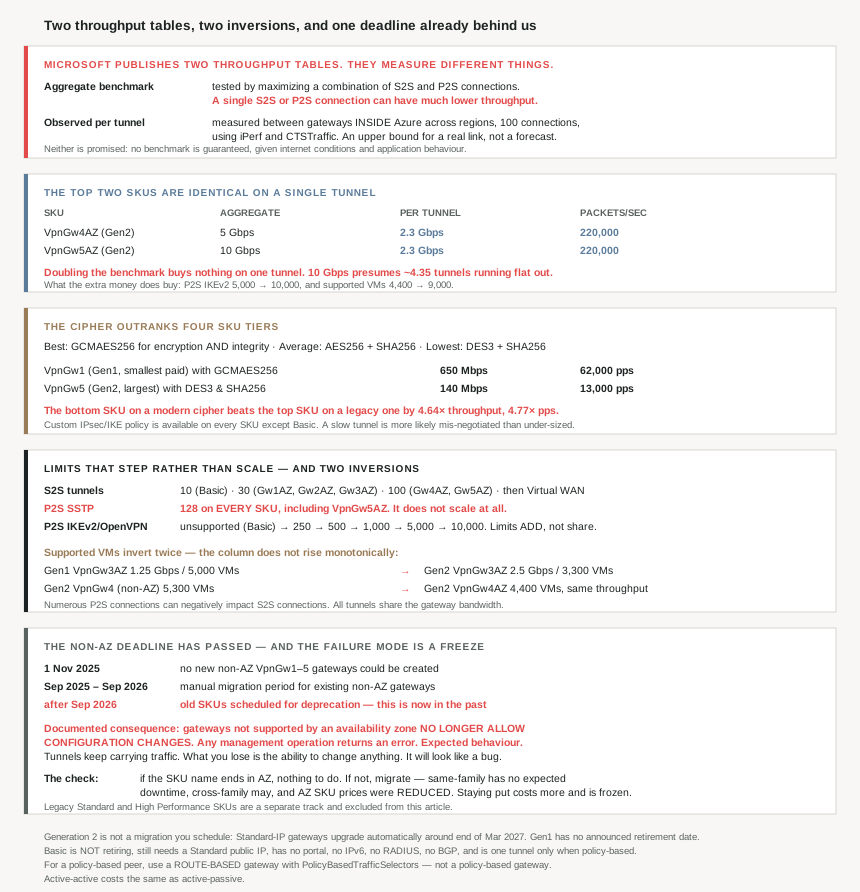
The two tables, and what each one measures
| Aggregate throughput benchmark | Observed throughput per tunnel | |
|---|---|---|
| What it measures | The gateway instance across all tunnels at once | One tunnel |
| How it was obtained | “maximizing a combination of S2S and P2S connections” | “between gateways (endpoints) within Azure across different regions with 100 connections”, using “iPerf and CTSTraffic” |
| Varies by cipher? | Not published per cipher | Yes — three rows per SKU |
| Useful for | Sizing a hub carrying many branches | Predicting one site's experience |
Note what the per-tunnel figures are not: they were measured between two Azure gateways, not between Azure and an on-premises device over a carrier network. They are an upper bound for a real site-to-site link, not a forecast of one. The documentation is explicit that neither table is a promise: “All benchmarks aren’t guaranteed due to Internet traffic conditions and your application behaviors.”
The SKU table for new deployments
These are the SKUs with zone-redundant options, which are “recommended for all new deployments”:
| Gen | SKU | S2S tunnels | P2S SSTP | P2S IKEv2/OpenVPN | Aggregate benchmark | BGP | Supported VMs |
|---|---|---|---|---|---|---|---|
| 1 | Basic | 10 | 128 | Not supported | 100 Mbps | No | 200 |
| 1 | VpnGw1AZ | 30 | 128 | 250 | 650 Mbps | Yes | 1000 |
| 1 | VpnGw2AZ | 30 | 128 | 500 | 1 Gbps | Yes | 2000 |
| 1 | VpnGw3AZ | 30 | 128 | 1000 | 1.25 Gbps | Yes | 5000 |
| 2 | VpnGw2AZ | 30 | 128 | 500 | 1.25 Gbps | Yes | 2000 |
| 2 | VpnGw3AZ | 30 | 128 | 1000 | 2.5 Gbps | Yes | 3300 |
| 2 | VpnGw4AZ | 100 | 128 | 5000 | 5 Gbps | Yes | 4400 |
| 2 | VpnGw5AZ | 100 | 128 | 10000 | 10 Gbps | Yes | 9000 |
Read the P2S SSTP column downward. It is 128 on every row, Basic to VpnGw5AZ. SSTP does not scale with the SKU at all; only IKEv2 and OpenVPN do, from unsupported on Basic to 10,000 on VpnGw5AZ. If your remote-access design depends on SSTP, the SKU ladder offers you nothing, and that is a design constraint rather than a budget one.
Read the S2S tunnels column downward and it steps rather than scales: 10, then 30 for three consecutive SKUs, then 100 for two. Needing 40 tunnels forces you to VpnGw4AZ and its 5 Gbps benchmark whether or not you want the bandwidth. And past that, the product changes: “If you need more than 100 S2S VPN tunnels, use Virtual WAN”.
One detail that saves an unnecessary SKU jump: the connection limits do not compete. “These connection limits are separate. For example, you can have 128 SSTP connections and also 250 IKEv2 connections on a VpnGw1AZ SKU.” They add rather than share. Throughput, however, does share — “all VPN tunnels share the available gateway bandwidth” — and the two kinds of traffic interfere: “If you have numerous P2S connections, it can negatively impact your S2S connections.”
Why This Architecture Holds Up
Because the top two SKUs are identical on a single tunnel
This is the finding that should change how people read the table. Compare the two tables for the top two Generation 2 zone-redundant SKUs:
| SKU | Aggregate benchmark | Observed per tunnel (GCMAES256) | Packets/sec per tunnel |
|---|---|---|---|
| VpnGw4AZ | 5 Gbps | 2.3 Gbps | 220,000 |
| VpnGw5AZ | 10 Gbps | 2.3 Gbps | 220,000 |
Doubling the aggregate benchmark changes the per-tunnel figures not at all. In Microsoft's own measurements these two SKUs deliver the same 2.3 Gbps and the same 220,000 packets per second to any individual tunnel.
So if your requirement is one fast tunnel to a datacentre, VpnGw5AZ buys you nothing over VpnGw4AZ on that tunnel. What the extra aggregate capacity buys is headroom across tunnels, plus the P2S IKEv2 ceiling going from 5,000 to 10,000 and supported VMs from 4,400 to 9,000. Those are real, and they are a different purchase from “a faster tunnel”.
How many tunnels does it take to use the top SKU's benchmark? Dividing the 10 Gbps aggregate by the 2.3 Gbps observed per-tunnel rate gives roughly 4.35 — so the 10 Gbps figure presumes something like four or five tunnels all running flat out. If you have three branches, you are buying a number you cannot reach.
Because the cipher outranks four SKU tiers
The per-tunnel table has three rows per SKU, one per cipher suite, and the spread within a SKU is wider than the spread between SKUs. The documented ranking: “The best performance was obtained when we used the GCMAES256 algorithm for both IPsec Encryption and Integrity… Average performance… using AES256 for IPsec Encryption and SHA256 for Integrity… The lowest performance… DES3 for IPsec Encryption and SHA256 for Integrity.”
Put the smallest paid SKU on the best cipher against the largest SKU on the worst:
| Configuration | Observed per tunnel | Packets/sec |
|---|---|---|
| Gen1 VpnGw1 with GCMAES256 | 650 Mbps | 62,000 |
| Gen2 VpnGw5 with DES3 & SHA256 | 140 Mbps | 13,000 |
| Ratio | 4.64× | 4.77× |
The bottom SKU on a modern cipher moves roughly four and a half times the traffic of the top SKU on a legacy one. That inverts the entire ladder, and it means a gateway that underperforms is at least as likely to be mis-negotiated as under-sized. Custom IPsec/IKE policy is available on “All Generation1 and Generation2 SKUs except Basic”, so this is a configuration you control — and the cheapest performance fix available on the service.
The practical reading: before approving a SKU upgrade for a slow tunnel, check what the tunnel actually negotiated. DES3 is present in this table because real devices still propose it.
Because supported-VM counts invert, twice
#72 covered why the supported-VM column is bigger than it looks — it counts “Virtual Machines in the hub and peered spoke virtual networks… Private Endpoints… Network Virtual Appliances… Backend instances of PaaS services”. What it did not cover is that the column does not rise monotonically.
| Comparison | Throughput | Supported VMs |
|---|---|---|
| Gen1 VpnGw3AZ | 1.25 Gbps | 5000 |
| Gen2 VpnGw3AZ | 2.5 Gbps | 3300 |
| Gen2 VpnGw4 (non-AZ) | 5 Gbps | 5300 |
| Gen2 VpnGw4AZ | 5 Gbps | 4400 |
The same SKU name on a newer generation doubles throughput and supports 1,700 fewer resources. And the zone-redundant VpnGw4AZ supports 900 fewer than its non-zonal namesake at identical throughput.
I am reading a published table rather than explaining Microsoft's capacity model, so I will not guess at the mechanism. The design consequence stands on its own: if your constraint is the number of things behind the gateway rather than bandwidth, “upgrade to the newer generation” or “move to the zone-redundant SKU” can move you backwards on the limit you actually care about. Check both columns against both tables before a migration, not just the one you were optimising.
Because the migration deadline has passed, and the failure mode is a freeze
The timeline, as documented:
| Date | What changed |
|---|---|
| 1 November 2025 | “You can no longer create new VPN gateways (VpnGw1-5 SKUs) that aren’t supported by an availability zone.” |
| Sept 2025 – Sept 2026 | Migration period for manual upgrade of existing non-AZ gateways. |
| After September 2026 | “The old SKUs are currently scheduled for deprecation…” |
That third row is now in the past. And the documented consequence is unusual enough to be worth quoting exactly, because it is not what people brace for:
“Existing VPN gateways not supported by an availability zone will no longer allow configuration changes. If you attempt any management or configuration operation, you’ll get an error message. This is expected behavior after the rollout.”
The tunnels keep carrying traffic. What stops is your ability to change anything — add a connection, adjust a policy, rotate a shared key. The gateway becomes read-only, and it will look like a bug.
This is the same shape as the Basic public IP situation in #69: a retirement date passes, the resource keeps working, and what you lose is support and the ability to make changes. The operational hazard is identical too — nothing pages you when a resource becomes unmanageable, so you discover it during the change you urgently needed to make.
The check costs one command and no risk. “If the SKU name ends in AZ (for example, VpnGw2AZ), your gateway already uses a SKU that supports an availability zone, and you don’t need to migrate it.”
And if it does not end in AZ, the migration is cheaper than it sounds. “There’s no downtime expected to manually upgrade SKUs that currently use Standard public IP addresses.” The caveat is on the word family: same-family migration is free of downtime, but “if you’re upgrading in addition to migrating, you might experience downtime consistent with existing VPN Gateway resize behavior. This is called cross-family migration.” So migrate and resize as two changes, not one, if a maintenance window is expensive.
One pleasant detail: the migration is not a pure cost. “To support this migration, we’re reducing the prices on SKUs supported by availability zones” — and the new pricing “starts after your gateway is migrated” for a VpnGw1–5, while it is “already in effect” for anything already on an AZ SKU. Staying put is the more expensive option as well as the frozen one.
Because “AZ” in the name does not guarantee zone redundancy
A naming subtlety that matters for a resilience claim in a design document. “If a region doesn’t currently support availability zones, you can still create VPN Gateway SKUs supported by availability zones, but the deployment will remain regional… These SKUs become zone redundant only in regions that support availability zones.”
So VpnGw3AZ in a region without zones is a regional gateway with an aspirational name. Azure upgrades it in place when the region gains zones — “we’ll enable zone redundancy for the gateways” — which is the right behaviour, but it means the SKU name is a statement of intent and the region list is the statement of fact.
Because Generation 2 arrives whether you plan it or not
Generation is not a migration you schedule. “Customers do not need to run any separate migration to move to Generation 2. The only required action is upgrading from a Basic to a Standard public IP address (if applicable).” And there is a date attached: gateways already on a Standard public IP “are automatically upgraded to the next generation (Generation 2) as part of regular service updates, ~end of Mar’27”, seamlessly and without downtime.
Two things follow. First, “There is no announced retirement date for Gen1 SKUs” — so Generation 1 is not the thing under deadline pressure; the non-AZ SKUs are, and those are a different axis. Second, that automatic upgrade will move some gateways across the inversion described above. A Gen1 VpnGw3AZ supporting 5,000 resources becomes a Gen2 VpnGw3AZ supporting 3,300. Worth knowing before March 2027 if your estate is anywhere near that number.
And one trap in the migration tooling, stated plainly in the documentation and easy to get wrong because the tool is right there:
“Don’t use the migration tool. Remove the Basic SKU public IP reference from your gateway instead. Your gateway continues to use the same public IP address.”
For VpnGw1–5 and legacy SKUs on a Basic IP, the tool is correct — and it does two jobs at once: migrating the IP “automatically upgrade[s]” the gateway to Generation 2 with “no separate Gen2 migration or additional steps”.
Because Basic is not retiring, and still is not a production SKU
Worth stating because the direction of travel elsewhere invites the opposite assumption. “Is the VPN Gateway Basic SKU retiring? No, the VPN Gateway Basic SKU isn’t retiring.” Basic public IPs went away; the Basic gateway did not. It does, however, now require a modern IP: “Use a Standard SKU public IP address when you create a Basic SKU VPN gateway.”
Surviving is not the same as being suitable. The constraints are severe and oddly shaped:
- No portal. It “can only be configured using PowerShell or Azure CLI”.
- No IPv6, no RADIUS, no BGP.
- Policy-based on Basic means one tunnel. “Policy-based VPN: (IKEv1): 1 S2S/connection tunnel; no P2S” — against 10 for route-based on the same SKU.
- Explicitly not for production. “limited support and shouldn’t be used for production purposes”, recommended only for “Dev-test or proof of concept”.
That one-tunnel policy-based limit is the detail that strands projects, and it has a workaround that does not require a policy-based gateway at all: “You can configure PolicyBasedTrafficSelectors to connect a route-based VPN gateway to multiple on-premises policy-based firewall devices.”
So an on-premises device that only speaks policy-based selectors is not a reason to choose a policy-based gateway. Choose route-based — which is what unlocks “up to 100 tunnels… P2S, BGP, active-active, custom IPsec/IKE policy, ExpressRoute/VPN coexistence” — and configure the selectors on it. Picking a policy-based gateway to match a policy-based peer is the decision that costs the most and is the easiest to avoid.
One more reason not to under-build for resilience: “The cost of an active-active VPN gateway setup is the same as active-passive.” The redundancy is free; only the configuration effort is not.
Key Architecture Decisions
| Decision point | Choose | Because |
|---|---|---|
| Sizing for one fast tunnel | Read the per-tunnel table, not the benchmark | The benchmark was measured under full saturation across many connections. |
| One tunnel needing more than 2.3 Gbps | Not a bigger VPN SKU | VpnGw4AZ and VpnGw5AZ observe the same per-tunnel rate. Consider ExpressRoute. |
| Choosing between VpnGw4AZ and VpnGw5AZ | Decide on tunnel count, P2S scale and supported VMs | Those differ (5,000 vs 10,000 P2S; 4,400 vs 9,000 VMs). Per-tunnel throughput does not. |
| A tunnel underperforming its SKU | Check the negotiated cipher first | GCMAES256 against DES3 is a 4.64× difference — wider than the SKU ladder. |
| Any new gateway | Custom IPsec/IKE policy with GCMAES256 | The cheapest performance decision available, and free. |
| Remote access at scale | IKEv2 or OpenVPN, never SSTP | SSTP is capped at 128 on every SKU including the largest. |
| Needing 31–100 tunnels | VpnGw4AZ | Tunnel counts step 10 / 30 / 100; there is nothing between. |
| More than 100 tunnels | Virtual WAN | Microsoft directs you off VPN Gateway at that point. |
| Mixing many P2S clients with S2S branches | Size with headroom, or separate the gateways | Numerous P2S connections can negatively impact S2S connections. |
| Counting your gateway's capacity | Add SSTP and IKEv2 limits together | The connection limits are separate, not shared. |
| Constrained by resources behind the gateway, not bandwidth | Compare the supported-VM column explicitly | It inverts: Gen2 VpnGw3AZ supports 3,300 where Gen1 supports 5,000. |
Any gateway whose SKU does not end in AZ |
Migrate now | Deprecation was scheduled after September 2026, which has passed. |
| A gateway rejecting configuration changes | Check for a non-AZ SKU before raising a support case | Refusing management operations is documented expected behaviour post-rollout. |
| Migrating when a maintenance window is costly | Migrate first, resize later | Same-family migration has no expected downtime; cross-family might. |
| Deciding whether migration is worth it | It lowers the bill | AZ SKU prices were reduced; new pricing starts only after migration. |
| Claiming zone redundancy in a design | Check the region, not the SKU name | An AZ SKU in a region without zones stays regional. |
| Planning a Generation 2 move | Nothing — it is automatic | Standard-IP gateways upgrade themselves around end of March 2027. |
| A Basic gateway on a Basic public IP | Remove the IP reference; do not use the migration tool | Documented explicitly, and the tool is the obvious wrong move. |
| An on-premises policy-based device | Route-based gateway with PolicyBasedTrafficSelectors |
A policy-based gateway on Basic gives you exactly one tunnel. |
| Production workloads | Any Gen1 or Gen2 SKU except Basic | Basic has limited support and is documented as not for production. |
| Resilience on a budget | Active-active | It costs the same as active-passive. |
Closing Thought
The reason this SKU table misleads is not that the numbers are wrong. It is that the most prominent column answers a question most readers are not asking. The aggregate throughput benchmark describes a gateway instance running many saturated tunnels at once; the question in the room is almost always “how fast will the link to this one site be?”, and the answer to that lives in a second table further down, where the top two SKUs turn out to be indistinguishable.
The other half of the lesson is that the cipher suite outranks the SKU. A bottom-tier gateway negotiating GCMAES256 moves roughly four and a half times the traffic of a top-tier gateway negotiating DES3. No amount of SKU spending recovers that, and the fix is a policy change rather than a purchase. When a tunnel is slow, the configuration is the better first suspect.
And the thing to do today rather than later: check whether your gateway's SKU name ends in AZ. The deprecation date for the ones that do not has already passed, the consequence is a gateway that refuses to be changed rather than one that stops working, and migration is both downtime-free in the same family and cheaper than staying. That is an unusually one-sided trade, and the only thing standing between most estates and taking it is that nothing has gone wrong yet.
#74 takes the other half of VPN Gateway: point-to-site VPN and client configuration — the protocol choice that the 128-connection SSTP ceiling above already forces, what each authentication method actually requires, and why the client configuration package is generated rather than written.
Official Azure Reference
- About VPN Gateway SKUs — both throughput tables, what the aggregate benchmark measures, the per-tunnel performance figures by cipher, the feature matrix, the Basic SKU limitations and the production versus dev-test recommendation
- Gateway SKU mappings — the migration timeline and dates, the configuration-freeze consequence, how to check your own SKU, the downtime and cross-family rules, the pricing reduction, and the automatic Generation 2 upgrade
- About Azure VPN Gateway — the site-to-site connection definition, shared gateway bandwidth, policy-based versus route-based routing, and active-active costing the same as active-passive
- Upgrade a VPN Gateway SKU — the step-by-step for the migration recommended above (no claims drawn from it)
- Managing legacy gateway SKUs — for Standard and High Performance gateways, which the consolidation article explicitly excludes (no claims drawn from it)
Comments