Business Challenge
Every post from #31 onwards examined one mechanism. A design is not a list of mechanisms, and the questions a multi-team organisation actually has to answer first are structural: how many directories, how many organisations, what shape are the folders, and who is allowed to be above all of it. This post answers those, and one of the sources corrected something I wrote three posts ago.
Start from the opposite default. The guidance is to manage all users through a single Cloud Identity or Google Workspace account and provide a single user account to each individual, because that is what makes password policy, single sign-on and two-step verification apply consistently. The rule is use as few accounts as possible, but as many as necessary, and then use the smallest number of Cloud Identity or Google Workspace accounts that satisfies your requirements.
Correct approachCollect the requirements that genuinely need a second directory, then count. Autonomy is usually an organisational-unit and group problem, not a directory problem.
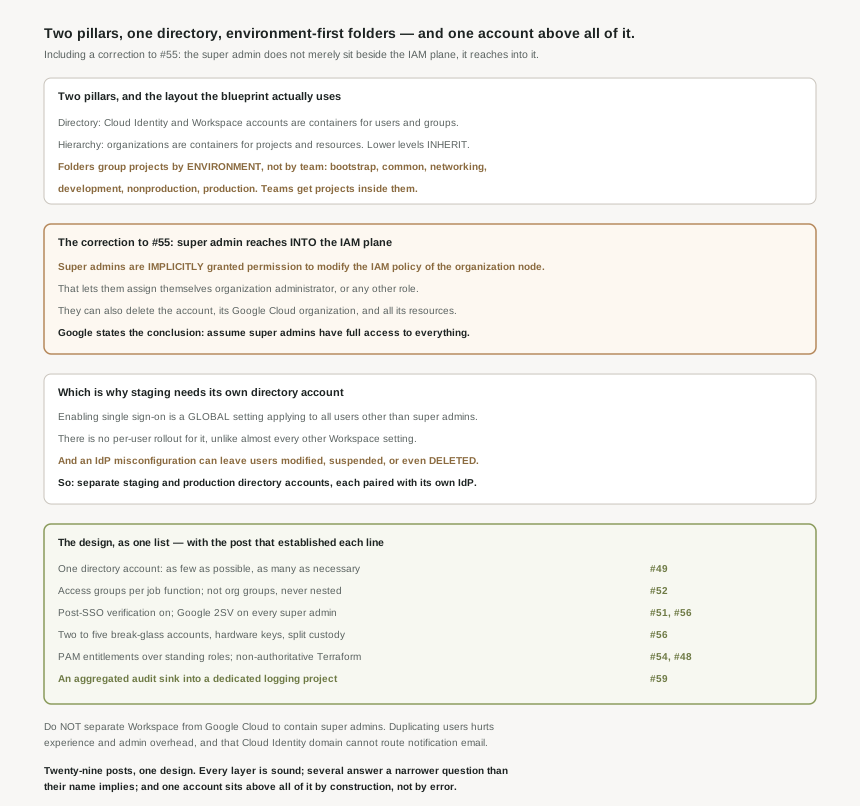
The security foundations blueprint does not. The blueprint uses folders to group projects based on their environment — bootstrap, common, networking, development, nonproduction, production — and uses projects to group individual resources based on their functionality and intended boundaries for access control. Teams live in projects inside environment folders, not in folders of their own.
Correct approachPut the environment boundary where policy inheritance is, because that is what you most need to differ. Team identity belongs in project naming and in the access groups from #52.
You cannot. Enabling single sign-on is a global setting that applies to all users other than super admins — unlike most Workspace settings, there is no per-user or per-OU staging of it. And the failure mode is not cosmetic: an accidental misconfiguration in the external IdP might lead to users inadvertently being modified, suspended, or even deleted.
Correct approachHave separate staging and production Cloud Identity or Google Workspace accounts, each paired with the matching IdP instance. That is the only pilot available.
A reasonable instinct that the guidance warns against: separating Google Workspace and Google Cloud can have several unintended consequences. Duplicate the users and duplicating users negatively affects both user experience and administrative overhead — and because the Cloud Identity domain must differ from the Workspace domain, it cannot route email, so you stop receiving Google Cloud notifications. Reference the Workspace users instead and the isolation you were buying is gone.
Correct approachKeep one directory and solve the trust problem with who holds super admin, not with a second tenant.
Architecture
In Google Cloud, identity and access management is based on two pillars. The directory side: a Cloud Identity or Google Workspace account denotes a directory of users, not an individual user account. The resource side: organizations are containers for projects and resources within Google Cloud. Almost every design error in this series came from reasoning about one pillar while the answer lived in the other.
The hierarchy, and the one property that makes it worth using
The resource hierarchy consists of folders, projects, and resources, and resources lower in the hierarchy inherit policies such as IAM allow policies and organization policies. The starting position is the right one: all access permissions are denied by default, until you apply allow policies directly to a resource or the resource inherits the allow policies from a higher level in the resource hierarchy.
Inheritance is the whole reason to care about folder shape. A grant at a folder reaches everything beneath it, so the folder boundary should sit where you most want policy to differ — which for almost every organisation is the environment boundary, not the team boundary. Teams change; the difference between what is allowed in development and what is allowed in production does not.
The layout, concretely
| Folder | Holds | Why it is its own folder |
|---|---|---|
bootstrap |
The CI/CD project, and the seed project that contains the Terraform state of your infrastructure and the Terraform service account that is required to run the pipeline | It can rebuild everything else, so it needs the tightest policy |
common |
Projects with resources that are shared by all environments — secrets, logging, Security Command Center, billing export, KMS | Shared services should not inherit any one environment policy |
networking |
Shared VPC hosts, hub, interconnect | Network administration is a distinct job function |
development |
Workload, secrets and KMS projects per team | Loosest policy, highest change rate |
nonproduction |
A copy of the production environment to let you test workloads before you promote them to production | It must resemble production closely enough to be a real test |
production |
The same project shapes, under the strictest policy | This is the boundary everything else exists to protect |
One project in that list is this series closing a loop. In common sits a logging project that contains the aggregated log sources for audit logs — which is exactly the aggregated sink #59 concluded you must build, because folder and organisation _Default retention is thirty days and not configurable. The blueprint does not present it as an optional extra; it is a named project in the foundation.
Why This Architecture Holds Up
#55 argued that the super admin cannot be constrained by IAM because it lives in a different control plane — the directory — and that IAM deny policies, which cover Google Cloud permissions, do not reach the directory plane. That is accurate as far as it goes, and I verified it against the deny-policy support list. But I framed the super admin as sitting beside the IAM plane, and this page is more direct than that.
Users with super admin privileges are implicitly granted permission to modify the Identity and Access Management (IAM) policy of the organization node. And then the consequence: this permission enables super admins to assign themselves the organization administrators role or any other role in the Google Cloud organization. Beyond that, having super admin access to a Cloud Identity or Google Workspace account also enables a user to delete the account, its associated Google Cloud organization, and all its resources. The documented conclusion is the sentence to carry into a design review: you therefore have to assume that super admins have full access to all resources within an organization.
So the sharper statement is not "super admin is outside IAM" but "super admin is implicitly at the top of IAM, by a grant you cannot see in the allow policy". That is worse than what #55 said, and better documented. It also explains, retroactively, every carve-out this block found: #51’s single sign-on bypass, #53’s recommended exclusion from access levels, #56’s emergency accounts. Those are not separate exceptions. They are one account whose authority the platform assumes, surfacing in each feature that tried to bound it.
The practical consequence is a change of question. "How do we restrict super admins" has no good answer. "How few super admins are there, who are they, and what would we see if one acted" has three, and they are #55’s hardware keys, #56’s two-to-five emergency accounts with split custody, and #59’s always-on Admin Activity log.
Why a second directory account is a security control, not a luxury
Put the single-sign-on fact next to the directory-sync fact and the staging account stops looking like tidiness. Enabling SSO is global and applies to everyone except super admins, so there is no cohort you can try it on. And the IdP integration that drives provisioning can, when misconfigured, leave users inadvertently being modified, suspended, or even deleted — which is #50’s delete-on-absence behaviour arriving at the directory rather than at a single project.
The recommended arrangement is specific: separate staging and production Cloud Identity accounts, each integrated with the matching staging or production IdP instance, with the same domain, user and group mapping approach applied to both pairs. And deliberately small: create a few test users in the staging accounts that you and other administrators can use to verify configuration changes — administrators only, not real users.
One trap when you do this. Domains must not nest: to avoid these conflicts, prefer using disjoint domains for each account. Subdomains added to a verified domain are not individually verified, so two accounts where one domain is a subdomain of the other will collide. Pick two unrelated domains rather than example.com and staging.example.com.
The design, as one list
Assembled, with the post that established each decision:
- One directory account — as few as possible, as many as necessary — plus a small staging account for IdP and SSO changes. (#49)
- Verify every domain your mail system accepts, using disjoint domains across accounts. (#49)
- Environment-first folders: bootstrap, common, networking, development, nonproduction, production. Teams get projects. (This post)
- Access groups per job function, never organisational groups, never nested, with external members disallowed. (#52)
- Post-SSO verification on, and Google 2-step verification enforced on every super admin. (#51, #56)
- Two to five break-glass accounts in their own OU, hardware keys, password and keys in different buildings, no automated rotation. (#56)
- Privileged Access Manager entitlements instead of standing administrative roles, and non-authoritative Terraform so it does not revoke live grants. (#54, #48)
- An aggregated audit sink into a dedicated logging project in
common, with Data Access logging enabled narrowly for IAM. (#59) - Alert on organisation policy writes, excluding the known machine writers rather than raising the threshold. (#55, #48)
- Review role recommendations weekly, starting with default service accounts. (#57)
Ten decisions. Nothing in that list is exotic, and the order matters more than the content: items 1 and 3 are expensive to change later because domains and folder structures acquire dependencies, while 9 and 10 can be added at any time.
Key Architecture Decisions
| Decision | Choose this | Because |
|---|---|---|
| Number of directory accounts | One, plus a small staging account | Consistent policy, and SSO cannot be piloted any other way. |
| Staging directory users | Administrators only | The guidance is a few test users, not real ones. |
| Domains across accounts | Disjoint, never nested | Unverified subdomains collide between accounts. |
| Folder shape | By environment | Inheritance should fall where policy most needs to differ. |
| Team boundaries | Projects and access groups | Projects are the intended access-control boundary. |
| Containing Workspace admins | Fewer super admins, not a second tenant | Separating the two has documented unintended consequences. |
| Reasoning about super admins | Assume full access to everything | They can implicitly modify the organisation IAM policy. |
| Audit retention | An aggregated sink into a logging project | It is a named project in the blueprint foundation. |
| The bootstrap folder | Tightest policy in the organisation | It holds the Terraform state and the pipeline service account. |
| Sequencing the work | Domains and folders first | Those two are the expensive ones to change later. |
The one to look at today
Count your super admins, then count your folders and ask what each folder boundary is for. If the answer to the second is "one per team", you have put the inheritance boundary where your org chart is rather than where your risk is — which is survivable, and worth knowing before the next reorganisation moves half your projects. And if the answer to the first is more than a handful, nothing else in this post changes your actual exposure, because the documented position is that each of those accounts has full access to everything.
Closing Thought
Thirty posts on IAM, and the design that falls out of them is unglamorous: one directory, six folders, groups per job function, a handful of break-glass accounts in a safe, temporary elevation instead of standing roles, and an audit sink. None of it is clever. All of it is in Google’s own documentation, scattered across perhaps forty pages, which is the only real reason it takes thirty posts to assemble.
The thing I am taking from the block is a reading habit rather than an architecture. Repeatedly the load-bearing sentence was not in the overview but in a limitations list, a note about audit logs, a page about propagation, or — as today — a paragraph explaining why not to do something that sounded sensible. And the most important correction came from a page I had cited in #49 as further reading without having fetched it: had I read it then, #55 would have been sharper. That is the lesson at the end of a block that spent thirty posts discovering that the architecture is usually sound and the documentation usually says so. The work is in the reading, and the only way to be caught out is to cite a page without opening it.
#61 leaves IAM for the network: VPC networks — global scope, regional subnets, and why that one design choice differs from every other cloud.
Comments