Business Challenge
Google Cloud has enough load balancers that the instinctive approach — read the feature matrix, pick the one with the most features — produces a choice that cannot be built. The documentation is explicit about the order: to determine which Cloud Load Balancing product to use, you must first determine the traffic type that your load balancers must handle.
Traffic type, then scope, then proxy or passthrough. Each question removes options, and by the end there is usually one or two left. The useful work is in knowing which answers are unavailable, because two of the three questions have an asymmetry that is not obvious from the product names.
There is no such thing, and the sentence is unambiguous: only external load balancers are available as global load balancers. The nearest equivalent exists under a different name — for internal load balancers with backends in multiple regions, choose the cross-region load balancer.
Correct approachUse the cross-region internal load balancer, and understand that it is not a renamed global one. Cross-region load balancers provide access by using a regional internal IP address that comes from the regional subnet in the VPC network, and this is different from global load balancers, which provide access by using a single anycast IP address and by providing IPv6 termination at the load balancer. One address that routes from anywhere, versus a regional address per region — which changes how clients find the service and what your DNS has to do.
Expected behaviour, and worth knowing before the migration rather than after. Proxy-based load balancers send connections to the backends from different GFE or Envoy IP addresses. The documentation spells out exactly which designs break: if you're using a form of authentication that relies on keeping track of the IP address that opened the first connection, and expects that same IP address to open the second connection, you might not want to use a proxy load balancer.
More generally: proxy load balancers don't preserve client IP addresses by default.
Correct approachEither change the authentication — we recommend that you use Identity-Aware Proxy (IAP) as your authentication method instead — or change the load balancer class, since passthrough preserves the client address. What does not work is tuning the proxy, because sending from its own addresses is what a proxy is.
A default, not a fault. By default, regional internal load balancers only allow traffic from clients in the same region as the load balancer.
Correct approachOne flag: however, you can allow traffic from clients in other regions by enabling global access on the forwarding rule. Worth checking first, because the symptom looks exactly like a routing or firewall problem and will send you through #81's peering rules and #85's VPN paths before you get to a load balancer setting.
Architecture
Three questions, in order, and two constraints that decide for you regardless of your answers.
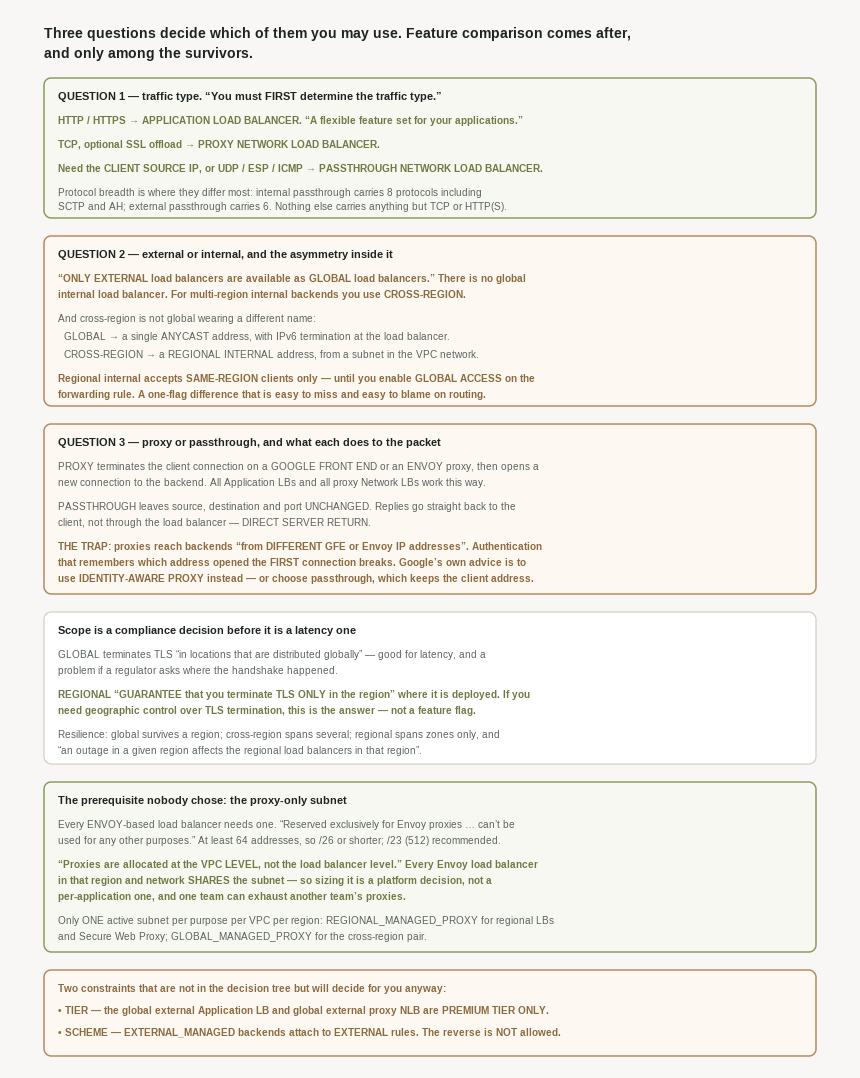
Question 1: traffic type
This one is nearly mechanical, and it is first because it eliminates the most.
Choose an Application Load Balancer when you need a flexible feature set for your applications with HTTP(S) traffic. Choose a proxy Network Load Balancer to implement TCP proxy load balancing to backends in one or more regions — proxy Network Load Balancers TCP with optional SSL offload. And choose a passthrough Network Load Balancer to preserve client source IP addresses, avoid the overhead of proxies, and to support additional protocols like UDP, ESP, and ICMP.
Note that the passthrough entry answers two different questions at once — protocol support and source-address preservation — which is why it reappears in question 3. If you need anything other than TCP or HTTP(S), the tree has already finished: passthrough is the only family that carries it.
The protocol lists are worth reading rather than summarising, because they are not identical across the passthrough variants. Internal is widest: internal 3 always regional TCP, UDP, ICMP, ICMPv6, SCTP, ESP, AH, and GRE premium tier INTERNAL. External is narrower: regional external TCP, UDP, ESP, GRE, ICMP, and ICMPv6 premium or standard tier EXTERNAL. Eight protocols against six — and the two that exist only internally are SCTP and AH, which means a workload needing either cannot be fronted by an external load balancer at all.
Question 2: external or internal, and the asymmetry inside it
External load balancers distribute traffic that comes from the internet; internal ones serve clients in the same VPC network as the load balancer or clients connected to your VPC network by using VPC Network Peering, Cloud VPN, or Cloud Interconnect. That part is straightforward. The scope options that follow are not symmetrical between the two.
| Scope | Available to | How clients reach it | Survives |
|---|---|---|---|
| Global | External only | a single anycast IP address, with IPv6 termination at the load balancer | zonal and regional outage |
| Cross-region | Internal | a regional internal IP address from a subnet in the VPC network | zonal and regional outage |
| Regional | Both | a regional address; backends in that region only | zonal outage only |
The regional row carries a consequence stated plainly: an outage in a given region affects the regional load balancers in that region. And a caution against reading too much into the table at all — the resilience of your overall application depends not just on the scope of the load balancer you choose (global or regional), but also on the redundancy of your backend services. A global load balancer in front of single-region backends is a global front door to a regional failure.
The usual framing of global versus regional is performance, and the documentation does make that case: global load balancers terminate Transport Layer Security (TLS) in locations that are distributed globally, so as to minimize latency between clients and the load balancer.
But the same sentence is a problem if anyone asks where your TLS handshake happens. The regional guarantee is explicit: regional load balancers guarantee that you terminate TLS only in the region in which you've deployed your load balancer and its backends, and a regional load balancer is deployed in a specific region that you choose and can connect to backends in the same region only.
Which makes the recommendation unambiguous: if you require geographic control over where TLS is terminated, you should use a regional load balancer. Not a setting on a global one — a different product. Worth settling with whoever owns your data-residency commitments before the architecture is drawn, because it is not a late change.
Question 3: proxy or passthrough
The mechanical difference decides several things at once. Proxy load balancers terminate incoming client connections at the load balancer and then open new connections from the load balancer to the backends, and they terminate client connections by using either Google Front Ends (GFEs) or Envoy proxies. Every Application Load Balancer and every proxy Network Load Balancer works this way.
Passthrough does the opposite. Passthrough load balancers don't terminate client connections; instead load-balanced packets are received by backend VMs with the packet's source, destination, and, if applicable, port information unchanged. And the return path differs, which surprises people reading flow logs: responses from the backend VMs go directly to the clients, not back through the load balancer. The term for this is direct server return.
Direct server return is worth holding onto, because it means a passthrough load balancer sees half the conversation. Request-side metrics exist; response-side ones do not, in the same way. If your observability plan assumes the load balancer is a vantage point on both directions, that assumption holds for proxies and not for passthrough.
The prerequisite nobody chooses
Whichever Envoy-based load balancer the tree produces, it will not deploy without a resource that is not part of the load balancer. A proxy-only subnet provides a pool of IP addresses that are reserved exclusively for Envoy proxies used by Google Cloud load balancers. It can't be used for any other purposes.
Two facts about it change how you plan. First, sizing: a proxy-only subnet must provide 64 or more IP addresses. This corresponds to a prefix length of /26 or shorter, with the recommendation to start with a proxy-only subnet with a /23 prefix (512 proxy-only addresses) and change the size as your traffic needs change. A /23 is 512 addresses, which is eight times the floor — a deliberate margin, because Envoy-based load balancers automatically scale the number of proxies available to handle your traffic based on your traffic needs and each proxy is modest: each proxy instance handles up to 18 MB per second.
Second, and more consequential for a platform team: proxies are allocated at the VPC level, not the load balancer level. You need one proxy-only subnet in each region of a VPC network in which you use Envoy-based load balancers, and if you deploy multiple load balancers in the same region and same VPC network, they share the same proxy-only subnet for load balancing.
Shared pools make capacity someone else's problem to cause. Because every Envoy-based load balancer in a region and network draws from the same subnet, one team's traffic growth consumes proxy addresses that another team's load balancer needs — and nothing in either load balancer's configuration says so.
The exclusivity is strict: in a given VPC network and region, only a single proxy-only subnet with purpose REGIONAL_MANAGED_PROXY can be active at any point in time, and likewise only a single proxy-only subnet with purpose GLOBAL_MANAGED_PROXY can be active at any point in time. One active subnet per purpose, per network, per region — so you cannot give a noisy team its own.
Two details save debugging time later. The IP address for the load balancer's forwarding rule doesn't come from the proxy-only subnet — so finding the forwarding rule's address outside that range is correct, not misconfigured. And packets sent from a proxy to a backend VM or endpoint have a source IP address from the proxy-only subnet, which is the range your backend firewall rules must allow. If you are short of private space, you can use the non-RFC 1918 address range for the proxy-only subnet.
This is also the subnet #100 mentioned in passing: Cloud DNS outbound endpoints draw from the same REGIONAL_MANAGED_PROXY subnet, as does Secure Web Proxy. It is shared further than its name suggests.
Why This Architecture Holds Up
The tree assumes you are free to pick its output. Two things can override it.
Network Service Tier. If you don't specify a network tier, your load balancer defaults to using the Premium Tier — and for some products there is no alternative: certain external load balancers, such as the global external Application Load Balancer and the global external proxy Network Load Balancer can only be configured in Premium Tier. So "global external" and "Standard Tier" is not a combination, and if the budget mandated Standard, the tree's answer has already been eliminated. The general warning is worth heeding: not all load balancers can be deployed in the Standard Tier, so plan your budget accordingly.
For internal traffic the question does not arise, and the cost footnote is useful: all the internal load balancers always use Google's high-quality global backbone and are therefore always configured to be Premium Tier by default, but the Internet egress charges associated with Premium Tier don't apply to internal load balancer traffic. Premium without the Premium bill.
The load-balancing scheme. The load-balancing scheme is an attribute on the forwarding rule and the backend service of a load balancer and indicates whether the load balancer can be used for internal or external traffic, and the term managed in EXTERNAL_MANAGED or INTERNAL_MANAGED indicates that the load balancer is implemented as a managed service either on a Google Front End (GFE) or on the open source Envoy proxy.
The part that matters during a migration is a one-way compatibility: it is possible to attach EXTERNAL_MANAGED backend services to EXTERNAL forwarding rules. However, EXTERNAL backend services cannot be attached to EXTERNAL_MANAGED forwarding rules.
Read that in migration order and it is good news. Moving from classic to the newer managed load balancers, the new backend services work with the old forwarding rules — so you can convert backends first and forwarding rules second. Attempt it the other way, converting the forwarding rule first, and the old backend services will not attach. The asymmetry defines the only safe sequence, and discovering it mid-migration means rolling back.
Answer the three questions before opening the feature matrix, and treat the answers as eliminations rather than preferences.
Traffic type usually leaves one family. External-or-internal plus scope usually leaves one or two products, with "global internal" removed as impossible. Proxy-or-passthrough is then often already decided by whether you need the client's source address — and if you do, no proxy will give it to you by default.
Then check the two overrides: Premium-Tier-only products, and the scheme compatibility if anything already exists. Only now does a feature comparison mean anything, because it is a comparison between things you could actually deploy.
Key Architecture Decisions
| Situation | Decision | Because |
|---|---|---|
| Starting the choice | Determine traffic type first | That is the documented first question. |
| HTTP or HTTPS | Application Load Balancer | It is the family with the HTTP feature set. |
| TCP, want SSL offload | Proxy Network Load Balancer | TCP with optional SSL offload is its description. |
| UDP, ESP, GRE, ICMP | Passthrough Network Load Balancer | No other family carries those protocols. |
| Need SCTP or AH | Internal passthrough only | External passthrough's protocol list excludes them. |
| Want a global internal load balancer | Use cross-region internal instead | Only external load balancers are available as global. |
| Assuming cross-region is global, renamed | It is not — the address model differs | Anycast address versus a regional internal address. |
| Internal load balancer unreachable cross-region | Enable global access on the forwarding rule | Same-region clients only, by default. |
| Data-residency or TLS-termination requirement | Regional load balancer | Only regional guarantees in-region TLS termination. |
| Global load balancer, single-region backends | Not regionally resilient | Resilience depends on backend redundancy too. |
| Authentication that tracks the client's first source address | Use IAP, or use passthrough | Proxies connect from their own GFE or Envoy addresses. |
| Need the client source IP at the backend | Passthrough | Proxies don't preserve client IPs by default. |
| Observability assuming both directions at the LB | True for proxy, not for passthrough | Passthrough replies go direct to the client. |
| Deploying any Envoy-based load balancer | Create the proxy-only subnet first | It is a hard prerequisite, one per region per network. |
| Sizing the proxy-only subnet | /23 unless you have a reason; /26 is the floor | 512 addresses recommended, 64 the minimum. |
| A noisy tenant consuming proxy capacity | You cannot give them their own subnet | One active subnet per purpose per network per region. |
| Backend firewall rules for an Envoy load balancer | Allow the proxy-only subnet range | Proxy-to-backend packets carry a source from it. |
| Budget mandates Standard Tier | Global external products are unavailable | They can only be configured in Premium Tier. |
| Migrating classic to managed load balancers | Convert backend services before forwarding rules | The scheme compatibility runs one way only. |
The one to look at today
For each load balancer you run, write down the three answers and check them against what you actually deployed. The one worth testing specifically is question 3: if anything behind a proxy load balancer authenticates on source address, it is already failing some fraction of requests, and the failure rate depends on how many GFE or Envoy addresses happen to be in play. Then check whether any proxy-only subnet is approaching its address count, because that ceiling is shared and the load balancer that trips over it will not be the one that caused the growth.
Closing Thought
What makes this a decision tree rather than a comparison is that the branches remove possibilities you might not know were removed. "Global internal" sounds like a configuration away from things that exist; it is not available at all. "Standard Tier global external" reads like a cost optimisation; it is not a valid combination. "Keep the client IP behind an Application Load Balancer" sounds like a header setting; the documentation's answer is to change your authentication method.
The proxy-only subnet is the quiet one. It is not in the decision tree, it belongs to no single load balancer, there can be only one of it per purpose per region, and it is shared with Secure Web Proxy and Cloud DNS outbound endpoints. A load balancer you are about to deploy depends on a resource that another team sized, for a different reason, some time ago — which is the most Google Cloud sentence in this whole block.
#104 takes the first survivor in detail: the global external Application Load Balancer — its anycast front door, the Google Front Ends that terminate it, and what "global" actually buys at the request-routing layer.
Official Google Cloud Reference
- Choose a load balancer
- Proxy-only subnets for Envoy-based load balancers
- Cloud Load Balancing overview
- Load balancer feature comparison
- Load balancer resource model
- Application Load Balancer overview
- Proxy Network Load Balancer overview
- Passthrough Network Load Balancer overview
- Forwarding rules overview
- Backend services overview
- Network endpoint groups overview
- Network Service Tiers overview
Comments