Business Challenge
Seven posts in a row have turned up the same thing. #51: super admins bypass single sign-on, so IdP-enforced MFA does not apply to them. #53: exclude an Organization Admin from the context-aware binding or risk a lockout. #54: PAM cannot hold the legacy basic roles. Each read as a local quirk. They are the same fact seen from four angles, and this post is that fact.
It is not in the hierarchy at all. To configure your Google Cloud organization resource, you need to use a Google Workspace or Cloud Identity super admin account, and a Google Workspace super admin account has a set of administrative capabilities that includes Cloud Identity. Its powers are directory powers — users, groups, domains, SSO profiles — which are not Google Cloud resources.
Correct approachTreat it as a second administrative system that happens to control who your IAM principals are, and control it with that system’s tools rather than looking for an IAM answer.
You can deny it Google Cloud permissions, which is worth doing. You cannot deny it the directory powers, because you can use some, but not all, Identity and Access Management (IAM) permissions in deny policies — and the supported list is a list of Google Cloud service permissions.
Correct approachDeny what you can at the organisation node, and accept that the remainder is governed by Workspace admin roles, account hygiene and detection.
In one direction. Its description is access to manage IAM policies and view organization policies for organizations, folders, and projects — no compute, no storage, no data. But the permissions include setIamPolicy at the organisation, which means it can grant itself every role it does not already hold.
Count Organization Administrators as having full authority, one API call removed, and grant the role to a group rather than to people directly.
The guidance says the opposite, twice. Create the admin group and add your Organization Administrator users to this group, but not your super admin user, because we recommend keeping your super admin account separate from your Organization Administrator group.
Correct approachDelegate the IAM role away from the super admin on day one. It is the only separation of duties available between the two planes.
Architecture
The clean way to hold this is as two control planes that meet at exactly one point: the directory decides who the principals are, and IAM decides what principals may do.
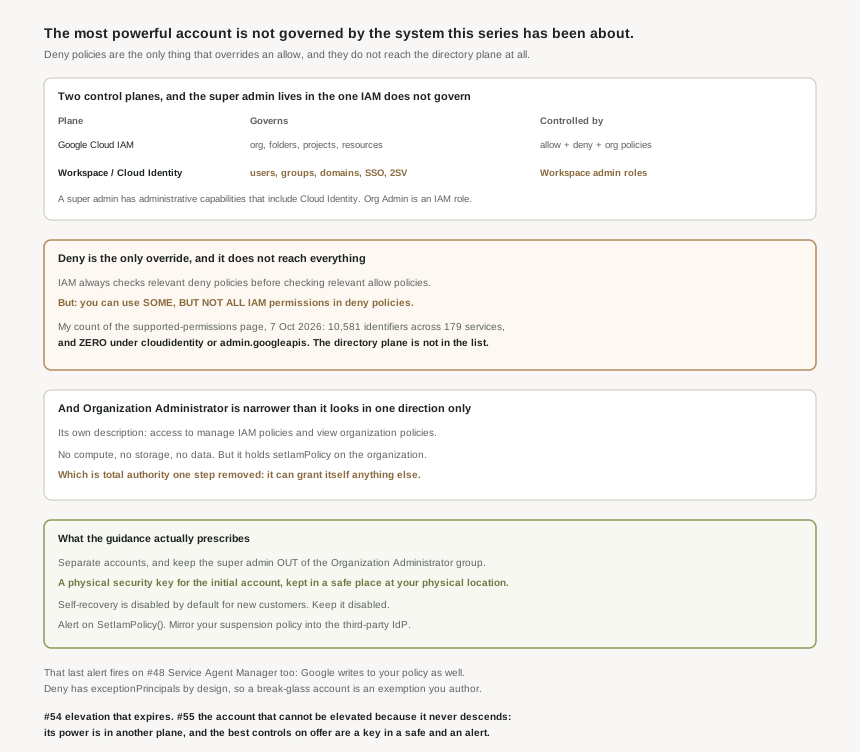
| Plane | Governs | Controlled by | Top role |
|---|---|---|---|
| Google Cloud IAM | Organisation, folders, projects, resources | Allow policies, deny policies, organization policies | Organization Administrator |
| Workspace / Cloud Identity | Users, groups, domains, SSO profiles, 2SV enforcement | Workspace admin roles | Super admin |
Everything this series has covered since #31 lives in the first row. IAM lets you control who (users) has what access (roles) to which resources by setting allow policies — and the subject of those policies is created, renamed, suspended and deleted in the second row. #49 showed the join is a mutable email address; #50 showed the second row can delete principals from the first; #51 showed its accounts skip the authentication gate. The super admin is the top of the second row, and that is why no amount of IAM design reaches it.
Worth noting which product you are in, because the two differ: a Cloud Identity account only provides authentication and identity management functionality, independent of Google Workspace. A Cloud Identity super admin has a smaller blast radius than a Workspace one — no documents, no mail — but the same authority over your Google Cloud principals.
Organization Administrator, and the one permission that matters
The role is genuinely narrow on resources. Reading its permission list, it is essential contacts, policy bindings, organization policy reads, and resource manager getters — plus resourcemanager.organizations.setIamPolicy, and the folder and project equivalents. The documentation describes it as having a smaller set of permissions that are designed to manage your day to day organization operations, which is true of the list and misleading about the consequence.
A principal that can set the organisation allow policy can add itself to any role in the organisation. So Organization Administrator is not a limited role; it is unlimited authority expressed as a single permission, with an audit entry for the moment it is used. That is a meaningfully better design than holding Owner permanently — the escalation is visible — but it is not a smaller grant, and sizing it that way in a review is a mistake.
Why This Architecture Holds Up
Deny policies are the only mechanism in IAM that overrides a grant, which makes them the natural place to look for a ceiling on a powerful account. IAM always checks relevant deny policies before checking relevant allow policies, they are inherited through the resource hierarchy like allow policies, and you get up to 500 deny policies per resource with a total of 500 deny rules between them. Permission groups make them broad: permission groups include all current and future permissions that match the specified pattern, so service.googleapis.com/*.* covers permissions that do not exist yet.
So for Google Cloud actions, a deny policy at the organisation node genuinely does bound a super admin. That is the useful half and it should be used.
You can use some, but not all, Identity and Access Management (IAM) permissions in deny policies. The supported set uses the IAM v2 permission format and is enumerated service by service. I counted that page on 7 October 2026 and it lists 10,581 distinct permission identifiers across 179 services, including 47 service-wide wildcards — a large surface, and these three numbers are my own measurement of the page rather than figures Google publishes. The part that matters for this post is what is absent: I found no deniable permissions under cloudidentity.googleapis.com or admin.googleapis.com. The directory plane is not in the list, which is consistent with deny policies being a Google Cloud IAM mechanism rather than a Workspace one.
That is the super admin problem stated precisely, and it is not a vulnerability. It is a boundary between two products. IAM deny policies restrict Google Cloud permissions; adding a user, changing a primary email address, assigning a SAML profile or turning off 2-step verification are not Google Cloud permissions, so there is no IAM rule that can prevent them. The account that can do those things is therefore limited by Workspace admin roles, by how well the credential is protected, and by whether anybody notices — and not by the policy language this series has spent twenty-four posts on.
Deny policies have exemptions by design, which is the right call
One feature of deny rules is worth reading as a design statement rather than a loophole. A rule carries the principals that are exempt from the deny rule, and these principals are not denied the specified permissions even if they are listed in deniedPrincipals.
Every post since #51 has found an exemption and treated it with some suspicion. This one is different, because it is explicit, authored by you, scoped by you, and recorded in a policy you can read. That is what a break-glass path should look like: not a built-in bypass you discover in a note, but a named principal in a rule, which an alert can watch. If the previous posts have a lesson it is that escape hatches are unavoidable in any system that can lock you out — so the thing to want is not their absence but their visibility, and exceptionPrincipals is the version of that done properly.
What the guidance actually prescribes, which is unusually physical
Given the above, the recommendations are not policy-shaped, and it is instructive how concrete they get. The Google Workspace and Cloud Identity super admin account has a powerful set of permissions that are not necessary for use in the daily administration of your organization, so:
- Separate the account from the person. Give super admins a separate account that requires a separate login — the
alice-admin@pattern #51 recommended. - Use hardware, and store it. Use a security key or other physical authentication device to enforce two-step verification, and for the initial super admin account, ensure that the security key is kept in a safe place, preferably at your physical location. A safe, in a building. That is the strongest available control on this account, and it is a facilities decision.
- Keep self-recovery off. By default, self-recovery for super administrator accounts is disabled for new Cloud Identity and Google Workspace customers, and we recommend keeping self-recovery disabled as a security best practice. Check it on an older tenant, where the default may have been the other way.
- Shorten the session. On the right licence, you can enforce a short sign-in period for any super admin accounts.
- Mirror suspension into the IdP. If you are synchronizing with a third-party identity protocol, ensure you apply the same suspension policy to Cloud Identity and the corresponding third-party identity — the #50 lifecycle problem, applied to the account that matters most.
The guidance is to use Google Cloud Observability to set up alerts that will notify you when a SetIamPolicy() API call is made, because this will send an alert when anyone modifies any allow policy. That is the right alert and it is the honest answer to a power you cannot prevent: watch it. But set expectations before you enable it, because #48 explains what you will see. The Service Agent Manager writes to your allow policy whenever a team enables an API, and PAM from #54 writes to it on every grant and every expiry. The alert will fire on all of them. Tune it by excluding the known machine writers rather than by raising the threshold, or the one human change you needed to see will arrive in a crowd.
One structural note for anyone considering hard isolation instead: if you want to use multiple organization resources instead, you will need multiple Google Workspace or Cloud Identity accounts. Separate organisations mean separate directories and separate super admins. That is the only way to put two estates genuinely out of reach of one another, and the cost is two of everything in this post.
Key Architecture Decisions
| Decision | Choose this | Because |
|---|---|---|
| Super admin and Organization Administrator | Different accounts, and keep the super admin out of the group | It is the only separation available between the two planes. |
| Sizing Organization Administrator in a review | Count it as full authority | setIamPolicy at the organisation can grant anything else. |
| Bounding a powerful account | Deny policy at the organisation node | Deny is checked before allow, and covers future permissions via groups. |
| Expecting deny to cover directory actions | Do not | Only some IAM permissions are deniable, and the directory plane is not among them. |
| Second factor for super admins | A hardware security key | It is what the guidance specifies, not an app code. |
| The initial super admin key | A safe, at your physical location | It is the documented storage recommendation. |
| Self-recovery for super admins | Disabled, and verify on older tenants | It is the recommended state and the new-customer default. |
| Break-glass access under a deny policy | A named exceptionPrincipal | An authored, readable exemption beats an undocumented bypass. |
| Alerting on SetIamPolicy | Enable it, then exclude known machine writers | Service agents and PAM write to the policy constantly. |
| Genuine isolation between estates | Separate organisations, separate directories | One directory means one set of super admins. |
The one to look at today
List your super admins and your Organization Administrators, side by side, and look for names in both columns. Any overlap is the separation the guidance asks for, not implemented — and it is usually there for a historical reason, because the account that created the organisation received both by default. Then check two settings on each super admin: whether the second factor is a hardware key, and whether self-recovery is off. That is the whole of the achievable control surface for these accounts, which is why it is worth being certain about rather than assuming.
Closing Thought
It would be easy to write this post as an indictment and it would be wrong. Somebody has to be able to create the organisation, recover the account and fix the broken SSO configuration, and that somebody cannot be constrained by the system they administer without creating a bootstrap problem with no exit. Google’s answer — put that power in a different plane, document it plainly, tell you to delegate the IAM half away immediately, and recommend a physical key in a safe — is close to the only honest answer available. The documentation does not pretend otherwise, which is more than the architecture diagrams of most products manage.
What this closes is the thread that started at #48. Across eight posts the allow policy turned out to have an author you cannot see, a referent you cannot name, a deletion path driven by an LDAP result, an authentication gate with an exemption, a membership layer that revokes in hours, conditions that fail open, and an elevation service built from the same bindings as everything else. The common factor was never a flaw in any one feature. It is that the thing we call "the IAM policy" is a shared, eventually-consistent document, and the authority to change who appears in it lives outside it entirely. That is worth knowing before the next design review, and it is the reason the only universally correct answer in this whole block was the dullest one: alert on the writes, and read the thing you are told rather than the thing the name implies.
#56 builds the thing this post could only gesture at: break-glass accounts, designed properly — what they hold, how they are stored, how use is detected, and how you test them without creating the risk you were avoiding.
Comments