Business Challenge
#53 covered what a guest is and who may invite one. This is the layer underneath it, and it is the one that actually decides whether a partner can get in: cross-tenant access settings, which govern every interaction between your Entra tenant and another one.
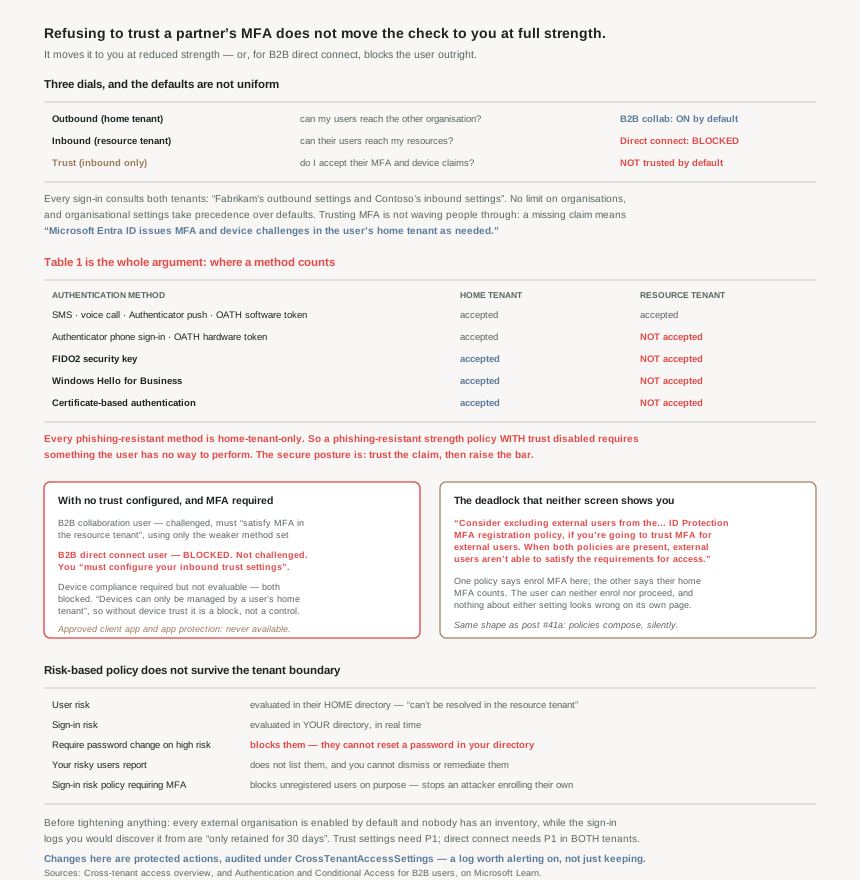
Three dials, and the third is the interesting one. “Outbound access settings control whether your users can access resources in an external organization… Inbound access settings control whether users from external Microsoft Entra organizations can access resources in your organization… Trust settings (inbound) determine whether your Conditional Access policies trust the multifactor authentication (MFA), compliant device, and Microsoft Entra hybrid joined device claims from an external organization.”
The defaults are worth stating precisely, because they are not what people assume in either direction:
- B2B collaboration is on, for every external Entra organisation. “No organizations are added to your Organizational settings by default. Therefore, all external Microsoft Entra organizations are enabled for B2B collaboration with your organization.”
- B2B direct connect is off, completely. “Microsoft Entra ID blocks all inbound and outbound B2B direct connect capabilities for all external Microsoft Entra tenants.”
- Trust is off. “MFA and device claims from other Microsoft Entra organizations aren't trusted.”
Leaving trust off feels like the conservative choice. It is the decision this post is about, and it is usually wrong — not for convenience reasons, but because of what it does to the strength of authentication you can actually require.
Authentication strength lets you demand a specific class of MFA — including phishing-resistant. But the methods that count differ depending on where the user authenticates. FIDO2 security keys, Windows Hello for Business and certificate-based authentication are acceptable in the home tenant only. In your tenant, an external user can satisfy MFA with SMS, a voice call, an Authenticator push or a software OATH token — and nothing stronger.
So refusing to trust the partner’s MFA does not give you a stricter check performed by you. It gives you a weaker one, performed by you.
Architecture
Two tenants, two sets of settings that must agree, and a claim that either arrives in the token or does not.
The flow, and where the decision actually happens
The sequence is worth holding in order, because every troubleshooting question lands somewhere in it. During sign-in, the token service “evaluates Contoso's Conditional Access policies… and checks whether the Fabrikam user is allowed access by evaluating cross-tenant access settings (Fabrikam's outbound settings and Contoso's inbound settings).” Both tenants are consulted on every sign-in. Then trust settings are checked, then the session is inspected for the claim.
The step people get wrong is what happens when the claim is missing. It is not a rejection: “If MFA is required but not completed, or if a device claim isn't provided, Microsoft Entra ID issues MFA and device challenges in the user's home tenant as needed.” Trusting MFA does not mean waving users through. It means the challenge happens where the user’s credentials actually live.
And when trust is off, the two collaboration types diverge sharply:
| Trust not configured, MFA required | Outcome |
|---|---|
| B2B collaboration user | Challenged, and must “satisfy MFA in the resource tenant” — with the weaker method set |
| B2B direct connect user | Blocked. Not challenged — blocked |
| Either, where device compliance is required and cannot be evaluated | Blocked |
That second row is why B2B direct connect — Teams shared channels — so often appears not to work. If your Conditional Access requires MFA and you have not configured trust, there is no path to success. Microsoft states it as a requirement rather than advice: you “must configure your inbound trust settings to accept MFA claims from the organization.”
The method table, which is the whole argument
This is Table 1 in the documentation and it deserves to be read as a security decision rather than a compatibility note:
| Authentication method | Accepted in home tenant | Accepted in resource tenant |
|---|---|---|
| SMS as second factor | yes | yes |
| Voice call | yes | yes |
| Authenticator push notification | yes | yes |
| OATH software token | yes | yes |
| Authenticator phone sign-in | yes | no |
| OATH hardware token | yes | no |
| FIDO2 security key | yes | no |
| Windows Hello for Business | yes | no |
| Certificate-based authentication | yes | no |
Every phishing-resistant method is in the home-tenant-only group. So if you set a phishing-resistant authentication strength policy for external users and disable MFA trust, you have required something the user has no way to perform — they must complete MFA in your tenant, and your tenant will not accept a security key from them.
With trust enabled the policy becomes satisfiable, and the documentation describes exactly how: “only those claims listed in the ‘Home tenant’ column are accepted by the resource tenant for MFA fulfillment”, and if the session’s methods are insufficient, “Microsoft Entra ID presents the user with a challenge to complete MFA in the home tenant using an acceptable authentication method.” With one honest caveat worth passing to the partner: “The MFA method must be enabled in the home tenant and user must be able to register for it.” You can require a security key; you cannot make their tenant offer one.
One scope limit to note before designing around this: “Currently, you can only apply authentication strength policies to external users who authenticate with Microsoft Entra ID.” For email one-time passcode, SAML/WS-Fed and Google federation users, you are back to the plain MFA grant control.
Devices are the same argument, stated more bluntly
The device case removes any ambiguity about why trust exists, because the alternative is not a weaker check — it is no check at all. “Devices can only be managed by a user's home tenant”, so “an external user can't register their unmanaged device with the resource organization.”
Which produces an unusually direct recommendation: “Unless you're willing to trust claims regarding device compliance or Microsoft Entra hybrid joined status from an external user's home tenant, we don't recommend applying Conditional Access policies that require external users to use managed devices.” A compliant-device requirement without device trust is not strict. It is a block, dressed as a control.
Two related controls are simply unavailable and should be struck from any external-user policy design: “Require approved client apps” and “Require app protection policies” both “require the device to be registered in the resource tenant” and are iOS/Android-only, so they “can't be applied to external guest users.” Neither is “Require password change”.
Why This Architecture Holds Up
Because risk-based policy does not survive the tenant boundary
Everything #48 established about risk policies needs an asterisk for external users, and the asterisk is large. The split is clean: “For an external user, the user risk is evaluated at their home directory. The real-time sign-in risk for these users is evaluated at the resource directory.”
User risk is therefore computed somewhere you cannot act on, and acting on it locally fails in a specific way: “if you require a password change for high-risk external guest users, they're blocked because of the inability to reset passwords in the resource directory.” Worse for operations, the evidence is invisible too — “The resource organization's risky users report doesn't reflect external users… Admins in the resource organization can't dismiss or remediate a risky external user.”
There is a sign-in-risk trap alongside it that looks like a bug and is deliberate: a risk policy requiring MFA blocks an external user who has not previously registered MFA in your tenant, “to prevent malicious users from registering their own Microsoft Entra multifactor authentication credentials in the event they compromise a legitimate user's password.” That is exactly the attack from last Saturday’s roundup — Storm-3068 registering its own authentication method after a password reset — anticipated and closed off in the cross-tenant case.
Microsoft’s own mitigation is blunt: put all external users in a group and exclude it from user-risk and sign-in-risk policies. Which is the honest summary of this whole section — risk-based Conditional Access is a control for your own population, not a shared one.
Because two settings in two tenants can deadlock
Buried in a tip, and the single most useful line for anyone about to enable MFA trust: “Consider excluding external users from the Microsoft Entra ID Protection MFA registration policy, if you're going to trust MFA for external users. When both policies are present, external users aren't able to satisfy the requirements for access.”
A registration policy that insists the user enrol MFA here, combined with a trust setting that says their home-tenant MFA counts, produces a user who can neither enrol nor proceed. Nothing about either setting looks wrong on its own screen. This is the #41a lesson in its purest form: the policies compose, and nothing shows you the composition.
The same shape appears in the app-ID footnotes, which are worth copying into a runbook rather than rediscovering. Block all apps outbound and users cannot read rights-protected email unless you allow 00000012-0000-0000-c000-000000000000. Require MFA or Terms of Use and users may be unable to register for them unless you allow 0000000c-0000-0000-c000-000000000000 and d52792f4-ba38-424d-8140-ada5b883f293. And then the detail that turns this into real work: “Due to a current user interface (UI) limitation, the configuration of the inbound settings must be performed via Microsoft Graph APIs.”
Because tightening this is the change most likely to break production
The documentation opens its considerations with a warning rather than a tip: “Changing the default inbound or outbound settings to block access could block existing business-critical access to apps in your organization or partner organizations.”
The reason is the default. Because every external Entra organisation is enabled by default, nobody has an inventory of which ones matter — collaboration accumulated without a decision, exactly as the guest population did in #53. So the prerequisite for tightening is discovery, and the window for it is short: “in some cases these logs are only retained for 30 days”, which is why Microsoft recommends talking to stakeholders rather than trusting the logs alone.
There is also a consistency rule that will reject half-finished configurations: “The access settings you configure for users and groups must match the access settings for applications. Conflicting settings aren't allowed.” You cannot block all external users inbound while leaving an application allowed.
Because the licensing shapes who can do what
Three facts that decide whether this design is available to you at all. Configuration needs “at least Security Administrator, or a custom role”. Trust settings and any per-user, per-group or per-application scoping need “a Microsoft Entra ID P1 license… on the tenant that you configure”. And B2B direct connect needs “a Microsoft Entra ID P1 license in both tenants”, because the trust is mutual and each side configures its own half.
That last point is the one to raise with a partner early. B2B direct connect is not something you can switch on unilaterally: “Both your organization and the external organization need to mutually enable B2B direct connect.” Same for suppressing the consent prompt — automatic redemption “suppresses the consent prompt and invitation email only if you select this setting for both the home/source tenant (outbound) and resource/target tenant (inbound).” Half-configured is simply off.
Because tenant restrictions are a different control that looks like the same one
The one setting here that is not about your tenant’s resources at all: tenant restrictions control “the types of external accounts your users can use on the devices you manage” — accounts in unknown tenants, and accounts a partner issued directly to your staff.
And it is deliberately isolated from everything else on the page: “Tenant restrictions are independent of other cross-tenant access settings, so any inbound, outbound, or trust settings you configure don't affect tenant restrictions.” Worth knowing because it is the control that addresses a real gap the rest of this does not touch — an employee signing into a partner’s tenant with an account you did not issue and cannot see. The argument for pushing that into B2B collaboration instead is that you regain the things you lose otherwise: Conditional Access over the session, inbound and outbound management, sign-in logs, and the ability to “terminate sessions and credentials when a B2B collaboration user's employment status changes.”
Because changing these settings is itself privileged
A small, genuinely good design detail to finish on: “Any actions that modify cross-tenant access settings are considered protected actions and can be additionally protected with Conditional Access policies.” The settings that decide which organisations can reach you can themselves be fenced behind step-up authentication.
And they are audited distinctly — filter the audit log on the category CrossTenantAccessSettings. Given that a single inbound change can open a tenant to a new organisation, this is a log worth alerting on rather than merely retaining.
Key Architecture Decisions
| Situation | Decision | Why |
|---|---|---|
| Requiring phishing-resistant MFA from partners | Enable MFA trust | FIDO2, WHfB and CBA are only accepted in the home tenant. |
| Enabling MFA trust | Exclude external users from the ID Protection MFA registration policy | Both together make access impossible to satisfy. |
| Teams shared channels with a partner | Configure inbound trust, and expect them to configure theirs | B2B direct connect is blocked by default and needs mutual setup plus P1 both sides. |
| MFA required, direct connect still failing | It is the missing trust setting | Direct connect users are blocked, not challenged. |
| Requiring compliant devices from externals | Enable device trust, or drop the requirement | Without trust it is a block; devices are managed only by the home tenant. |
| Policy design using approved client app or app protection | Remove them for external users | Both need device registration in your tenant. |
| User-risk policies covering guests | Exclude external users | User risk is evaluated in the home directory and cannot be remediated by you. |
| Expecting guests in the risky users report | They will not be there | Risk evaluation happens in their home directory. |
| Sign-in risk policy requiring MFA for guests | Expect blocks for unregistered users | Deliberate, to stop an attacker registering their own method. |
| About to restrict inbound or outbound access | Inventory real usage first | Every external organisation is enabled by default; logs may hold only 30 days. |
| Blocking all apps outbound | Allow the OME, MFA registration and ToU app IDs | Otherwise users cannot read protected mail or register. |
| Configuring those inbound app exceptions | Use Microsoft Graph | The portal cannot do it today. |
| Suppressing the partner consent prompt | Both tenants must tick it | One side alone has no effect. |
| Staff using partner-issued accounts on your devices | Tenant restrictions, then move them to B2B | It is an independent control and recovers CA, logs and revocation. |
| Authentication strength for social or OTP guests | Use the plain MFA grant control | Strength policies apply only to Entra-authenticated externals. |
| Protecting the settings themselves | Treat them as protected actions and alert on the audit category | One inbound change can admit a new organisation. |
Closing Thought
The useful reframing is that “trust” here is not a relaxation. It is a statement about where a check happens, and the table decides whether the check you want is even possible in each place. Your tenant can verify a password-plus-SMS from someone else’s user. It cannot verify their security key, their Windows Hello enrolment or their certificate — those are facts only their home tenant can establish. Refusing the claim therefore does not move the check to you at full strength; it moves it to you at reduced strength, or blocks it entirely.
Which makes this one of the few places in identity design where the cautious-looking setting and the secure setting point in opposite directions. The genuinely secure posture is to trust the claim and raise the bar — enable MFA trust, then require a phishing-resistant authentication strength, so the partner’s own tenant is compelled to produce a strong method before your resource opens. You get a better guarantee than you could have performed yourself, and the partner carries the enrolment burden for their own staff, which is where it belongs.
The limit of that argument is worth stating too, because it is the real cost: you are relying on another organisation’s controls and you cannot audit them from here. Their risk signals do not reach you, their risky-user remediation is not yours to perform, and the method must be “enabled in the home tenant” for your policy to be satisfiable at all. That is a conversation with a partner, not a setting. Cross-tenant access is the part of Entra where the configuration is easy and the agreement behind it is the actual work.
#56 moves from trust between organisations to granting access within one: entitlement management and access packages — bundling resources, approval and expiry into something a non-administrator can request.
Official Azure Reference
- Cross-tenant access overview — inbound, outbound and trust settings, the defaults, automatic redemption, tenant restrictions, the app-ID exceptions and the audit category
- Authentication and Conditional Access for B2B users — the cross-tenant authentication flow, the supported grant and session controls, Table 1 of authentication strength methods, and the risk-policy limits
- Configure cross-tenant access settings for B2B collaboration — the procedures for the inbound, outbound and trust changes described above
Comments