Business Challenge
#57 was about one recommender. This is the toolkit around it, and it exists to answer the three questions anybody actually asks about access: who has it, why was this denied, and what will break if I change this. All three tools are good and I would use all three. The reason they need a post is that the previous twenty-seven established an access model with at least half a dozen moving parts, and each tool reads a different subset of them.
It tells you who the allow policy grants access to. Policy Analyzer for allow policies only supports IAM allow policies, and the unsupported list is specific: IAM deny policies, IAM Principal Access Boundary policies, Google Kubernetes Engine role-based access control, Cloud Storage access control lists and Cloud Storage public access prevention. Query results do not account for unsupported policy types.
Correct approachRead its answer as "who is granted" rather than "who can". If you use deny policies, check them separately — they are the mechanism that overrides the answer you just got.
Partly, with two hard edges. This feature only evaluates allow policies — deny, organization and Principal Access Boundary policies have separate simulators. And conditions are not simulated at all: a conditional binding returns Policy Simulator does not support conditions, so the binding could not be evaluated.
Correct approachSimulate the allow change, then reason about conditions by hand. #53 showed conditions decide outcomes; the simulator will not tell you how.
It does not degrade; it stops. The maximum number of access logs that a simulation can replay is 5,000, and if there are more than 5,000 access logs for your project or organization for the past 90 days, the simulation will fail. Busy estates are the ones that cannot simulate.
Correct approachSimulate at the narrowest resource that accepts the policy rather than at project or organisation scope, so the log population stays under the ceiling.
Not any. Policy Troubleshooter does not account for access granted by Cloud Storage access control lists (ACLs), and it also does not diagnose access issues related to VPC Service Controls. There is a separate violation analyzer for the latter.
Correct approachWhen the troubleshooter says the policy permits the call and the call still fails, stop looking at IAM. That result is a signal to check the perimeter, not a contradiction.
Architecture
The toolkit maps cleanly onto three questions, and keeping them separate is most of the value. There are also parallel troubleshooters for the other enforcement layers — a VPC Service Controls troubleshooter and a Policy Troubleshooter for Chrome Enterprise Premium — which is itself the clue that no single tool covers the stack.
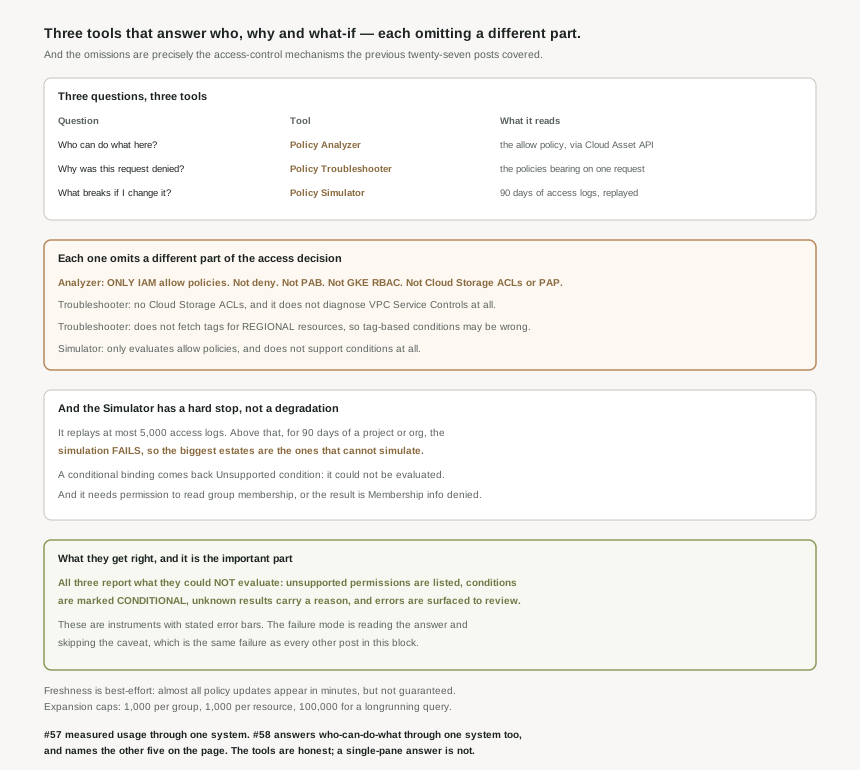
| Question | Tool | What it reads | What it does not read |
|---|---|---|---|
| Who can do what here? | Policy Analyzer | The allow policy, via the Cloud Asset API | Deny, PAB, GKE RBAC, Cloud Storage ACLs and public access prevention |
| Why was this denied? | Policy Troubleshooter | The policies bearing on one request | Cloud Storage ACLs, VPC Service Controls, tags on regional resources |
| What breaks if I change this? | Policy Simulator | 90 days of access logs, replayed | Conditions, unsupported resource types, anything past 5,000 logs |
How the Simulator actually decides, which is cleverer than a diff
The Simulator lets you see how a change to an allow policy might affect a principal’s access, and the method is the interesting part: rather than comparing permission sets, it uses access logs to focus on the permission changes that would actually affect your users. Concretely, Policy Simulator determines which access attempts from the last 90 days have different results under the proposed allow policy and the current allow policy.
That is the right design. A permission-set diff would flag hundreds of theoretical losses; replaying real attempts tells you which ones anybody would notice. And for new resources it adapts: if the parent resource has not existed for 90 days, Policy Simulator retrieves all access attempts since the resource was created. It is the same 90-day horizon as #57, used more precisely.
Freshness and expansion, which bound the Analyzer rather than break it
Two properties worth knowing before you treat an Analyzer result as authoritative. First, freshness is best-effort: Policy Analyzer uses the Cloud Asset API, which offers best-effort data freshness, and while almost all policy updates appear in Policy Analyzer in minutes, the most recent change might not be in there. Given #52’s propagation numbers, a policy you edited two minutes ago is doubly uncertain — it may not have propagated and may not have been indexed.
Second, expansion is capped. This expansion is capped at 1,000 resources per parent resource for Policy Analyzer queries and 100,000 resources per parent resource for longrunning Policy Analyzer queries, and the quotas page adds the group dimension: 1,000 per group. So on a large project the resource list is a sample, and on a large group the membership expansion is too — which matters because #52 made group membership the thing that actually decides access.
On conditions the Analyzer is more honest than the Simulator: rather than skipping a conditional binding it includes the role and marks the condition evaluation as CONDITIONAL. That is an answer with a flag on it, which is the correct behaviour.
Why This Architecture Holds Up
Collected in one place the omissions look damning, so it is worth being precise about what they are. None of these tools is wrong. Each is a correct instrument for a bounded question, and every boundary in this post is printed on the tool’s own documentation page.
"Who has access to this resource and what can they do" is the question Policy Analyzer is sold on, and its unsupported list includes IAM deny policies. From #55: deny policies are the only mechanism that overrides a grant, and IAM always checks relevant deny policies before checking relevant allow policies. So the tool that answers who has access reads the layer that is evaluated second and ignores the layer that is evaluated first. The result is still useful — it is the complete set of principals who are granted the permission, which is exactly what you want for a least-privilege review. It is not the set of principals who can perform the action, and those are different sets in any estate that uses deny policies at all.
The Simulator ceiling is the one that will surprise an operator
Most limits in this series degrade. This one fails. Above 5,000 access logs across 90 days the simulation does not return partial results — the simulation will fail. Five thousand log entries over three months is roughly fifty-five a day, which a single moderately busy project clears without trying. So the practical reading is that project- and organisation-scope simulation is available to quiet estates, and everyone else simulates at a narrower resource.
Two more Simulator caveats worth knowing in advance, because both produce an "unknown" rather than an error you would notice. Policy Simulator does not support all resource types in simulations — though helpfully, Policy Simulator lists these permissions in the simulation results so that you know which permissions it was unable to simulate. And a result can come back unknown because the principal running the simulation did not have permission to view the members of one or more of the groups included in the simulated allow policy. That is #52 again: the person simulating a change needs to be able to read group membership, which is itself permission-gated.
The Troubleshooter needs you to supply the context it cannot observe
For conditional bindings, Policy Troubleshooter needs additional context about the request — for instance, to troubleshoot conditions based on date/time attributes, Policy Troubleshooter needs the time of the request. In the console you get this by troubleshooting directly from an audit log entry, which is the right workflow and worth adopting as the default.
The sharper caveat is tags. It does not fetch tags for regional resources, such as Google Kubernetes Engine regional clusters, so with tag-based conditions on regionalised resources you might get inaccurate results. Note the wording: not "unavailable", not "unknown" — inaccurate. That is the only place in these four pages where a tool may be confidently wrong rather than openly incomplete, and it is the one to remember.
Every gap above is reported by the tool rather than inferred by the reader. The Simulator lists the permissions it could not simulate, names the reason a result is unknown, and surfaces replay and unsupported-resource errors for review. The Analyzer marks conditional evaluations CONDITIONAL instead of guessing. The Troubleshooter documents its blind spots in a warning on the page. These are instruments with stated error bars, which is the most you can ask of a tool reading an eventually-consistent, multi-authored policy. The failure mode is not the tools; it is reading the headline number and skipping the section that says what it excludes — which, twenty-eight posts in, is the same failure as everything else in this block.
Key Architecture Decisions
| Decision | Choose this | Because |
|---|---|---|
| Reading an Analyzer result | Treat it as "who is granted", not "who can" | It omits deny, PAB, GKE RBAC and Cloud Storage ACLs. |
| Estates using deny policies | Check deny separately, every time | Deny is evaluated first and the Analyzer does not read it. |
| Simulating on a busy project | Simulate at the narrowest resource | Above 5,000 logs in 90 days the simulation fails outright. |
| Changes involving conditions | Reason about them by hand | Policy Simulator does not support conditions. |
| Who runs the simulation | A principal who can read group membership | Otherwise results come back as unknown. |
| Troubleshooting a conditional denial | Start from the audit log entry | The tool needs request context you otherwise type by hand. |
| Tag-based conditions on regional resources | Do not trust the troubleshooter | It does not fetch those tags and may be inaccurate. |
| A denial the troubleshooter says should succeed | Check VPC Service Controls | It does not diagnose perimeter issues at all. |
| Querying just after a policy edit | Wait, then re-query | Freshness is best-effort on top of propagation delay. |
| Analyzer results on large scopes | Treat expansion as a sample | 1,000 per group and per resource; 100,000 longrunning. |
The one to look at today
Run one Policy Analyzer query for a permission you care about on a project you know well, and then ask yourself which of the five unsupported mechanisms are in play on that project. If the answer is none, the result you are looking at is complete and you can trust it as an inventory. If the answer is deny policies or GKE RBAC, you have just learned that your "who has access" report has a known, named gap — and knowing which gap is most of the work. That takes ten minutes and changes how you read every subsequent report.
Closing Thought
These are the tools I would reach for first in an unfamiliar organisation, and nothing above changes that. Policy Analyzer automates group and role expansion, which is the tedious half of any access review. The Simulator’s decision to replay real access attempts rather than diff permission sets is a genuinely good piece of design. And the Troubleshooter turns "why can this person not do the thing" from an afternoon into a query.
What this post adds is the shape of the toolkit, which mirrors the shape of the thing it inspects. The access model has six or seven mechanisms; the toolkit has three tools, each reading a different subset, plus two more troubleshooters for the layers the main one does not cover. There is no pane of glass, and the documentation never claims there is — it lists the exclusions, flags what it could not evaluate, and points you at the other tool. That is the honest version of a hard problem. The dishonest version would be a single confident answer, and the thing worth taking from twenty-eight posts is that a confident answer about access is the one to distrust.
#59 moves from inspecting access to recording it: Cloud Audit Logs — which log types are on by default, which must be enabled, and what that means for the questions you can answer after the fact.
Comments