Business Challenge
Fifty-seven posts have described controls. This one is about the evidence they leave, because every claim this series has made — that a policy applied, that an account was disabled, that a workflow ran — is only checkable if something recorded it and the recording is still there.
The division of labour is clean. Sign-ins answer who got in; audit answers what changed, carrying “information about changes applied to your tenant, such as users and group management”; provisioning answers what a connector did to another system. All three share one useful property: “Entries in the sign-in logs are system generated and can't be changed or deleted”, and the same sentence appears for provisioning. Nobody tidies these, including you.
Then there is the retention table, which is the reason to read this post rather than skim it:
| Report | Free | P1 | P2 |
|---|---|---|---|
| Audit logs | Seven days | 30 days | 30 days |
| Sign-ins | Seven days | 30 days | 30 days |
| Risky sign-ins | 7 days | 30 days | 90 days |
| Risky users | No limit | No limit | No limit |
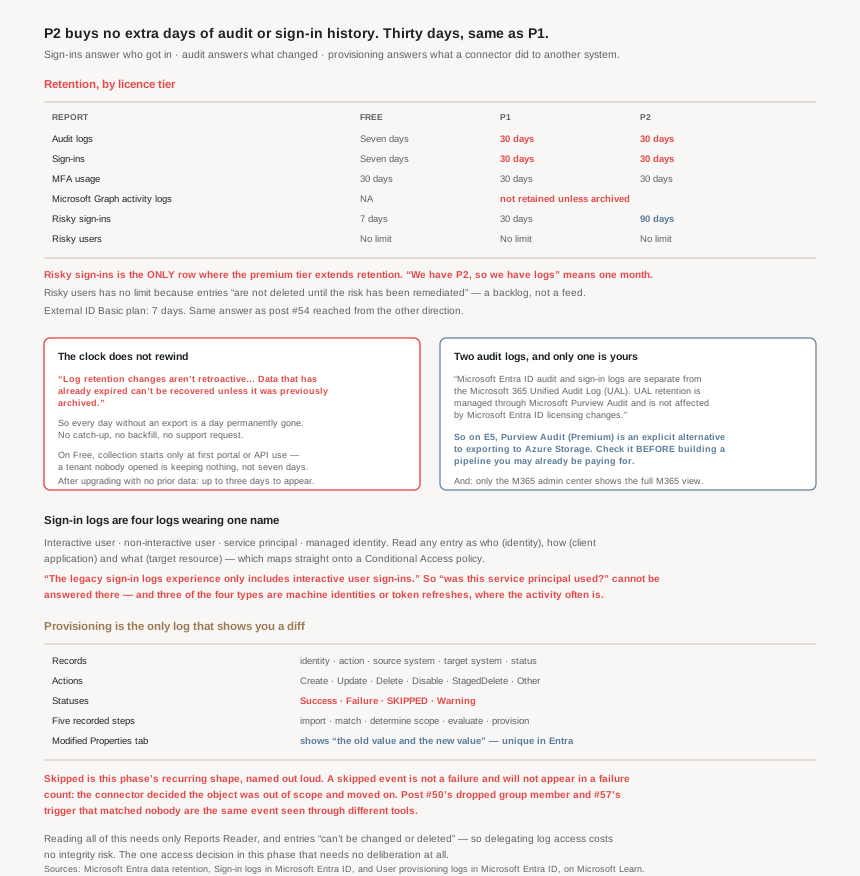
Thirty days of audit and sign-in history at P1, and thirty at P2. The premium tier that unlocks ID Protection, PIM and everything else in this phase adds zero days of the two logs you will actually be asked for in an investigation. The only place P2 extends retention is risky sign-ins, at 90 days.
So “we have P2, so we have logs” resolves to one month. Any obligation measured in quarters or years is unmet by the platform’s own storage, and the remedy is explicit: “You can retain the audit and sign-in activity data for longer than the default retention period… by routing it to an Azure storage account using Azure Monitor.” That is a deployment, not a setting, and it should be done on day one — because of what comes next.
Architecture
Four activity logs, four kinds of sign-in, and a retention clock that does not rewind.
Sign-in logs are four logs wearing one name
“There are four types of logs in the sign-in logs preview: interactive user sign-ins · non-interactive user sign-ins · service principal sign-ins · managed identity sign-ins.” And a warning that matters for anyone reading an older runbook: “The legacy sign-in logs experience only includes interactive user sign-ins.”
That distinction is where a lot of bad conclusions come from. A question like “did anything use this service principal” cannot be answered from the interactive view, and the interactive view is what the old experience shows. Three of the four types are machine identities or token refreshes — which, given #40’s point that a refresh token can carry a session for weeks, is where the interesting activity often is.
The framing Microsoft gives for reading any single entry is worth adopting verbatim because it maps onto Conditional Access exactly: “Who — The identity (User) performing the sign-in. How — The client (Application) used for the sign-in. What — The target (Resource) accessed by the identity.”
Provisioning logs are the only ones that show you the diff
Provisioning is the narrowest log and has the richest detail. It records “the identity, action taken, source system, target system, and the status”, with actions “Create, Update, Delete, Disable, StagedDelete, and Other” and statuses “Success, Failure, Skipped, and Warning.”
Two things stand out. First, the per-item detail is grouped into four tabs, and one of them is unique in Entra: “Modified Properties: If there were changes, this tab shows the old value and the new value.” Nowhere else in these logs do you get a before-and-after; the audit log tells you a change happened, provisioning tells you what it was.
Second, the five recorded steps are an unusually honest exposure of the pipeline: “Import the object. Match the object between source and target. Determine if the object is in scope. Evaluate the object before synchronization. Provision the object.” When a user is missing from a target system, the useful question is which of those five it stopped at — and the Skipped status plus the scope step is almost always the answer.
That Skipped value is this phase’s recurring shape appearing one last time. A skipped provisioning event is not a failure and will not show in a failure count; it is the connector deciding the object was out of scope and moving on. #50’s silently dropped group member and #57’s trigger that matched nobody are the same event viewed from different tools.
Graph activity logs are not retained at all
One row of the table is different in kind from the others. For Microsoft Graph activity logs: “NA” on Free, and on P1 and P2, “Must be integrated with storage or analytics tools.” Stated plainly underneath: “Data isn't retained unless it's archived to a storage account or integrated with analytics tools.”
So the log that records what applications actually did through Graph — read your directory, enumerate your groups, change an attribute — has no default storage whatsoever. It is zero days until you build the pipe, and collection only begins “when the log category is enabled in diagnostic settings.” Given that #53 and #56 both turned on Graph calls as the path around portal limitations, this is the log most likely to be wanted and least likely to exist.
Why This Architecture Holds Up
Because the clock does not rewind, and that makes archiving urgent rather than important
Most capacity decisions can be deferred. This one cannot, and the documentation says so twice. First on upgrading: “No, you can't [see last month's data]. Azure stores up to seven days of activity data for a free version. When you switch from a free to a premium version, you can only see up to 7 days of data.” Then generally: “Log retention changes aren't retroactive… Data that has already expired can't be recovered unless it was previously archived.”
So every day without an export is a day permanently missing from your history. There is no catch-up, no backfill, no support request that recovers it. That reframes the Azure Monitor deployment from a maturity item to a first-week task — the same conclusion #54 reached about external tenants, where retention is “7 days” and the export is still in preview.
There is a second, subtler trap in when collection starts. On premium tiers it begins “when you sign up for a subscription”. On Free it begins “the first time you open Microsoft Entra ID or use the reporting APIs” — so a Free tenant nobody has looked at is not keeping seven days of history, it is keeping none. And if you upgrade with no prior data, “it will take up to three days for the data to show up.”
Because there are two audit logs and only one of them is yours
A distinction that causes genuine confusion in incident reviews: “Microsoft Entra ID audit and sign-in logs are separate from the Microsoft 365 Unified Audit Log (UAL). UAL retention is managed through Microsoft Purview Audit and is not affected by Microsoft Entra ID licensing changes.”
Two independent stores, two retention policies, two owners. Which is an opportunity rather than a nuisance, because it means an E5 estate has a second, longer-lived route for the same evidence: “Organizations with Microsoft 365 E5, Office 365 E5, Microsoft Purview Suite, or E5 eDiscovery and Audit add-on licenses can also use Microsoft Purview Audit (Premium) to retain Microsoft Entra ID audit logs beyond the default period, providing an alternative to exporting logs to Azure Storage.”
So before building an export pipeline, check what the Microsoft 365 side of the house already retains. A lot of organisations buy Azure Monitor storage for audit history they are already paying Purview to keep. And the related note for anyone chasing an answer across both: “only the Microsoft 365 admin center provides a full view of the Microsoft 365 activity logs.”
Because risk data follows different rules, and one of them is unbounded
The security-signals half of the table behaves unlike the activity half, in two ways worth knowing. “Risky users: No limit” on every tier, including Free — and the reason is a design decision rather than generosity: “Risky users and workload identities are not deleted until the risk has been remediated.”
A risky user is therefore not a log entry with an expiry; it is an open item with no clock, which is exactly the right shape for the thing #48 described. The corollary is that an unremediated risk accumulates indefinitely, so the risky users report is a backlog, not a feed — and that reinforces #48’s point about dismissal being a deliberate act rather than housekeeping.
Risky sign-ins, meanwhile, are the single row where P2 earns retention: 90 days against P1’s 30. If your reason for buying P2 included log history, that row is the whole of what you bought.
Because the reports around the logs answer questions the logs cannot
Worth knowing before writing a Log Analytics query that already exists as a report. Usage & insights carries five: “Microsoft Entra application activity (preview) · AD FS application activity · Authentication methods activity · Service principal sign-in activity · Application credential activity.”
Two of those are directly load-bearing for earlier posts in this phase. Authentication methods activity is how you check whether #44’s passwordless rollout actually happened. Application credential activity is how you find the client secrets that #54 noted cannot be governed by policy in an external tenant — a report, in place of an enforcement.
And for provisioning specifically there are two prebuilt workbooks rather than a blank query editor: “Provisioning Analysis provides a high-level overview of the provisioning events in your tenant” and “Provisioning Insights provides details on events related to syncing users from other sources.” Both need a Log Analytics workspace, which is the same prerequisite as retention — so the export you build for compliance is also the thing that makes the analysis possible. One deployment, two reasons.
Because reading them is a role, and it is a small one
A pleasant detail after several posts of privilege escalation hazards: viewing sign-in logs needs “at least a Reports Reader”. Not Security Administrator, not Global Reader — a purpose-built, read-only role.
Which makes log access the easiest thing in this entire phase to delegate correctly. Anyone who needs to answer “did this person sign in” should have Reports Reader and nothing else, and the fact that entries “can't be changed or deleted” means handing it out costs you no integrity risk. Compare that with #45’s eligible-versus-active deliberation, and this is the one access decision that needs no deliberation at all.
Key Architecture Decisions
| Situation | Decision | Why |
|---|---|---|
| Any retention obligation beyond a month | Export to Azure Monitor in week one | Audit and sign-in are 30 days at P1 and at P2 alike. |
| Assuming P2 bought you log history | It bought 90-day risky sign-ins and nothing else | Audit and sign-in retention is identical on P1 and P2. |
| Deferring the export decision | Don't — every day is lost permanently | Retention changes aren't retroactive and expired data can't be recovered. |
| Already an E5 estate | Check Purview Audit (Premium) first | It is an explicit alternative to exporting to Azure Storage. |
| Investigating across Entra and Microsoft 365 | Treat them as two stores with two policies | The Unified Audit Log is separate and unaffected by Entra licensing. |
| Needing to know what an app did via Graph | Enable the Graph activity log category now | It is retained for zero days until archived. |
| Asking whether a service principal was used | Do not use the legacy sign-in view | Legacy shows interactive user sign-ins only. |
| Hunting token-refresh activity | Non-interactive sign-ins | Three of the four sign-in types are not interactive. |
| A user missing from a target system | Read the Steps tab and look for Skipped | The scope step is the usual answer, and it is not a failure. |
| Needing before-and-after values | Provisioning logs, Modified Properties | It is the only log that shows old and new values. |
| Counting provisioning health by failures | Count Skipped too | Skipped is a distinct status from Failure. |
| A Free tenant nobody has opened | Expect no history at all | Collection begins at first portal or API use on Free. |
| Just upgraded to premium | Allow up to three days for data to appear | Documented delay where no prior data exists. |
| Reviewing the risky users report | Treat it as a backlog, not a feed | Entries are not deleted until the risk is remediated. |
| Verifying a passwordless rollout | Authentication methods activity report | Purpose-built; no query needed. |
| Finding ageing app secrets | Application credential activity report | A report in place of an enforcement. |
| Delegating log access | Reports Reader, and nothing more | Read-only, and entries cannot be changed or deleted. |
| Analysing provisioning at scale | The two prebuilt workbooks | Same Log Analytics prerequisite as the export. |
Closing Thought
The three logs are well designed and the reports around them are better than their reputation. Sign-ins separate the four kinds of identity properly; audit records change; provisioning exposes its own pipeline step by step and is the only place in Entra you can see a before-and-after value. If the question is “can I find out what happened”, the answer within the window is usually yes.
The window is the problem, and it is a procurement problem disguised as a technical one. Thirty days of audit and sign-in history, identical at P1 and P2, against obligations that are routinely twelve months or seven years. The premium licence that unlocks every control this phase has described does not extend the two logs that prove those controls worked. And because retention is not retroactive, the gap cannot be closed later — there is no version of this where you decide in March to have January’s sign-in logs. Which makes the Azure Monitor export the only genuinely urgent item in this post, and possibly in this phase: it is the one thing whose cost of delay is measured in evidence you can never get back.
The pattern worth carrying out of these eighteen posts, though, is the one the Skipped status says out loud. Across Conditional Access, access reviews, sync, writeback, workflows and now provisioning, the platform’s characteristic behaviour when something does not apply is to proceed quietly and record a neutral outcome. The logs are honest about it — Skipped is right there next to Failure, and total processed users sits next to failed tasks. The platform is not hiding these. It is just that nobody builds an alert on the absence of an event, and the absence is where the failures live.
#59 moves to the application side of the directory: enterprise applications and SSO configuration — what an app registration and a service principal actually are, and which of the four SSO modes a given application really needs.
Official Azure Reference
- Microsoft Entra data retention — the full retention table by licence tier, when collection starts, and why retention changes are not retroactive
- Sign-in logs in Microsoft Entra ID — the four sign-in types, the legacy view's limitation, the who-how-what framing, and the Usage & insights reports
- User provisioning logs — the actions and statuses, the five provisioning steps, the Modified Properties diff, and the two workbook templates
Comments