Business Challenge
Yesterday's post was a flag on a subnet. This one shares its product name and works almost entirely differently, and the documentation opens by saying so. On-premises hosts can reach Google APIs and services by using Cloud VPN or Cloud Interconnect from your on-premises network to Google Cloud — so the transport is whatever you built over the last seven posts — and then: to enable Private Google Access for on-premises hosts, you must configure DNS, firewall rules, and routes in your on-premises and VPC networks.
Note what is absent from that list. And then note the sentence that states it outright: you don't need to enable Private Google Access for any subnets in your VPC network as you would for Private Google Access for Google Cloud VM instances.
It is not, and the flag was never going to do it. The subnet setting from #90 governs VMs whose interfaces have no external address; it says nothing about packets arriving over a tunnel from a different network. The on-premises path is built from DNS, routes and firewall rules instead, on both sides of the link.
Correct approachTreat these as two unrelated features that share a name. The practical consequence is that an on-premises access problem cannot be diagnosed or fixed by looking at subnet properties, which is where most people start because the name sent them there. Check the VIP, the two routes and the DNS resolution instead.
That works for VMs and not for you. On-premises hosts must connect to Google APIs and services by using the virtual IP addresses (VIPs) for either the restricted.googleapis.com or private.googleapis.com domains. Must, and the choice has consequences — services available to on-premises hosts are limited to those supported by the domain name and VIP used to access them.
Correct approachPick the VIP domain deliberately, against the list of services each one supports, because that choice defines your reachable API surface rather than merely your addressing. It is the one decision in this post that is difficult to reverse quietly: changing it later means re-doing the DNS, the advertised route and the static route together.
That is the documented outcome, not a misconfiguration. Only the supported APIs are accessible with this configuration, which might cause other services to be unreachable. And the obvious remedy is unavailable on Google's own resolver: Cloud DNS doesn't support partial overrides. If you require partial overrides, use BIND.
Correct approachDecide up front whether you need a wildcard. A wildcard override is all-or-nothing on Cloud DNS, so if any workload needs an API the chosen VIP does not support, you need per-domain records or a resolver that does partial overrides. Discovering this after the wildcard is live means the breakage arrives for an unrelated team, on an API nobody was thinking about.
Architecture
Six posts of plumbing, pointed at one destination.
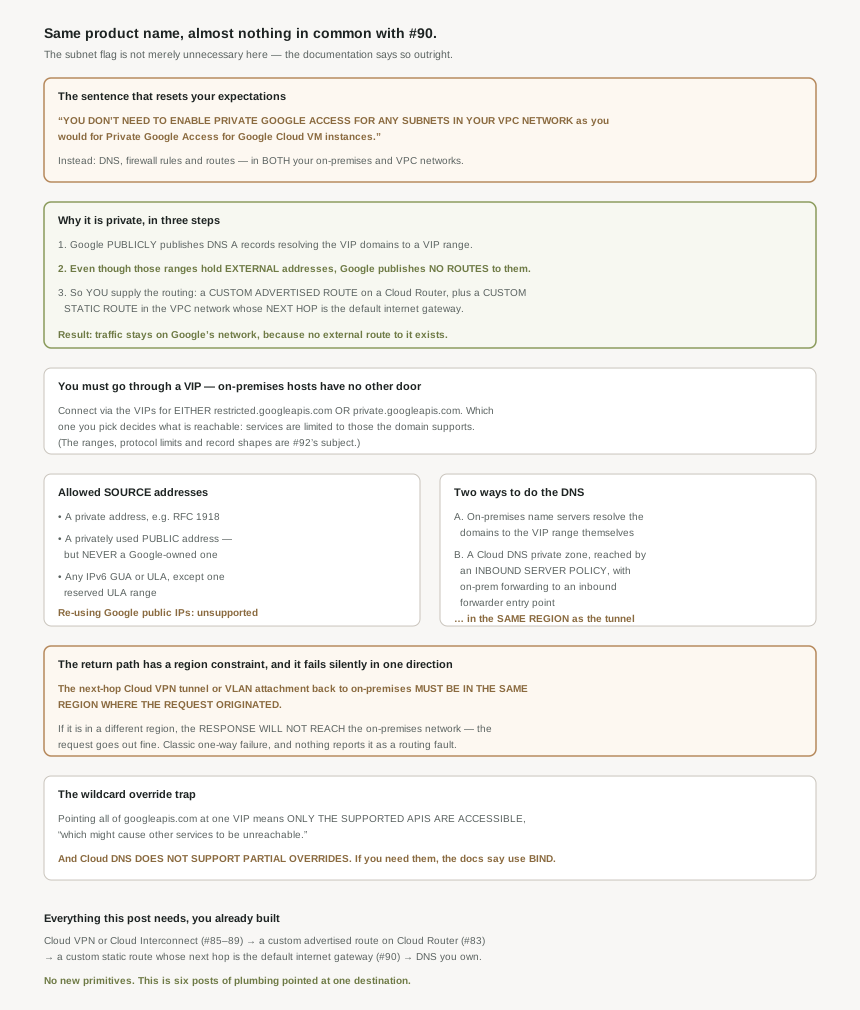
Why the traffic is private, in three steps
This is the most satisfying mechanism in the private-access material, because the privacy comes from an absence rather than a feature.
First, the names resolve publicly: Google publicly publishes DNS A records that resolve the domains to a VIP range. Anyone can look them up. Second, and this is the load-bearing part: even though the ranges have external IP addresses, Google does not publish routes for them. Public addresses, no public routes. Third, because no route exists, you have to supply one — you must add a custom advertised route on a Cloud Router and have an appropriate custom static route in your VPC network for the VIP's destination, where the route must have a destination matching one of the VIP ranges and a next hop being the default internet gateway.
And the conclusion: traffic sent to the VIP range stays within Google's network instead of traversing the public internet because Google does not publish routes to them externally. The addresses are public; the reachability is not. That is a more elegant design than a private endpoint would have been, because it needs no new address space and no per-customer state — the only thing standing between the internet and those addresses is that nobody outside has a route.
Read the requirement list against the last nine posts and there is not one new primitive in it. The transport is Cloud VPN or Cloud Interconnect, from #85 through #89. The advertisement is a custom advertised route on a Cloud Router, which is #83. The VPC-side route is a custom static route whose next hop is the default internet gateway — the same next hop that confused everybody in #90, for the same reason. The only genuinely new thing is which DNS answer you hand your on-premises resolver.
Which makes this a good checkpoint on the block: if the hybrid connectivity posts felt like a lot of mechanism for its own sake, this is the post where it composes. The work was done; this is a destination for it.
Which source addresses qualify
Two categories are allowed and one is specifically ruled out. On-premises hosts can send from a private IP address, such as an RFC 1918 address, or from a privately used public IP address, except for a Google-owned public IP address. The exclusion gets its own parenthetical: Private Google Access for on-premises hosts does not support re-using Google public IP addresses as sources in your on-premises network.
That is a narrow but real constraint for estates that use privately-used public address space — a legitimate and reasonably common practice in large networks. If any of that space happens to be Google's, those hosts cannot use this path, and the fix is renumbering rather than configuration.
For IPv6 the allowance is broad with one carve-out: on-premises clients can send requests from any IPv6 GUA or ULA addresses, except for the ULA range fda3:e722:ac3:cc00::/64 , which is reserved for internal use. Reaching Google APIs over IPv6 does require the link to be ready for it — you must configure the connection to your VPC network to support IPv6.
Why This Architecture Holds Up
The routing and DNS are straightforward to set up and have two failure modes that are not.
The next hop Cloud VPN tunnels or VLAN attachments that connect to your on-premises network for these routes must be within the same region where the request originated. And the consequence, stated plainly: if the next hop is in a region different from where the request to Private Google Access originated, response from Private Google Access will not reach the on-premises network.
Read that as an operator. The request leaves your data centre, crosses the tunnel, hits the VIP, is served. The response is routed back towards on-premises through a tunnel in the wrong region and does not arrive. Every component reports healthy: the tunnels are up, the BGP sessions are established, the routes are present, the API is serving. What you observe is a timeout, which is the symptom everybody misattributes to the API, to TLS, to a firewall, or to the application.
It is also exactly the kind of thing #84's global dynamic routing mode makes easy to create by accident. Global mode means a learned route can have a next hop in another region, which is usually the point of it — and here it is the mechanism by which a response leaves through the wrong tunnel. Worth checking deliberately on any multi-region hybrid estate rather than assuming symmetry.
And the DNS has a regional constraint of its own, if you take the Cloud DNS route. The approach is to create an inbound server policy in the VPC network to which your on-premises network connects, then configure on-premises systems and on-premises DNS name servers to forward googleapis.com and the other required names to an inbound forwarder entry point in the same region as the Cloud VPN tunnel or VLAN attachment that connects to the VPC network.
Same region again, for the same underlying reason, on a different mechanism. So a multi-region hybrid design has two separate regional pairings to get right: the forwarder entry point to the tunnel, and the return route's next hop to the request's origin. Both are invisible in a topology diagram that shows only which networks are connected.
Routing on your own side
The symmetry requirement is stated from both ends. Yours: your on-premises network must have routes for either the private.googleapis.com or restricted.googleapis.com destination IP ranges, and these routes must direct traffic to the appropriate Cloud VPN tunnel or VLAN attachment that connects to your VPC network. Google's side: the VPC network to which your on-premises network is connected must have appropriate routes to reach the on-premises network.
Nothing surprising in either, except that both are yours to maintain and neither is validated by anything until traffic tries to flow.
One small saving worth knowing
A detail that trims the setup for pure-gateway projects: if your project is providing access to Google APIs for on-premises hosts only, you don't need to enable the Google APIs for the project. The project is carrying transit, not calling the APIs itself, so the enablement step that #90 required belongs to whichever project actually makes the calls. Useful for the common pattern where a dedicated network host project exists only to terminate hybrid links.
Key Architecture Decisions
| Situation | Decision | Because |
|---|---|---|
| On-premises hosts must reach Google APIs privately | DNS, firewall rules and routes on both sides | Those are the stated requirements; the subnet flag is not among them. |
| Diagnosing an on-premises access failure | Do not start at subnet properties | You don't need the subnet setting at all for this path. |
| Choosing between the two VIP domains | Decide against the services each supports | Reachable services are limited by the domain and VIP you use. |
| Wanting to change VIP domain later | Plan DNS, advertised route and static route together | All three reference the chosen range. |
| Setting up the VPC side | Custom advertised route on Cloud Router plus a custom static route | Google publishes no routes to the VIP ranges, so you supply them. |
| Surprised the static route's next hop is the internet gateway | Expect it | The VIP ranges hold external addresses; only the routing keeps traffic internal. |
| Multi-region hybrid estate | Pin the return next hop to the request's origin region | Otherwise the response never reaches on-premises, while the request succeeds. |
| Using Cloud DNS rather than on-premises records | Inbound server policy, forwarding to a same-region entry point | The entry point must match the tunnel or attachment's region. |
| Needing some googleapis.com names to resolve normally | Avoid a wildcard, or use BIND | Cloud DNS does not support partial overrides. |
| On-premises hosts using privately-used public addresses | Confirm none of it is Google-owned space | Re-using Google public IP addresses as sources is unsupported. |
| IPv6 clients on-premises | Make the hybrid link IPv6-capable first | The connection to the VPC network must support IPv6. |
| A dedicated network host project terminating the links | Do not enable the APIs there | Not needed if the project only provides access for on-premises hosts. |
| Running global dynamic routing mode | Check return-path regions explicitly | Global mode allows next hops in other regions, which is how this breaks. |
The one to look at today
If on-premises hosts reach Google APIs over a hybrid link, trace one response path end to end and write down the region of three things: where the request originates, which tunnel or VLAN attachment the return route uses as its next hop, and which region the DNS inbound forwarder entry point sits in. If those three do not line up, you either have a latent one-way failure or you are relying on something the documentation says will not work. It takes ten minutes and it is not visible in any dashboard.
Closing Thought
Two posts, one name, two unrelated mechanisms. #90 was a subnet property that decides whether a VM with no external address can call an API. This is a routing and DNS exercise that decides whether packets arriving over a tunnel can, and the shared name is doing real harm — it sends people to the wrong half of the console when something breaks.
The mechanism itself is the nicest thing in this block. Google publishes the names publicly and withholds the routes, so the VIP ranges are reachable only by networks that have been given a route deliberately. No private address space to allocate, no per-customer endpoint, nothing to provision on Google's side. The entire privacy guarantee is that a route does not exist unless you create it — which is also why the two regional constraints bite so hard, because when the only thing holding the path together is routing you own, getting the routing subtly wrong is the whole failure surface.
#92 finally opens the box this post kept pointing at: restricted and private VIPs, and the DNS records behind them — the address ranges, what each domain actually covers, the protocol restrictions, and the records to create.
Official Google Cloud Reference
- Private Google Access for on-premises hosts
- Configure Private Google Access for on-premises hosts
- Private Google Access overview
- Private access options for services
- Cloud Router advertised routes
- Cloud Router overview
- Cloud VPN overview
- Cloud Interconnect overview
- Routes overview
- VPC firewall rules
- Cloud DNS zones
- Cloud DNS server policies
Comments