Business Challenge
Everything in the private-access block so far has pointed outward. #90 had a VM calling the ordinary public address of a Google API. #91 and #92 had an on-premises host routed to a VIP whose addresses are public but deliberately unrouted. In all three the destination belonged to Google and the work was getting packets to it.
This inverts. Private Service Connect endpoints are internal IP addresses in a consumer VPC network that can be directly accessed by clients in that network. The service answers on an address you chose, in your own space, and the routing question largely disappears.
Which is a better model for most things and introduces three decisions the previous mechanisms did not have.
Not with an endpoint. Endpoints provide layer 4 connectivity to services, and the documentation names the alternative in the same breath: if you need load balancer features, such as custom URLs or advanced traffic management, use backends. Backends are a different construct — backends are deployed by using network endpoint groups (NEGs) that let consumers direct traffic to their load balancer before reaching a Private Service Connect service.
Correct approachDecide at layer 4 or layer 7 before you build, because the two are different resources rather than two settings on one. An endpoint is a forwarding rule; a backend is a NEG behind your own load balancer. If anything in the requirement list mentions paths, hostnames, headers, WAF or TLS termination you want to own, the answer is backends and the endpoint was never going to stretch.
You cannot. You can't update an endpoint for Google APIs and services after it is created. And the bundle is the governance decision: use all-apis to give access to all supported APIs, or use vpc-sc to restrict access to Google APIs that support VPC Service Controls.
Correct approachSettle the VPC Service Controls question before creating the endpoint, exactly as #92 argued for the VIP choice — it is the same decision wearing different clothes. Note the recreate path is not free either: each forwarding rule counts toward the per VPC network quota for Private Service Connect, so an estate that iterates by creating new endpoints will meet a limit.
Almost certainly a leftover zone. If your VPC network does not contain any endpoints, check if a Cloud DNS private zone exists for p.googleapis.com. If one does, if the zone exists, delete it before you create the endpoint. Otherwise: if you don't delete it, creation of the Service Directory DNS zone used for Private Service Connect fails.
Correct approachCheck for the zone first, especially in an estate that has tried this before — a deleted endpoint can leave its zone behind, and the next attempt fails with an error that names a product nobody configured. The diagnostic is one command and the fix is a deletion, but only if you know to look.
Architecture
Three types, one direction each, and a clear line at layer 4.
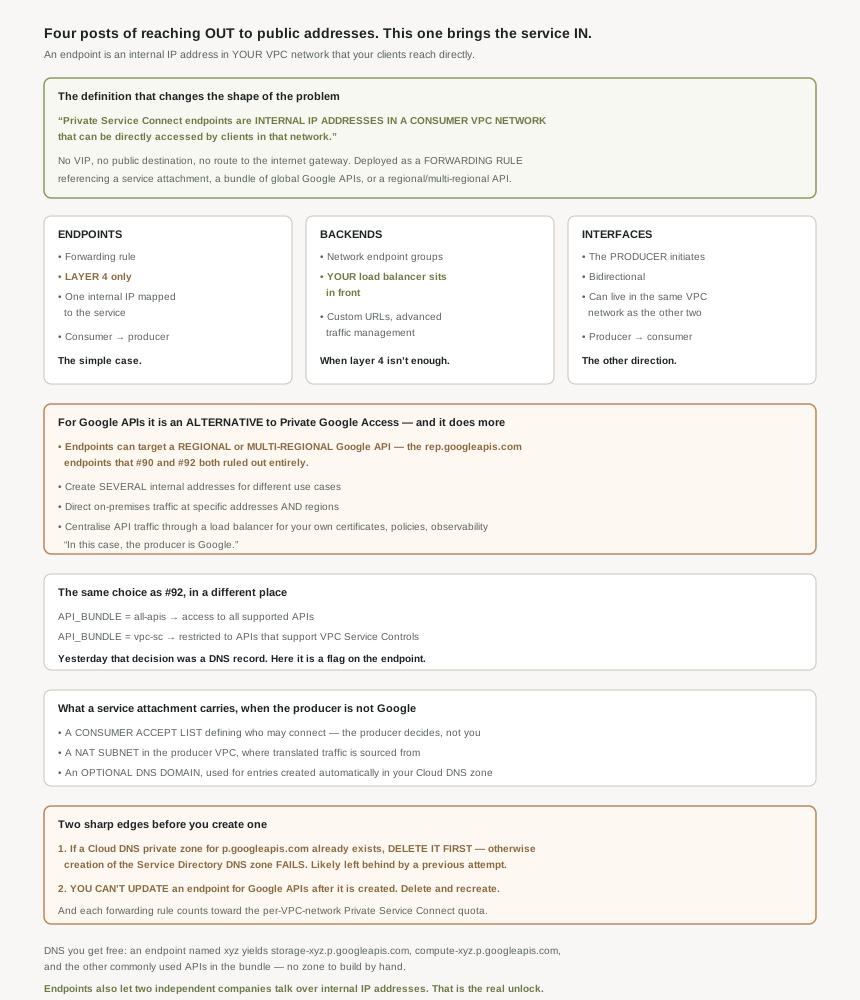
The three types, and which way each one faces
The product is a family rather than one thing: Private Service Connect lets you send traffic to endpoints and backends that forward the traffic to managed services, including Google APIs and published services. Endpoints and backends both carry consumer-to-producer traffic and differ in layer. The third type reverses the direction entirely — Private Service Connect interfaces let managed services initiate connections to consumer VPC networks, and usefully they compose: Private Service Connect interfaces provide bidirectional communication and can be used in the same VPC network as endpoints and backends.
An endpoint's mechanism is a forwarding rule, and what it points at is the interesting part: endpoints are created by deploying a forwarding rule that references a service attachment , a bundle of global Google APIs , or a regional or multi-regional API. One construct, three kinds of target — another company's service, a bundle of Google's, or a single regional Google API. And endpoints are deployed by using forwarding rules that provide the consumer an IP address that is mapped to the Private Service Connect service.
#90 established that Private Google Access doesn't support regional and multi-regional endpoints, the ones ending rep.googleapis.com. #92 confirmed neither VIP serves them either, and that a wildcard pointed at a VIP actively breaks them.
Here they are supported: endpoints let you target a bundle of global Google APIs , or a regional or multi-regional Google API, and backends go further still — backends let you target a global Google API , a regional Google API , or a multi-regional Google API. So the answer to "how do I reach a regional endpoint privately", which the last three posts could only answer with "not this way", is Private Service Connect. Worth knowing before anyone spends a day trying to make a VIP do it.
What it buys over Private Google Access
The documentation positions it as a choice rather than a successor: using Private Service Connect to access Google APIs is an alternative to using Private Google Access or the public domain names for Google APIs. With a nice framing of why the mechanism is the same as for third-party services — in this case, the producer is Google.
Three capabilities are listed, and each corresponds to something the earlier mechanisms could not do. Create one or more internal IP addresses to access Google APIs for different use cases — several addresses, so different workloads can have different paths, where a VIP is one shared destination. Direct on-premises traffic to specific IP addresses and regions when accessing Google APIs — which addresses #91's region problems directly. And centralize Google API traffic through a supported load balancer to apply your own certificates, security policies, or observability, which is simply not available when the destination is Google's own VIP.
That third one is the strongest argument for backends over endpoints in a regulated estate: if you need to see, log or police API traffic yourself, you need your own load balancer in the path, and only backends put it there.
The bundle, which is #92's decision relocated
For Google APIs the endpoint takes a bundle, and the two options map exactly onto yesterday's two VIPs: use all-apis to give access to all supported APIs, or use vpc-sc to restrict access to Google APIs that support VPC Service Controls.
Same governance question, third presentation. In #92 it was which domain you create DNS records for; here it is a flag on a forwarding rule. The substance has not changed and neither has the trap: choosing the restrictive option blocks APIs that do not support VPC Service Controls, by design, and the team that discovers it may not be the team that chose it.
You do get the DNS for free, which the VIP route did not give you: if your endpoint name is xyz , DNS records are created for storage-xyz.p.googleapis.com , compute-xyz.p.googleapis.com , and other commonly used APIs in the API bundle. No zone to build, no wildcard to reason about, and no risk of capturing names you did not intend — which was #92's main hazard.
Why This Architecture Holds Up
The more interesting case is a service somebody else publishes, and the documentation is direct about what that unlocks: private Service Connect endpoints and published services let two independent companies communicate with each other by using internal IP addresses. Two organisations, two VPC networks, no shared address space, no peering, no transitivity to reason about — and each side sees an internal address.
That is a materially different proposition from everything in the hybrid block. #81's peering required coordinated address space and gave non-transitive reachability; #88's Partner Interconnect required a shared physical facility and a third party. This requires neither, because the connection is brokered by a service attachment rather than by a network join.
Three things that attachment carries are worth knowing from the consumer side, because they tell you what you do and do not control.
Access is the producer's decision. The attachment holds a consumer accept list that defines which consumers are allowed to connect to the service. You can create the endpoint; whether it connects is on their list. Which is the right design and means a failed connection may be an administrative matter rather than a technical one.
Source addresses are translated on their side. The attachment names the NAT subnet where translated traffic is sourced from in the producer VPC network. So your client's address is not what the producer's service sees, which matters if you expected to use source IP for anything — allow-listing, logging, rate limiting by client.
DNS may be handed to you. There is an optional DNS domain , if provided, that is used in the DNS entries for endpoints that are automatically created in the consumer's Cloud DNS zone. Optional, and the producer's choice, so whether you get usable names or just an IP address depends on how they published.
The architecture note underneath all of this: producer services are published through load balancers that expose a single IP address to the consumer VPC network. One address on your side regardless of how many instances serve it on theirs, which is what makes the endpoint model simple to consume and also what caps it at layer 4 — there is nothing in that address for a path or a hostname to attach to.
Reading this against the last four posts
It is worth laying the four private-access options side by side, because the block has now produced one mechanism per post and they are easy to conflate. Private Google Access is a subnet flag that lets an internal-only VM use Google's public addresses. The VIPs are public addresses with no public routes, reached over routing you supply, and are the only option for an on-premises host. Private Service Connect endpoints are internal addresses in your network at layer 4. Backends are the same but with your load balancer in front.
The decision order that falls out: what is the client, what is the producer, and do you need layer 7. An on-premises client constrains you to the VIPs. A Google API with no need for inspection is cheapest as Private Google Access. Anything needing your own certificates or policies needs backends. Everything else is an endpoint.
Key Architecture Decisions
| Situation | Decision | Because |
|---|---|---|
| Consuming a service another organisation publishes | A Private Service Connect endpoint | It gives both sides internal addresses with no shared address space. |
| Needing custom URLs, paths or traffic management | Backends, not endpoints | Endpoints provide layer 4 connectivity only. |
| Needing your own certificates, policies or observability | Backends | Only they put a load balancer you own in the path. |
| Reaching a regional or multi-regional Google API privately | An endpoint or a backend | Private Google Access and both VIPs exclude those endpoints. |
| Different workloads needing different API paths | Several endpoints | You can create one or more internal addresses for different use cases. |
| On-premises traffic that must hit a specific region | An endpoint per target | Directing on-premises traffic at specific addresses and regions is a stated capability. |
| Choosing the API bundle | Settle VPC Service Controls first | The endpoint cannot be updated after creation. |
| Iterating on endpoint configuration | Expect delete and recreate, and watch the quota | Each forwarding rule counts toward a per-network quota. |
| Endpoint creation fails mentioning Service Directory | Look for a leftover p.googleapis.com private zone | An existing zone makes creation fail; it must be deleted first. |
| Your endpoint connects but the service rejects you | Ask the producer about their consumer accept list | Access is defined on the attachment, on their side. |
| Planning to allow-list by client source IP at the producer | Do not | Traffic is sourced from a NAT subnet in the producer VPC network. |
| Expecting friendly DNS names for a published service | Confirm the producer set a DNS domain | That field is optional and theirs to set. |
| A Google API endpoint for a well-known service | Use the automatic p.googleapis.com names | Records are created for the bundle's common APIs from the endpoint name. |
| The producer must call back into your network | Interfaces, alongside the endpoint | They are bidirectional and can share the VPC network. |
The one to look at today
If you already use endpoints for Google APIs, record which bundle each one was created with, because that is a decision you cannot revise and it will not be obvious later from the endpoint's name or address. And if any endpoint creation has ever failed in an estate, check for an orphaned p.googleapis.com private zone before the next attempt — it is the single most likely cause and it survives the endpoint that created it.
Closing Thought
The thing that makes this the most satisfying post in the block is that the hard problem simply goes away. Four posts of routing public addresses through networks that were not supposed to reach the internet, of VIPs whose privacy came from a missing route, of regional pinning and wildcard traps — and then an internal IP address in your own network, with DNS created for you, and the whole routing question answered by the fact that the address is local.
What replaces it is a boundary of a different kind. The producer decides who may connect, translates your source addresses, and chooses whether you get names. The bundle you pick is permanent. And the layer 4 ceiling is firm enough that half the reasons people want this — inspect the traffic, terminate TLS, route by path — require a different resource entirely. Simpler to operate, more to settle in advance.
#94 turns the model around: Private Service Connect published services — the producer side, the service attachment, and the accept list that decides who gets in.
Official Google Cloud Reference
- Private Service Connect
- Access Google APIs through endpoints
- Private Service Connect architecture
- Private Service Connect deployments
- Private Service Connect backends
- About Private Service Connect interfaces
- Access published services through endpoints
- Private Service Connect compatibility
- Private access options for services
- Private Google Access overview
- Service Directory overview
Comments