Business Challenge
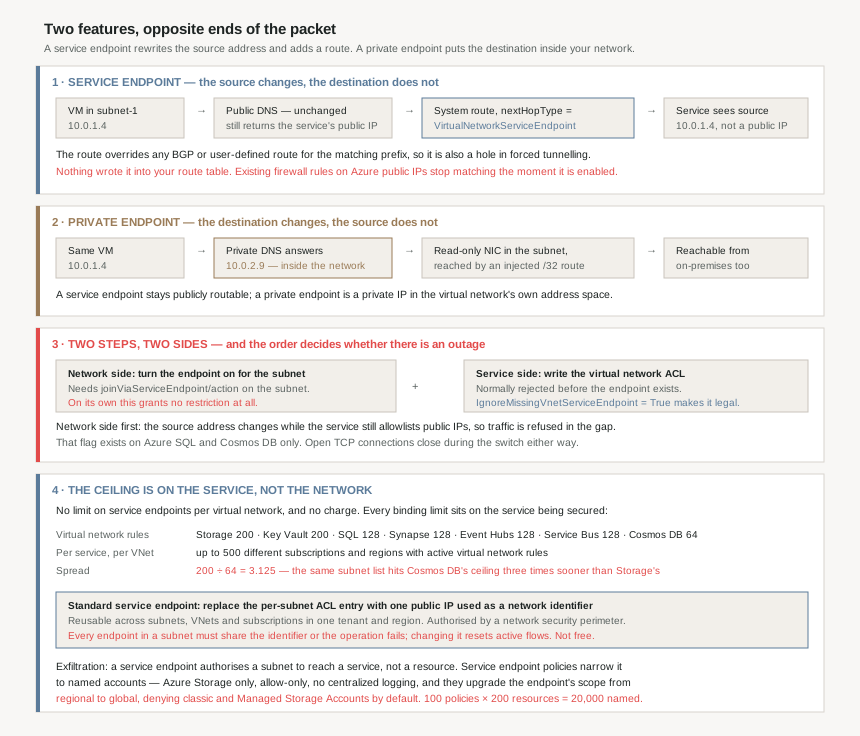
A storage account is reachable from the internet and you want only your virtual network to reach it. Azure offers two features that both claim to solve this, both of them free to turn on in the portal, and they are usually presented as a cheap option and an expensive one. They are not two grades of the same thing. They operate on opposite ends of the packet.
“A Service Endpoint remains a publicly routable IP address. A Private Endpoint is a private IP in the address space of the virtual network where the private endpoint is configured.”
#91 covered the private endpoint: a network interface in your subnet, holding an address out of your own range, standing in for somebody else's service. A service endpoint moves nothing into your network. The service keeps its public address, DNS keeps returning that public address, and what changes is the address your virtual machine sends from.
“With service endpoints, the source IP addresses of the virtual machines in the subnet for service traffic switches from using public IPv4 addresses to using private IPv4 addresses. Existing Azure service firewall rules using Azure public IP addresses stop working with this switch.”
That is not a side effect. The reason a service endpoint lets you drop the public IP allowlist on the storage account is that the allowlist would no longer match anything. And the documentation is explicit about the cost of discovering this in the wrong order: “any existing open TCP connections to the service are closed during this switch”, so this is a change with a maintenance window, not a checkbox.
Architecture
What each one actually does
| Property | Service endpoint | Private endpoint |
|---|---|---|
| What moves | The source address of your traffic | The destination address of the service |
| Service's address | Stays publicly routable | A private IP in your virtual network's space |
| DNS | Unchanged — “continue to resolve to public IP addresses” | Must resolve to the private address |
| Configured on | A subnet | A subnet, as a network interface |
| Granularity | The whole service in a region, unless policies narrow it | One resource, one subresource |
| From on-premises | Not supported | Supported |
| Exfiltration protection | Recorded as not supported | Recorded as supported |
| Protocols | TCP only | TCP and UDP only |
| Price | Free | Paid |
The route, and why it is not in your route table
Enabling a service endpoint writes a route nobody authored. The validation step is to look at effective routes on a NIC in the subnet, where the route to the service “shows a more specific default route to address prefix ranges of each service” with a nextHopType of VirtualNetworkServiceEndpoint. Its precedence is stated flatly: “Service endpoint routes override any BGP or user-defined routes for the address prefix match of an Azure service.”
That is the fourth time in this run of posts that longest-prefix-match has decided an outcome somebody else thought they controlled — after #78's route tables, #90's forwarding rules, and the /32 that #91 showed a private endpoint injecting. It is also the second hole in #79's forced tunnelling, and this one is advertised as a feature rather than a caveat: keeping service traffic on the backbone “allows you to continue auditing and monitoring outbound Internet traffic from your virtual networks, through forced-tunneling, without impacting service traffic”.
Read that from the auditor's chair instead. Your appliance inspects everything leaving the network except traffic to the Azure services you enabled endpoints for, and the route that exempts them is invisible in the route table because nothing wrote it there.
The service-side ceilings, which are the ones that bind
The network side has no ceiling at all: “There's no limit on the total number of service endpoints in a virtual network”, and no charge either. Every real limit lives on the service being secured.
| Resource | Limit on virtual network rules |
|---|---|
| Azure Storage | 200 |
| Azure Key Vault | 200 |
| Azure SQL | 128 |
| Azure Synapse Analytics | 128 |
| Azure Event Hubs | 128 |
| Azure Service Bus | 128 |
| Azure Cosmos DB | 64 |
| Per supported service, per virtual network | Up to 500 different subscriptions and regions |
The spread matters more than the numbers. A hub-and-spoke estate that allowlists one subnet per spoke on each data service fits comfortably under Storage's 200 and exceeds Cosmos DB's 64 more than three times sooner — the same design, the same subnets, two different verdicts depending on which service you point it at. And each entry is a subnet reference, so every subnet added, moved or deleted is a change on every service's access list.
Why This Architecture Holds Up
Because the activation order decides whether there is an outage
Securing a service this way is two operations on two sides of a boundary, and the documentation is unusually blunt that doing one is worthless: “Only turning on service endpoints for the Azure service on the network side does not give you the limited access. You must also set up virtual network ACLs on the Azure service side.”
The order is where the outage lives. Turn on the endpoint first and “the source IP changes from a public IPv4 address to a private address” while the service is still allowlisting public addresses, so traffic is refused until the second step lands. Doing the service side first normally fails validation — the service rejects a virtual network rule for a subnet with no endpoint. Azure SQL and Cosmos DB provide the way out: IgnoreMissingVnetServiceEndpoint set to True lets the ACL be written ahead of the endpoint, which exists “to help customers in cases where the specific IP firewalls are configured on Azure services”.
Two services have the flag. For the rest, the gap between the two steps is the outage, and the only lever is making it short.
Because neither of your usual diagnostics will tell you the truth
“ICMP traffic that's sourced from a subnet with service endpoints enabled won't take the service tunnel path to the desired endpoint. Service endpoints handle only TCP traffic. If you want to test latency or connectivity to an endpoint via service endpoints, tools like ping and tracert won't show the true path that the resources within the subnet will take.”
So the first tool anyone reaches for reports on the old path, which still exists and still works. Private endpoints have the same hole from the other direction — “TCP and UDP traffic are only supported for a private endpoint” — and #91 added that effective routes and security rules are not even displayed for the private endpoint NIC. Both features are diagnosed by looking at what the service logged, not by probing from the client.
Which is the right answer anyway: “All new requests with service endpoints show the source IP address for the request as the virtual network private IP address”. If the service diagnostics show a private address, the endpoint is working, whatever tracert says.
And when it is not working, the error is deliberately uninformative. A request from outside the allowlist gets “an HTTP 403 or HTTP 404 error” — so a network misconfiguration can present as a missing blob, and the two troubleshooting paths that diverge from there look nothing alike.
Because “it cannot reach on-premises” has a workaround that undoes the point
The limitation is stated plainly: “Endpoints can't be used for traffic from your on-premises services to Azure services.” The documented way to let on-premises in is the part worth reading twice.
“If you want to allow traffic from on-premises, you must also allow public (typically, NAT) IP addresses from your on-premises or ExpressRoute. You can add these IP addresses through the IP firewall configuration for Azure service resources.”
A hybrid estate that secures storage with service endpoints therefore ends up with both controls live at once — “A virtual network ACL and an IP firewall can coexist” — one allowing a subnet and one allowing a NAT address block, and the NAT block is as coarse as whatever your ExpressRoute provider gave you. The private endpoint alternative is one line in the same documentation: “traffic can reach the service resource from on premises without using public endpoints”.
Because the exfiltration gap has exactly one patch, and it is Storage-only
A service endpoint authorises a subnet to reach a service, not a resource. The useful way to see the gap is what network security group service tags give you instead: “Azure service tags… allow you to restrict virtual network outbound traffic to specific Azure Storage regions. However, this process allows traffic to any account within selected Azure Storage region” — including an attacker's.
Service endpoint policies close that, and only for Azure Storage, generally available in all global Azure regions. They are an allowlist of resource IDs at subscription, resource group or account granularity, and they default closed once present: “once a policy is configured on that subnet, only the resources specified in the policy can be accessed… Access to all other storage accounts is denied.”
Three things about them are not obvious from the feature description.
“When Service Endpoint policies are applied on a subnet, the Azure Storage Service Endpoint scope gets upgraded from regional to global. This means that all the traffic to Azure Storage is secured over service endpoint thereafter.”
So the control that narrows which accounts you can reach simultaneously broadens which traffic it governs, from one region to all of Azure Storage. For a subnet that was quietly relying on regional scope, that is a change in behaviour delivered by adding a security feature.
Second, the allowlist is absolute and it has blind spots that are denied by default rather than by configuration. Classic storage accounts “policies deny access to all classic storage accounts, by default”; Managed Storage Accounts the same. And the warning covers services you did not know were using storage: “Azure services deployed into your virtual network, such as Azure HDInsight, access other Azure services, such as Azure Storage, for infrastructure requirements. Restricting endpoint policy to specific resources could break access to these infrastructure resources.” Managed services other than SQL Managed Instance are unsupported outright — Batch, Entra Domain Services, Application Gateway, VPN Gateway and Azure Firewall among them.
Third, there is nowhere to look when it bites: “No centralized logging is available for service endpoint policies.” An allow-only control with no deny log is a control whose failures surface as somebody else's application error.
| Service endpoint policy limit | Default |
|---|---|
| Policies per subscription | 500 |
| Policies per subnet | 100 |
| Policies per virtual network | 100 |
| Service resources per policy definition | 200 |
| Derived: resources nameable from one subnet | 100 × 200 = 20,000 |
| Derived: fully loaded subnets per subscription | 500 ÷ 100 = 5 |
Twenty thousand named resources per subnet is not a ceiling anyone reaches. Five fully loaded subnets per subscription is, if policies are generated per application rather than per boundary.
Because the scale problem produced a third option, and it is a public IP
Those per-service rule limits are what standard service endpoints exist to fix, and the fix is the opposite of what the name suggests. Instead of identifying traffic by subnet, you identify it by a public IP address you own.
“A standard service endpoint introduces the concept of a network identifier — a public IP address that you associate with service endpoints on your subnets. The public IP address is the only method of identification for the traffic connecting directly to the virtual network to the service.”
The leverage is reuse: “You can assign the same public IP address to all subnets in a region and subscription, which dramatically reduces the number of ACL entries required… A single network identifier can represent many VNets and subnets.” One ACL entry replaces the per-subnet list, which is why the official comparison marks basic service endpoints as not a scalable solution and standard ones as one.
Authorisation moves to a network security perimeter, which supports “up to 200 prefixes and 1,000 PaaS resources per network security perimeter”, 100 perimeters per subscription and 200 profiles each — so 100,000 PaaS resources under perimeter control in a subscription, allow-rules only, with the guidance to run in observation and “monitor for one to two weeks” before enforcing.
Two constraints are worth knowing before designing around it. “All service endpoints in a subnet must reference the same network identifier, otherwise the operation fails” — so the identifier is a property of the subnet in practice, not of each endpoint. And changing it is not free: “Active flows reset when you add or change a network identifier on an existing service endpoint”, the same class of disruption as turning service endpoints on in the first place. Reuse works across subscriptions inside one tenant and region, and not across tenants or regions.
It also costs money, which breaks the one reliable heuristic people had. Basic service endpoints are free; standard service endpoints and Private Link are both paid. “Service endpoint” is no longer the cheap answer by definition.
Because the documentation disagrees with itself about whether it has shipped
One reading hazard, stated as what each page says rather than as a verdict. The virtual network service endpoints overview lists standard service endpoint under Public Preview. The standard service endpoint article, in a highlighted note, says “Standard service endpoint is generally available”, lists four services as generally available in all Azure regions, and names the national clouds it covers.
The same page pair also counts the services differently: the overview lists twelve generally available entries for basic service endpoints, while the comparison table in the standard article records “approximately 10 services”. Neither number is wrong for what it is counting, and neither is safe to quote in a design document without saying which page it came from.
Both articles agree on the thing that actually decides designs, and it is the clearest statement Microsoft makes about this choice: “Microsoft recommends use of Azure Private Link and private endpoints for secure and private access to services hosted on the Azure platform.”
Key Architecture Decisions
| Decision | Choice | Why |
|---|---|---|
| Default choice for securing a PaaS service | Private endpoint | Microsoft's own recommendation, and the only one of the three options recorded as supporting private connectivity, on-premises connectivity and exfiltration protection. |
| Order of the two activation steps | Service-side ACL first where the flag exists, otherwise shortest possible gap | The network-side step changes the source address immediately. IgnoreMissingVnetServiceEndpoint makes ACL-first legal on Azure SQL and Cosmos DB; nothing else has it. |
| Treating the switch-on as a config change | No — maintenance window | Open TCP connections close during the switch, and existing public-IP firewall rules stop matching at the same moment. |
| Relying on forced tunnelling to inspect all egress | Enumerate service endpoints as deliberate exemptions | The service endpoint route overrides BGP and user-defined routes and is written by the platform, so the route table gives no sign that the exemption exists. |
| Which service's rule ceiling to design against | The lowest one in the estate, not Storage's | Cosmos DB allows 64 virtual network rules against Storage's 200, and the subnet list is shared by the whole design. |
| Exfiltration control over service endpoints | Service endpoint policies, Storage only, with dependencies enumerated first | They are allow-only, they deny classic and Managed Storage Accounts by default, they can break in-VNet services' infrastructure access, and there is no centralized log of what they denied. |
| Accepting a policy's side effect | Re-test the subnet's storage traffic after attaching one | Attaching a policy upgrades the Azure Storage endpoint scope from regional to global, which changes which traffic the endpoint governs, not only which accounts it allows. |
| Standard service endpoints for scale | Only with a public IP lifecycle owner and a perimeter plan | The identity is a public IP, every endpoint in a subnet must share it, changing it resets active flows, and it is a paid feature unlike basic service endpoints. |
| On-premises access through service endpoints | Not a supported design — use private endpoints | The documented workaround is allowlisting on-premises or ExpressRoute NAT public IP addresses, which reintroduces the public allowlist the endpoint removed. |
| Verifying either feature works | Service diagnostics and the service's own logs | ICMP does not take the service endpoint path, private endpoint NICs show no effective routes, and a blocked request returns HTTP 403 or HTTP 404. |
| Cross-tenant service endpoints | Storage and Key Vault only | Virtual network ACLs across Microsoft Entra tenants are supported for those two services and unsupported for the rest; private endpoints cross tenants with manual approval. |
Closing Thought
The comparison people usually make — free versus paid, simple versus complex — is the least useful one available, and it has now stopped being true: the scalable service endpoint is a paid feature too.
The comparison that holds is which end of the packet each feature edits. A service endpoint rewrites your source address and adds a route, so it is a statement about where traffic comes from, enforced by the service. A private endpoint puts an address for the service inside your network, so it is a statement about where the service is, enforced by routing and DNS. Everything else follows. On-premises cannot use a service endpoint because on-premises has no virtual network identity to assert. A service endpoint cannot stop exfiltration because every storage account in the region answers on the same public prefix the route points at. The source-address switch closes live connections because it is a genuine change of identity, not a configuration tweak.
Neither feature changes what the service is. A service endpoint leaves it publicly routable and merely changes who it will answer; a private endpoint, as #91 showed, adds a path without removing the public one. In both cases the thing that actually restricts access is a setting on the service, not the network feature you spent the afternoon enabling.
Which is why the activation order matters so much more than the choice. Both of these features are only half a control, and the other half lives somewhere a network engineer does not usually have permission to change.
Official Azure Reference
- Azure virtual network service endpoints — key benefits, the source-address switch, the route and its precedence, limitations and pricing
- Azure Private Link FAQ — the service endpoint versus private endpoint distinction, the two-step activation and its ordering, per-service virtual network rule limits, ICMP and the 403/404 behaviour
- Virtual network service endpoint policies — allow-only filtering for Azure Storage, the regional-to-global scope upgrade, unsupported account types and the limits
- What is a standard service endpoint? — network identifiers, network security perimeter integration, the three-way comparison table and the feature's availability
- What is a network security perimeter? — the authorisation layer standard service endpoints depend on, for further reading (no claims drawn from it)
- Tutorial: restrict access to PaaS resources with service endpoints — the end-to-end walkthrough, for further reading (no claims drawn from it)
Comments