Business Challenge
This block has now produced four mechanisms for the same requirement, each introduced on its own terms: a subnet flag, two VIP domains reached over routing you supply, an internal endpoint, and a load balancer in front of one. What none of those posts could do is say which to use, because the comparison only makes sense once all four exist.
The mechanism itself is a sentence: instead of sending API requests to the publicly available IP addresses for service endpoints such as storage.googleapis.com , you can send the requests to the internal IP address of an endpoint. The interesting part is what the comparison table says once you line all four up.
It has the narrowest client set of the four. Private Google Access serves Google Cloud resources without external IP addresses — that is the entire eligible population. Private Service Connect endpoints serve Google Cloud resources or on-premises systems, with or without external IP addresses.
Correct approachCheck the client precondition before the mechanism. If any client has an external address, or is on-premises, Private Google Access either does nothing for it (#90 established the flag is inert on VMs with external addresses) or needs the separate hybrid variant. An endpoint covers all of them with one construct, which is usually worth more than the subnet flag's simplicity.
Reasonable, and it costs coverage. Endpoints support all Google Cloud APIs and most other Google APIs and services; backends support selected locational and global Google APIs and services. Selected, against all.
Correct approachConfirm the specific APIs you need are on the backend-supported list before committing to that path, because the reason to choose backends — your own certificates, policies and observability, from #93 — is real but is paid for in reach. The combination that catches people is an estate that standardises on backends for inspection and then finds one team's API is not among the selected set.
Two settings are not theirs to choose. All endpoints that are used to access Google APIs and services in a given VPC network use the same Service Directory region, and all endpoints that you use to access Google APIs and services in a given VPC network use the same Service Directory namespace.
Correct approachDecide the region and namespace once, at network level, before the first endpoint exists — because the first endpoint fixes both. And know the defaults, which are easy to inherit by accident: if a region is not configured, the region is set to us-central1, and if a namespace is not configured, a system-generated namespace is assigned. A team creating the second endpoint gets whatever the first team chose, or whatever the defaults gave them.
Architecture
One address, two network-wide settings, and a four-way comparison.
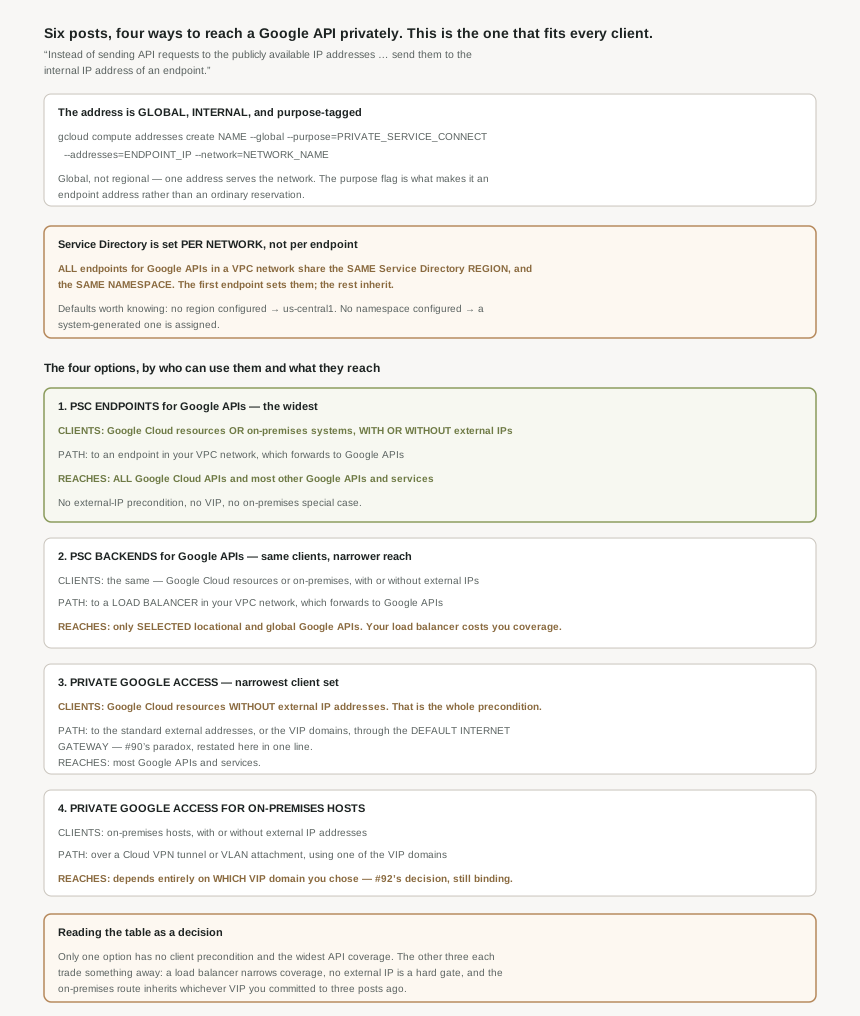
An address unlike the others in this block
The endpoint is built on a reservation, and two details distinguish it. First: reserve a global internal IP address to assign to the endpoint. Global, not regional — which is unusual for an internal address and means one address serves the whole network rather than a region of it.
Second, the reservation is tagged for this use: the command carries --purpose=PRIVATE_SERVICE_CONNECT, alongside the address itself and NETWORK_NAME : the name of the VPC network for the endpoint. The purpose flag is what makes it an endpoint address rather than an ordinary internal reservation, which matters when auditing — the addresses are distinguishable from everything else in the project.
Worth pausing on how different this is from the rest of the block. #90's mechanism had no address of its own at all. #92's VIPs were Google's public addresses with no public route. #91 required you to advertise someone else's range into your own network. Here you pick an address out of your own space and tag it.
This is the sharpest operational detail in the post and it is easy to read past, because it appears as a note in a procedure rather than as a constraint. Every Google API endpoint in a VPC network shares one Service Directory region and one namespace.
The consequence is ordering-dependent. Whoever creates the first endpoint sets both, deliberately or by default — and the defaults are specific: no region configured means us-central1, no namespace configured means a system-generated one. Everyone after inherits. In a Shared VPC estate, where #80's split puts network administration in a different team from the workloads, that means a property of every team's endpoint was fixed by whichever team deployed first, in a resource most of them will never look at.
The permission is the ordinary network one — create, view, and delete endpoints: Compute Network Admin ( roles/compute.networkAdmin ) on your project — so this is not even a specially privileged action. It is the normal network admin role, doing something with network-wide consequences.
Why This Architecture Holds Up
The comparison has three columns worth reading together — who may use it, what path it takes, and what it reaches. Laid out, the asymmetry is larger than the individual posts suggested.
Private Service Connect endpoints for Google APIs. Clients: Google Cloud resources or on-premises systems, with or without external IP addresses. Path: connect to an endpoint in your VPC network, which forwards requests to Google APIs and services. Reach: supports all Google Cloud APIs and most other Google APIs and services.
Private Service Connect backends for Google APIs. Same clients. Path: connect to a load balancer in your VPC network, which forwards requests to Google APIs and services. Reach: supports selected locational and global Google APIs and services.
Private Google Access. Clients: Google Cloud resources without external IP addresses. Path: connect to the standard external IP addresses or Private Google Access domains and VIPs for Google APIs and services through the VPC network's default internet gateway. Reach: supports most Google APIs and services.
Private Google Access for on-premises hosts. Clients: on-premises hosts with or without external IP addresses. Path: connect to Google APIs and services from your on-premises network through a Cloud VPN tunnel or VLAN attachment by using one of the Private Google Access-specific domains and VIPs. Reach: the Google services that you can access depend on which Private Google Access-specific domain you use.
Only one has no client precondition. Endpoints and backends both take any client; Private Google Access requires the absence of an external address; the on-premises variant requires being on-premises. If an estate has a mix — and most do — the endpoint is the only single answer.
Coverage and control trade against each other. Endpoints reach all Google Cloud APIs. Backends, which exist to give you a load balancer, reach a selected set. You cannot have maximum reach and your own inspection point in the same construct.
Two of the four inherit a decision from three posts ago. Private Google Access's path runs through the default internet gateway — #90's apparent contradiction, restated here as a one-line fact. And the on-premises variant's coverage is explicitly a function of which VIP domain you chose, which is #92's decision still binding.
The one thing the table does not say
Cost and operational weight are absent from it, and they run the other way. Private Google Access is a flag on a subnet; an endpoint is a reserved address, a forwarding rule, a Service Directory namespace and a quota entry, and from #93 it cannot be updated after creation. For a single-project estate whose VMs have no external addresses and whose APIs are all in the "most" category, the flag genuinely is the right answer and the endpoint is over-engineering.
The table is a capability comparison, not a recommendation, and reading it as one leads to building endpoints everywhere. The honest decision rule is: start from the client set, because that eliminates options without debate; then check reach against the specific APIs you call; then pick the lightest mechanism still standing.
For completeness: consuming other people's services
The same page covers the published-service side from #93 and #94, with the same endpoint-versus-backend split. Clients there are narrower — Google Cloud VM instances with or without external IP addresses, so no on-premises row — and the two paths are connect to services in another VPC network through an endpoint or connect to services in another VPC network through a load balancer, both of which support services that are published using Private Service Connect for service producers.
Worth noting that the client set is narrower for published services than for Google APIs. An on-premises host can reach Google APIs through an endpoint; reaching a third party's published service is listed for Google Cloud VM instances. If a design assumes on-premises systems will consume a partner's published service directly, that assumption deserves checking against the specific case rather than inferred from the Google API row.
Key Architecture Decisions
| Situation | Decision | Because |
|---|---|---|
| Mixed clients: some with external addresses, some on-premises | Private Service Connect endpoints | It is the only option with no precondition on the client. |
| Single project, VMs with no external addresses, common APIs | Private Google Access | A subnet flag against an endpoint's several resources. |
| Needing your own certificates, policies or observability | Backends, after checking API coverage | They reach only selected locational and global APIs. |
| Calling an API not on the backend-supported list | Endpoints | They support all Google Cloud APIs and most others. |
| On-premises clients only, already on a hybrid link | Either the on-premises variant or an endpoint | Both serve on-premises hosts; the endpoint avoids the VIP choice. |
| Before the first endpoint in a network | Decide the Service Directory region and namespace | The first endpoint fixes both for every endpoint that follows. |
| Endpoints appearing in an unexpected region | Check whether a region was ever configured | With none configured the default is us-central1. |
| Shared VPC with several workload teams | Treat the namespace as a platform decision | Network admins can set it, and everyone inherits it. |
| Auditing which addresses are endpoints | Filter on the PRIVATE_SERVICE_CONNECT purpose | The reservation is tagged, so they are distinguishable. |
| Expecting a regional address | Expect a global one | The reservation is a global internal IP address. |
| Choosing between all four | Client set, then reach, then weight | The client set eliminates options without argument. |
| On-premises hosts consuming a partner's published service | Verify it against that case specifically | Published services are listed for Google Cloud VM instances. |
The one to look at today
If any Private Service Connect endpoint for Google APIs exists in your estate, find out what Service Directory region and namespace it set, and whether that was a decision or a default. Then write it down somewhere the next team will see it, because they will inherit it without being asked and the setting is not visible from their own endpoint. If the answer is us-central1 and nobody chose it, that is worth knowing before it becomes the answer for everyone.
Closing Thought
Six posts in, the private-access block resolves into something simpler than it looked. There is one mechanism that works for every client and reaches almost everything, and three that are narrower in exchange for being lighter, more inspectable, or already built. That is a reasonable product line, and the only reason it reads as confusing is that the documentation introduces each one separately and the comparison lives on a page none of them link to prominently.
The detail I will carry forward is the Service Directory one, because it is the shape of problem this series keeps finding: a setting that looks local, is actually network-wide, is fixed by whoever moves first, and has a default nobody chose. #90 had the subnet flag that answers at the wrong level. #87 had the dynamic routing mode that turns out to be contractual. This is the same class — and the common remedy is the same too, which is to find out what the first team set before you become the second.
#96 goes underneath all of this to the thing managed services actually create on your behalf: service networking, and the peering that appears in your VPC network when you provision one.
Official Google Cloud Reference
- Access Google APIs through endpoints
- Private access options for services
- Private Service Connect backends
- Access Google APIs through backends
- Private Service Connect
- Private Service Connect compatibility
- Private Google Access overview
- Configure Private Google Access
- Private Google Access for on-premises hosts
- Service Directory overview
- IP addresses
- Subnets
Comments