Business Challenge
#93 described the consumer's experience: an internal address of your own, access decided by somebody else, and source addresses that arrive translated. This post is that somebody else. Publishing is straightforward in outline — create a service attachment that points to the target service — and the detail is where the decisions live.
Three of them are worth settling before you type anything, because two cannot be undone cheaply and one is a set of rules most people guess wrong.
Not on one attachment. The lists accept three kinds of entry — a given service attachment can accept or reject consumers based on one of the following types: Project VPC network Private Service Connect endpoint — but each entry in the consumer lists must be of the same type. Said again for the avoidance of doubt: a given service attachment can't accept some consumers based on project and some based on VPC network.
Correct approachPick the granularity first and let it drive how many attachments you need, because the homogeneity rule turns a mixed access list into several attachments. That is affordable — however, multiple service attachments can share the same target service — so one service can be published several times with different list types in front of it. Decide deliberately rather than discovering it halfway through a Terraform run.
There is no such thing here: additionally, specifying consumers by folder is not supported. Which is unusual in Google Cloud, where most access decisions inherit down the resource hierarchy, and is worth noticing precisely because the instinct is so well trained by everything else.
Correct approachEnumerate projects or networks explicitly and build the maintenance of that list into whatever process creates consumer projects. If teams self-serve new projects, the accept list becomes a thing somebody has to update, and nothing will remind them — a new project simply cannot connect, and the error appears on the consumer's side rather than yours.
With explicit approval, an empty list means the opposite of that. To accept users based on individual Private Service Connect endpoints, publish a service with explicit approval, but don't add any values to the consumer lists. Empty plus explicit is how you get per-endpoint approval, not how you deny everyone.
Correct approachRead the empty list as "ask me each time" rather than "allow nobody", and make sure whoever operates the service knows a queue of pending connections exists and needs working. The failure mode is not a security hole — nothing connects without approval — it is a service that appears broken to consumers because approvals are sitting unactioned by a team that did not know they were the gate.
Architecture
One attachment, a dedicated subnet with firm rules, and two numbers.
What the attachment points at
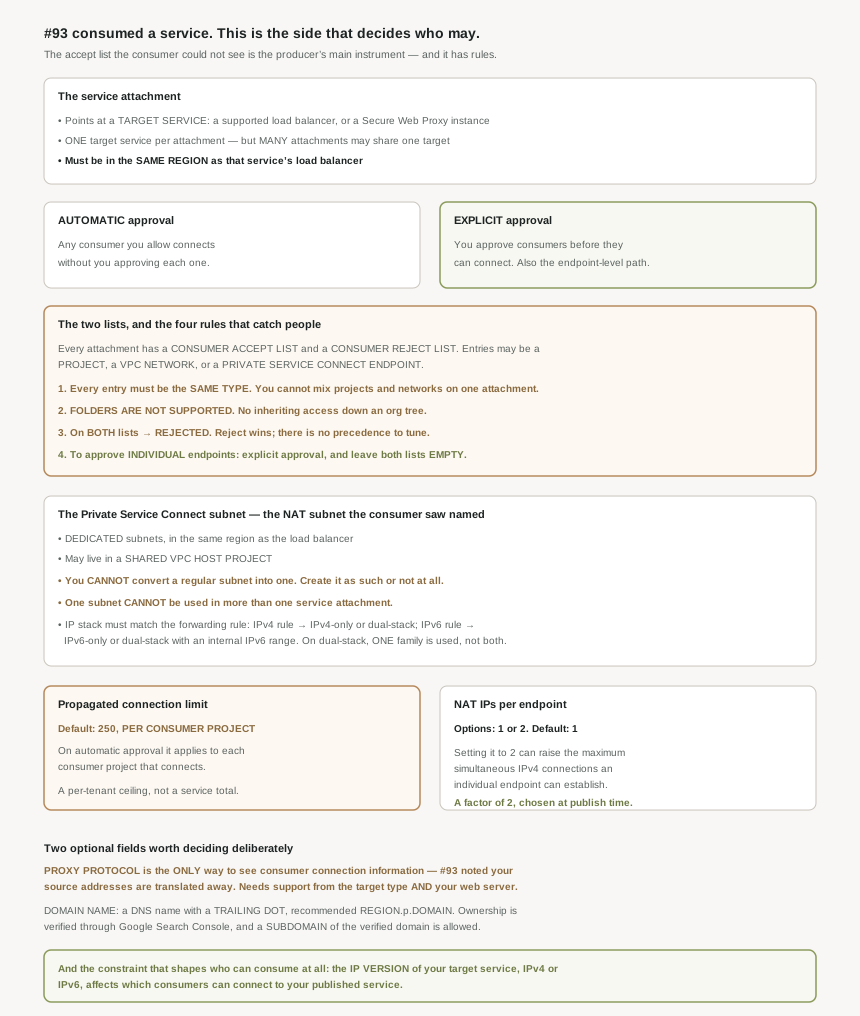
The target is a load balancer or a proxy — the page lists a supported load balancer with a supported configuration, or a Secure Web Proxy instance. The cardinality is one-way: a service attachment can have only one target service, while however, multiple service attachments can share the same target service. One service, many front doors, each with its own access rules.
And the placement rule that follows from the target being regional: create the service attachment in the same region as the service's load balancer.
One constraint decides your addressable market before you think about lists: the IP version of your target service (IPv4 or IPv6) affects which consumers can connect to your published service. Worth settling early, because changing the load balancer's address family later is not a service-attachment edit.
The four list rules, together
Each service attachment has a consumer accept list and a consumer reject list, and the consumer lists determine which endpoints can connect to the service. The rules, in the order they bite:
One type per attachment. Projects, VPC networks or endpoints — pick one.
No folders. Specifying consumers by folder is not supported.
Reject wins. If you add a value to both the accept list and the reject list, connection requests from that consumer are rejected. No precedence to tune, no ordering to reason about — which is the right design and means a reject entry is effectively permanent until removed.
Empty plus explicit means per-endpoint. As above, and the only route to endpoint-level control.
The two modes read as a simple choice — you can publish a service with automatic approval or you can publish a service with explicit approval, where the latter is for when you want to explicitly approve consumers before they can connect to this service.
But automatic approval is not "anyone may connect". It is "anyone on the accept list connects without a human step". The list still governs; what automation removes is the per-connection approval, not the access decision. Which makes the combination to be careful about automatic approval with a broad accept list, since that genuinely is open to every project named, with no queue anybody has to work and therefore no moment where somebody notices.
The subnet, and four things you cannot do to it
Publishing needs dedicated address space: create one or more dedicated subnets to use with Private Service Connect, and you must create the subnet in the same region as the service's load balancer. This is the thing #93 saw from the other side, where the overview called it the NAT subnet where translated traffic is sourced from in the producer VPC network — same object, and the gcloud flag is still --nat-subnets.
Four constraints, three of them absolute. It can live in a shared estate: you can create a Private Service Connect subnet in a Shared VPC host project. But you can't convert a regular subnet to a Private Service Connect subnet, and a subnet cannot be used in more than one service attachment. So capacity planning is per attachment, and retrofitting an existing subnet is not an option — it is a new subnet or nothing.
The IP stack must line up with the forwarding rule: for IPv4 forwarding rules, create an IPv4-only or dual-stack subnet, and for IPv6 forwarding rules, create an IPv6-only or dual-stack subnet that has an internal IPv6 address range. With a caveat that limits the value of hedging: if you use a dual-stack subnet, either the IPv4 or IPv6 address range is used, but not both. Dual-stack buys you the option, not simultaneous use.
Why This Architecture Holds Up
Two optional flags at publish time set the capacity each consumer can take, and both default to something you may want to change.
The connection limit is per tenant, not per service. PROPAGATED_CONNECTION_LIMIT : the per-project propagated connection limit . The default value is 250. And the scope is stated explicitly for the automatic case: when you publish a service with automatic approval, the propagated connection limit applies to each consumer project that connects to your service attachment.
Per consumer project. So the total your service may face is 250 multiplied by however many projects you accepted, which is a different capacity question from the one most people model. If you accept twenty projects on automatic approval, the default is not a limit on your service at all — it is a limit on each of twenty tenants independently.
The NAT IP setting raises a per-endpoint ceiling. NAT_IPS_PER_ENDPOINT : the number of NAT IP addresses to assign to each accepted consumer endpoint or backend. Options are 1 or 2 . The default value is 1. Doubling it does something specific: setting this value to 2 can increase the maximum number of simultaneous IPv4 connections that individual endpoints or backends can establish to your service.
Two values, a factor of two between them, chosen at publish time. The useful reading is that a consumer complaining about connection exhaustion against your service may be hitting a ceiling you set rather than anything in their code — and the remedy is on your side.
#93 established that the producer does not see the consumer's real source address, because traffic is sourced from the NAT subnet. This is the fix, and it is opt-in: if you want to view consumer connection information, you can enable PROXY protocol on supported services.
With a two-sided prerequisite: only enable PROXY protocol if it's supported by both your target service type and the service's backend web server software. Both, so this is a decision that reaches into your application stack rather than just your network configuration. Worth settling early if you have any requirement to attribute, log, rate limit or bill by consumer — because without it the connection metadata genuinely is not there, and no amount of network configuration will recover it.
The domain name, and proving it is yours
An optional field with a verification step attached: DOMAIN_NAME : a DNS domain name for the service, including a trailing dot, with a recommended shape of region-dot-p-dot-domain. The trailing dot is easy to omit and the kind of thing that fails validation rather than failing subtly, which is the better outcome.
Ownership is checked: to verify ownership, go to the Google Search Console. And usefully, verification is at the parent level — the domain name that you specify in the service attachment can be a subdomain of the domain that you verify. The page's own example: you can verify example.com and then create a service attachment with a domain name of us-west1.p.example.com.
Which means one verification covers a family of regional attachments, and the naming convention in that example is worth copying rather than inventing — region, then p, then your domain, matching the shape Google uses for its own endpoint DNS from #93.
Reading the two sides together
Across #93 and #94 the division of control is clean and worth stating plainly, because a service published between two organisations has no single owner of the connection. The consumer picks the address, the layer, and whether their own load balancer is in the path. The producer picks who may connect, at what granularity, how many connections each tenant gets, whether their own source addresses are visible, and what the service is called.
Neither side can see most of the other's choices. A consumer debugging a connection refusal cannot read your accept list; a producer debugging exhaustion cannot see how the consumer's clients pool connections. Which argues for writing down, in whatever contract exists between the two parties, the four things that cross the boundary: the approval mode, the list granularity, the connection limit, and whether PROXY protocol is on.
Key Architecture Decisions
| Situation | Decision | Because |
|---|---|---|
| Consumers of mixed kinds need access | Several attachments, one per list type | Every entry on one attachment must be the same type. |
| Needing several front doors to one service | Several attachments sharing the target | One target per attachment, but many attachments per target. |
| Wanting access to inherit down the org | Enumerate projects or networks instead | Folders are explicitly unsupported. |
| Consumer projects are self-served | Put accept-list updates in that process | Nothing prompts you, and the error surfaces on the consumer's side. |
| A consumer must be blocked permanently | Add to the reject list | A value on both lists is rejected, so reject wins unconditionally. |
| Wanting per-endpoint approval | Explicit approval, both lists empty | That combination is how endpoint-level control is expressed. |
| Using automatic approval | Keep the accept list narrow | Automation removes the human step, not the access decision. |
| Hoping to reuse an existing subnet | Create a new dedicated one | A regular subnet cannot be converted. |
| Several attachments in one region | A subnet each | A subnet cannot be used in more than one attachment. |
| Hedging on IP version with dual-stack | Expect one family in use, not both | Only the IPv4 or the IPv6 range is used. |
| Modelling your service's peak load | Multiply 250 by the number of accepted projects | The default connection limit is per consumer project. |
| A consumer reports connection exhaustion | Check NAT IPs per endpoint before blaming their client | The default of 1 caps simultaneous IPv4 connections; 2 raises it. |
| Needing to attribute, log or bill by consumer | Enable PROXY protocol, and confirm both sides support it | It is the only way to see consumer connection information. |
| Publishing regional attachments under one name | Verify the parent domain once | The attachment's name may be a subdomain of the verified domain. |
The one to look at today
For each service attachment you publish, write down four facts and share them with whoever consumes it: the approval mode, what type the consumer lists hold, the propagated connection limit, and whether PROXY protocol is on. All four are invisible from the consumer's side and all four produce consumer-visible symptoms when they are wrong. If you also multiply the connection limit by the number of accepted projects, you will have a peak-load figure that is probably larger than the one in your capacity model.
Closing Thought
The producer side is where Private Service Connect stops being a networking feature and becomes a product decision. Who may connect, at what granularity, how much each of them gets, whether you can see them at all — those are the terms on which you offer a service, and here they happen to be expressed as fields on a forwarding-rule-adjacent resource.
What I find genuinely well designed is the honesty of the constraints. One type per list, no folders, reject wins, a subnet that cannot be converted or shared. Each of those removes an ambiguity that would otherwise have to be resolved at connection time by rules nobody could predict. The cost is that you have to decide more up front, which after four posts of this block is starting to look like the consistent trade: the mechanisms that are simple to operate are the ones that made you choose early.
#95 returns to the case where the producer is Google: Private Service Connect for Google APIs — the fourth and last way to reach an API privately, and how to choose between all four.
Official Google Cloud Reference
- Publish services using Private Service Connect
- Access published services through endpoints
- Manage published services
- Private Service Connect security
- Manage security for producers
- Monitor Private Service Connect connections
- Private Service Connect
- Private Service Connect compatibility
- Private Service Connect backends
- About Private Service Connect interfaces
- Subnets
- Shared VPC overview
Comments